
ZZN ZZN ZT02
ZZN Wireless Earbuds ZT02 User Manual
Model: ZZN ZT02 | Brand: ZZN
מָבוֹא
Welcome to the user manual for your ZZN Wireless Earbuds ZT02. This guide provides essential information for setting up, operating, and maintaining your earbuds to ensure optimal performance and longevity. Please read this manual carefully before using the product.
מה יש בקופסה
Your ZZN ZT02 Wireless Earbuds package includes the following items:
- ZZN ZT02 Wireless Earbuds (Left and Right)
- נרתיק טעינה
- כבל טעינה USB-C
- Ear Caps Set (Small, Medium, Large sizes)
- מדריך למשתמש

This image displays the complete contents of the ZZN ZT02 Wireless Earbuds package, including the earbuds, charging case, USB-C cable, various ear cap sizes, and the user manual.
This video provides a visual guide to unboxing your ZZN ZT02 Wireless Earbuds, showcasing all included components and their initial presentation within the packaging.
המוצר נגמרview
Familiarize yourself with the different parts and functions of your ZZN ZT02 Wireless Earbuds.
אוזניות
- MFB Button (Multi-Function Button)
- לחצן עוצמת הקול
- מִיקרוֹפוֹן
- וו אוזן
- מחוון LED לאוזניות
נרתיק טעינה
- יציאת טעינה USB-C
- מחוון LED של מארז טעינה

This diagram highlights the key features of the earbuds and charging case, including button locations, charging port, and LED indicators.
הגדרה
טעינה ראשונית
לפני השימוש הראשון, ודאו שהאוזניות ומארז הטעינה טעונים במלואם.
- Remove the red insulation stickers from the earbuds if present.
- הכנס את שני האוזניות לתוך מארז הטעינה.
- חברו את כבל ה-USB-C למארז הטעינה ולמקור חשמל.
- The charging case LED indicator will show charging status. A full charge takes approximately 3 hours.
This image shows the earbuds inside their charging case, highlighting the red insulation stickers that need to be removed before initial use.
צִמוּד
האוזניות ייכנסו אוטומטית למצב צימוד עם הוצאתן ממארז הטעינה.
- פתחו את מארז הטעינה והוציאו את שתי האוזניות. הן יידלקו אוטומטית ויכנסו למצב צימוד.
- במכשיר שלך (סמארטפון, טאבלט וכו'), עבור אל הגדרות Bluetooth.
- חפש "ZT02" in the list of available devices.
- Select "ZT02" to connect. A voice prompt will confirm successful pairing.

This image illustrates the simple one-step pairing process, showing the earbuds ready for connection to a mobile device via Bluetooth.
הוראות הפעלה
לובש את האוזניות
- Choose a pair of suitable ear caps (S, M, L) for a comfortable and secure fit.
- Gently hang the ear hooks over your ears.
- Push the earphones slowly into your ear canal.
- Rotate the earphones to fit snugly.

This image demonstrates how to correctly wear the earbuds, emphasizing the secure fit provided by the ear hooks and the importance of selecting the right ear tip size.
פונקציות בסיסיות
| פוּנקצִיָה | פְּעוּלָה |
|---|---|
| הפעלה | Open charging case or press MFB for 3 seconds |
| כיבוי | Place in charging case or press MFB for 5 seconds |
| הפעל/השהה | לחץ פעם אחת על MFB |
| ענה לשיחה | לחץ פעם אחת על MFB |
| ניתוק שיחה | לחץ פעם אחת על MFB |
| דחה שיחה | החזק MFB למשך שנייה אחת |
| הגברת עוצמת הקול | לחץ על כפתור הגברת עוצמת הקול |
| הורדת עוצמת הקול | לחץ על כפתור הנמכת עוצמת הקול |
| השיר הבא | Hold MFB for 1 second (Right earbud) |
| השיר הקודם | Hold MFB for 1 second (Left earbud) |
| הפעלת העוזרת הקולית (Siri) | לחץ פעמיים על MFB |
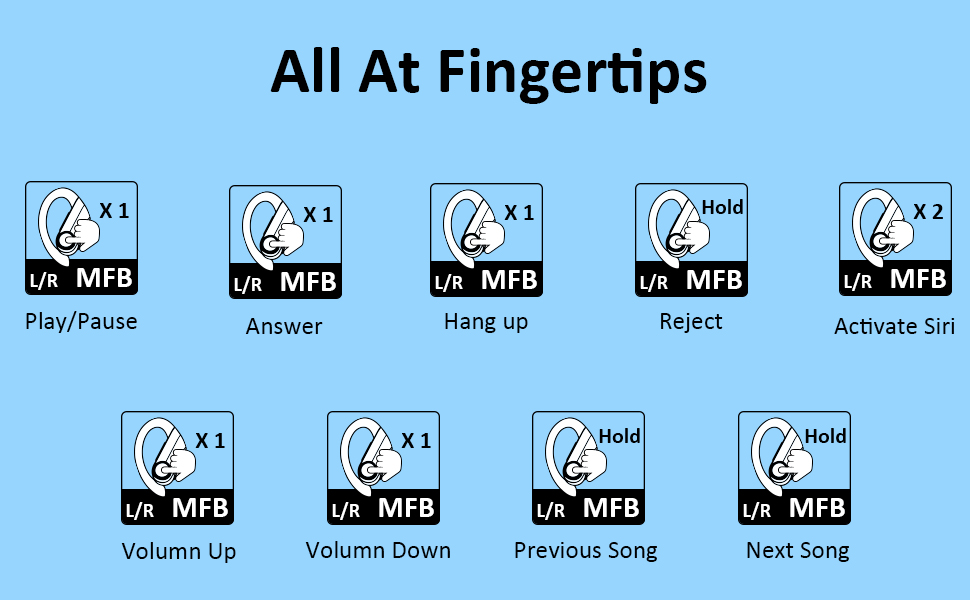
תמונה זו מספקת סקירה מקיפהview of all touch and button controls on the earbuds, explaining how to manage calls, music playback, and voice assistant activation.
תַחזוּקָה
To ensure the longevity and optimal performance of your ZZN ZT02 Wireless Earbuds, please follow these maintenance guidelines:
- שמרו על ניקיון ויבשות של האוזניות ומארז הטעינה.
- הימנעו מחשיפת המוצר לטמפרטורות קיצוניות, לאור שמש ישיר או לחות גבוהה.
- Do not use harsh chemicals or strong detergents to clean the earphones. Use a soft, dry cloth.
- If the earbuds are unused for over 2 weeks, please recharge them periodically to maintain battery health.
- הרחק מילדים וחיות מחמד.

This image illustrates the IPX7 waterproof capability of the earbuds, showing them resistant to splashes and sweat, making them suitable for sports and workouts.
פתרון בעיות
If you encounter any issues with your ZZN ZT02 Wireless Earbuds, refer to the following common problems and solutions:
בעיות נפוצות
- Cannot hear sound: Ensure the earbuds are connected to your device and the volume is turned up on both the earbuds and your device. Check if the earbuds are properly seated in your ears.
- Poor sound quality/muffled sound: Adjust the volume on your phone and earphones. Make sure there is no radio or Wi-Fi interference nearby.
- חיבור לא יציב: Ensure the earbuds are within 10 meters of your device. Avoid obstacles between the earbuds and your device.
- האוזניות לא נטענות: Check if the red insulation stickers have been removed. Ensure the charging cable is securely connected and the power source is active.
איפוס אוזניות
If issues persist, you can try resetting the earbuds:
- כבה את האוזניות.
- Press and hold the MFB button for 10 seconds until the LED indicator flashes.
- החזירו את האוזניות למארז הטעינה וסגרו אותו.
- Take them out again to re-pair with your device.
מפרטים
| תכונה | פְּרָט |
|---|---|
| שם הדגם | ZT02 |
| טכנולוגיית קישוריות | בלוטות' 5.0, אלחוטי |
| טכנולוגיית תקשורת אלחוטית | בלוטות' |
| רכיבים כלולים | נרתיק טעינה |
| טווח גילאים (תיאור) | מְבוּגָר |
| חוֹמֶר | סיליקון |
| שימושים ספציפיים למוצר | ספורט ופעילות גופנית |
| זמן טעינה | 3 שעות |
| סוג בקרה | בקרת מדיה |
| תכונת כבלים | בלי כבל |
| רמת עמידות במים | אֲטִימוּת |
| ספירת יחידות | 1 ספירה |
| שיטת בקרה | לָגַעַת |
| מספר פריטים | 1 |
| חיי סוללה | 30 שעות |
| טווח בלוטות' | 10 מטר |
| צורת אפרכסת | אין אוזן |
| UPC | 754988969407 |
| יַצרָן | ZZN |
| מידות המוצר | 4.72 x 4.72 x 1.97 אינץ' |
| משקל פריט | 5.6 אונקיות |
| ASIN | B09LHHX8V2 |
| מספר דגם פריט | ZZN ZT02 |
| סוללות | נדרשת 3 סוללת ליתיום פולימר. (כּוֹלֵל) |
| תאריך ראשון זמין | 10 בנובמבר 2021 |
| מותג | ZZN |
| צֶבַע | שָׁחוֹר |
| מיקום אוזניים | אין אוזן |
| גורם צורה | אין אוזן |
| בקרת רעש | ביטול רעשים אקטיבי |

This image provides a visual summary of the earbuds' battery capacity and playback time, including quick charge information.

This image illustrates the internal components of the earbud, highlighting the 11mm large speaker driver responsible for high-fidelity stereo sound.
אחריות ותמיכה
For warranty information, technical support, or customer service inquiries, please refer to the contact details provided on the product packaging or visit the official ZZN webאֲתַר.
אתה יכול גם לבקר ב ZZN Store on Amazon למידע נוסף על המוצר ותמיכה.
Ask a question about this manual
Ask about setup, troubleshooting, compatibility, parts, safety, or missing instructions. Manuals+ will review the question and use this page’s manual context to help answer it.