
1. הוראות בטיחות
אנא קרא בעיון את הוראות הבטיחות לפני השימוש במוצר. שמור מדריך זה לעיון עתידי.
- מוצר זה מיועד לשימוש פנימי בלבד. אין לחשוף ללחות או לטמפרטורות קיצוניות.
- Do not attempt to open or modify the device. This may void the warranty and pose a safety risk.
- הרחק את המכשיר מילדים.
- Use only the provided micro-USB cable for charging.
- אל תסתכל ישירות לתוך מקור האור LED.
2. תכולת החבילה
ודא שכל הפריטים נמצאים בחבילה:
- ANSMANN Under-Cabinet Light M
- כבל טעינה מיקרו-USB
- מדריך הוראות
3. המוצר נגמרview
The ANSMANN Under-Cabinet Light M is a versatile, rechargeable LED lamp designed for various indoor applications. It features a motion sensor, adjustable color temperatures, and a slim design for discreet placement.

Image 1: The ANSMANN Under-Cabinet Light M, showcasing its sleek, white design and integrated motion sensor.
תכונות עיקריות:
- חיישן תנועה PIR: Automatically activates the light when motion is detected in low-light conditions.
- חיישן דמדומים: Ensures the light only activates in dark environments, conserving battery life.
- טמפרטורת צבע מתכווננת: Choose between 3 color temperatures (cool white, neutral white, warm white) or activate all LEDs for maximum brightness.
- עמעום ללא שלב: Adjust brightness by holding down the control button.
- סוללה נטענת: Integrated battery for cordless operation, charged via micro-USB.
- הרכבה מגנטית: Easy installation and removal with a magnetic strip.

Image 2: Diagram illustrating the Micro-USB Port, On/Off button, and PIR motion sensor on the device.
4. התקנה והתקנה
The Under-Cabinet Light M offers flexible installation options using its integrated magnetic strip.
הרכבה מגנטית:
- Identify a suitable, clean, and dry surface for installation (e.g., inside a cabinet, under a shelf).
- The light comes with a fixed magnetic strip on its back. For non-metallic surfaces, use the included adhesive strip.
- Peel off the protective film from the adhesive strip and firmly press it onto the desired surface.
- Attach the Under-Cabinet Light M to the adhesive strip. The magnetic connection will hold it in place.
תמונה 3: תקריב view of the magnetic strip and the removable adhesive strip, demonstrating the mounting mechanism.

תמונה 4: דוגמהample of the under-cabinet light installed in a modern kitchen setting, providing illumination over a countertop.
5. תפעול
The Under-Cabinet Light M offers intuitive control for its lighting functions.
הפעלה/כיבוי:
- Locate the On/Off button (refer to Image 2).
- Press the button once to turn the light on or off.
התאמת טמפרטורת צבע:
- With the light on, short press the control button repeatedly to cycle through the 3 available color temperatures: cool white, neutral white, and warm white.
- A fourth press will activate all LEDs for maximum brightness.
פונקצית עמעום:
- To adjust the brightness, press and hold the control button. The light will gradually dim or brighten. Release the button when the desired brightness level is reached.
Motion and Twilight Sensor:
- When the light is in motion sensor mode, it will automatically turn on when movement is detected within its range.
- The integrated twilight sensor ensures that the motion sensor only activates the light in dark environments, preventing unnecessary illumination during daylight hours.
6. טעינה
The Under-Cabinet Light M is equipped with a rechargeable battery for convenient cordless use.
- When the battery is low, the light output may decrease or the light may not turn on.
- Gently detach the light from its magnetic mounting surface.
- Connect the provided micro-USB cable to the micro-USB port on the light (refer to Image 2).
- Connect the other end of the micro-USB cable to a suitable USB power source (e.g., USB wall adapter, computer USB port).
- נורית חיווי תציג את מצב הטעינה (למשל, אדום לטעינה, ירוק לטעינה מלאה).
- Once fully charged, disconnect the cable and reattach the light to its mounting surface.

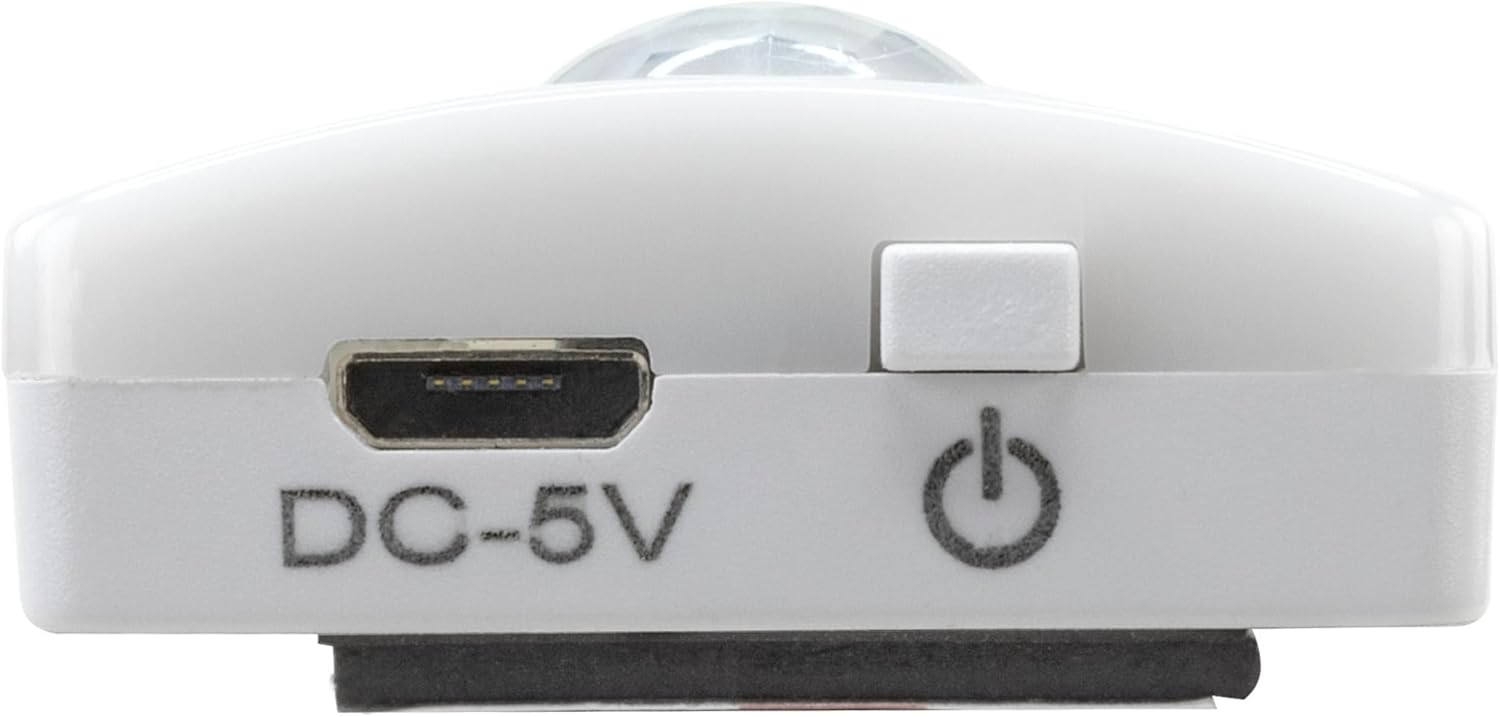
תמונה 5: מפורט view of the Micro-USB charging port and the On/Off button, essential for charging and operation.
7. תחזוקה
To ensure the longevity and optimal performance of your Under-Cabinet Light M, follow these simple maintenance guidelines:
- Clean the light regularly with a soft, dry cloth. Do not use abrasive cleaners or solvents.
- Ensure the motion sensor lens is kept clean and free from obstructions for proper function.
- Store the light in a cool, dry place if not in use for extended periods.
8. פתרון תקלות
If you encounter issues with your Under-Cabinet Light M, refer to the following common problems and solutions:
| בְּעָיָה | סיבה אפשרית | פִּתָרוֹן |
|---|---|---|
| האור לא נדלק. | הסוללה התרוקנה. | Charge the light using the micro-USB cable. |
| חיישן התנועה אינו מזהה תנועה. | Ensure the sensor is clean and unobstructed. Check if the environment is dark enough for the twilight sensor to activate. | |
| האור אינו נטען. | כבל או מקור חשמל פגומים. | Try a different micro-USB cable or USB power adapter. |
| שקע הטעינה מלוכלך. | Gently clean the micro-USB port with a dry, soft brush. | |
| האור מהבהב או עמום. | סוללה חלשה. | טען מחדש את המכשיר. |
אם הבעיה נמשכת לאחר ניסיון פתרונות אלה, אנא צור קשר עם תמיכת הלקוחות.
9. מפרטים
| תכונה | פְּרָט |
|---|---|
| מספר דגם | 1600-0438 |
| מידות המוצר | 25L x 3.5W x 1.3H ס"מ (9.84L x 1.38W x 0.51H אינץ') |
| משקל פריט | 112 גרם (0.25 פאונד) |
| מקור כוח | מופעל על סוללה |
| יציאת טעינה | Micro-USB (DC-5V) |
| חוֹמֶר | פּלָסטִי |
| צֶבַע | לָבָן |
| סוג התקנה | מתקן קיר (מגנטי) |
| סוג חדר | Dining Room, Kitchen, Wardrobe, Hallway, etc. |
10. אחריות ותמיכה
ANSMANN products are manufactured with high-quality standards. For information regarding warranty terms and conditions, please refer to the documentation provided with your purchase or visit the official ANSMANN webאֲתַר.
For technical support or inquiries, please contact ANSMANN customer service through their official channels.