
Microsoft 2026
Microsoft Modern USB-C Headphones User Manual
דגם: 2026
מָבוֹא
The Microsoft Modern USB-C Headphones are designed to provide high-quality audio for calls, meetings, and general use, particularly optimized for Microsoft Teams. They offer clear sound, a noise-reducing microphone, and intuitive controls for enhanced productivity and communication.
תוכן החבילה
- Microsoft Modern USB-C Headset
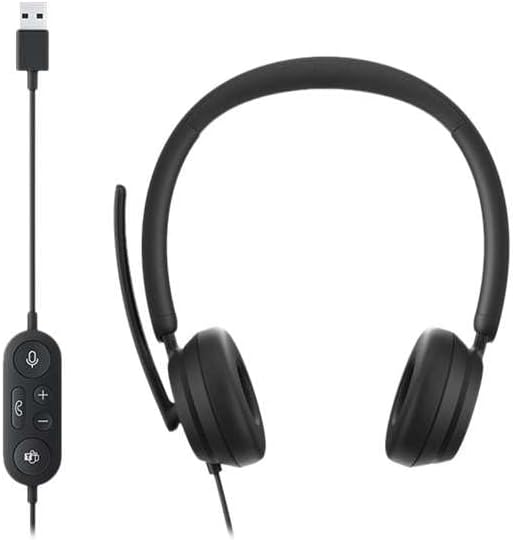
Image: The Microsoft Modern USB-C Headphones, featuring the headset with its attached USB-C cable and inline control unit. The control unit has buttons for mute, volume up/down, call answer/end, and a Microsoft Teams button.
הגדרה
חיבור האוזניות
- Locate an available USB-C port on your computer or compatible device.
- Plug the USB-C connector of the headset into the USB-C port.
- Your operating system (Windows 11/10/8.1/8 or Mac OS 11.0/10.15) should automatically detect and install the necessary drivers.
התאמת מיקרופון
- The microphone boom is flexible. Position it approximately one inch from your mouth for optimal voice pickup.
- The microphone features noise reduction to minimize background distractions during calls.

תמונה: תקריב view of the earcups and the adjustable microphone boom of the Microsoft Modern USB-C Headphones.
הפעלת האוזנייה
בקרות מוטבעות
The inline control unit provides convenient access to essential functions:
- כפתור השתק: Press to mute or unmute your microphone. An indicator light on the control unit may show mute status.
- לחצני עוצמת הקול למעלה / למטה: כוונן את עוצמת השמע.
- כפתור חיוג: לחץ כדי לענות או לסיים שיחה.
- כפתור Microsoft Teams: Quickly launch or bring Microsoft Teams to the foreground.

תמונה: מפורט view of the inline control unit, showing the microphone mute, volume up/down, call, and Microsoft Teams buttons.
נוחות ועיצוב
The headset features padded and lightweight earcups designed for extended wear, ensuring comfort during long calls or work sessions.

Image: A close-up showing the soft, padded earcup of the Microsoft Modern USB-C Headphones, highlighting its comfortable design.
תַחזוּקָה
- ניקוי: השתמשו במטלית רכה ויבשה לניקוי האוזניות. הימנעו משימוש בכימיקלים חזקים או בחומרים שוחקים.
- אִחסוּן: יש לאחסן את האוזניות במקום קריר ויבש כאשר אינן בשימוש. יש להימנע מטמפרטורות קיצוניות.
- טיפול בכבלים: אין לכופף או למשוך את כבל ה-USB-C יתר על המידה כדי למנוע נזק.
פתרון בעיות
| בְּעָיָה | פִּתָרוֹן |
|---|---|
| אין קול מהאוזניות |
|
| המיקרופון לא עובד |
|
| האוזניות לא מזוהות על ידי המחשב |
|
מפרטים
| מותג | מיקרוסופט |
| שם הדגם | I6N-00009 |
| מספר דגם של פריט | 2026 |
| טכנולוגיית קישוריות | חוטי (USB-C) |
| מיקום אוזניים | מעל אוזן |
| גורם צורה | על אוזן |
| חוֹמֶר | דמוי עור |
| סוג בקרה | בקרת שיחות |
| מכשירים תואמים | התקנים תואמי USB-C |
| תאימות מערכת הפעלה | Windows 11 / 10 / 8.1 / 8, Mac OS 11.0/10.15 |
| מידות המוצר | 16 x 3.99 x 24.99 ס"מ |
| משקל פריט | 390 גרם |
| רמת עמידות במים | עמיד במים |
אחריות ותמיכה
למידע על אחריות ותמיכה טכנית, אנא עיינו בתמיכה הרשמית של מיקרוסופט website or contact Microsoft customer service. Details regarding specific warranty periods and terms are typically provided with your purchase documentation or available online.
You can find support resources at the official Microsoft support page: support.microsoft.com
Ask a question about this manual
Ask about setup, troubleshooting, compatibility, parts, safety, or missing instructions. Manuals+ will review the question and use this page’s manual context to help answer it.