
1. הקדמה
תודה על הרכישהasing the AIYIMA TUBE T9 Bluetooth 5.0 6K4 Tube Amplifier. This device combines a tube preamplifier with a digital power amplifier, offering multiple audio inputs including Bluetooth 5.0, USB, Coaxial, Optical, and RCA. It features a classic VU meter and tone controls for a personalized audio experience. This manual provides detailed instructions for setup, operation, and maintenance to ensure optimal performance and longevity of your ampחיים יותר.
2. מידע בטיחות
- ספק כוח: Use only the provided DC24V power adapter. Ensure the voltage is within the specified range (DC18V-30V).
- אוורור: מניחים את amplifier in a well-ventilated area. Do not block ventilation openings.
- לַחוּת: הרחק את המכשיר ממים, לחות ולחות גבוהה.
- חוֹם: הימנע מהצבת ampהמכשיר ליד מקורות חום או באור שמש ישיר.
- טיפול בצינורות: Vacuum tubes can become hot during operation. Exercise caution when handling or replacing them. Allow the unit to cool down before touching the tubes.
- ניקוי: נתק את החשמל לפני הניקוי. השתמש במטלית רכה ויבשה. אין להשתמש בנוזלי ניקוי או בתרסיסים.
- שֵׁרוּת: אל תנסה לטפל במוצר זה בעצמך. יש לפנות לכל טיפול וטיפול באנשי מקצוע מוסמכים.
3. תכולת החבילה
אנא בדקו את החבילה עבור הפריטים הבאים:
- AIYIMA TUBE T9 Ampליפר x 1
- 6K4 Vacuum Tube x 2
- אנטנת Bluetooth x 1
- DC24V Power Adapter x 1
- כבל USB למחשב x 1
- Remote Control x 1 (AA batteries not included)
- מדריך למשתמש x 1
- תעודת אחריות x 1

Image: Contents included in the AIYIMA TUBE T9 ampחבילת ההספק, המציגה את amplifier unit, two 6K4 tubes, a Bluetooth antenna, power adapter, USB cable, remote control, user manual, and warranty card.
4. המוצר נגמרview
4.1 לוח קדמי
The front panel features controls for power, input selection, volume, and tone, along with a classic VU meter and input indicators.
- מד VU: Displays audio signal level in real-time.
- מחוון קלט: LEDs indicate the currently selected input (Bluetooth, PC-USB, RCA, Coaxial, Optical).
- כפתור עוצמת קול/קלט: Rotate to adjust volume. Press to cycle through input sources. Press and hold to power on/off.
- בקרת בס: מכוונן את הפלט בתדרים נמוכים.
- בקרת טרבל: מכוונן את פלט התדרים הגבוהים.
- מקלט IR: For remote control commands.

תמונה: מפורט view of the AIYIMA TUBE T9 amplifier's front panel, showing the VU meter, input indicators, volume knob, bass and treble controls, and the two visible 6K4 vacuum tubes.
4.2 פאנל אחורי
The rear panel provides all necessary audio input and output connections.
- יציאת אנטנת בלוטות': חבר את אנטנת ה-Bluetooth המצורפת.
- כניסת RCA (שמאל/ימין): עבור מקורות שמע אנלוגיים.
- קלט קואקסיאלי: עבור מקורות שמע דיגיטליים.
- קלט אופטי: עבור מקורות שמע דיגיטליים.
- כניסת USB למחשב: לחיבור למחשב כ-DAC USB.
- AUX Out (3.5mm): For connecting to an active subwoofer or another ampחיים יותר.
- פלט רמקול (שמאל/ימין): Connect passive speakers (3-8Ω).
- קלט חשמל DC18-30V: חבר את מתאם החשמל.
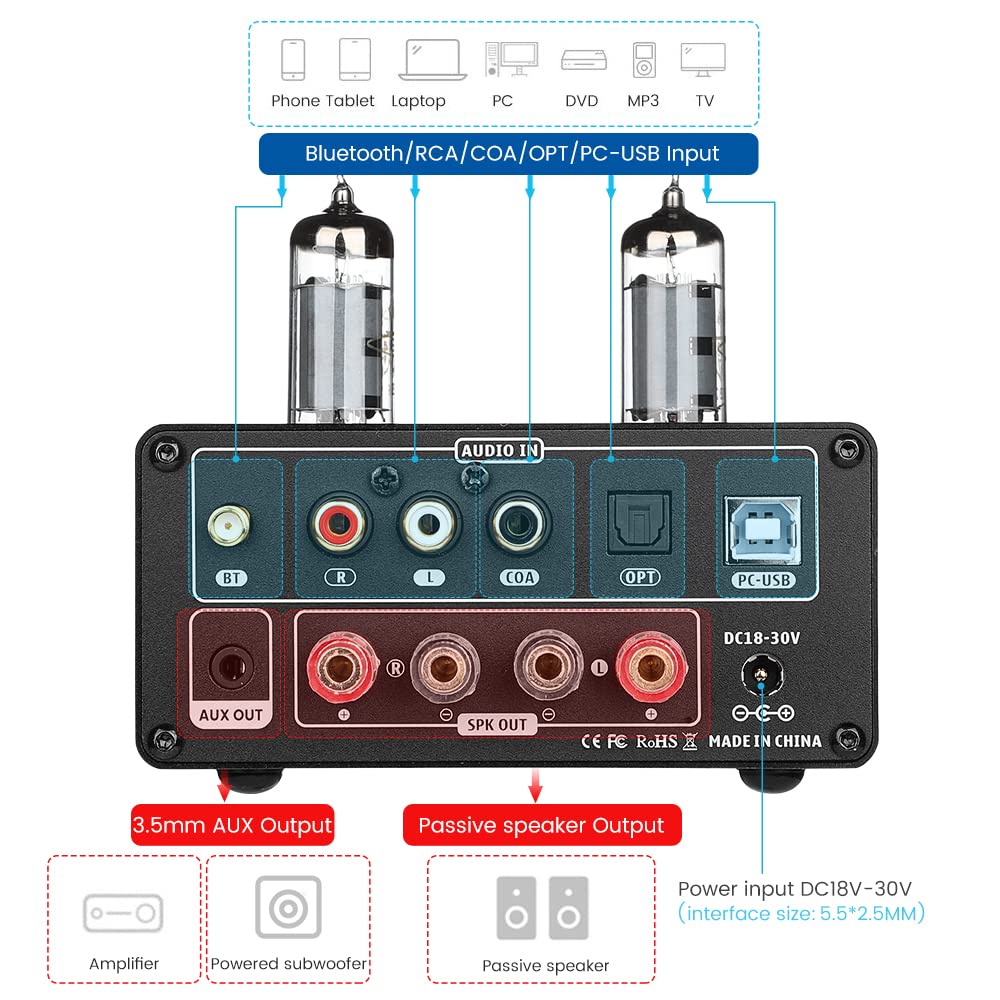
תמונה: אחורי view of the AIYIMA TUBE T9 amplifier, highlighting the various input and output ports including Bluetooth, RCA, Coaxial, Optical, PC-USB, AUX Out, speaker terminals, and power input.
5. התקנה
5.1 התקנת צינור
- Carefully unpack the two 6K4 vacuum tubes.
- יישר את הפינים של כל צינור עם החורים המתאימים ב ampשקעי הצינור של המפיץ.
- Gently push the tubes straight down into the sockets until they are firmly seated. Do not force them.
5.2 חיבור רמקולים
The TUBE T9 is designed for passive speakers with an impedance of 3-8Ω.
- חבר את הרמקולים הפסיביים שלך ל Speaker Output (SPK OUT) הדקים בפאנל האחורי. ודאו קוטביות נכונה (+ ל-+ ו- ל--).
- For a 2.1 channel system, connect an active subwoofer to the AUX Out (3.5mm) נָמָל.
5.3 חיבור מקורות שמע
Connect your desired audio sources to the corresponding input ports:
- בלוטות': Screw the included Bluetooth antenna into the BT נָמָל.
- PC-USB: Use the provided USB cable to connect your computer to the מחשב USB נָמָל.
- RCA: Connect analog audio devices (e.g., CD player, streamer) using RCA cables to the RCA (L/R) קֶלֶט.
- קואקסיאלי/אופטי: Connect digital audio devices (e.g., TV, game console) using Coaxial or Optical cables to the respective inputs.
הערה חשובה: זֶה amplifier does not have a built-in phono preamplifier. Do not connect a vinyl record player directly to the RCA input without an external phono preamp, as this may result in very low volume or distorted sound.

Image: Diagrams illustrating various connection scenarios for the AIYIMA TUBE T9 amplifier, including connecting to passive speakers, an amplifier, and different audio sources like phones, tablets, laptops, PCs, DVDs, and TVs.

Image: A visual warning indicating that the AIYIMA TUBE T9 amplifier cannot be directly connected to a vinyl record player without an external phono preampחיים יותר.
5.4 חיבור מתח
- ודא שכל חיבורי השמע מאובטחים.
- Connect the DC24V power adapter to the DC18-30V input port on the rear panel.
- חבר את מתאם החשמל לשקע בקיר.
6. הוראות הפעלה
6.1 הפעלה/כיבוי
Press and hold the main Volume/Input Knob on the front panel for approximately 1 second to power the amplifier on or off. The VU meter and tubes will illuminate upon power-on.
6.2 בחירת קלט
Short press the main Volume/Input Knob to cycle through the available input sources: Bluetooth, PC-USB, RCA, Coaxial, Optical. The corresponding LED indicator on the front panel will light up.
6.3 בקרת עוצמת הקול
Rotate the main Volume/Input Knob עם כיוון השעון כדי להגביר את עוצמת הקול ונגד כיוון השעון כדי להנמיך את עוצמת הקול.
בקרת 6.4 צלילים
השתמש ב- בַּס ו לְשַׁלֵשׁ knobs on the front panel to adjust the low and high frequencies according to your preference. This allows for fine-tuning the sound profile.
6.5 זיווג בלוטות '
- Select the Bluetooth input using the Volume/Input Knob. The Bluetooth indicator will flash.
- במכשיר הנייד שלך (טלפון, טאבלט וכו'), הפעל את Bluetooth וחפש מכשירים זמינים.
- Select "AIYIMA TUBE T9" from the list of devices to pair.
- Once paired, the Bluetooth indicator will stop flashing and remain solid. You can now play audio from your device.

Image: A smartphone connected via Bluetooth 5.0 to the AIYIMA TUBE T9 amplifier, demonstrating wireless audio streaming.
6.6 VU מטר
The integrated VU meter provides a visual representation of the audio output level. Its warm light and dynamic movement add a retro aesthetic to your listening experience. The meter is designed to respond to various volume levels.

תמונה: תקריב view of the illuminated VU meter on the AIYIMA TUBE T9 amplifier, showing its needle indicating audio levels.
7. תחזוקה
7.1 החלפת צינור
The 6K4 vacuum tubes can be replaced to customize the sound or if they wear out. Compatible tube models include:
- 6J1
- 6J2
- GE5654
- 6J3
- 6J4
- 6J5
- 6Ж1п (6Zh1p)
- 6AK5
To replace tubes:
- כבה את amplifier and disconnect it from the power outlet.
- Allow the tubes to cool completely (this may take several minutes).
- Gently pull the existing tubes straight up from their sockets.
- Insert the new compatible tubes, aligning the pins carefully, and push them straight down until seated firmly.
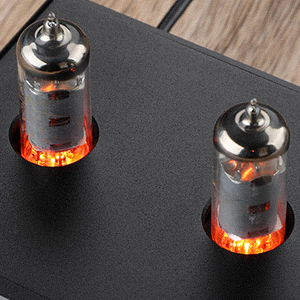
תמונה: תקריב view of the two 6K4 vacuum tubes installed on the AIYIMA TUBE T9 amplifier, showing their glowing filaments during operation.
7.2 ניקוי
נגב את amplifier's exterior with a soft, dry cloth. Do not use abrasive cleaners or solvents.
7.3 אוורור
ודא זרימת אוויר נאותה מסביב amplifier to prevent overheating. Do not place objects on top of the unit that could obstruct ventilation.
8. פתרון תקלות
| בְּעָיָה | סיבה אפשרית | פִּתָרוֹן |
|---|---|---|
| אין פלט קול |
|
|
| צליל מעוות |
|
|
| בעיות בחיבור בלוטות' |
|
|
| Clicking sound after silence | Automatic hibernation mode engaging | ה amplifier may enter a hibernation state after a period of no audio signal, producing a soft click. This feature can be disabled using the remote control: press the M1 button on the remote to toggle the hibernation prompt on/off. |
| מד VU לא זז | Very low volume or specific audio characteristics | The VU meter is designed to respond to audio levels. Ensure the volume is sufficiently high for the meter to register movement. This issue has been addressed in updated models to work at various levels. |
9. מפרטים

Image: The AIYIMA TUBE T9 amplifier shown with its physical dimensions and a table summarizing its key specifications.
| תכונה | מִפרָט |
|---|---|
| מספר דגם | TUBE T9 |
| מותג | אייימה |
| ממשקי קלט | Bluetooth 5.0, PC-USB, RCA, Coaxial, Optical |
| ממשקי פלט | Passive Speaker Output, 3.5mm AUX Out (for active subwoofer/ampחי יותר) |
| כוח פלט | 100W x 2 (at 4Ω load) |
| עכבת רמקול | 3-8Ω |
| תגובת תדר | 20-20kHz (±1dB) |
| יחס אות לרעש (S/N) | ≥98dB |
| כרך עבודהtage | DC18V-30V |
| מידות (L x W x H) | 22 x 22 x 10 ס"מ (כ-8.66 x 8.66 x 3.94 אינץ') |
| משקל פריט | 1 ק"ג (כ-2.2 פאונד) |
| הסמכות | CE |
| ארץ מוצא | סִין |
10. אחריות ותמיכה
10.1 מידע אחריות
According to the product specifications, there is no explicit warranty provided for this product. Please refer to your retailer's return policy for any issues within the initial purchase period.
10.2 תמיכת לקוחות
For technical assistance or inquiries, please contact the seller or AIYIMA customer support through their official channels. Keep your purchase receipt or order details handy for any support requests.