
PLZ MP-902
מדריך למשתמש של מערכת סטריאו לרכב כפולה PLZ MP-902
דגם: MP-902 | מותג: PLZ
מָבוֹא
This user manual provides comprehensive instructions for the installation, operation, and maintenance of your PLZ MP-902 Double Din Car Stereo. Please read this manual thoroughly before using the product to ensure proper functionality and safety. The MP-902 is designed to enhance your in-car audio and entertainment experience with its advanced features and user-friendly interface.
תכונות המוצר
- Bluetooth 5.1 & Dual Mic: Enjoy hands-free calling and audio streaming with advanced Bluetooth 5.1. Features a built-in microphone and external microphone interface for clear communication.
- פונקציונליות קישור מראה: Supports screen mirroring for both ISO (iPhone) and Android phones via USB, allowing you to display navigation, videos, and other apps on the 7-inch touchscreen.
- אחורי/קדמי View תמיכת מצלמה: Designed for safety, the MP-902 automatically displays the rear camera image when reversing. An HD rear camera with night vision and a 170° ultra-wide viewing angle is included.
- 7 Inch Full HD Capacitive Touchscreen: Features a highly sensitive and accurate 7-inch capacitive touch screen supporting 1080P video playback for an immersive viewניסיון.
- 16-Band EQ DSP: Customize your audio experience with the built-in 16-band equalizer and Digital Signal Processor (DSP) to match various music styles.
- USB Fast Charging & Data Read: Conveniently charge your devices and read data via the USB port.
- רדיו FM/AM: Access your favorite radio stations with FM/AM tuner.
- בקרת הגה: Compatible with steering wheel controls for safe and convenient operation while driving.
תוכן החבילה
אנא ודאו שכל הפריטים המפורטים להלן נמצאים בחבילה שלכם:
- PLZ MP-902 Double Din Car Stereo Unit
- שְׁלַט רָחוֹק
- אֲחוֹרִי View מַצלֵמָה
- כבל מצלמת גיבוי
- מִסגֶרֶת
- Brackets (Mounting Hardware)
- ברגים
- רתמת חיווט
- מדריך למשתמש

Image: Complete package contents for the PLZ MP-902 car stereo.
התקנה והתקנה
Before beginning installation, ensure your vehicle's dashboard opening is compatible with the standard double din size (173mm x 98mm). If not, a suitable dash kit or modification may be required. Professional installation is recommended.
1. חיבורי חיווט
Connect the included wiring harness to your vehicle's existing wiring. Refer to the detailed wiring diagram provided in the user manual and on the product image for correct connections. Additional wire harness adapters or antenna adapters may be needed for specific car models.

Image: Standard size and wiring diagram for the MP-902 car stereo.
2. התקנת מצלמה
The MP-902 supports both front and rear view cameras. The included HD rear camera should be mounted at the rear of your vehicle. Connect the camera's video output to the 'R-CAM' input on the stereo and its power to your vehicle's reverse light circuit for automatic activation when shifting into reverse.

Image: Front and rear camera input setup, highlighting the included rear camera with night vision and wide viewזווית ing.
3. התקנה פיזית
Secure the stereo unit into the dashboard opening using the provided brackets and screws. Attach the frame for a clean, integrated look. Ensure all cables are properly routed and secured to prevent interference or damage.
Video: A demonstration of the PLZ MP-902 car stereo's functions, including a brief overview of its physical features and connections.
הוראות הפעלה
The PLZ MP-902 features an intuitive touchscreen interface for easy navigation and control. Below are instructions for key functions.
1. ניווט בסיסי
From the main menu, tap on the desired icon to access functions such as Radio, Bluetooth, Phone Link, USB, Card, AV In, F-CAM (Front Camera), and Setup.

Image: Main menu interface of the MP-902.
2. קישוריות בלוטות'
To connect your phone via Bluetooth 5.1, go to the 'BT' menu. Enable Bluetooth on your phone and search for 'MP-902'. Pair the devices. Once connected, you can make hands-free calls, access your phonebook, and stream audio. The dual microphone system ensures clear call quality.

Image: Bluetooth 5.1 interface for hands-free calling and music streaming.
3. Mirror Link (Phone Connectivity)
Select 'Phone Link' from the main menu. Connect your ISO or Android smartphone via a USB cable. Follow the on-screen prompts to enable screen mirroring. This allows you to display your phone's screen, including navigation apps and video content, directly on the stereo's display.

Image: Phone Mirror Link feature displaying a mirrored smartphone screen.
4. Audio Settings (16-Band EQ)
Access the 16-Band EQ settings from the 'EQ' icon. Adjust individual frequency bands to customize your audio output. You can also control fader and balance settings to optimize sound distribution within your vehicle.

Image: Detailed 16-Band EQ settings for audio customization.
5. תפעול רדיו
Select 'Radio' from the main menu. You can manually tune to stations or use the auto-scan feature to find available FM/AM frequencies. Save your favorite stations as presets for quick access.
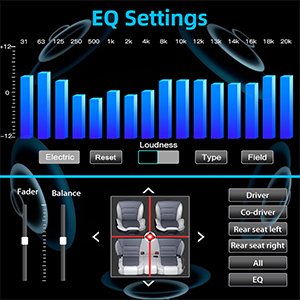
Image: FM/AM Radio interface.
6. בקרת הגה (SWC)
If your vehicle supports steering wheel controls, you can configure them in the 'Setup' menu under 'Steering Wheel Setup'. This allows you to control volume, track changes, and other functions directly from your steering wheel.

תמונה: ממשק הגדרת בקרת הגה.
תַחזוּקָה
To ensure the longevity and optimal performance of your PLZ MP-902 car stereo, follow these maintenance guidelines:
- ניקוי המסך: השתמש במטלית רכה ונטולת סיבים כדי לנגב בעדינות את מסך המגע. עבור כתמים עקשניים, נגב קלותampשטפו את המטלית במים או בחומר ניקוי המתאים למסכים. הימנעו מחומרים שוחקים או כימיקלים חזקים.
- ניקיון כללי: שמרו על המכשיר נקי מאבק ופסולת. השתמשו במברשת רכה או באוויר דחוס כדי לנקות את סביבת הכפתורים ופתחי האוורור.
- עדכוני תוכנה: בדקו מעת לעת את הוראות היצרן website or contact customer support for any available software updates. Updates can improve performance, add features, or fix bugs. Follow update instructions carefully.
- הימנע מטמפרטורות קיצוניות: אין לחשוף את המכשיר לחום או קור קיצוניים למשך תקופות ממושכות, שכן הדבר עלול לפגוע ברכיבים אלקטרוניים.
פתרון בעיות
If you encounter issues with your PLZ MP-902, refer to the following common troubleshooting steps:
| בְּעָיָה | סיבה אפשרית | פִּתָרוֹן |
|---|---|---|
| אין כוח | Loose wiring, blown fuse, vehicle power issue. | Check power and ground connections. Inspect vehicle's fuse box and the stereo's inline fuse. Ensure ignition is on. |
| אין סאונד | חיווט רמקולים שגוי, עוצמת קול נמוכה מדי, השתקה מופעלת, מקור שמע שגוי. | Verify speaker connections. Increase volume. Check if mute is active. Select the correct audio source (e.g., Radio, BT, USB). |
| Bluetooth לא מתחבר | Bluetooth not enabled on phone/stereo, device not in pairing mode, interference. | Ensure Bluetooth is on for both devices. Put stereo in pairing mode. Delete previous pairings on phone and retry. Move closer to the unit. |
| קישור המראה לא עובד | Incorrect USB cable, phone settings, app compatibility. | Use a high-quality USB cable. Ensure phone's USB debugging or mirroring settings are enabled. Some apps may restrict mirroring due to copyright. |
| תמונה מהמצלמה האחורית לא מוצגת | Incorrect camera wiring, reverse trigger wire not connected, faulty camera. | Check camera video input and power connections. Ensure the reverse trigger wire is correctly connected to the vehicle's reverse light. |
If these steps do not resolve the issue, please contact PLZ customer support for further assistance.
מפרטים
| תכונה | פְּרָט |
|---|---|
| מספר דגם | MP-902 |
| גודל מסך | 7 אינץ' |
| סוג מסך | Full HD Capacitive Touchscreen |
| גרסת בלוטות' | 5.1 |
| אקולייזר אודיו | 16-Band EQ DSP |
| קישוריות | בלוטות', עזר, USB |
| Supported Video Playback | 1080P |
| מידות המוצר | מידות: 8.28 x 17.78 x 9.98 ס"מ (עומק 3.26 אינץ' x רוחב 7 אינץ' x גובה 3.93 אינץ') |
| משקל פריט | 2.51 פאונד (1.14 ק"ג) |
| Included Camera | HD Rear Camera with Night Vision (170° ultra-wide viewזווית) |
אחריות ותמיכה
PLZ is committed to providing high-quality products and excellent customer service. For any warranty claims, technical support, or inquiries regarding your MP-902 car stereo, please contact PLZ customer support directly. Refer to the contact information provided with your product packaging or visit the official PLZ webאתר לסיוע.
Many common issues can be resolved by referring to the troubleshooting section of this manual or by checking for the latest software updates from PLZ.
Ask a question about this manual
Ask about setup, troubleshooting, compatibility, parts, safety, or missing instructions. Manuals+ will review the question and use this page’s manual context to help answer it.