
arkrocket AR-WB01
arkrocket 200 Wall-O-Matic Table Jukebox
Model: AR-WB01 User Manual
מָבוֹא
This manual provides comprehensive instructions for the setup, operation, and maintenance of your arkrocket 200 Wall-O-Matic Table Jukebox. Please read this manual thoroughly before using the product to ensure proper function and longevity.

Figure 1: The arkrocket 200 Wall-O-Matic Table Jukebox, designed to complement retro American diner aesthetics.
מידע בטיחות
- אין לחשוף את היחידה לגשם או לחות.
- אין לפרק את היחידה. יש לפנות לכל טיפול וטיפול בטכנאים מוסמכים.
- ודא שמתאם החשמל מחובר כראוי למקור חשמל מתאים.
- הרחק את היחידה מאור שמש ישיר, מקורות חום ואבק מוגזם.
- הימנע מהנחת חפצים כבדים על גבי היחידה.
מה יש בקופסה
בעת פירוק האריזה, אנא ודא שכל הפריטים הבאים כלולים:
- arkrocket 200 Wall-O-Matic Table Jukebox Unit
- מתאם מתח
- מדריך למשתמש (מסמך זה)
- Song List Cards
הגדרה
- מיקום: Place the jukebox on a stable, flat surface. Ensure adequate ventilation around the unit. The unit can also be wall-mounted using the mounting points on the back.
- חיבור חשמל: Connect the provided power adapter to the 'DC IN' port on the side of the jukebox and then plug it into a standard electrical outlet.
- הפעלה ראשונית: Locate the power switch, typically on the side or back, and switch it to the 'ON' position. The display on top should illuminate.
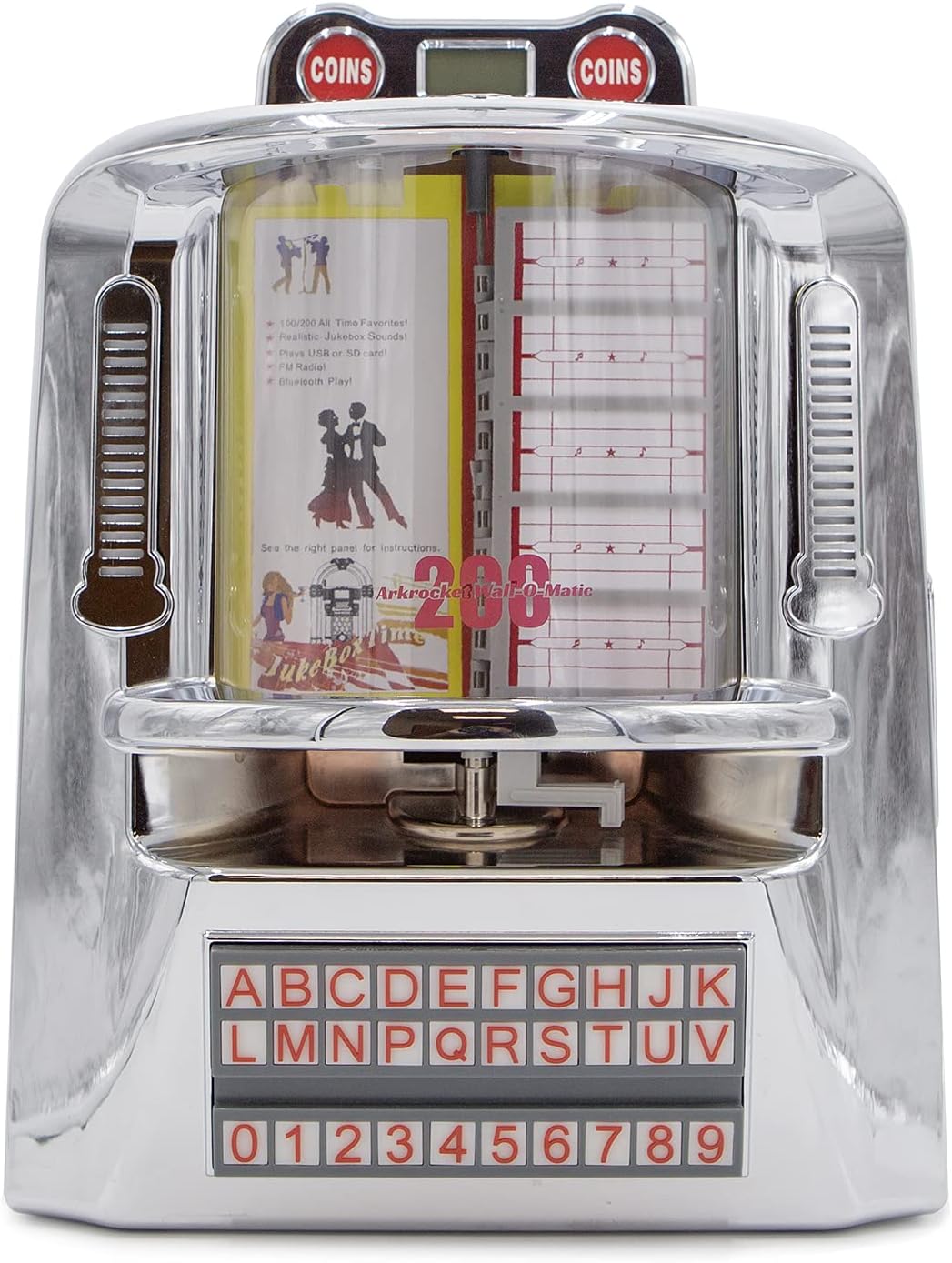
איור 2: חזית view of the jukebox, highlighting its classic design.

Figure 3: Dimensions of the jukebox for proper placement and fitting.
הוראות הפעלה
לוח הבקרה מעלview
The main control panel is located on the right side of the unit. It features various buttons and ports for different functions.

Figure 4: Side control panel with various input and control options.
בחירת מצב
Press the 'MODE' button on the control panel to cycle through available input modes: Bluetooth (BT), FM Radio, USB, and SD Card. The top LED display will indicate the currently selected mode.
Bluetooth
- Switch the jukebox to 'BT' mode using the 'MODE' button. The LED display will show 'BLUE'.
- במכשיר הנייד שלך, הפעל את Bluetooth וחפש מכשירים זמינים.
- Select 'arkrocket 200' from the list. Once paired, the jukebox will emit an audible confirmation.
- You can now play audio from your device through the jukebox speakers.
תפעול רדיו FM
- Switch the jukebox to 'FM' mode using the 'MODE' button. The LED display will show the frequency.
- Use the 'PREV' and 'NEXT' buttons (left and right arrows) to tune to different radio stations.
הפעלת כרטיס USB/SD
- Insert a USB drive into the 'USB' port or an SD card into the 'SD' slot on the control panel.
- הבטח את המוזיקה שלך files are in MP3 format. The jukebox supports up to 199 songs.
- The unit will automatically switch to USB or SD mode and begin playback.
- Use the 'PLAY/PAUSE', 'PREV', and 'NEXT' buttons to control playback. The 'RPT' button allows for repeat playback.

Figure 5: USB drive and SD card slots for playing digital music files.
Jukebox Song Selection (Physical Cards)
The jukebox features a classic song selection interface with physical cards.
- To access the song list cards, gently lift the top chrome cover near the 'COINS' display.
- Carefully pull out the transparent sleeves containing the song list cards.
- Write your desired song titles and artists on the provided cards, corresponding to the track numbers on your USB/SD media.
- Slide the sleeves back into place and close the chrome cover.
- Use the alphabet and number buttons on the front panel to select a song (e.g., A1, B2). The selected song will begin playing immediately if in USB/SD mode.

Figure 6: Top section of the jukebox where song list cards are housed.

Figure 7: The illuminated alphabet and number buttons for song selection.
תאורת סביבה
The jukebox features ambient lighting that enhances its retro aesthetic. To control the lighting:
- Locate the 'LIGHT' switch on the side control panel.
- Toggle the switch to 'ON' to activate the lights.
- The side lights are designed to react to the music, creating a dynamic visual effect.

Figure 8: The jukebox with its ambient lighting activated, adding to the retro atmosphere.
Aux In / Line Out
- AUX IN: Connect external audio devices (e.g., smartphones, MP3 players) to the 'AUX IN' port using a 3.5mm audio cable. Switch the jukebox to 'AUX' mode.
- יציאת קו: Connect the 'LINE OUT' port to an external amplifier or speaker system for enhanced audio output.
תַחזוּקָה
- ניקוי: Use a soft, dry cloth to clean the exterior of the jukebox. For stubborn marks on the chrome, a slightly damp cloth followed by immediate drying is recommended. Do not use abrasive cleaners or solvents.
- אִחסוּן: אם מאחסנים את היחידה לתקופה ממושכת, נתקו אותה מהחשמל ואחסנו אותה במקום קריר ויבש, הרחק מאור שמש ישיר וטמפרטורות קיצוניות.
פתרון בעיות
| בְּעָיָה | סיבה אפשרית | פִּתָרוֹן |
|---|---|---|
| אין כוח | מתאם החשמל לא מחובר; שקע לא פעיל. | ודא שמתאם החשמל מחובר היטב ליחידה ולשקע חשמלי תקין. |
| אין קול | Volume too low; incorrect mode selected; external device issue. | Increase volume using VOL+ button. Verify correct mode (BT, USB, SD, FM, AUX). Check external device connection/volume. |
| בלוטות' לא מתאמת | Jukebox not in BT mode; device too far; previous connection active. | Ensure jukebox is in 'BT' mode. Move device closer. Disconnect from other Bluetooth devices. |
| כרטיס USB/SD לא מתנגן | לֹא נָכוֹן file פרמט; כרטיס/כונן לא הוכנס כהלכה; פגום files. | לְהַבטִיחַ files are MP3. Reinsert USB/SD card. Try a different USB/SD card or reformat. |
| אורות לא עובדים | כיבוי אור. | Toggle the 'LIGHT' switch to 'ON'. |
מפרטים
| תכונה | פְּרָט |
|---|---|
| מותג | arkrocket |
| שם הדגם | 200 Wall-O-Matic |
| מספר דגם | AR-WB01 |
| חוֹמֶר | כרום |
| צֶבַע | כרום כסף |
| מידות המוצר | 6" D x 11" W x 16" H |
| משקל פריט | 7 פאונד |
| סוג רמקול | רְכִיב |
| גודל רמקול | 5 אינץ' |
| הספק פלט מרבי של הרמקול | 40 וואט |
| מצב פלט שמע | סטריאו |
| טכנולוגיית קישוריות | עזר, בלוטות', USB |
| טכנולוגיית תקשורת אלחוטית | בלוטות' |
| טווח בלוטות' | 10 מטר |
| תכונות מיוחדות | Bluetooth, FM Radio, SD card, USB Port, Ambient Lighting |
| מקור כוח | חשמלי עם כבלים |
| סוג אחריות | 1 שנה |
אחריות ותמיכה
Your arkrocket 200 Wall-O-Matic Table Jukebox comes with a אחריות מוגבלת ל-1 שנים מתאריך הרכישה. אחריות זו מכסה פגמי ייצור וביצוע תחת שימוש רגיל.
For warranty claims, technical support, or any inquiries regarding your product, please visit the official arkrocket website or contact their customer service directly. Please have your model number (AR-WB01) and proof of purchase ready when seeking support.