
1. הקדמה
This manual provides essential instructions for the installation, operation, and maintenance of your Hikvision 8MP AcuSense WDR Mini Bullet Network Camera, model DS-2CD2083G2-IU. Please read this manual thoroughly before using the product and retain it for future reference.
המוצר נגמרview
The Hikvision DS-2CD2083G2-IU is a high-performance 8-megapixel (4K) network camera designed for advanced surveillance. It features AcuSense technology for accurate human and vehicle target classification, Wide Dynamic Range (WDR) for clear imaging against strong backlight, and a fixed 2.8mm lens for a wide field of view. Its IP67 rating ensures robust outdoor performance, and the integrated microphone allows for audio monitoring.
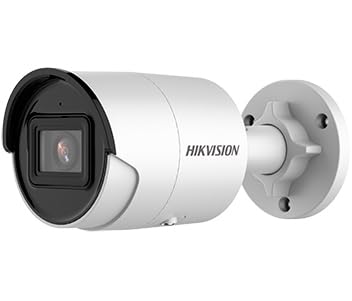
Figure 1: Hikvision 8MP AcuSense WDR Mini Bullet Network Camera (DS-2CD2083G2-IU)
This image displays the Hikvision 8MP AcuSense WDR Mini Bullet Network Camera, highlighting its compact bullet-style design suitable for various installation environments.
תכונות מפתח
- 8 Megapixel (4K) Resolution: Delivers high-quality, detailed video.
- טכנולוגיית AcuSense: Reduces false alarms by accurately classifying human and vehicle targets.
- טווח דינמי רחב (WDR): Ensures clear images even in scenes with strong contrast.
- Fixed 2.8mm Lens: מספק מגוון רחב viewזווית ing.
- תאורת אינפרא אדום (IR): Night vision up to 40 meters.
- דירוג עמידות למים IP67: מתאים לשימוש חיצוני בתנאי מזג אוויר שונים.
- מיקרופון מובנה: Enables audio monitoring.
- קורא כרטיסים משולב: Supports local storage (microSD card not included).
2. מידע בטיחות
אנא הקפידו על אמצעי הזהירות הבאים כדי למנוע פגיעה או נזק למוצר:
- Ensure the power supply meets the camera's requirements (6.5 Watts).
- אין לחשוף את המצלמה לטמפרטורות קיצוניות, לחות או סביבות קורוזיביות.
- Avoid pointing the lens directly at strong light sources, as this may damage the sensor.
- ההתקנה צריכה להתבצע על ידי אנשי מקצוע מוסמכים בהתאם לתקנות החשמל המקומיות.
- השתמש רק באביזרים שצוינו על ידי היצרן.
- Clean the camera lens with a soft, dry cloth. Avoid harsh chemicals.
3. התקנה והתקנה
3.1 פירוק
Carefully unpack the camera and check for any signs of damage. Ensure all components are present. (Typical components include: camera unit, mounting template, screws, waterproof connector, quick start guide).
3.2 התקנה פיזית
The camera is designed for ceiling mounting. Select a suitable location that provides the desired field of view and is within reach of network and power cables. Due to its IP67 rating, it is suitable for outdoor environments.
- Use the provided mounting template to mark drill holes on the ceiling.
- קדחו את החורים הדרושים והכניסו תקעים לקיר במידת הצורך.
- Secure the camera base to the mounting surface using the supplied screws.
- התאם את זווית המצלמה לכיסוי מיטבי.
3.3 חיבור רשת וחשמל
This is an IP network camera. It requires a network connection and power. Power over Ethernet (PoE) is typically supported, simplifying installation by delivering both power and data over a single Ethernet cable. If PoE is not used, a separate 12V DC power adapter (not included) will be required.
- Connect an Ethernet cable from your network switch/router to the camera's RJ45 port. Use the waterproof connector for outdoor installations.
- If not using PoE, connect a 12V DC power adapter to the camera's power input.
- Once connected, the camera will power on. Allow a few minutes for it to boot up.
3.4 תצורה ראשונית
גישה למצלמה web ממשק באמצעות א web browser using its default IP address (refer to the quick start guide or use Hikvision's SADP tool to discover the IP address). You will be prompted to set a strong password for security. Follow the on-screen instructions to configure network settings, date/time, and other basic parameters.
4. הוראות הפעלה
4.1 בשידור חי View והקלטה
לאחר ההתקנה הראשונית, תוכלו view the live feed from the camera through its web interface, a Network Video Recorder (NVR), or Hikvision's client software (e.g., iVMS-4200) or mobile app (Hik-Connect). Configure recording schedules and methods (continuous, motion-triggered) via the camera's settings or NVR.
4.2 AcuSense Smart Features
The AcuSense technology allows the camera to distinguish between humans, vehicles, and other moving objects, significantly reducing false alarms caused by animals, rain, or falling leaves. Configure these detection rules in the camera's event settings to receive more accurate alerts.
- זיהוי תנועה 2.0: Set up detection zones and sensitivity for human and vehicle events.
- איתור חדירות: Define virtual boundaries, and the camera will trigger an alarm if a human or vehicle crosses them.
- זיהוי חציית קווים: Similar to intrusion, but for a specific line.
4.3 טווח דינמי רחב (WDR)
WDR compensates for extreme lighting conditions, such as strong backlight, to ensure that both bright and dark areas of the image are clearly visible. This feature is typically enabled by default but can be adjusted in the image settings.
4.4 ראיית לילה אינפרא אדום (IR)
The camera automatically switches to IR mode in low-light conditions, providing clear black-and-white video up to 40 meters. Ensure no obstructions block the IR LEDs for optimal night vision performance.
4.5 ניטור שמע
With its built-in microphone, the camera can capture audio from the surveillance area. Audio settings, including gain control, can be configured in the camera's web interface. Ensure local regulations regarding audio recording are followed.
5. תחזוקה
- ניקוי: נקו באופן קבוע את עדשת המצלמה ואת ביתה בעזרת מטלית רכהamp בַּד. אין להשתמש בחומרי ניקוי שוחקים.
- עדכוני קושחה: בדקו מעת לעת את רשמי Hikvision website for firmware updates. Keeping the firmware updated ensures optimal performance, new features, and security enhancements.
- בדיקת כבלים: For outdoor installations, periodically inspect cables and connections for wear or damage, especially the waterproof connectors.
- ניהול סיסמאות: Regularly change your camera's password to maintain security.
6. פתרון תקלות
| בְּעָיָה | סיבה אפשרית | פִּתָרוֹן |
|---|---|---|
| No image/camera offline | No power, network cable disconnected, incorrect IP address. | Check power supply and network cable. Verify IP address using SADP tool. Restart camera. |
| איכות תמונה ירודה | Dirty lens, incorrect focus (if adjustable), poor lighting, network bandwidth issues. | Clean the lens. Ensure adequate lighting. Check network connection speed. Adjust image settings (WDR, exposure). |
| אזעקות שווא מזיהוי תנועה | Sensitivity too high, environmental factors (trees, animals), AcuSense not configured. | Adjust motion detection sensitivity. Configure AcuSense human/vehicle detection. Adjust detection zones. |
| לא ניתן לגשת web מִמְשָׁק | Incorrect IP address, network connectivity issue, browser compatibility. | Verify IP address. Ensure camera and PC are on the same network segment. Try a different browser. |
If the problem persists after attempting these solutions, please contact Hikvision technical support.
7. מפרטים
| תכונה | פְּרָט |
|---|---|
| מספר דגם | DS-2CD2083G2-IU |
| חיישן תמונה | CMOS |
| מקסימום הַחְלָטָה | 8 מגה פיקסל (4K) |
| עֲדָשָׁה | 2.8mm קבוע עדשה |
| טווח IR | עד 40 מטר |
| WDR | נתמך |
| AcuSense | Human and Vehicle Target Classification |
| שֶׁמַע | מיקרופון מובנה |
| אחסון מקומי | Integrated Card Reader (MicroSD slot) |
| דירוג עמיד בפני מזג אוויר | IP67 |
| צריכת חשמל | 6.5 וואט |
| מידות (L x W x H) | 15 x 15 x 8 ס"מ (בקירוב) |
| סוג הרכבה | הר תקרה |
| סוג התראה | Motion Only (configurable for human/vehicle) |
8. אחריות ותמיכה
מוצרי Hikvision מגיעים בדרך כלל עם אחריות יצרן מוגבלת. אנא עיינו בכרטיס האחריות המצורף למוצר שלכם או בקרו באתר הרשמי של Hikvision. webבאתר לקבלת תנאי אחריות מפורטים הספציפיים לאזורך.
For technical support, firmware downloads, or further assistance, please visit the official Hikvision support portal or contact their customer service department. Ensure you have your product model number (DS-2CD2083G2-IU) and serial number ready when contacting support.
Hikvision הרשמי Webאֲתַר: www.hikvision.com