
מָבוֹא
The Poly DA75 is a versatile USB-A/USB-C digital adapter designed to connect Poly Quick Disconnect (QD) headsets to computers. It ensures clear audio quality for call center environments, supporting both USB-A and USB-C connections for compatibility with various systems. This adapter is engineered to work seamlessly with platforms such as Avaya, Genesys, and Cisco, providing a reliable audio solution for professionals.
תכונות מפתח כוללות:
- קישוריות אוניברסלית: Equipped with both USB-A and USB-C connectors on the cable for broad compatibility with new and legacy equipment.
- Intelligent Headset Recognition: Automatically adjusts audio performance to the specific Poly Quick Disconnect headset for optimized call quality.
- Acoustic Protection: Incorporates features to manage safe volume levels, protecting user hearing.
- שילוב פלטפורמה: Fully compatible with leading call center platforms including Avaya, Genesys, and Cisco.
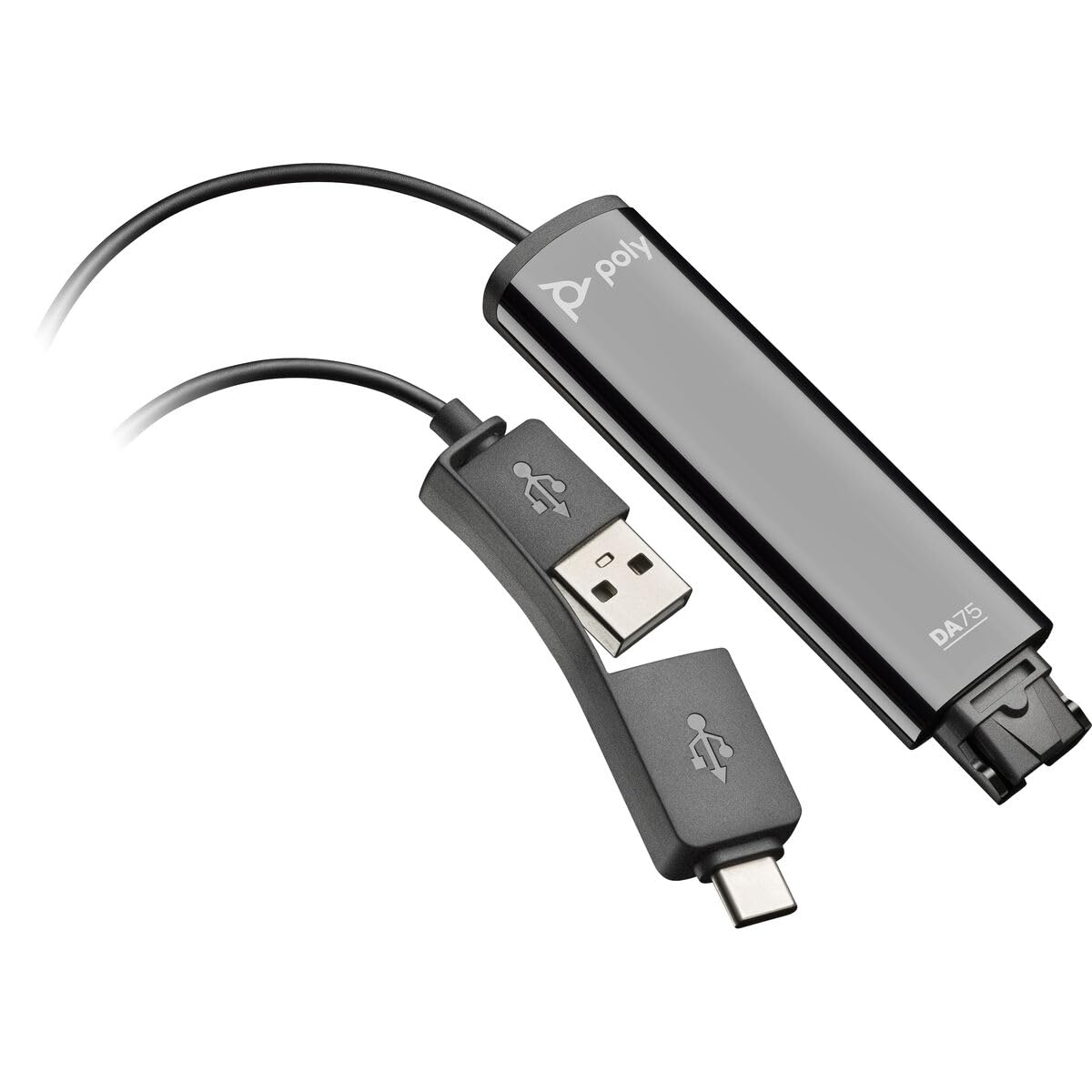
Image: The Poly DA75 USB-A/USB-C Digital Adapter, showing its dual USB-A and USB-C connectors and the Quick Disconnect port for headsets.
מה יש בקופסה
The Poly DA75 package typically includes the following items:
- Poly DA75 USB-A/USB-C Digital Adapter
- תיעוד (מדריך התחלה מהירה, מידע בטיחות)
Note: Headsets are sold separately and are not included with the DA75 adapter.
הגדרה
Follow these steps to set up your Poly DA75 Digital Adapter:
- חיבור אוזניות: Connect your Poly Quick Disconnect (QD) headset to the QD port on the Poly DA75 adapter. Ensure the connection is secure.
- התחבר למחשב:
- If your computer has a USB-A port, use the USB-A connector on the DA75 cable.
- If your computer has a USB-C port, use the USB-C connector on the DA75 cable.
Plug the appropriate USB connector into an available USB port on your computer.
- התקנת דרייבר: The DA75 is a plug-and-play device. Your operating system (Windows, macOS) should automatically detect the device and install the necessary drivers. This process may take a few moments.
- אימות זיהוי מכשיר:
- חלונות: עבור אל הגדרות > מערכת > צליל or לוח הבקרה > סאונד. The Poly DA75 should appear as an audio input and output device.
- MacOS: עבור אל הגדרות מערכת > צליל. The Poly DA75 should appear as an input and output device.
Select the Poly DA75 as your default communication device for both playback and recording.
- תצורת תוכנה: If you are using communication software (e.g., Avaya, Genesys, Cisco, Microsoft Teams, Zoom), ensure that the Poly DA75 is selected as the audio device within the application's settings.
הוראות הפעלה
The Poly DA75 adapter facilitates audio communication through your connected Poly QD headset. Its operation is primarily managed through your computer's operating system and communication software.
- ביצוע/קבלת שיחות: Use your communication software to initiate or answer calls. The audio will be routed through your connected Poly QD headset via the DA75 adapter.
- בקרת עוצמת הקול: Adjust the listening volume using your computer's system volume controls or the volume controls within your communication application.
- השתקת מיקרופון: Mute and unmute your microphone using the controls provided by your communication software.
- Audio Optimization: The DA75 automatically optimizes audio for your specific Poly QD headset. No manual adjustments are typically required for audio profiles.
תַחזוּקָה
To ensure the longevity and optimal performance of your Poly DA75 Digital Adapter, follow these maintenance guidelines:
- ניקוי: Gently wipe the adapter with a soft, dry, anti-static cloth. Do not use liquid cleaners or abrasive materials.
- אִחסוּן: יש לאחסן את המתאם במקום קריר ויבש, הרחק מאור שמש ישיר וטמפרטורות קיצוניות.
- טיפול: הימנעו מכיפוף או פיתול יתר על המידה של הכבל, במיוחד ליד המחברים, כדי למנוע נזק פנימי.
- קישוריות: Ensure the Quick Disconnect (QD) connection and USB connections are clean and free of debris before connecting.
פתרון בעיות
If you encounter issues with your Poly DA75 Digital Adapter, refer to the following troubleshooting steps:
| בְּעָיָה | סיבה אפשרית | פִּתָרוֹן |
|---|---|---|
| אין שמע מהאוזניות |
|
|
| המיקרופון לא עובד |
|
|
| Adapter not recognized by computer |
|
|
מפרטים
| תכונה | פְּרָט |
|---|---|
| מספר דגם | 218266-01 |
| מותג | פולי |
| סוג מחבר | USB-A, USB-C (dual connector) |
| מכשירים תואמים | Poly Quick Disconnect (QD) Headsets |
| שימושים ספציפיים | PC, Call Center Platforms (Avaya, Genesys, Cisco) |
| צֶבַע | שָׁחוֹר |
| מידות פריט (L x W x H) | 0.98 x 0.39 x 2.95 אינץ' |
| משקל פריט | 30 גרם |
| מספר יציאות | 2 (USB-A/USB-C to QD) |
| UPC | 197029650054, 017229175112 |
אחריות ותמיכה
מידע על אחריות: The Poly DA75 Digital Adapter comes with a אחריות מוגבלת של היצרן לשנהאחריות זו מכסה פגמים בחומרים ובביצוע בשימוש רגיל. אנא שמור את הוכחת הרכישה שלך לצורך תביעות אחריות.
תמיכה טכנית: For technical assistance, product inquiries, or warranty service, please contact Poly customer support. Visit the official Poly website for the most up-to-date support contact information, FAQs, and additional resources.
משאבים מקוונים: תמיכה פולי Webאֲתַר