
מָבוֹא
Thank you for choosing the PHEANOO D6 Sound Bar System. This 2.1 channel soundbar with a dedicated wired subwoofer is designed to enhance your audio experience, providing clear dialogue, powerful bass, and immersive sound for your home entertainment. This manual provides detailed instructions for setup, operation, maintenance, and troubleshooting to ensure optimal performance and longevity of your device.
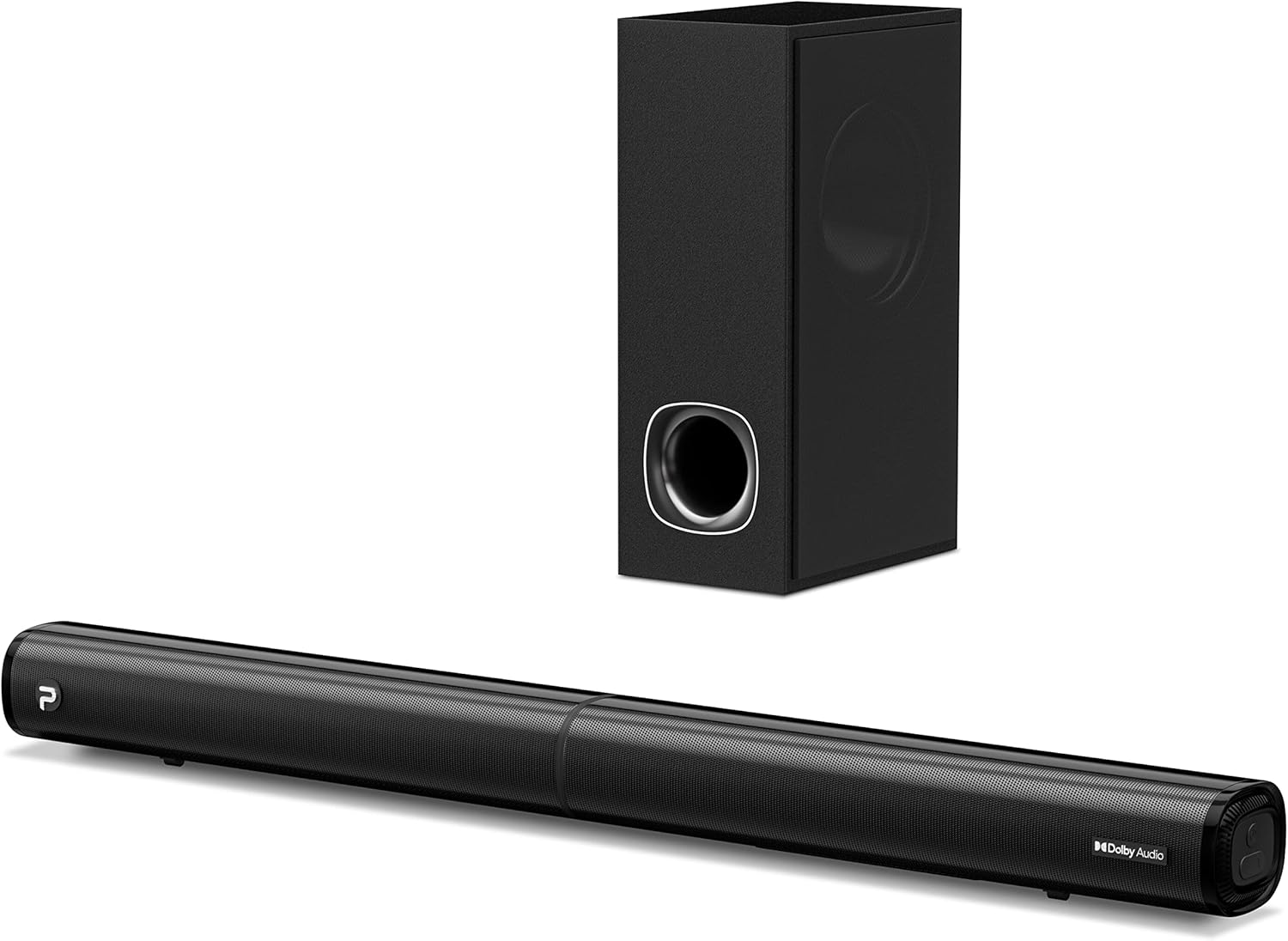
Image: The PHEANOO D6 Sound Bar and its accompanying wired subwoofer, showcasinהעיצוב השחור והחלקלק שלהם.
מה יש בקופסה
אנא בדוק את תוכן החבילה בקפידה. אם חסרים פריטים או פגומים, צור קשר עם תמיכת הלקוחות.
- Soundbar and Wired Subwoofer
- כבל HDMI
- כבל שמע RCA
- ערכת התקנה לקיר (ברגים ועוגנים)
- שלט רחוק (סוללות לא כלולות)
- מתאם מתח

Image: All components included in the PHEANOO D6 Sound Bar package, laid out for clear identification, including the soundbar, subwoofer, cables, remote, and wall mount kit.
הגדרה
1. Assembling the Soundbar (Detachable Design)
The PHEANOO D6 soundbar features a unique detachable design for flexible placement. Follow these steps to assemble it:
- Align the audio connector from one half of the soundbar with the corresponding port on the other half.
- Gently push the two halves together until they click into place.
- Twist the two halves to secure the connection, ensuring the soundbar is firmly assembled.

Image: A three-step visual guide demonstrating how to connect the two halves of the detachable soundbar, ensuring proper alignment and secure locking.
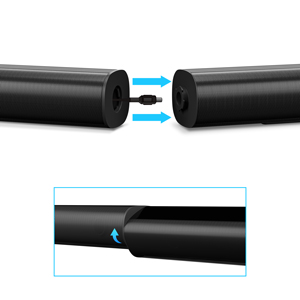
תמונה: תקריב view of the soundbar's detachable connection point, showing the male and female connectors.
2. חיבור הסאבוופר
Connect the wired subwoofer to the soundbar using the dedicated subwoofer cable. Ensure the connection is secure.
3. אפשרויות מיקום
You can place the soundbar on a tabletop or mount it on a wall.
- מיקום משטח שולחני: מקמו את הסאונד בר ישירות מול הטלוויזיה, וודאו שהוא לא חוסם את חיישן השלט של הטלוויזיה.
- הרכבה על הקיר: Use the included wall mount kit. It is recommended to measure and mark the drilling points accurately, rather than relying solely on the paper stencil, to ensure a level installation.
4. חיבורי שמע
The PHEANOO D6 offers multiple connectivity options. Choose the best one for your device:
- HDMI (ARC): For the best audio quality and control, connect an HDMI cable from the soundbar's HDMI (ARC) port to your TV's HDMI (ARC) port. This allows your TV remote to control the soundbar's volume.
- אוֹפּטִי: Connect an optical cable from the soundbar's Optical port to your TV's Optical Digital Audio Out port.
- AUX: Use the 3.5mm AUX cable to connect to devices with a 3.5mm audio output.
- Bluetooth 5.0: For wireless connection, pair your device via Bluetooth.

Image: The rear panel of the PHEANOO D6 Sound Bar, highlighting the HDMI (ARC), Bluetooth, Optical, and AUX input ports with corresponding icons.

תמונה: מפורט view of the soundbar's input panel, showing the AUX, Optical, and HDMI (ARC) ports clearly labeled.
5. חיבור חשמל
Connect the power adapter to the soundbar and then plug it into a wall outlet.
הוראות הפעלה
שְׁלַט רָחוֹק
The included remote control allows you to manage all functions of the soundbar. Insert two AAA batteries (not included) into the remote before use.

Image: The remote control for the PHEANOO D6 Sound Bar, showing its buttons and an indicator light.
הפעלה/כיבוי
Press the power button on the remote or the soundbar to turn the unit on or off.
בחירת קלט
Press the "Input" button on the remote to cycle through available input sources: HDMI (ARC), Optical, AUX, and Bluetooth.
Bluetooth
כדי להתאים מכשיר Bluetooth:
- Select Bluetooth input on the soundbar. The indicator light will flash.
- Enable Bluetooth on your device (smartphone, tablet, etc.) and search for "PHEANOO D6".
- Select the soundbar from the list to pair. Once connected, the indicator light will be solid.

Image: A smartphone displaying a music app, wirelessly connected to the PHEANOO D6 Sound Bar via Bluetooth, indicated by a Wi-Fi like symbol.
מצבי סאונד
סאונד בר מציע מגוון מצבי שמע כדי לייעל את חוויית ההאזנה שלך:
- מצב דיאלוג: משפר את צלילות הקול, מה שהופך את הדיבור לקל יותר להבנה.
- מצב מוזיקה: אופטימלי להשמעת מוזיקה, ומספק אודיו מאוזן.
- מצב סרט: Delivers an immersive cinematic experience with enhanced effects.
- מצב תלת מימד: Creates a wider, more enveloping soundstage.

Image: Icons representing different sound modes: Dialogue, Music, Movie, and 3D, indicating the soundbar's versatility.
כוונון בס
Use the dedicated bass control buttons on the remote to increase or decrease the subwoofer's output level to your preference.

Image: A close-up of the subwoofer, with a visual effect suggesting powerful bass emanating from it.
Dolby Digital Support
The PHEANOO D6 Sound Bar supports Dolby Digital decoding, providing a rich and dynamic audio experience for compatible content.

Image: A living room setup with the soundbar and TV, overlaid with a grid pattern indicating premium 3D surround sound powered by Dolby Audio.

Image: The Dolby Audio logo accompanied by visual representations of sound waves, emphasizing the enhanced audio quality.
מוכן לטלוויזיה של Roku
This soundbar is certified to work seamlessly with your Roku TV. Enjoy smooth setup, easy access to sound settings, and compatibility with any Roku TV remote.

Image: A television screen displaying the "Roku TV Ready" setup interface, with the PHEANOO Soundbar and subwoofer positioned below it, illustrating seamless integration.
תַחזוּקָה
- ניקוי: השתמשו במטלית רכה ויבשה לניקוי משטחי הסאונדבר והסאב-וופר. אין להשתמש בחומרי ניקוי נוזליים או בתרסיסים.
- אוורור: ודאו אוורור נאות סביב הסאונד בר והסאב וופר כדי למנוע התחממות יתר. אין לחסום פתחי אוורור.
- אִחסוּן: אם מאחסנים את המכשיר לתקופה ממושכת, יש לנתק אותו מהחשמל ולאחסן אותו במקום קריר ויבש.
פתרון בעיות
| בְּעָיָה | סיבה אפשרית | פִּתָרוֹן |
|---|---|---|
| אין כוח | כבל חשמל לא מחובר; שקע החשמל לא עובד. | ודא שכבל החשמל מחובר היטב. נסה שקע חשמל אחר. |
| אין קול | נבחרה קלט שגויה; עוצמת קול נמוכה מדי; כבלים אינם מחוברים כראוי. | בחר את מקור הקלט הנכון. הגבר את עוצמת הקול. בדוק את כל חיבורי כבלי השמע. |
| התאמת Bluetooth נכשלה | סאונד בר לא במצב צימוד; המכשיר רחוק מדי; הפרעות. | Ensure soundbar is in Bluetooth input and indicator is flashing. Move device closer. Turn off other Bluetooth devices. |
| איכות סאונד ירודה | Incorrect sound mode; Source audio quality is low. | Try different sound modes (Music, Movie, Dialogue). Ensure the audio source is high quality. |
| השלט רחוק לא עובד | Batteries dead or incorrectly inserted; Obstruction between remote and soundbar. | החליפו את הסוללות תוך הקפדה על הקוטביות הנכונה. הסירו כל חסימה. |
For more detailed troubleshooting, refer to the official Troubleshooting Guide PDF available on the product page or contact PHEANOO customer support.
מפרטים
| תכונה | פְּרָט |
|---|---|
| דֶגֶם | D6 |
| מותג | PHANOO |
| סוג רמקול | סרגל סאונד עם סאב וופר קווי |
| תצורת ערוץ | 2.1 CH |
| טכנולוגיית קישוריות | HDMI (ARC), Bluetooth 5.0, Optical, AUX |
| טווח בלוטות' | עד 100 מטרים (כ-328 רגל) |
| רמקול כוח פלט מרבי | 240 וואט |
| מידות מוצר (סאונדבר) | 29.5 אינץ' רוחב x 2.4 אינץ' גובה x 2.8 אינץ' עומק |
| משקל פריט | 11.57 פאונד |
| סוג בקר | שְׁלַט רָחוֹק |
| תכונות מיוחדות | Dolby Digital Decoding, Dialogue Enhancement, Bass Adjustable, Detachable Design, Roku TV Ready |
אחריות ותמיכה
The PHEANOO D6 Sound Bar System comes with a אחריות מוגבלתאנא עיין בכרטיס האחריות המצורף לחבילה שלך לקבלת תנאים והגבלות ספציפיים.
For technical support, warranty claims, or further assistance, please visit the official PHEANOO website or contact their customer service department. You can also find additional resources like the מדריך למשתמש (PDF) ו מדריך לפתרון בעיות (PDF) באינטרנט.