
1. הקדמה
תודה על הרכישהasing the Ledwood Drop 400 Wireless LED Speaker. This manual provides essential information for setting up, operating, and maintaining your speaker. Please read it carefully before use to ensure proper functionality and to maximize your listening experience.
2. מידע בטיחות
- אין לחשוף את הרמקול למים, לחות או טמפרטורות קיצוניות.
- הימנע מהפלת הרמקול או הכפיפה למכות חזקות.
- אל תנסו לפרק או לתקן את הרמקול בעצמכם. צרו קשר עם אנשי שירות מוסמכים.
- הרחק את הרמקול ממקורות חום ומאור שמש ישיר.
- השתמשו רק במתאם החשמל המצורף לטעינה.
- נקו את הרמקול בעזרת מטלית רכה ויבשה. אין להשתמש בחומרי ניקוי שוחקים.
3. תכולת החבילה
אנא ודאו שכל הפריטים נמצאים בחבילה:
- 1 x Ledwood Drop 400 Wireless LED Speaker
- 1 x מתאם חשמל
- 1 x 3.5mm AUX Input Cable
- 1 x שלט רחוק
- 1 x מיקרופון קווי
- מדריך למשתמש אחד (מסמך זה)
4. המוצר נגמרview
The Ledwood Drop 400 is a powerful wireless speaker featuring dynamic LED lighting and multiple connectivity options.
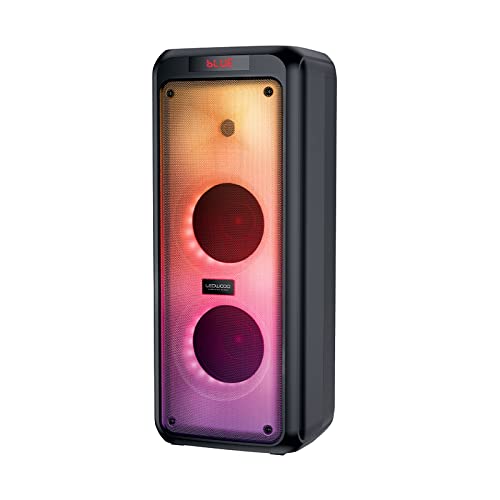
איור 4.1: חזית view of the Ledwood Drop 400 speaker, showcasing its LED light panel.
לוח בקרה ויציאות

Figure 4.2: Top control panel with input ports and function buttons.
The top panel includes controls for power, volume, mode selection, playback, and inputs for USB, SD card, AUX, and two microphones. A digital display indicates the current mode or status.
5. התקנה
5.1 טעינת הרמקול
- חבר את מתאם החשמל המצורף ליציאת DC IN ברמקול.
- חבר את המתאם לשקע קיר רגיל.
- The charging indicator will illuminate. The speaker is fully charged when the indicator changes color or turns off (refer to the speaker's display for specific indications).
- טעינה מלאה מספקת כ-6 שעות של זמן נגינה.
5.2 הפעלה/כיבוי
- To power on, press and hold the Power button on the control panel or remote control.
- כדי לכבות, לחץ והחזק שוב את לחצן ההפעלה.
6. הוראות הפעלה
6.1 זיווג בלוטות '
- Power on the Ledwood Drop 400 speaker. It will automatically enter Bluetooth pairing mode, indicated by a flashing 'BLUE' on the display and an audible prompt.
- הפעל את Bluetooth בטלפון החכם, בטאבלט או במכשיר אחר התומך ב-Bluetooth.
- חפש available devices and select "Ledwood Drop 400" from the list.
- Once connected, the speaker will provide an audible confirmation, and 'BLUE' on the display will stop flashing.
- כעת ניתן להשמיע אודיו מהמכשיר דרך הרמקול.
6.2 ניגון באמצעות כרטיס USB/SD
- Insert a USB flash drive or an SD card (pre-loaded with MP3 audio files) into the respective port on the speaker's control panel.
- The speaker will automatically switch to USB or SD card mode and begin playing the audio files.
- Use the Play/Pause, Next Track, and Previous Track buttons on the speaker or remote control to manage playback.
6.3 כניסת AUX
- Connect one end of the supplied 3.5mm AUX cable to the AUX IN port on the speaker.
- חבר את הקצה השני לשקע האוזניות או ליציאת השמע של התקן השמע החיצוני שלך.
- Press the Mode button on the speaker or remote control until 'AUX' is displayed.
- הפעל אודיו מהמכשיר החיצוני שלך. ניתן לשלוט בעוצמת הקול גם דרך הרמקול וגם דרך המכשיר החיצוני.
6.4 רדיו FM
- Press the Mode button on the speaker or remote control until 'FM' is displayed.
- כדי לסרוק אוטומטית ולשמור תחנות FM זמינות, לחצו והחזיקו את לחצן ההפעלה/השהיה. הרמקול יסרוק וישמור תחנות באופן אוטומטי.
- Use the Next Track and Previous Track buttons to navigate through the saved stations.
6.5 שימוש במיקרופון
- Connect the wired microphone (or another compatible microphone) to one of the MIC IN ports on the speaker.
- Adjust the microphone volume using the dedicated MIC VOL knob on the control panel.
- The microphone can be used in any audio mode (Bluetooth, USB, SD, AUX, FM).
6.6 מצבי אור LED
The Ledwood Drop 400 features dynamic LED lighting with 4 different modes.
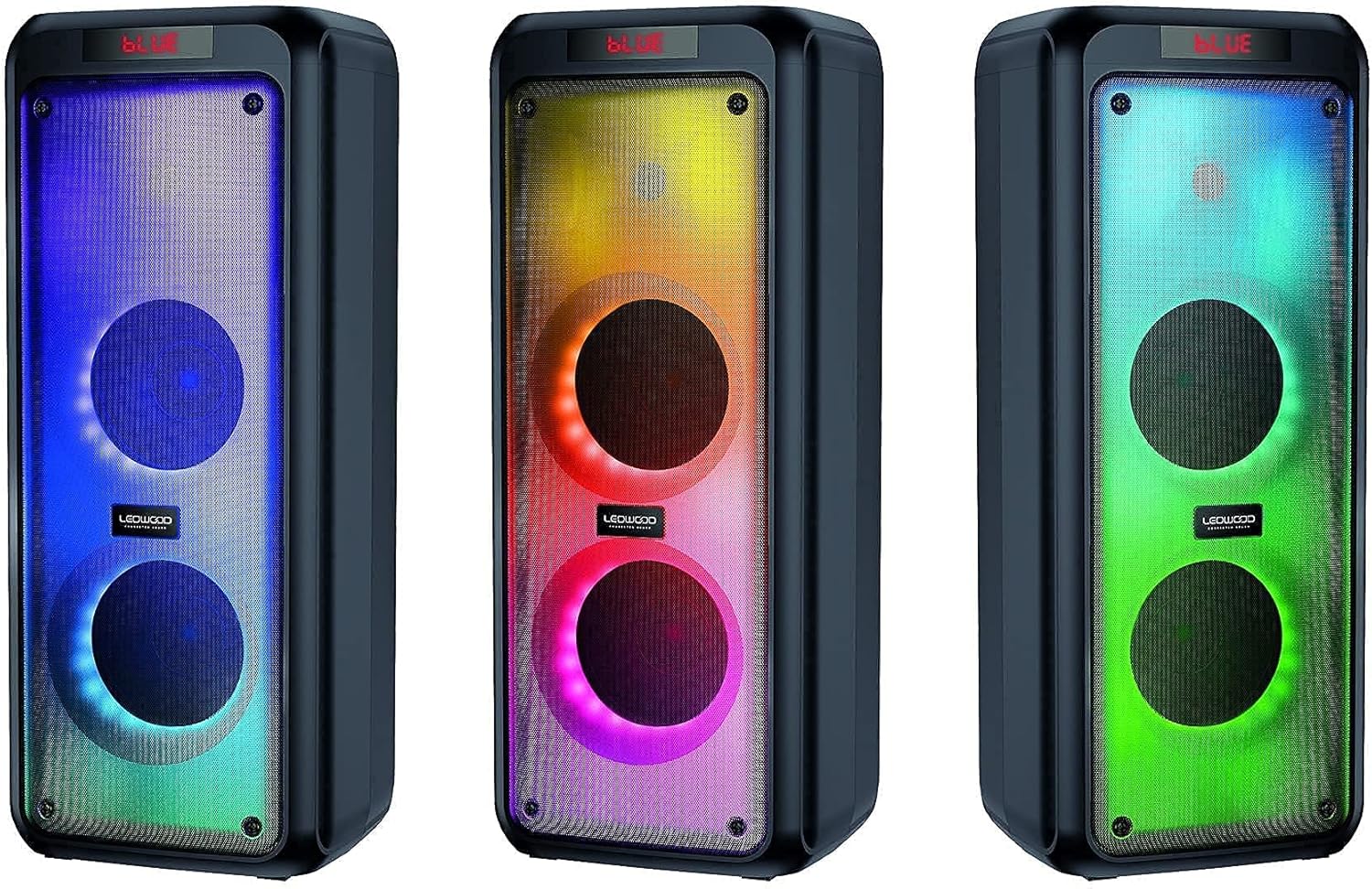
איור 6.1: דוגמהamples of the speaker's LED light modes.
- Press the LED button on the control panel or remote control to cycle through the available light modes.
- Press the LED button again to turn off the lights.
6.7 פונקציית סטריאו אלחוטי אמיתי (TWS)
The TWS function allows you to pair two Ledwood Drop 400 speakers together for a stereo sound experience.
- Ensure both Ledwood Drop 400 speakers are powered on and in Bluetooth mode, but not connected to any device.
- On one of the speakers (this will be the primary speaker), press and hold the TWS button (if available) or a designated pairing button (refer to specific button labels on your speaker).
- The primary speaker will search for the secondary speaker. Once connected, both speakers will emit an audible confirmation.
- כעת, חברו את מכשיר ה-Bluetooth שלכם לרמקול הראשי כמתואר בסעיף 6.1. האודיו יתנגן בסטריאו דרך שני הרמקולים.
7. תחזוקה
7.1 ניקוי
- תמיד כבו את הרמקול ונתק אותו מהחשמל לפני ניקויו.
- השתמש במטלית רכה, יבשה ונטולת סיבים כדי לנגב את המשטחים החיצוניים.
- אין להשתמש בחומרי ניקוי נוזליים, תרסיסים או ממסים.
7.2 אחסון
- יש לאחסן את הרמקול במקום קריר ויבש, הרחק מאור שמש ישיר וטמפרטורות קיצוניות.
- אם מאחסנים את הסוללה לתקופה ממושכת, יש לטעון אותה מעת לעת (למשל, כל 3 חודשים) כדי לשמור על תקינותה.
8. פתרון תקלות
| בְּעָיָה | סיבה אפשרית | פִּתָרוֹן |
|---|---|---|
| הרמקול לא נדלק. | Battery is depleted. Power adapter not connected. | Charge the speaker using the provided power adapter. Ensure the adapter is securely connected to both the speaker and a working power outlet. |
| אין קול מהרמקול. | Volume too low. Incorrect mode selected. Device not connected. | Increase speaker volume and source device volume. Ensure the correct input mode (Bluetooth, AUX, USB, SD, FM) is selected. Re-pair Bluetooth device or check cable connections. |
| מכשיר בלוטות' לא יכול להתחבר. | הרמקול לא במצב צימוד. המכשיר רחוק מדי. הפרעות. | Ensure speaker is in Bluetooth pairing mode (flashing 'BLUE'). Move device closer to the speaker. Turn off other Bluetooth devices to reduce interference. Try restarting both devices. |
| קליטת רדיו FM גרועה. | Weak signal. Speaker position. | Reposition the speaker to improve reception. Extend any external antenna if available. |
| המיקרופון לא עובד. | Microphone not connected properly. MIC VOL too low. | Ensure microphone is fully inserted into the MIC IN port. Increase the MIC VOL knob. |
9. מפרטים
- מותג: לדווד
- דֶגֶם: ירידה של 400
- טכנולוגיית קישוריות: בלוטות', USB
- מאפיינים מיוחדים: FM Radio, LED Light Effects
- שימושים מומלצים: For computer, For smartphone or tablet
- מכשירים תואמים: מחשב נייד, סמארטפון
- צֶבַע: שָׁחוֹר
- שיטת בקרה: שְׁלַט רָחוֹק
- מקור כוח: כבל חשמלי
- חיי סוללה ממוצעים: 6 שעות
- תפוקת חשמל: 400W (40W RMS)
- מידות: 24 x 25 x 64 ס"מ (בקירוב)
- ASIN: B0972SSC4J
10. אחריות ותמיכה
For warranty information or technical support, please refer to the warranty card included with your product or contact Ledwood customer service directly. Contact details can typically be found on the official Ledwood webבאתר או על אריזת המוצר.