1. הקדמה
תודה על הרכישהasing the Kimiso-E92 (KMS-206) Portable Bluetooth Speaker. This manual provides essential information for the safe and efficient operation of your device. Please read it thoroughly before use and retain it for future reference.
The Kimiso-E92 (KMS-206) is a portable speaker designed for convenience and quality audio. It features wireless Bluetooth connectivity, support for USB and SD card playback, and an FM radio function. Its compact design includes a carrying strap for easy transport.
2. מידע בטיחות
- אין לחשוף את הרמקול למים, לחות או טמפרטורות קיצוניות.
- הימנע מהפלת הרמקול או הכפיפה למכות חזקות.
- אל תנסו לפרק או לתקן את הרמקול בעצמכם. צרו קשר עם אנשי שירות מוסמכים.
- הרחק את הרמקול ממקורות חום ומאור שמש ישיר.
- Use only the provided charging cable or a certified 5V USB charger.
- נקו את הרמקול בעזרת מטלית רכה ויבשה. אין להשתמש בחומרי ניקוי שוחקים.
3. תכולת החבילה
אנא בדקו את החבילה עבור הפריטים הבאים:
- 1 x Kimiso-E92 (KMS-206) Portable Bluetooth Speaker
- 1 x רצועת נשיאה
- 1 x כבל טעינה USB
4. המוצר נגמרview
הכירו את רכיבי הרמקול והבקרות שלו.
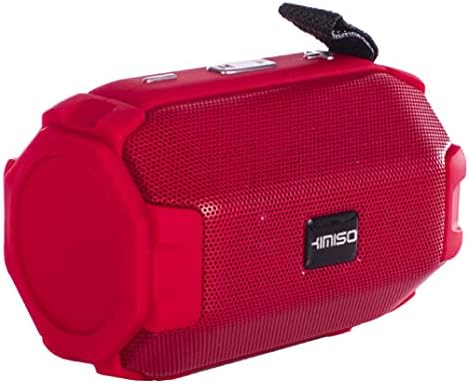
Figure 1: Kimiso-E92 (KMS-206) Portable Bluetooth Speaker (Red)
This image displays the red version of the Kimiso-E92 (KMS-206) portable speaker. It features a cylindrical shape with a mesh grille covering the front speaker, control buttons located on the top panel, and a black carrying strap attached to one end.

Figure 2: Kimiso-E92 (KMS-206) Portable Bluetooth Speaker (Black, Front View)
This image shows a direct front view of the Kimiso-E92 (KMS-206) portable speaker in black. The prominent feature is the speaker grille with the 'KIMISO' brand logo centrally placed. The textured surface of the speaker is also visible.
5. התקנה
5.1. טעינת הרמקול
- חבר את הקצה הקטן של כבל הטעינה USB המצורף לשקע הטעינה ברמקול.
- Connect the larger end of the USB cable to a 5V USB power adapter (not included) or a computer's USB port.
- נורית חיווי הטעינה תידלק, בדרך כלל באדום, במהלך הטעינה.
- Once fully charged (approximately 2 hours), the indicator light may change color or turn off.
- נתק את כבל הטעינה.
5.2. הפעלה/כיבוי
- To power on, press and hold the Power button for a few seconds until you hear an audible prompt or see an indicator light.
- כדי לכבות, לחץ והחזק שוב את לחצן ההפעלה עד שהרמקול יכבה.
6. הוראות הפעלה
6.1. זיווג Bluetooth
- Ensure the speaker is powered on and in Bluetooth mode (it usually defaults to Bluetooth mode upon power-on). An indicator light will typically flash, indicating it's ready for pairing.
- במכשיר הנייד שלך (סמארטפון, טאבלט, מחשב נייד), הפעל את Bluetooth וחפש מכשירים זמינים.
- Select "KMS-206" or a similar name from the list of found devices.
- Once paired, the speaker will emit an audible confirmation, and the indicator light will typically stop flashing and remain solid.
- You can now play audio from your device through the speaker. The effective range for Bluetooth connection is approximately 10 meters.
6.2. השמעת USB
- הכנס כונן הבזק מסוג USB המכיל קובץ שמע MP3 fileליציאת ה-USB ברמקול.
- The speaker should automatically switch to USB mode and begin playing the audio files.
- Use the speaker's control buttons to navigate tracks (next/previous) and adjust volume.
6.3. ניגון מכרטיס SD
- Insert a Secure Digital (SD) card containing MP3 audio files into the SD card slot on the speaker.
- The speaker should automatically switch to SD card mode and begin playing the audio files.
- Use the speaker's control buttons to navigate tracks (next/previous) and adjust volume.
6.4. רדיו FM
- Press the Mode button (if available) to switch to FM radio mode.
- In FM mode, press the Play/Pause button to automatically scan and save available radio stations.
- Use the Next/Previous track buttons to switch between saved stations.
6.5. בקרות
The speaker features intuitive button controls for various functions:
- לחצן הפעלה: לחץ והחזק להפעלה/כיבוי.
- לחצן מצב: Short press to switch between Bluetooth, USB, SD Card, and FM Radio modes.
- לחצן הפעלה/השהה: Short press to play or pause audio. In FM mode, press to auto-scan stations.
- כפתור הנמכת עוצמת הקול / הרצועה הקודמת: לחיצה קצרה לרצועה/תחנה הקודמת. לחיצה ארוכה להנמכת עוצמת הקול.
- כפתור הגברת עוצמת הקול / הבא ברצועה: לחיצה קצרה לרצועה/תחנה הבאה. לחיצה ארוכה להגברת עוצמת הקול.
7. תחזוקה
- שמור על הרמקול נקי על ידי ניגוב שלו עם מטלית רכה ויבשה.
- הימנעו משימוש בחומרי ניקוי נוזליים או ממסים.
- אחסנו את הרמקול במקום קריר ויבש כאשר אינו בשימוש למשך תקופות ממושכות.
- טען את הסוללה באופן קבוע, גם אם אינה בשימוש תכוף, כדי לשמור על תקינותה.
8. פתרון תקלות
| בְּעָיָה | סיבה אפשרית | פִּתָרוֹן |
|---|---|---|
| הרמקול לא נדלק. | הסוללה התרוקנה. | טען את הרמקול למשך 2 שעות לפחות. |
| אין קול מהרמקול. | עוצמת הקול נמוכה מדי; המכשיר לא משויך; מצב שגוי. | Increase volume; re-pair Bluetooth; switch to correct mode (BT, USB, SD). |
| מכשיר הבלוטות' לא מוצא את הרמקול. | הרמקול לא במצב צימוד; המכשיר רחוק מדי. | Ensure speaker is on and in Bluetooth mode; move device closer (within 10m). |
| כרטיס USB/SD לא מתנגן. | לֹא נָכוֹן file פרמט; כרטיס/כונן לא הוכנס כהלכה; פגום files. | לְהַבטִיחַ files are MP3; re-insert card/drive; try another card/drive. |
| קליטת רדיו FM גרועה. | אות חלש. | Move speaker to a different location; re-scan stations. |
9. מפרטים
| דֶגֶם: | KMS-206 |
| גרסת בלוטות': | 5.1 + EDR (A2DP) |
| מרחק חיבור אלחוטי: | עד 10 מטר |
| ערוץ אודיו: | סטריאו 2.0 |
| כוח פלט: | 10W |
| תגובת תדירות: | 20Hz - 20KHz |
| קיבולת סוללה: | 1500 מיליאמפר/שעה |
| קלט כרךtage: | 5V USB |
| זמן פעולה: | 4-6 שעות |
| זמן טעינה: | בערך שעתיים |
| מצבים נתמכים: | USB, TF (SD Card), Bluetooth, FM Radio |
| שיטת בקרה: | לַחְצָן |
| מכשירים תואמים: | מחשב נייד, סמארטפון, טאבלט |
| סוג רמקול: | סאב וופר |
| קוטר סאבוופר: | 5.25 אינץ' |
| מהtagה (שיא): | 20 וואט |
10. אחריות ותמיכה
למידע על אחריות או תמיכה טכנית, אנא עיינו בתיעוד שסופק בנקודת הרכישה או צרו קשר עם הספק שלכם. שמרו את הוכחת הרכישה שלכם לכל תביעת אחריות.