
1. הקדמה
This manual provides comprehensive instructions for the installation, programming, and operation of the Finder 12.A4.8.230.0010 NFC Weekly Time Clock. This electronic astronomical time switch features a weekly program, an analog output, and can be programmed via a joystick or an NFC-enabled smartphone using the Finder Toolbox app.
2. מידע בטיחות
Please read these safety instructions carefully before installation and operation. Failure to follow these instructions may result in electric shock, fire, or damage to the device.
- ההתקנה חייבת להתבצע על ידי חשמלאי מוסמך בהתאם לתקנות החיווט המקומיות.
- ודא שספק הכוח מנותק לפני כל עבודת התקנה או תחזוקה.
- אין לחשוף את המכשיר ללחות, לטמפרטורות קיצוניות או לסביבות קורוזיביות.
- המכשיר מיועד לשימוש פנימי בלבד.
3. המוצר נגמרview
The Finder 12.A4.8.230.0010 is an electronic time switch designed for DIN rail mounting. It offers precise time control with a weekly program and astronomical function.

איור 1: חזית view of the Finder 12.A4.8.230.0010 Time Clock, showing the LCD display, joystick, and NFC symbol.
תכונות עיקריות:
- Weekly program for flexible scheduling.
- 1 analog output: 0-10 V or PWM.
- 1 changeover contact for 16 A / 250 V AC (AC1).
- אספקה כרךtage: 110-230 V AC/DC.
- LCD display for clear information.
- Programming via joystick or NFC-enabled smartphone with Finder Toolbox app (Android and iOS).
- Astronomical time control: automatic switching at sunrise and sunset based on postcode or coordinates.
- Adjustable time offset for sunrise/sunset.
4. התקנה והתקנה
This device is designed for DIN rail mounting. Follow these steps for proper installation:
- ניתוק חשמל: Ensure the main power supply to the installation area is completely disconnected before proceeding.
- הַרכָּבָה: Mount the time switch securely onto a standard DIN rail.
- תִיוּל: Connect the power supply (110-230 V AC/DC) to terminals A1 and A2. Connect the load to the changeover contact terminals (NO, NC, COM) and the analog output (W, O, Y) as required. Refer to the wiring diagram below.
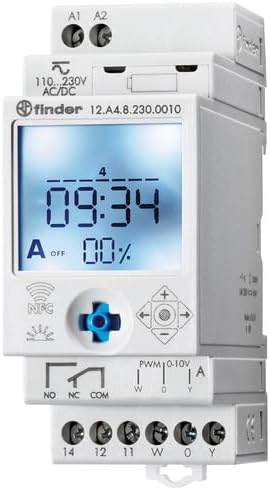
איור 2: מפורט view of the wiring terminals for power input (A1, A2), relay output (NO, NC, COM), and analog output (W, O, Y).
פֶּתֶק: The device features safe separation between the power supply and contacts.
5. הוראות הפעלה
5.1 הפעלה ראשונית
Once wired, restore power. The LCD display will illuminate. You may need to set the current date and time if it's the first use or after a prolonged power outage.
5.2 Programming via Joystick
The integrated joystick allows for direct programming on the device:
- ניווט: Use the joystick to move through menu options (up, down, left, right).
- בחירה/אישור: Press the joystick inwards to select an option or confirm a setting.
- Follow the on-screen prompts to set the current time, date, weekly program, and astronomical functions.
5.3 Programming via NFC (Finder Toolbox App)
For maximum flexibility, program the time switch using an NFC-enabled smartphone and the Finder Toolbox app:
- הורד אפליקציה: Download the "Finder Toolbox" app from the Google Play Store (Android) or Apple App Store (iOS).
- Create/Load Program: Open the app and create a new program or load an existing one. The app allows for detailed configuration of weekly schedules, astronomical settings, and special functions.
- העברת נתונים: To transfer the program, hold your smartphone close to the NFC symbol on the time switch. The app will guide you through the data transfer process.
- Read Program: You can also read an existing program from the time switch to your smartphone for editing or backup.
5.4 Astronomical Time Control
The device can automatically switch based on sunrise and sunset times:
- הגדרת מיקום: Set your location by entering a postcode or geographical coordinates in the programming menu (via joystick or app).
- לְקַזֵז: You can set a selectable time offset for both sunrise and sunset times to adjust switching points.
- Astro ON/OFF: Configure specific ON/OFF times during the astronomical ON period if needed.
6. תחזוקה
The Finder 12.A4.8.230.0010 is designed for maintenance-free operation. However, periodic checks are recommended:
- ניקוי: נקו את המכשיר בעזרת מטלית יבשה ורכה. אין להשתמש בחומרי ניקוי שוחקים או ממסים.
- חיבורים: בדקו מעת לעת את חיבורי הטרמינלים כדי לוודא שהם מאובטחים.
- עדכוני קושחה: בדוק את המחפש webבאתר או באפליקציה עבור עדכוני קושחה זמינים לשיפור הפונקציונליות או תיקוני באגים.
7. פתרון תקלות
| בְּעָיָה | סיבה אפשרית | פִּתָרוֹן |
|---|---|---|
| המכשיר לא מופעל. | אין אספקת חשמל או חיווט שגוי. | Check power connections (A1, A2) and ensure power is supplied. Verify wiring against the diagram. |
| Program not executing. | Incorrect program settings or manual override active. | Review program settings via joystick or app. Check for any active manual override functions. Ensure current date/time is correct. |
| NFC transfer fails. | Smartphone not NFC-enabled, app not open, or poor contact. | Ensure your smartphone has NFC enabled. Open the Finder Toolbox app. Hold the phone directly over the NFC symbol on the device. |
| Astronomical function inaccurate. | Incorrect location (postcode/coordinates) or time zone setting. | Verify the entered postcode or coordinates. Check the time zone setting. |
If the problem persists, please contact Finder technical support.
8. מפרט טכני
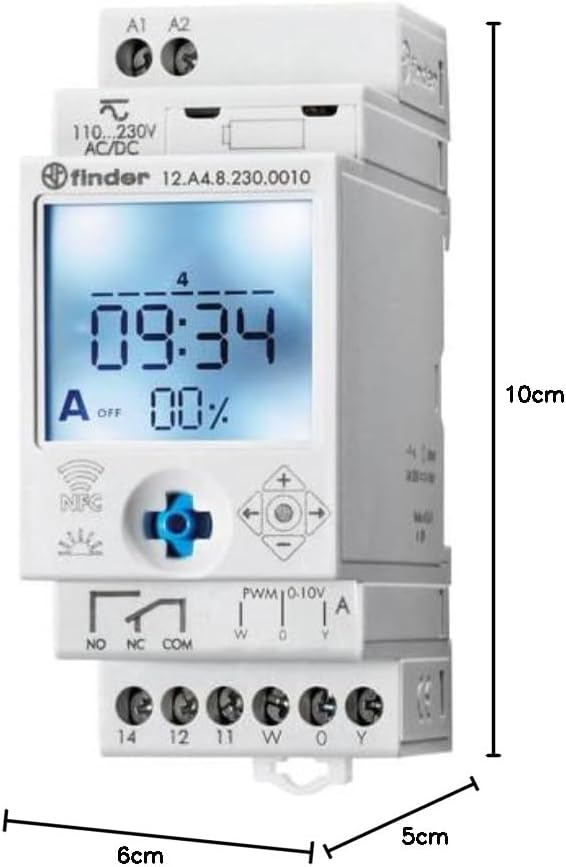
Figure 3: Dimensions of the Finder 12.A4.8.230.0010 Time Clock, showing approximate measurements of 10cm height, 6cm width, and 5cm depth.
| תכונה | פְּרָט |
|---|---|
| מותג | מוֹצֵא |
| מספר דגם | 12.A4.8.230.0010 |
| מידות (H x W x D) | 10 x 6 x 5 ס"מ |
| מִשׁקָל | 70 גרם |
| אספקה כרךtage | 110-230 וולט AC/DC |
| קשר פלט | 1 changeover contact, 16 A / 250 V AC (AC1) |
| פלט אנלוגי | 0-10 V or PWM |
| צור קשר עם חומר | AgSnO2 |
| מקסימום Inrush Current | 120 A עבור 5 אלפיות השנייה |
| Min. Switching Time | דקה אחת |
| Max. Switching Power (230 V AC1) | 4000 VA |
| קלט ממשק אנושי | Buttons (Joystick) |
| סוללות נדרשות | לֹא |
| תוֹאֵם | Power supplies/ballasts with 0-10 V or PWM inputs, or Slave dimmers Type 15.11 |
9. אחריות ותמיכה
For warranty information and technical support, please refer to the official Finder webאתר או צרו קשר עם המפיץ המקומי שלכם. שמרו את קבלת הרכישה כהוכחת קנייה.
יַצרָן: מוֹצֵא
Product on Amazon.es since: 24 במאי 2021