
מָבוֹא
Thank you for choosing the Cecotec BigDry 9000 Professional Dehumidifier. This manual provides essential information for the safe and efficient operation, maintenance, and troubleshooting of your new appliance. Please read this manual thoroughly before use and keep it for future reference.
This dehumidifier is designed to significantly reduce humidity levels in your environment, contributing to improved comfort and preventing issues caused by excessive moisture, such as mold growth or damage to furniture. With its advanced features, including Wi-Fi control and a large capacity tank, it offers a convenient and effective solution for humidity management.
הוראות בטיחות
יש להקפיד תמיד על אמצעי זהירות בסיסיים בעת שימוש במכשירי חשמל כדי להפחית את הסיכון לשריפה, התחשמלות ופציעות.
- ודא שהמכשיר ממוקם על משטח יציב וישר.
- אין להפעיל את מסיר הלחות ליד מים או בסביבות רטובות במיוחד.
- הרחק את המכשיר ממקורות חום ומאור שמש ישיר.
- אין לחסום את כניסות או יציאות האוויר. יש לוודא מרווח מספיק מסביב ליחידה לזרימת אוויר תקינה.
- נתקו את מסיר הלחות משקע החשמל לפני ניקוי, תחזוקה או כאשר אינו בשימוש.
- Do not use if the power cord or plug is damaged. Contact qualified service personnel for repair.
- מכשיר זה מיועד לשימוש פנימי בלבד.
- אין לאפשר לילדים לשחק עם מסיר הלחות.
- חָשׁוּב: After transport, allow the unit to stand upright for at least 24 hours before plugging it in. This allows the refrigerant to settle.
המוצר נגמרview
רכיבים
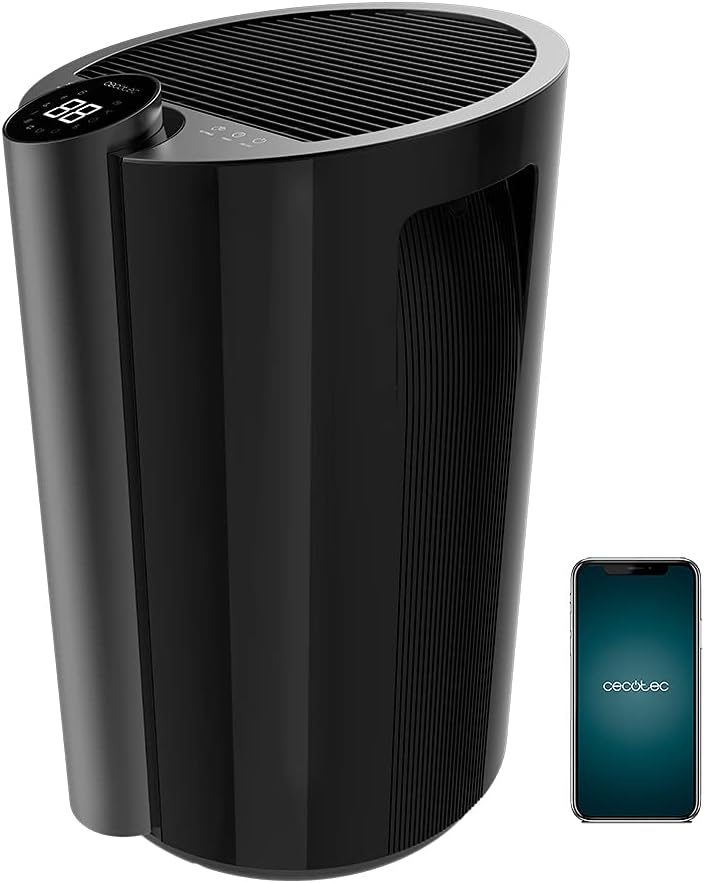
- לוח בקרה עם תצוגת LED
- סורג כניסת אוויר
- סורג לשקע אוויר
- Water Tank (4.5 Liters)
- Wheels for portability
- ידית משולבת
- כבל חשמל
- מסנן אוויר
תכונות מפתח
- קיבולת ייבוש לחות גבוהה: Up to 20 liters per day.
- מיכל מים גדול: 4.5-liter removable tank minimizes emptying frequency.
- בקרת Wi-Fi: Manage settings remotely via your smartphone.
- כיסוי רחב: Effective for areas up to 90 m² (250 m³/h).
- Full Tank Warning: Prevents overflows and conserves energy.
- לחות מתכווננת: Set desired ambient humidity between 40% and 80%.
- תצוגת לד: Shows current ambient humidity, temperature, and selected settings.
- בקרות מגע: ממשק אינטואיטיבי וקל לשימוש.
- טיימר ניתן לתכנות: Up to 12 hours with automatic shut-off.
- שתי מהירויות: Low and High dehumidification speeds.
- פעולה שקטה: Designed for minimal noise disruption.
- מסנן אוויר: Improves air quality by preventing large particle entry.
- הִטַלטְלוּת: מצויד בגלגלים וידית להזזה קלה.
הגדרה
- פריקת אריזה: הוצא בזהירות את מסיר הלחות מאריזתו. שמור את חומרי האריזה לאחסון או הובלה עתידיים.
- מיקום: Place the dehumidifier on a firm, level surface in the desired room. Ensure there is at least 20 cm (8 inches) of space around all sides of the unit for proper air circulation. Avoid placing it against walls or furniture that could obstruct airflow.
- המתנה ראשונית: After transport, it is crucial to let the dehumidifier stand upright for a minimum of 24 hours before plugging it into a power outlet. This allows the refrigerant fluid to stabilize, preventing potential damage to the compressor.
- חיבור חשמל: חבר את כבל החשמל לשקע חשמלי מוארק. ודא שעוצמת הקולtage תואם למפרט של היחידה.
- התקנת מיכל מים: Ensure the water tank is correctly inserted into its compartment. The unit will not operate if the tank is not properly seated or is full.
- הגדרת Wi-Fi (אופציונלי):
- Download the official Cecotec app on your smartphone.
- צור חשבון או היכנס.
- Follow the in-app instructions to add your BigDry 9000 dehumidifier. This typically involves pressing the Wi-Fi button on the unit for 5 seconds to enter pairing mode. Note that the device requires a 2.4 GHz Wi-Fi network.

הוראות הפעלה
לוח הבקרה מעלview

- לחצן הפעלה/כיבוי: לחץ כדי להפעיל או לכבות את היחידה.
- לחצן MODE: Cycle through different operating modes (e.g., continuous dehumidification, auto mode).
- לחצן מהירות מאוורר: כוונן את מהירות המאוורר בין נמוך לגבוהה.
- SETTINGS Button: Used to set the desired humidity level. Press repeatedly to cycle through humidity percentages (40% - 80%).
- לחצן טיימר: Set the automatic shut-off timer (up to 12 hours).
- תצוגת לד: Shows current ambient humidity, temperature, and selected settings.
פעולה בסיסית
- הפעלה: Press the ON/OFF button to start the dehumidifier. The LED display will show the current ambient humidity.
- הגדר את הלחות הרצויה: Press the SETTINGS button to select your target humidity level. The unit will operate until the desired humidity is reached, then cycle on and off to maintain it.
- התאם את מהירות המאוורר: Press the FAN SPEED button to switch between low and high fan speeds. Lower speed provides quieter operation, while higher speed offers faster dehumidification.
- הגדר טיימר: Press the TIMER button to set the desired operating duration (e.g., 1 hour, 2 hours, up to 12 hours). The unit will automatically turn off after the set time.
- בקרת Wi-Fi: If connected to Wi-Fi, use the Cecotec app on your smartphone to control all functions remotely.
תַחזוּקָה
תחזוקה שוטפת מבטיחה ביצועים אופטימליים ומאריכה את תוחלת החיים של מסיר הלחות שלכם.
ריקון מיכל המים

- When the water tank is full, the unit will automatically stop operating and an indicator light (or message on the LED display) will alert you.
- משכו בזהירות את מיכל המים מחזית היחידה.
- רוקנו את המים שנאספו.
- החלק את המיכל הריק בחזרה למקומו עד שיישמע נקישה בטוחה. היחידה תחזור לפעול.
ניקוי מסנן האוויר
- It is recommended to clean the air filter every two weeks or more frequently depending on usage and air quality.
- כבו את מסיר הלחות ונתק אותו משקע החשמל.
- Locate and remove the air filter (refer to your specific model's diagram for exact location, usually at the back or side).
- Clean the filter using a vacuum cleaner to remove dust and debris. For heavier dirt, wash it gently with lukewarm water and a mild detergent.
- יש לאפשר למסנן להתייבש לחלוטין באוויר לפני הכנסתו מחדש ליחידה. אין להשתמש במייבש או בחום ישיר.
- הכנס מחדש את המסנן היבש וחבר את היחידה בחזרה לחשמל.
ניקיון כללי
- נגב את החלק החיצוני של מסיר הלחות בחומר רך, דamp בַּד. אין להשתמש בחומרי ניקוי שוחקים או ממסים.
- ודא שאין מים שנכנסים לרכיבים החשמליים.
פתרון בעיות
לפני פנייה לתמיכת הלקוחות, אנא עיין במדריך לפתרון בעיות הבא עבור בעיות נפוצות.
| בְּעָיָה | סיבה אפשרית | פִּתָרוֹן |
|---|---|---|
| מסיר הלחות לא נדלק. | אין חשמל; מיכל המים מלא או מוכנס בצורה שגויה. | בדקו את חיבור החשמל; רוקנו והכניסו מחדש את מיכל המים בצורה נכונה. |
| אין איסוף מים או ייבוש לחות נמוך. | Ambient humidity too low; Air filter clogged; Room temperature too low; Unit size too small for room. | Increase target humidity setting; Clean air filter; Ensure room temperature is above 5°C (41°F); Consider a larger unit for the space. |
| היחידה רועשת. | היחידה אינה על משטח ישר; מסנן אוויר סתום; חסימה במאוורר. | הנח על משטח ישר; נקה את מסנן האוויר; בדוק אם יש חסימות והסר אותן. |
| בעיות חיבור Wi-Fi. | Incorrect Wi-Fi password; Router too far; Only supports 2.4 GHz network. | Verify password; Move unit closer to router; Ensure your Wi-Fi is 2.4 GHz. |
מפרטים
| תכונה | מִפרָט |
|---|---|
| מותג | Cecotec |
| מספר דגם | 05655 |
| צֶבַע | Black - Bigdry 9000 Professional Black Connected |
| יכולת לחות | 20 ליטר/יום |
| קיבולת מיכל מים | 4.5 ליטר |
| כּוֹחַ | 320 וואט |
| אזור כיסוי | Up to 90 m² (250 m³/h) |
| שָׁעוֹן עֶצֶר | עד 12 שעות (כיבוי אוטומטי) |
| מספר מהירויות | 2 (נמוך, גבוה) |
| מידות (L x W x H) | 38.1 x 60.5 x 38.3 ס"מ |
| משקל פריט | 14 קילוגרם |
| תכונות מיוחדות | Wi-Fi Control, Timer, High Dehumidification Capacity |
אחריות ותמיכה
Cecotec products are manufactured to the highest quality standards. For warranty information and customer support, please refer to the official Cecotec webאתר או צרו קשר ישירות עם שירות הלקוחות שלהם.
- זמינות חלקי חילוף: 10 שנים (בהתאם למפרט המוצר).
- For technical assistance, troubleshooting beyond this manual, or warranty claims, please visit www.cecotec.com או פנה למשווק המורשה המקומי שלך.