
1. המוצר נגמרview
Discover the ForceClima 12300 Connected Heating portable air conditioner, designed to adapt to your needs at any time with its portable design and five operating modes. It ventilates, cools, heats, and dehumidifies any room in your home, or allows for peaceful rest with its night mode. Featuring Wi-Fi control, a remote control, a touch panel, and an LED screen, it ensures you can enjoy the optimal environment with maximum comfort.

תמונה 1.1: חזית view of the Cecotec ForceClima 12300 portable air conditioner.

Image 1.2: Another perspective of the Cecotec ForceClima 12300 portable air conditioner.
2. אזהרות בטיחות
Please read all safety warnings and instructions carefully before using the appliance to prevent personal injury or damage to the product. Keep this manual for future reference.
- פריקת אריזה: Remove the product from its box and remove all packaging materials. Ensure all components are present and undamaged.
- מיקום: Place the unit on a stable, flat surface. Ensure adequate clearance around the unit for proper airflow.
- ספק כוח: חברו את המכשיר אך ורק לשקע חשמל מוארק עם עוצמת קול מתאימה.tage כפי שמצוין על תווית המוצר.
- ילדים וחיות מחמד: הרחק ילדים וחיות מחמד מהמכשיר במהלך פעולתו.
- תַחזוּקָה: אל תנסו לתקן או לשנות את המכשיר בעצמכם. פנו לאנשי שירות מוסמכים לצורך תיקונים.
- מַיִם: Do not immerse the appliance in water or other liquids. Avoid spilling liquids on the unit.
- אוורור: Ensure the exhaust hose is properly installed and vented outdoors to prevent heat buildup.
3. תכונות מוצר
- High Cooling/Heating Capacity: Portable air conditioner with a powerful 12000 BTU capacity, suitable for quickly and efficiently reaching desired temperatures in areas up to approximately 25 m². Features a heat pump for effective heating during winter.
- קישוריות Wi-Fi: Configure the appliance remotely via Wi-Fi connection, allowing full control from your smartphone from anywhere.
- מהירויות מרובות: Three fan speeds (Low, Medium, High) to adapt operation according to immediate needs.
- שְׁלַט רָחוֹק: Includes a remote control for convenient operation from any location without needing to approach the unit.
- Intuitive Display and Control: LED screen displays all possible configurations and highlights current settings for easy control. The top touch control panel provides practical and simple operation.
- חמישה מצבי הפעלה: Offers Fan mode, Cooling mode, Heating mode, Dehumidification mode, and Night mode.
- קיבולת ייבוש לחות גבוהה: Dehumidification mode can capture up to 26 liters per day, contributing to a healthier environment in your home.

12000 BTU Capacity

חימום קירור

בקרת Wi-Fi

שליטה מרחוק ומגע

תצוגת LED

מצבי הפעלה של 5

3 מהירויות מאוורר

הסרת לחות
4. התקנה והתקנה
Proper setup is crucial for the optimal performance of your portable air conditioner. Follow these steps for installation:
- לִפְרוֹק: Carefully remove the air conditioner and all accessories from the packaging. Ensure you have the unit, exhaust hose, window kit, and remote control.
- מיקום: Place the unit on a firm, level surface near a window and a grounded electrical outlet. Ensure there is at least 20 cm (8 inches) of space around the unit for proper air circulation.
- התקנת ערכת חלונות:
- הרכיבו את ערכת לוחית האיטום של החלון בהתאם לסוג החלון שלכם (חלון הזזה או חלון קסמנט).
- אבטחו את ערכת החלון בחלון הפתוח, תוך הקפדה על אטימה הדוקה למניעת דליפת אוויר.
- חבר צינור פליטה:
- חבר קצה אחד של צינור הפליטה לפתח יציאת האוויר בגב המכשיר.
- Connect the other end of the exhaust hose to the adapter in the window kit. Extend the hose as little as possible and avoid sharp bends to maximize efficiency.
- Drainage (Dehumidification/Cooling): For continuous drainage during dehumidification or cooling in high humidity, connect a drain hose (not included) to the continuous drain port and lead it to a floor drain or suitable container. Otherwise, the internal water tank will collect condensate and require manual emptying.
- חיבור חשמל: חבר את כבל החשמל לשקע חשמלי מוארק של 230 וולט.

Image 4.1: Proper placement of the unit with the exhaust hose connected to a window.
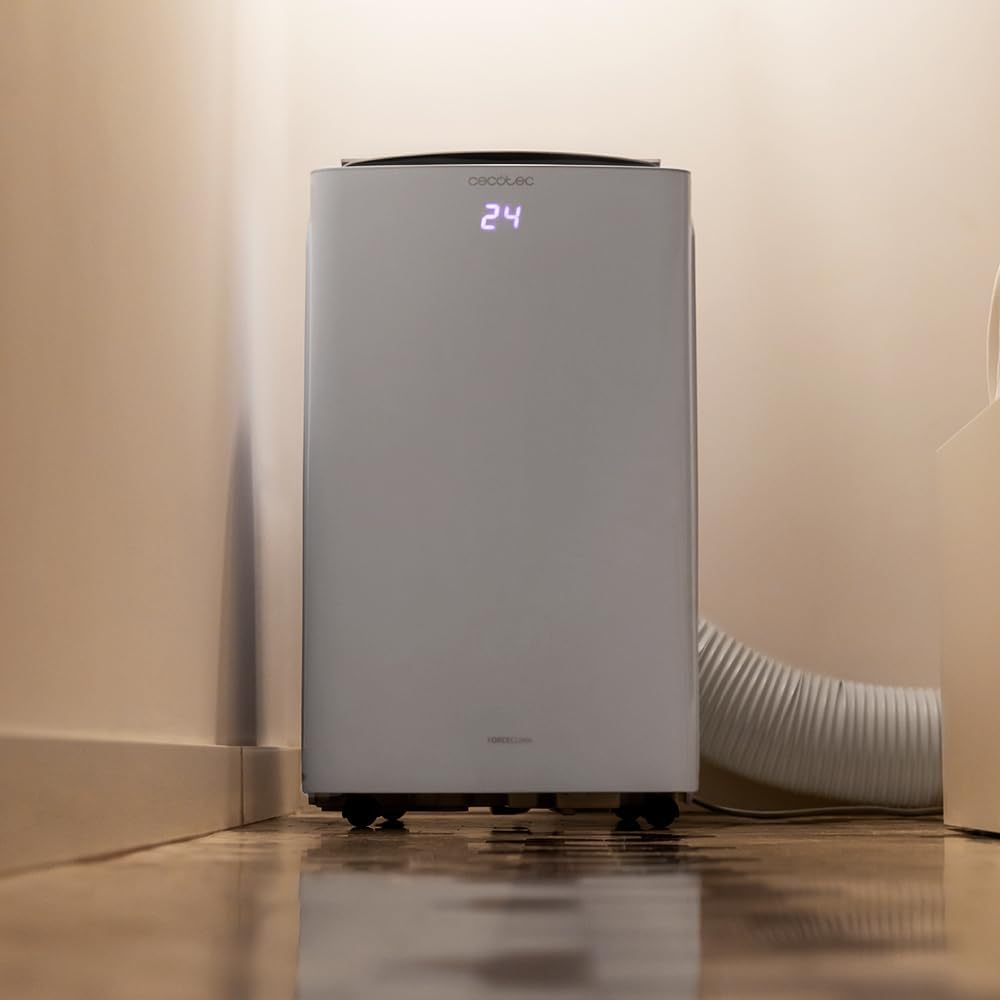
Image 4.2: Close-up of the exhaust hose connection at the base of the unit.
5. הוראות הפעלה
Your ForceClima 12300 offers various ways to control its functions:
5.1. תפעול לוח הבקרה
The touch control panel on top of the unit allows direct access to all functions.

Image 5.1: User interacting with the top control panel of the air conditioner.
- לחצן הפעלה: לחץ כדי להפעיל או לכבות את היחידה.
- לחצן מצב: Cycle through the 5 operating modes: Cooling, Heating, Fan, Dehumidification, and Night.
- לחצן מהירות מאוורר: בחר את מהירות המאוורר הרצויה: נמוכה, בינונית או גבוהה.
- התאמת טמפרטורה: השתמשו בחצים למעלה/למטה כדי להגדיר את הטמפרטורה הרצויה.
- כפתור טיימר: הגדר טיימר לפעולת הפעלה/כיבוי אוטומטית.
5.2. פעולת שלט רחוק
השלט הרחוק המצורף מספק הפעלה נוחה מרחוק.

Image 5.2: Remote control for the Cecotec ForceClima 12300.
- All functions available on the control panel can be accessed via the remote control.
- Ensure the remote control is pointed towards the receiver on the unit.
- Install batteries (not included) as per the markings inside the battery compartment.
5.3. Wi-Fi and App Control
Control your air conditioner from anywhere using the dedicated smartphone application.

Image 5.3: Smartphone displaying the Cecotec control application.
- Download the official Cecotec app from your smartphone's app store.
- Follow the in-app instructions to pair your ForceClima 12300 unit with your Wi-Fi network.
- Once connected, you can remotely adjust modes, temperature, fan speed, and set schedules.

Image 5.4: The air conditioner seamlessly integrated into a home environment.
6. תחזוקה
תחזוקה שוטפת מבטיחה את אורך חייו ותפקודו היעיל של המזגן שלכם.
- ניקוי מסנן האוויר:
- כבה ונתק את היחידה לפני הניקוי.
- Remove the air filter (location typically on the back or side, refer to diagrams in the full manual if available).
- Clean the filter with a vacuum cleaner or wash it gently with lukewarm water and mild detergent. Rinse thoroughly and allow it to air dry completely before reinserting.
- Clean the air filter every two weeks or more frequently if the unit is used often or in dusty environments.
- ניקוז מים:
- When the internal water tank is full, the unit will stop operating and an indicator light will illuminate.
- הניחו סיר או מגש רדוד מתחת לפתח הניקוז בחלק התחתון האחורי של היחידה.
- Remove the drain plug to allow water to flow out. Replace the plug once the tank is empty.
- ניקוי החלק החיצוני של היחידה: נגב את החלק החיצוני עם רך, דamp מטלית. אין להשתמש בכימיקלים חזקים, חומרים שוחקים או ממסים.
- אִחסוּן: If storing the unit for an extended period, ensure the water tank is completely drained and the unit is clean and dry. Store it in a cool, dry place, preferably in its original packaging.
7. פתרון תקלות
לפני פנייה לתמיכת הלקוחות, אנא עיינו בבעיות הנפוצות ובפתרונות הבאות:
| בְּעָיָה | סיבה אפשרית | פִּתָרוֹן |
|---|---|---|
| היחידה לא נדלקת. | אין חשמל, כבל החשמל מנותק, מפסק החשמל מופעל. | בדוק את חיבור החשמל, אפס את מפסק החשמל. |
| היחידה פועלת אך לא מקררת/מחממת. | Air filter dirty, exhaust hose blocked/disconnected, room too large, doors/windows open. | Clean air filter, check hose connection, close doors/windows, ensure unit is sized for the room. |
| דליפת מים. | Drain plug loose, continuous drain hose blocked or improperly connected, water tank full. | Ensure drain plug is secure, check drain hose, empty water tank. |
| היחידה רועשת. | היחידה אינה על משטח ישר, חסימה במאוורר. | Place on a level surface, check for obstructions in fan area. |
| השלט רחוק לא עובד. | סוללות מתות או לא הוכנסו בצורה שגויה, חסימה בין השלט ליחידה. | Replace batteries, ensure clear line of sight to unit's receiver. |
8. מפרטים
Detailed technical specifications for the Cecotec ForceClima 12300 Connected Heating Portable Air Conditioner:
| מִפרָט | עֵרֶך |
|---|---|
| מותג | Cecotec |
| מספר דגם | 05959 |
| מידות המוצר (L x W x H) | 47.5 x 40.5 x 88 ס"מ |
| מִשׁקָל | 27 קילוגרם |
| דירוג יעילות אנרגטית | A |
| צריכת אנרגיה שנתית | 1.1 קילוואט-שעה |
| קיבולת קירור | 12000 BTU |
| כּוֹחַ | 1350 וואט |
| כרך ידtage | 230 וולט |
| רמת רעש | 65 dB |
| יכולת לחות | עד 26 ליטר/יום |
| אזור כיסוי | כ. 25 מ"ר |
| סוג התקנה | חַלוֹן |
| סוּג | נייד |
| תכונות מיוחדות | Dehumidifier, Heating, Wi-Fi Control, Remote Control, LED Display |
| צֶבַע | לָבָן |
| חוֹמֶר | פּלָסטִי |
| רכיבים כלולים | 1 x Air conditioner; 1 x Window kit; 1 x Remote control; 1 x User manual |

Image 8.1: EU Energy Label for the ForceClima 12300, showing A-rated energy efficiency.
9. אחריות ותמיכה
For warranty information, technical support, or spare parts availability, please refer to the warranty card included with your product or contact Cecotec customer service directly. Information regarding spare parts availability was not provided at the time of this manual's creation.
You can typically find contact details for Cecotec customer support on their official webבאתר או בתוך אריזת המוצר.