
מָבוֹא
תודה על הרכישהasing the LEDWOOD ACCESS100 Portable Bluetooth Speaker. This manual provides detailed instructions for setting up, operating, and maintaining your speaker to ensure optimal performance and longevity. Please read this manual thoroughly before using the product.

Image: The LEDWOOD ACCESS100 portable Bluetooth speaker, showcasing its cylindrical design and integrated carrying strap.
תוכן החבילה
ודא שכל הפריטים המפורטים להלן נמצאים בחבילה שלך:
- 1 x LEDWOOD ACCESS100 Bluetooth Speaker
- 1 x Charging Cable (USB-A to Micro-USB)
- 1 x Audio Cable (3.5mm AUX)
- 1 x מדריך למשתמש
- 1 x רצועת נשיאה

Image: The LEDWOOD ACCESS100 speaker shown within its retail packaging box.
המוצר נגמרview
בקרות ויציאות
הכירו את בקרות הרמקול ופתחי החיבור:

תמונה: מפורט view of the speaker's control panel, showing buttons and input ports.
- חריץ כרטיס MicroSD: Insert a MicroSD card for direct music playback.
- יציאת USB: Insert a USB flash drive for direct music playback.
- יציאת טעינה DC 5V: חבר את כבל הטעינה כאן.
- כניסת AUX: חברו התקני שמע חיצוניים באמצעות כבל שמע 3.5 מ"מ.
- Previous Track / Volume Down (V-): לחיצה קצרה לרצועה הקודמת, לחיצה ארוכה להנמכת עוצמת הקול.
- Next Track / Volume Up (V+): לחיצה קצרה לרצועה הבאה, לחיצה ארוכה להגברת עוצמת הקול.
- לחצן הפעלה: Long press to power on/off. Short press to play/pause in Bluetooth/USB/MicroSD mode.
- כפתור מצב (M): Short press to switch between Bluetooth, AUX, USB, MicroSD, and FM Radio modes.
- Play/Pause / TWS Button: Short press to play/pause. Long press to activate TWS pairing (in Bluetooth mode).
הגדרה
טעינת הרמקול
לפני השימוש הראשון, טען את הרמקול במלואו.
- חבר את כבל הטעינה USB המצורף ליציאת DC 5V ברמקול.
- חבר את הקצה השני של כבל ה-USB לספק כוח USB (לא כלול) או ליציאת ה-USB של המחשב.
- נורית חיווי הטעינה תידלק במהלך הטעינה ותכבה כאשר המכשיר טעון במלואה.
הפעלה/כיבוי
- כדי להפעיל, לחצו לחיצה ארוכה על כפתור הפעלה עד שתשמע הנחיה קולית.
- כדי לכבות, לחצו לחיצה ארוכה על כפתור הפעלה שוב עד שהרמקול יכבה.
הוראות הפעלה
מצב Bluetooth
The speaker enters Bluetooth pairing mode automatically when powered on, or when selected via the Mode button.
- Ensure the speaker is powered on and in Bluetooth mode (indicated by an audible prompt).
- הפעל את Bluetooth בטלפון החכם, בטאבלט או במכשיר תואם אחר שלך.
- חפש "LEDWOOD ACCESS100" in your device's Bluetooth settings and select it to pair.
- לאחר הצימוד, תשמעו צליל אישור. כעת תוכלו להשמיע אודיו מהמכשיר שלכם דרך הרמקול.
- בקרות:
- לחיצה קצרה כפתור הפעלה לשחק / להשהות.
- לחיצה קצרה V- עבור הרצועה הקודמת.
- לחיצה קצרה V+ for Next Track.
- לחיצה ארוכה V- to Decrease Volume.
- לחיצה ארוכה V+ to Increase Volume.

Image: An icon representing wireless connectivity, indicating Bluetooth functionality.
פונקציית סטריאו אלחוטית אמיתית (TWS)
The TWS function allows you to pair two LEDWOOD ACCESS100 speakers together for a stereo sound experience.
- Ensure both ACCESS100 speakers are powered on and in Bluetooth mode, but not yet connected to any device.
- באחד הרמקולים (זה יהיה הרמקול הראשי), לחצו לחיצה ארוכה על הלחצן Play/Pause / TWS Button. You will hear an indication sound.
- The two speakers will automatically search and pair with each other. Once successfully paired, you will hear a confirmation sound.
- Now, connect your smartphone or tablet to the primary speaker via Bluetooth as described in the "Bluetooth Mode" section.
- כעת האודיו יתנגן בסטריאו דרך שני הרמקולים.

Image: An icon representing True Wireless Stereo (TWS) functionality, showing two interconnected loops.
מצב AUX
Use the AUX mode to connect devices without Bluetooth capability.
- Connect one end of the 3.5mm audio cable to the AUX input port on the speaker.
- חבר את הקצה השני לשקע פלט השמע של המכשיר החיצוני שלך (למשל, נגן MP3, מחשב).
- הקש על כפתור מצב (M). repeatedly until you hear the "AUX mode" prompt.
- שלוט בהשמעה ובעוצמת הקול ישירות מהמכשיר המחובר שלך.
USB / MicroSD Card Mode
Play music directly from a USB flash drive or MicroSD card.
- Insert a USB flash drive into the USB port or a MicroSD card into the MicroSD card slot.
- The speaker will automatically switch to the corresponding mode and begin playing music. If not, press the כפתור מצב (M). to select USB or MicroSD mode.
- בקרות:
- לחיצה קצרה כפתור הפעלה לשחק / להשהות.
- לחיצה קצרה V- עבור הרצועה הקודמת.
- לחיצה קצרה V+ for Next Track.
- לחיצה ארוכה V- to Decrease Volume.
- לחיצה ארוכה V+ to Increase Volume.
מצב רדיו FM
האזינו לתחנות הרדיו FM האהובות עליכם.
- הקש על כפתור מצב (M). repeatedly until you hear the "FM Radio" prompt.
- To automatically scan and save available stations, long press the Play/Pause / TWS Button. The speaker will scan and store stations.
- To switch between saved stations, short press the V- or V+ כפתורים.
- לחיצה ארוכה V- to Decrease Volume.
- לחיצה ארוכה V+ to Increase Volume.
תַחזוּקָה
- ניקוי: השתמשו במטלית רכה ויבשה לניקוי משטח הרמקול. אין להשתמש בחומרי ניקוי שוחקים או ממסים.
- אִחסוּן: יש לאחסן את הרמקול במקום קריר ויבש, הרחק מאור שמש ישיר וטמפרטורות קיצוניות.
- טיפול בסוללה: כדי להאריך את חיי הסוללה, הימנעו מפריקה מלאה של הרמקול לעתים קרובות. טען אותו באופן קבוע, גם אם אינו בשימוש למשך פרקי זמן ממושכים.
- עמידות במים: הדובר הזה הוא לֹא עמיד למים. יש להימנע מחשיפה למים או ללחות מוגזמת.
פתרון בעיות
| בְּעָיָה | סיבה אפשרית | פִּתָרוֹן |
|---|---|---|
| הרמקול לא נדלק. | סוללה חלשה. | טען את הרמקול במלואו. |
| אין קול מהרמקול. | עוצמת קול נמוכה מדי; מצב שגוי; המכשיר לא מחובר. | Increase volume on speaker and connected device. Ensure correct mode (Bluetooth, AUX, USB, MicroSD, FM). Re-pair Bluetooth device or check cable connection. |
| התאמת Bluetooth נכשלה. | הרמקול לא במצב צימוד; המכשיר רחוק מדי; הפרעות. | Ensure speaker is in Bluetooth pairing mode. Move device closer to speaker (within 10 meters). Turn off other Bluetooth devices. |
| צימוד TWS נכשל. | הרמקולים אינם במצב צימוד TWS; רחוקים מדי זה מזה. | Ensure both speakers are in Bluetooth mode and not connected to any device. Long press the TWS button on one speaker. Keep speakers close during pairing. |
| בעיות נגינה ב-USB/MicroSD. | לא נתמך file format; corrupted media; incorrect mode. | ודא אודיו files are in a supported format (e.g., MP3). Try a different USB drive or MicroSD card. Press Mode button to select correct input. |
| קליטת רדיו FM גרועה. | אות חלש; הפרעות סביבתיות. | Move the speaker to a different location. Re-scan for stations. |
מפרטים
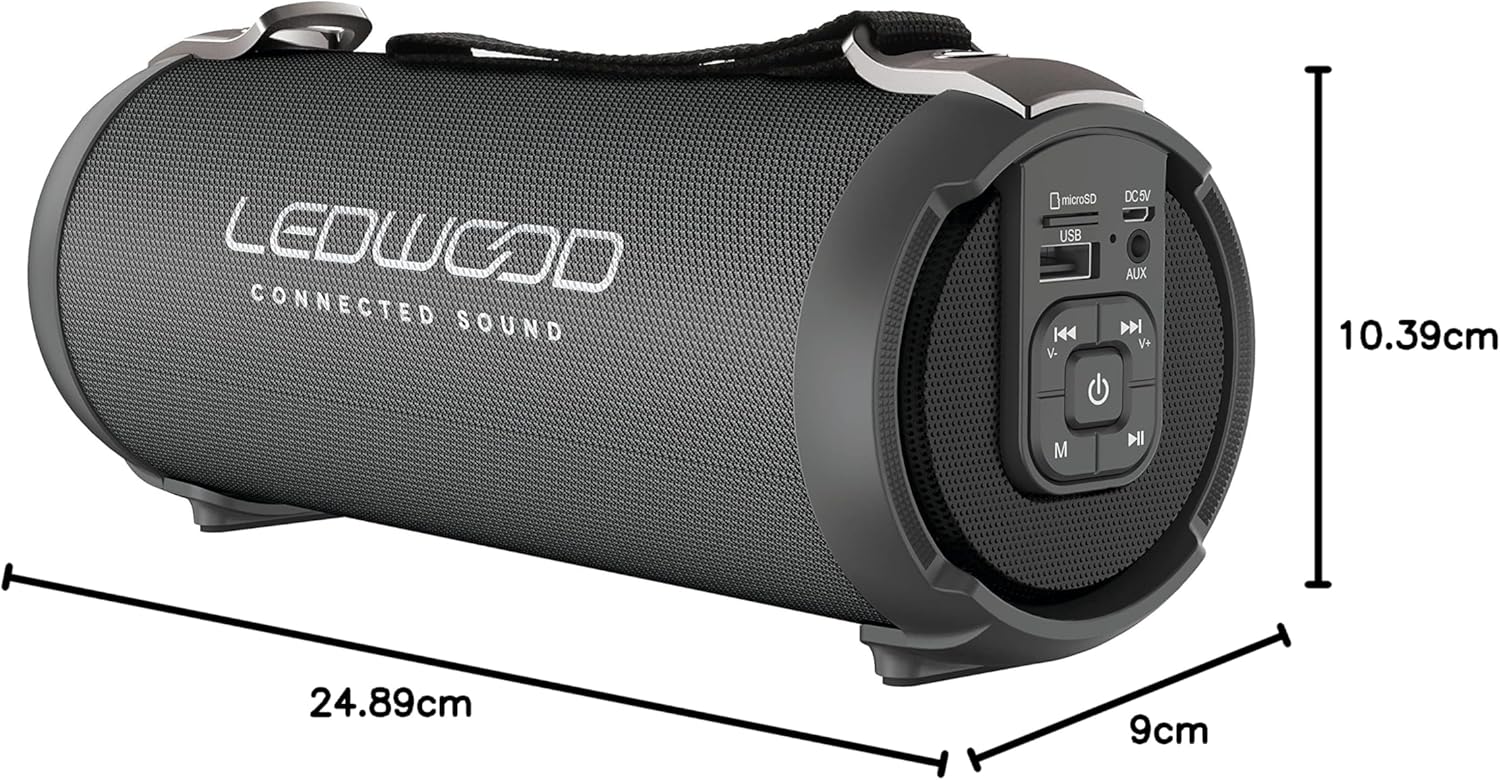
Image: The LEDWOOD ACCESS100 speaker with its length, width, and height dimensions indicated.
| תכונה | פְּרָט |
|---|---|
| שם הדגם | גישה 100 |
| מותג | לדווד |
| טכנולוגיית קישוריות | בלוטות' |
| טווח אלחוטי | עד 10 מטר (33 רגל) |
| מצב פלט שמע | סטריאו (2.0 ערוץ) |
| Speaker Output Power (RMS) | 8.5 וואט |
| שיא הספק | 100 וואט |
| תכונות מיוחדות | USB Port, MicroSD Card Slot, AUX Input, FM Radio, TWS Function |
| מקור כוח | Battery Powered (rechargeable via USB cable) |
| מידות המוצר (L x W x H) | 24.9 ס"מ x 9 ס"מ x 10.4 ס"מ (9.8 x 3.5 x 4.1 אינץ') |
| מִשׁקָל | 820 גרם (1.8 פאונד) |
| צֶבַע | שָׁחוֹר |
| אֲטִימוּת | לֹא |
| מכשירים תואמים | טלפונים חכמים, טבליות |
מידע בטיחות
- אין לחשוף את הרמקול לטמפרטורות קיצוניות, לאור שמש ישיר או לחות גבוהה.
- אין לפרק, לתקן או לשנות את הרמקול בעצמך. פעולה זו תגרום לביטול האחריות.
- הרחק את הרמקול מילדים וחיות מחמד.
- השתמש רק בכבל הטעינה המצורף או בכבל שווה ערך מאושר.
- הימנע מהאזנה בעוצמת קול גבוהה לתקופות ממושכות כדי למנוע נזקי שמיעה.
- יש להשליך את המוצר ואת הסוללה שלו בצורה אחראית בהתאם לתקנות המקומיות.
אחריות ותמיכה
This product comes with a standard manufacturer's warranty. For detailed warranty terms and conditions, please refer to the warranty card included in your package or contact Ledwood customer support.
For technical support, troubleshooting assistance, or general inquiries, please visit the official Ledwood webבאתר או צרו קשר עם מחלקת שירות הלקוחות שלהם. פרטי הקשר ניתן למצוא בדרך כלל על אריזת המוצר או בהודעה הרשמית של המותג webאֲתַר.