
1. הקדמה
The Levoit Core 300S is an advanced smart air purifier designed to enhance your indoor air quality. It features a high-precision dust sensor, real-time air quality display, and multiple operating modes including automatic, pollen, and sleep modes. With its compact design and powerful 4-layer filtration system, it effectively removes 99.97% of airborne particles as small as 0.1 microns, including pollen, dust, pet dander, and odors. The device can be controlled via the VeSync app and is compatible with voice assistants like Amazon Alexa and Google Assistant.

Figure 1: Levoit Core 300S Smart Air Purifier.
2. התקנה
2.1 פריקה והצבה ראשונית
Carefully remove the air purifier from its packaging. Ensure all packing materials are removed. Place the unit on a flat, stable surface. The 4-layer 360° genuine filter comes pre-installed. The compact body allows placement on floors or tabletops.
2.2 חיבור מתח
Connect the power cord to the air purifier and then plug it into a standard electrical outlet. The power cord length is 1.83m.

Figure 2: Plug the air purifier into a power outlet.
2.3 הורדה וצימוד של אפליקציית VeSync
To utilize smart features, download the VeSync app from your smartphone's app store. Follow the in-app instructions to pair your air purifier. Ensure your smartphone's Bluetooth is enabled and keep your phone close to the router during connection.
Video 1: Guide to connecting the Levoit Core 300S to the VeSync app via Wi-Fi.
3. הוראות הפעלה
3.1 הפעלה/כיבוי
Press the power button on the top panel to turn the air purifier on or off.

Figure 3: Top control panel with power button and mode indicators.
מצבי הפעלה של 3.2
- מצב אוטומטי: The air purifier's high-precision dust sensor detects air quality in real-time and automatically adjusts the fan speed to maintain clean air. This mode is ideal for continuous, hands-free operation.
- מצב אבקה: Designed for allergy sufferers, this mode automatically switches between low and high fan speeds every 20 minutes to effectively capture airborne pollen and other allergens for rapid purification.
- מצב שינה: For quiet operation, sleep mode utilizes patented silent technology, operating at a mere 22dB. The display lights can also be turned off to ensure an undisturbed sleep environment.

Figure 4: Pollen mode helps alleviate allergy symptoms.

Figure 5: Automatic mode adjusts fan speed based on detected air quality.

Figure 6: The air purifier operates quietly in sleep mode, ideal for bedrooms.
3.3 בקרה חכמה עם אפליקציית VeSync
The VeSync app provides comprehensive control over your air purifier, including:
- Remote control of power and modes.
- Setting schedules and timers for automatic operation.
- Monitoring PM2.5 concentration and air quality history.
- Activating child lock.
- Turning the display lights on/off.

Figure 7: Control your air purifier from anywhere using the VeSync app.
3.4 שליטה קולית
Integrate your Levoit Core 300S with Amazon Alexa or Google Assistant for convenient voice control. Simply use voice commands to manage your air purifier.

Figure 8: Use Amazon Alexa or Google Assistant for hands-free control.
4. תחזוקה
מערכת סינון 4.1
The Levoit Core 300S uses a 4-layer filtration system:
- לפני סינון: לוכד חלקיקים גדולים כמו אבק, שיער ופרוות חיות מחמד.
- H13 Electrostatic HEPA Filter: Traps pollen, house dust, PM2.5, dust mites, and bacteria.
- Sterilization Coating: Provides double sterilization.
- מסנן פחם פעיל: Effectively removes odors from tobacco smoke, pets, cooking, and mold.

Figure 9: The 4-layer filtration system for comprehensive air purification.
4.2 החלפת מסנן
The filter has a lifespan of approximately 2 years, but it is recommended to replace it every 6 to 12 months, depending on usage and air quality. The VeSync app will notify you when a filter replacement is due.
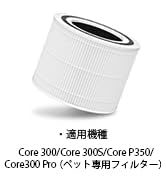
Figure 10: Original replacement filter for Core 300/300S/P350/300 Pro.
4.3 ניקוי מקדים של המסנן
The pre-filter should be cleaned lightly about once a month to maintain optimal performance. Refer to the detailed instructions in the full user manual for proper cleaning procedures.
5. פתרון תקלות
If you encounter any issues with your Levoit Core 300S, please refer to the following common troubleshooting tips:
- המכשיר לא נדלק: Ensure the power cord is securely plugged into both the air purifier and the wall outlet. Check if the outlet is functioning correctly.
- בעיות חיבור לאפליקציה: Verify that your smartphone's Bluetooth is on and that you are connected to a 2.4GHz Wi-Fi network. Keep your smartphone close to the router during the pairing process. If connection is lost, try re-pairing the device.
- Air quality sensor not responding: Ensure the sensor intake is not blocked by dust or debris. Clean the sensor area if necessary. If the issue persists, contact customer support.
- רעש יוצא דופן: בדוק אם המסנן מותקן כהלכה. ודא שאין חפצים זרים שחוסמים את המאוורר.
- Odor not being removed: Confirm that the filter is not expired and is correctly installed. Consider replacing the filter if it's old or heavily used.
For more detailed troubleshooting steps, please consult the comprehensive user manual or contact customer support.
6. מפרטים
| תכונה | מִפרָט |
|---|---|
| מותג | לויט |
| מספר דגם | LAP-C301S-WJP |
| צֶבַע | לָבָן |
| מידות המוצר (D x W x H) | 22 x 22 x 36 ס"מ |
| משקל פריט | 3 ק"ג |
| מקור כוח | חשמלי עם כבלים |
| שיטת בקרה | קול, אפליקציה |
| סוג מסנן | HEPA |
| Covered Floor Area | Up to 33 square meters (20 tatami mats) |
| רמת רעש | 22 דציבלים (מצב שינה) |
| גודל שמירת החלקיקים | 0.1 מיקרון |
| סוג בקר | Amazon Alexa, Google Assistant |
| צריכת חשמל | 3.3 W |
| תקנים תואמים | מוסמך על ידי Energy Star |
| רכיבים כלולים | 4-layer 360° Genuine Filter (pre-installed), Quick Start Guide, Quality Guarantee Card, Japanese Instruction Manual |
| ארץ מוצא | סִין |
| UPC | 810043374774 |
Note: Product specifications may be updated due to performance improvements. Refer to the Amazon product page for the latest information.

איור 11: מידות ומשקל המוצר.
7. אחריות ותמיכה
Levoit provides a 2-year quality guarantee for this product. Our customer support team is available 24 hours a day to assist you.
7.1 פנייה לתמיכה
If you have any questions or encounter problems, please feel free to contact us. You can typically find a chat button for questions by selecting the 'Seller' on the product page and navigating to the seller information page.