
מָבוֹא
Thank you for choosing the Opal Selfie Stick OP-Sel-BT-01. This manual provides essential information for the safe and effective use of your device. Please read it thoroughly before operation and retain it for future reference.
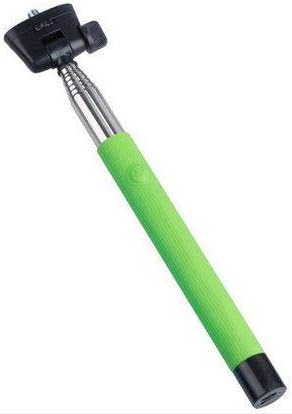
איור 1: The Opal Selfie Stick OP-Sel-BT-01 in green, showing its extendable arm, phone holder, and comfortable grip.
תכונות המוצר
- צֶבַע: יָרוֹק
- חומר עיקרי: פְּלָדָה
- קיבולת עומס מרבית: 500 גרם
- קישוריות: אלחוטי (Bluetooth)
- מערכות תואמות: אנדרואיד 3.0 ומעלה, iOS 4.0 ומעלה
הגדרה
- Unfold the Selfie Stick: Gently pull the phone holder section upwards to extend the stick.
- כוונון מחזיק הטלפון: פתח את הטלפון clamp and securely place your smartphone within it. Ensure the phone is centered and stable. The clamp is designed to hold various phone sizes.
- הפעלה: Locate the power button (if applicable, usually on the handle) and press it to turn on the selfie stick. An indicator light may illuminate.
הוראות הפעלה
Bluetooth
- Ensure the selfie stick is powered on and in pairing mode (indicator light may flash rapidly).
- בסמארטפון שלך, עבור אל הגדרות > בלוטות'.
- הפעל את Bluetooth וחפש מכשירים זמינים.
- Select "Opal OP-Sel-BT-01" or a similar name from the list of devices.
- Once paired, the indicator light on the selfie stick may turn solid or turn off, indicating a successful connection.
צילום תמונות/סרטונים
- פתחו את אפליקציית המצלמה של הסמארטפון שלכם.
- האריכו את מקל הסלפי לאורך הרצוי.
- Position your phone for the desired shot.
- Press the shutter button on the selfie stick handle to capture a photo or start/stop video recording.
תַחזוּקָה
- ניקוי: נגבו את מוט הסלפי בעזרת מטלית רכה ויבשה. אין להשתמש בחומרי ניקוי שוחקים או ממסים.
- אִחסוּן: Store the device in a cool, dry place away from direct sunlight and extreme temperatures. Retract the stick fully before storage.
- טיפול בסוללה: If the selfie stick has a rechargeable battery, ensure it is charged periodically even when not in use to maintain battery health.
פתרון בעיות
| בְּעָיָה | סיבה אפשרית | פִּתָרוֹן |
|---|---|---|
| לא ניתן להתאים לטלפון | Selfie stick not in pairing mode; Bluetooth off on phone; battery low. | Ensure stick is on and in pairing mode. Turn phone's Bluetooth off/on. Charge the selfie stick. |
| Shutter button not working | Not paired; camera app settings. | Verify successful Bluetooth pairing. Check camera app settings for volume button shutter control. |
| Phone not stable in clamp | Phone not centered; clamp not fully secured. | Re-position phone to be centered. Ensure clamp is firmly gripping the phone. |
מפרטים
- דֶגֶם: OP-Sel-BT-01
- מותג: אוֹפַּל
- צֶבַע: יָרוֹק
- חומר עיקרי: פְּלָדָה
- קיבולת עומס מרבית: 500 גרם
- קישוריות: אלחוטי (Bluetooth)
- מערכות הפעלה נתמכות: Android 3.0 +, iOS 4.0 +
- ASIN: B091DBB122
- תאריך זמין ראשון: 30 במרץ 2021
אחריות ותמיכה
For information regarding warranty coverage or technical support, please refer to the documentation included with your purchase or visit the official Opal webאתר. תנאי האחריות הספציפיים עשויים להשתנות בהתאם לאזור ולקמעונאי.
מידע בטיחות
- אין לחשוף את המכשיר לטמפרטורות קיצוניות, לחות או אור שמש ישיר למשך תקופות ממושכות.
- הרחק מהישג ידם של ילדים.
- אל תנסה לפרק או לשנות את המכשיר. פעולה זו עלולה לבטל את האחריות ולגרום נזק.
- Ensure your phone is securely fastened in the clamp before extending the stick.