
מָבוֹא
Thank you for choosing the Ringway TB810A Electronic Keyboard. This manual provides essential information for the safe and efficient use of your instrument. Please read it thoroughly before operating the keyboard and keep it for future reference.
מידע בטיחות
- ספק כוח: השתמשו רק במתאם החשמל או בסוללות שצוינו. ודאו שהעוצמהtage תואם את דרישות המקלדת.
- מים ולחות: Do not expose the keyboard to water or excessive moisture. Avoid placing liquids near the instrument.
- אוורור: Ensure proper ventilation around the keyboard. Do not block ventilation openings.
- ניקוי: Clean the keyboard with a soft, dry cloth. Do not use abrasive cleaners or solvents.
- טיפול: Handle the keyboard with care. Avoid dropping or subjecting it to strong impacts.
תוכן החבילה
ודא שכל הפריטים נמצאים בחבילה:
- Ringway TB810A Electronic Keyboard
- מתאם מתח (אם כלול)
- מנוחה למוזיקה
- מדריך למשתמש
המוצר נגמרview
The Ringway TB810A is a 61-key electronic keyboard designed for various skill levels. It features touch-sensitive keys, a multi-function LCD, and a wide range of voices and accompaniment styles.
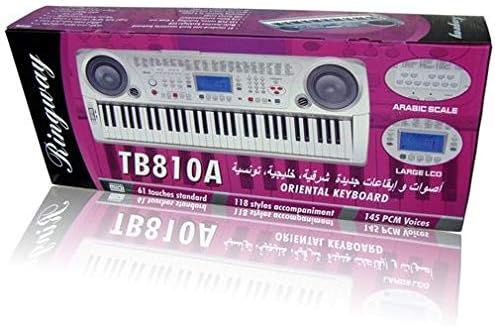
איור 1: חזית view of the Ringway TB810A Electronic Keyboard, showcasing the 61 keys, built-in speakers, and control panel.

איור 2: זוויתי view of the Ringway TB810A Electronic Keyboard, including the detachable music rest.
הגדרה
- פריקת אריזה: הוציאו בזהירות את המקלדת ואת כל האביזרים מהאריזה.
- חיבור חשמל:
- מתאם למזגן: Connect the AC adapter to the DC 12V input jack on the rear panel of the keyboard, then plug it into a standard wall outlet.
- סוללות: If using batteries, open the battery compartment on the underside of the keyboard and insert the required batteries (not included), ensuring correct polarity.
- מנוחת מוזיקה: Insert the music rest into the designated slots on the top panel of the keyboard.
- יציאת אוזניות/שמע: For private practice, connect 3.5mm headphones to the headphone jack. To connect to an external amplifier or sound system, use the Line Out jack.
- פֵּדָל: Connect an optional sustain pedal to the Pedal jack for enhanced expression.
הוראות הפעלה
1. הפעלה/כיבוי ועוצמת קול
- הקש על כּוֹחַ כפתור כדי להפעיל או לכבות את המקלדת.
- כוונן את עוצמת הקול הראשית באמצעות נפח מאסטר כַּפתוֹר.
2. תצוגה ולוח בקרה
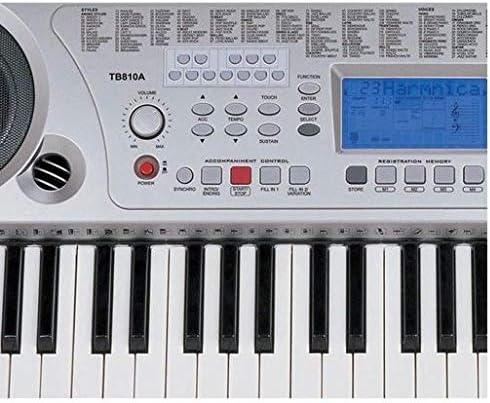
איור 3: תקריב view of the control panel, showing the LCD screen, power button, volume knob, and various function buttons.
- The multi-function LCD screen displays current settings, voice numbers, rhythm numbers, and other operational information. It is backlit for visibility.
- Use the numeric keypad and +/- buttons to select voices, rhythms, and other parameters.
3. Voices (Tones)
- The keyboard features 141 PCM voices.
- To select a voice, press the קוֹל button, then use the numeric keypad or +/- כפתורים כדי להזין את מספר הקול הרצוי.
- פּוֹלִיפוֹנִיָה: The keyboard supports 64-note polyphony, allowing multiple notes to sound simultaneously.
4. Accompaniment Styles (Rhythms)
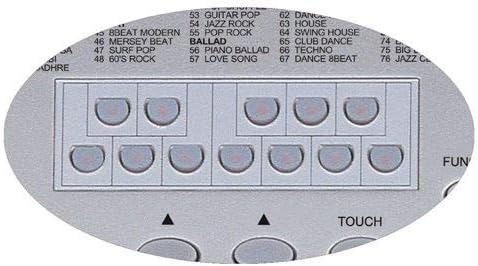
Figure 4: Detail of the rhythm selection buttons, showing various style categories.
- The keyboard includes 118 auto accompaniment styles, including 3 Arabic rhythm groups.
- To select a style, press the סִגְנוֹן button, then use the numeric keypad or +/- כפתורים.
- בקרת הליווי: השתמשו בכפתורים כמו סנכרון, התחל/עצור, מבוא/סיום, למלא 1, ו FILL 2/VARIATION to control the accompaniment.
5. Key Modes
- נוֹרמָלִי: Standard playing mode.
- אֶחָד: Single-finger chord recognition for accompaniment.
- Fingered: Full-finger chord recognition for accompaniment.
- לְפַצֵל: Divides the keyboard into two sections, allowing different voices to be played on each side.
6. Lesson Function (3 Steps)
The keyboard offers a 3-step lesson function to help users learn songs.
- Lesson 1 (One-Key Play): Practice timing by pressing any key to advance the melody.
- Lesson 2 (Follow Me): המקלדת ממתינה שתנגנו את התו הנכון לפני שתמשיכו.
- Lesson 3 (Ensemble): Play along with the accompaniment, focusing on rhythm and melody.
- The keyboard includes 50 lesson songs (numbered 51 to 100).
7. שירי הדגמה
The keyboard has 100 demo songs (numbered 01 to 100) for listening pleasure and demonstration of instrument capabilities.
8. הקלטה
- The multi-track recording feature allows you to record and play back your performances.
- Refer to the specific recording section in the full manual for detailed instructions on how to record and playback.
9. זיכרון רישום
Store and recall up to 4 panel settings (voices, rhythms, tempo, etc.) using the registration memory function.
10. פונקציות אחרות
- לְשַׁרבֵּב: Adjust the pitch of the keyboard in semitone steps.
- מַנגִינָה: Fine-tune the overall pitch.
- לָגַעַת: Enable or disable touch sensitivity for the keys.
- אוֹקְטָבָה: Shift the keyboard's pitch up or down by octaves.
- לִתְמוֹך: Apply a sustain effect to notes.
- מַקְהֵלָה: Add a chorus effect to the sound.
- לְפַצֵל: Divide the keyboard into two sections with different voices.
- הַרמוֹנִיָה: Add harmony notes to your melody.
- MIDI In/Out: Connect the keyboard to other MIDI devices or a computer using the MIDI USB port for advanced control and recording.
תַחזוּקָה
- ניקוי: Wipe the keyboard surface with a soft, dry, lint-free cloth. For stubborn dirt, slightly dampשטפו את המטלית במים וסבון עדין, ולאחר מכן נגבו יבש מיד.
- אִחסוּן: When not in use for extended periods, store the keyboard in a dry, dust-free environment, away from direct sunlight and extreme temperatures.
- החלפת סוללה: If using batteries, replace them when the power indicator dims or the keyboard functions become unstable. Always replace all batteries at once with new ones of the same type.
פתרון בעיות
| בְּעָיָה | סיבה אפשרית | פִּתָרוֹן |
|---|---|---|
| אין כוח | Power adapter not connected, batteries depleted/incorrectly inserted | Check AC adapter connection; replace batteries ensuring correct polarity. |
| אין קול | Volume too low, headphones connected, external device connected to Line Out | Increase Master Volume; disconnect headphones; check external audio connections. |
| מפתחות לא מגיבים | Keyboard in a specific mode (e.g., Lesson mode waiting for input) | Exit lesson mode or reset the keyboard (refer to full manual for reset procedure). |
| צליל מעוות | Volume too high, faulty connection | Lower volume; check all cable connections. |
מפרטים
| תכונה | תֵאוּר |
|---|---|
| מפתחות | 61 standard touch-sensitive keys |
| לְהַצִיג | Multi-function LCD with backlight |
| פּוֹלִיפוֹנִיָה | 64 פתקים |
| קולות | 141 PCM voices |
| סגנונות ליווי | 118 styles (including 3 Arabic rhythm groups) |
| Lesson Function | 3-step (One-Key Play, Follow Me, Ensemble) |
| Lesson Songs | 50 songs (51-100) |
| שירי הדגמה | 100 songs (01-100) |
| הַקלָטָה | Multi-track recording and playback |
| זיכרון רישום | 4 panel settings |
| קישוריות | MIDI In/Out (USB), Pedal, Line Out, Aux In (Mobile), DC 12V |
| שקע אוזניות | 3.5 מ"מ |
| מקור כוח | AC Adapter (DC 12V) or Batteries |
| מידות (L x W x H) | 950 מ"מ × 350 מ"מ × 130 מ"מ |
| סוג גימור | מַברִיק |
| רמת מיומנות | כֹּל |
| סִגְנוֹן | מוֹדֶרנִי |
אחריות ותמיכה
For warranty information and technical support, please refer to the warranty card included with your product or contact your local Ringway distributor. Keep your purchase receipt as proof of purchase for any warranty claims.