
1. מידע בטיחות
Please read and understand all safety information before operating the Triplett CM650 Clamp Meter. Failure to follow these instructions may result in electric shock, fire, or serious injury.
- הקפד תמיד על חוקי הבטיחות המקומיים והארציים.
- אין להשתמש במד אם הוא נראה פגום או אם חוטי הבדיקה פגומים.
- Ensure the meter is set to the correct function and range before making measurements.
- Do not exceed the maximum input limits for any function. The CM650 is rated CAT III-600V.
- היזהר בעת עבודה עם כרךtagמעל 30V AC RMS, 42V שיא, או 60V DC, מכיוון שאלו מהווים סכנת התחשמלות.
- שמרו על האצבעות מאחורי מגני האצבעות שעל חוטי הבדיקה במהלך השימוש.
- החליפו סוללות מיד כאשר מופיע מחוון סוללה חלשה כדי להבטיח קריאות מדויקות.
- אין להפעיל את המונה בסביבות נפיצות של גז, אדים או אבק.
2. המוצר נגמרview
The Triplett CM650 is a True RMS 6000-count AC/DC clamp meter designed for accurate electrical measurements. It features a large backlit LCD, inrush current measurement, and a non-contact voltagגלאי e.
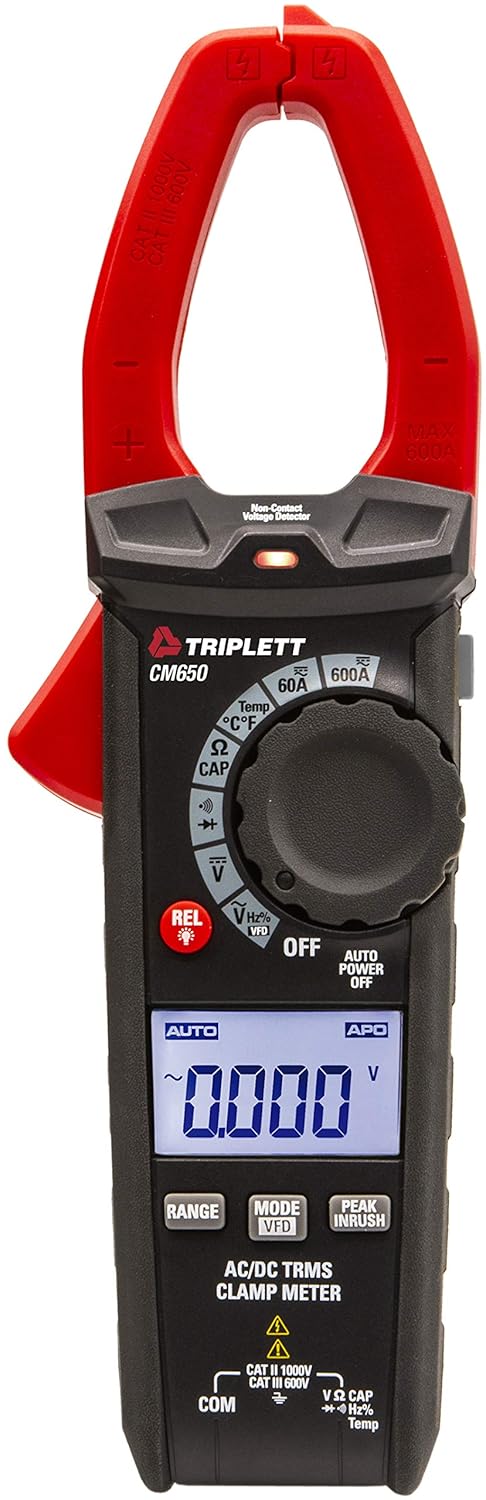
איור 2.1: חֲזִית view of the Triplett CM650 True RMS 600A AC/DC Clamp Meter. This image displays the meter's main body, the red clamp jaws, the rotary dial, the LCD screen, and the function buttons.
2.1 רכיבים ובקרות
- Clamp מלתעות: משמש למדידת זרם AC/DC ללא מגע.
- Clamp לְהַפְעִיל: פותח וסוגר את clamp לסתות.
- מתג פונקציה סיבובי: בוחר את פונקציית המדידה הרצויה.
- תצוגת LCD: 6000-count backlit display for reading measurements.
- לחצני פונקציה: Include RANGE, MODE/VFD, PEAK INRUSH, REL/Light, and Data Hold.
- שקעי קלט: For connecting test leads (COM, VΩCAPHzTemp).
- חיישן NCV: ללא מגע כרךtage detection sensor.
- פָּנַס כִּיס: תאורת LED משולבת להארת אזורי עבודה.

איור 2.2: תקריב view of the Triplett CM650's rotary dial and function buttons. This image highlights the various measurement selections such as 60A, 600A, Temperature, Resistance/Capacitance, Continuity/Diode, Voltage, and VFD mode, along with the REL and backlight button.
3. התקנה
3.1 התקנת סוללה
The CM650 requires 3 AAA batteries (included). To install or replace batteries:
- Ensure the meter is OFF and disconnect all test leads.
- אתר את תא הסוללה בחלקו האחורי של המונה.
- השתמש במברג כדי לפתוח את מכסה תא הסוללות.
- Insert the 3 AAA batteries, observing correct polarity (+/-).
- החזר את מכסה תא הסוללות למקומו ואבטח אותו באמצעות הבורג.
3.2 חיבור חוטי בדיקה
עבור כרךtage, resistance, capacitance, frequency, temperature, diode, and continuity measurements, connect the test leads as follows:
- הכנס את כבל הבדיקה השחור לתוך COM שקע קלט.
- הכנס את כבל הבדיקה האדום לתוך VΩCAPHzTemp שקע קלט.

איור 3.1: The Triplett CM650 clamp meter shown with its included accessories: test leads, K-type thermocouple probe, and a soft carrying case. This illustrates the complete package provided with the device.
4. הוראות הפעלה
Turn the rotary switch to the desired function to begin measurement. The meter features an automatic shutdown function to conserve battery life, which can be deactivated if needed.
4.1 מדידת זרם AC/DC (Clamp)
To measure AC or DC current up to 600A without breaking the circuit:
- סובב את המתג הסיבובי ל- 60A or 600A AC/DC current range.
- לחץ על clamp הדק לפתיחת הלסתות.
- יש להקיף רק מוליך אחד בתוך ה-clamp לסתות. ודא שהלסתות סגורות לחלוטין.
- קרא את הערך הנוכחי בצג ה-LCD.

איור 4.1: A hand holding the Triplett CM650 clamp meter, with its jaws clamped around a single wire within an electrical panel, demonstrating how to measure current. The display shows a reading of 60.0 A.

איור 4.2: The Triplett CM650 clamp meter being used to measure current on a wire connected to an industrial motor. The meter's display shows a reading of 16.00 A, illustrating its application in industrial settings.
4.2 כרךtagמדידה אלקטרונית (AC/DC)
למדידת AC או DC voltage:
- Connect the test leads to the appropriate input jacks (COM and VΩCAPHzTemp).
- סובב את המתג הסיבובי ל- V (כרך א ')tage) position. The meter will auto-range.
- געו עם גששי הבדיקה בנקודות המעגל שבהן עוצמת הקולtage יש למדוד.
- קרא את הכרךtagערך e בתצוגת ה-LCD.
4.3 Resistance, Capacitance, Frequency, Temperature, Diode, and Continuity
For these measurements, connect the test leads as described in Section 3.2 and select the corresponding function on the rotary switch. Use the MODE button to cycle through sub-functions if necessary (e.g., Resistance, Capacitance, Diode, Continuity share a dial position).
- התנגדות (Ω): Measures electrical resistance in Ohms.
- קיבול (CAP): Measures capacitance in Farads.
- תדר (הרץ): מודד את התדירות של אות AC.
- טמפרטורה (°C/°F): Use the K-type thermocouple probe for temperature measurements.
- בדיקת דיודה: Checks the forward voltagטיפה של דיודה.
- הֶמשֵׁכִיוּת: Emits an audible tone if the circuit has low resistance (continuity).
4.4 פונקציות מיוחדות
- RMS אמיתי: Provides accurate readings for non-sinusoidal or noisy AC waveforms.
- Inrush Current (PEAK INRUSH): Captures the instantaneous surge current when electrical equipment is powered on. Press the PEAK INRUSH לחצן להפעלת פונקציה זו.
- Low Pass Filter (LPF/VFD): Filters out high-frequency noise and harmonics when measuring variable frequency drives (VFDs). Activate by pressing the MODE כפתור בכרךtage function until VFD appears.
- ללא מגע כרךtagה (NCV): מזהה AC voltage without physical contact. Hold the NCV sensor near a live conductor. An LED indicator and audible beep will signal the presence of voltage.
- מצב יחסי (REL): Allows for comparisons with a stored reference value. Press the REL button to store the current reading as a reference. Subsequent readings will show the difference from this reference.
- החזקת נתונים: Freezes the current reading on the display. Press the לְהַחזִיק כפתור להפעלה/כיבוי.
- מינימום מקסימום: Records the minimum and maximum values during a measurement session.
- פָּנַס כִּיס: הקש על REL/Light button briefly to turn the integrated flashlight on or off.
5. תחזוקה
5.1 ניקוי
Wipe the meter with a dry, clean cloth. Do not use abrasives or solvents. Keep the input terminals free of dirt and moisture.
5.2 החלפת סוללה
Refer to Section 3.1 for battery replacement instructions. Replace batteries promptly when the low battery indicator appears on the display to ensure accurate measurements.
6. פתרון תקלות
| בְּעָיָה | סיבה אפשרית | פִּתָרוֹן |
|---|---|---|
| המד לא נדלק | סוללות מתות או שהותקנו בצורה לא נכונה | בדוק את קוטביות הסוללה; החלף סוללות. |
| אין קריאה או מוצג "OL" | Incorrect function/range; open circuit; measurement exceeds range | Select correct function/range; check circuit continuity; ensure measurement is within meter's limits. |
| קריאות לא מדויקות | Low battery; external interference; dirty test leads | Replace batteries; move away from strong electromagnetic fields; clean test leads and input jacks. |
| NCV לא מזהה נפחtage | כרך ידtage too low; sensor not close enough; shielded wire | ודא כרךtage is present and within detectable range; place sensor closer to conductor; NCV may not work on shielded wires. |
7. מפרטים
| תכונה | מִפרָט |
|---|---|
| דֶגֶם | CM650 |
| לְהַצִיג | 6000 ספירות, LCD עם תאורה אחורית |
| זרם AC / DC | עד 600A |
| RMS אמיתי | כֵּן |
| Inrush Current | כֵּן |
| מסנן נמוך לעבור (LPF) | כֵּן |
| ללא מגע כרךtage (NCV) | Yes, with LED indicator |
| מדידות | Resistance, Capacitance, Frequency, Temperature, Diode Test, Continuity |
| דירוג בטיחות | CAT III-600V |
| מקור כוח | 3 סוללות AAA (כלולות) |
| מידות המוצר | 22.35 x 7.62 x 4.06 ס"מ |
| משקל פריט | 290.3 גרם |
| אביזרים כלולים | Test cables, K-type thermocouple probe, carry case |
8. אחריות ותמיכה
The Triplett CM650 True RMS 6000 Count 600A AC/DC Clamp מד מגיע עם אחריות לשנה מתאריך הרכישה. אחריות זו מכסה פגמים בחומרים ובעבודה בשימוש רגיל.
For warranty claims, technical support, or service inquiries, please contact Triplett customer service. Keep your proof of purchase for warranty validation.
For more information, visit the official Triplett webאתר או צור קשר עם המפיץ המקומי שלך.