
ALFAJR CW-15
מדריך למשתמש לשעון תפילה אזאן אסלאמי אוטומטי ALFAJR CW-15
Model: CW-15 | Brand: ALFAJR
מָבוֹא
This manual provides comprehensive instructions for setting up and operating your ALFAJR CW-15 Automatic Islamic Azan Prayer Clock. Designed for both wall mounting and table placement, this digital clock automatically calculates and plays the Azan five times a day based on your set location. Please read this manual carefully to ensure proper use and to fully utilize all features of your new clock.
תוכן החבילה
אנא ודא שכל הפריטים נמצאים בחבילה:
- 1 x ALFAJR CW-15 Azan Clock
- 4 x סוללות AA
- 1 x מדריך הוראות (מסמך זה)
תכונות המוצר
- Automatic Azan for all five daily prayers.
- Multiple Azan reciters (Makkah, Madina, Egypt, AlQuds, Riyadh).
- Automatic Azan time adjustment after initial city/time setup.
- Gregorian and Hijri calendar display.
- תצוגת טמפרטורה בצלזיוס או פרנהייט.
- Daylight Saving Time (DST) option.
- English and Arabic display languages.
- Wall-mountable or table-standing design.
- Dimensions: Approximately 9 inches (width) x 8.5 inches (height).
- Powered by 4 AA batteries (included) or USB-C (cable not included).
מדריך התקנה
1. התקנת סוללה
The ALFAJR CW-15 clock operates on 4 AA batteries. These are included in your package.
- אתר את תא הסוללות בגב השעון.
- פתח את מכסה תא הסוללות.
- הכניסו את 4 סוללות AA, תוך הקפדה על קוטביות נכונה (+ ו-).
- סגור היטב את מכסה תא הסוללות.
Alternatively, the clock can be powered via a USB-C cable (not included) connected to a compatible power adapter.
2. Initial Power On and Display Overview
Upon inserting batteries or connecting USB-C power, the clock will power on. The display will show the current time, date, and temperature. Familiarize yourself with the buttons on the side/back of the clock: UP, מַעֲרֶכֶת, ו לְמַטָה.

איור 1: חזית view of the ALFAJR CW-15 clock, showing the digital display with time, date, and temperature. The speaker grilles are visible at the bottom.
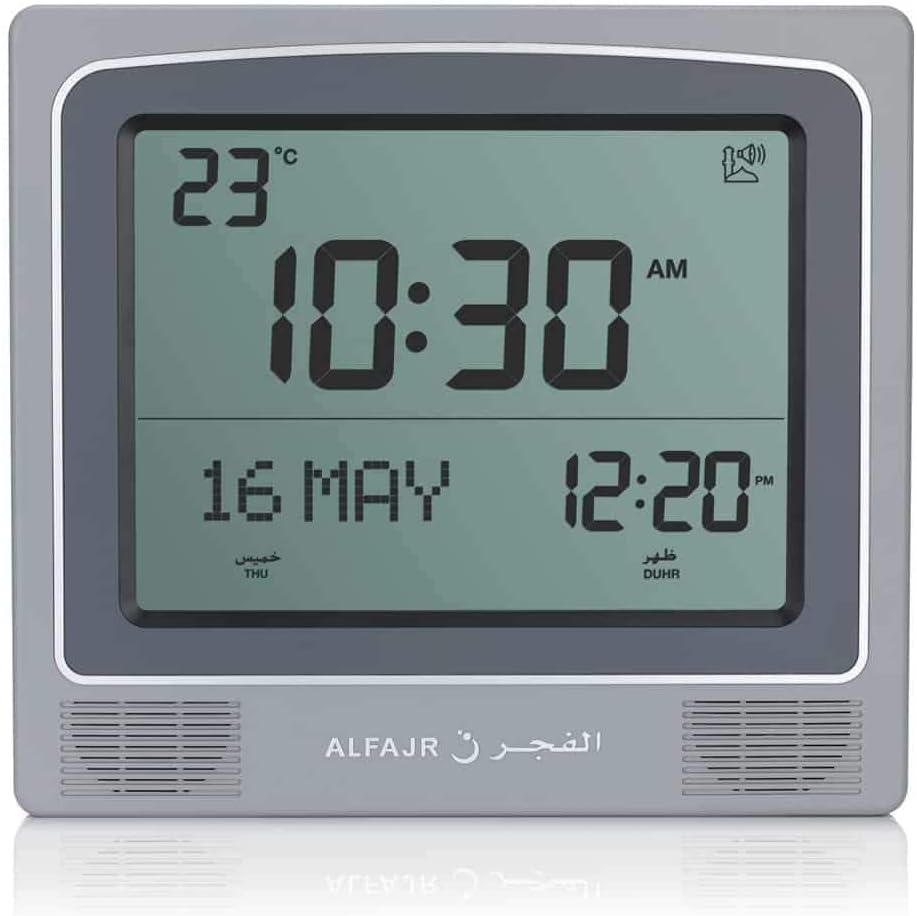
איור 2: חזית view of the ALFAJR CW-15 clock, similar to Figure 1, but with the ALFAJR brand logo visible at the bottom center.
3. הגדרת שעה ותאריך
- לחץ והחזק את מַעֲרֶכֶת למשך כ-3 שניות עד שתצוגת הזמן תתחיל להבהב.
- השתמש ב- UP ו לְמַטָה לחצו על הכפתורים כדי לכוונן את השעה. מַעֲרֶכֶת כדי לאשר ולעבור לדקות.
- כוונן את הדקות באמצעות UP ו לְמַטָה, ואז הקש מַעֲרֶכֶת.
- המשך בתהליך זה כדי להגדיר את השנה, החודש והיום.
- לאחר הגדרת התאריך, לחצו על מַעֲרֶכֶת to exit the time/date setting mode.
4. Setting Location (City or Coordinates)
Accurate Azan times depend on correct location settings. You can select a pre-programmed city or enter latitude/longitude.
- הקש על מַעֲרֶכֶת button once (short press) to enter the main menu.
- לְהִשְׁתַמֵשׁ UP or לְמַטָה to navigate to the "CITY" or "LOCATION" setting.
- לִלְחוֹץ מַעֲרֶכֶת to enter the location setting.
- Option A: Select Pre-programmed City: לְהִשְׁתַמֵשׁ UP or לְמַטָה to scroll through the list of cities. Once your city is displayed, press מַעֲרֶכֶת כדי לאשר.
- Option B: Enter Latitude/Longitude: If your city is not listed, select the option to enter coordinates. Use UP ו לְמַטָה to adjust the values for latitude, longitude, and time zone offset (GMT). Press מַעֲרֶכֶת אחרי כל ערך.
- After confirming your location, the clock will automatically calculate the Azan times.
5. Azan Calculation Method
The clock supports various Azan calculation methods. Consult local Islamic authorities for the recommended method in your region.
- From the main menu (short press מַעֲרֶכֶת), navigate to "CALC. METHOD".
- לִלְחוֹץ מַעֲרֶכֶת להיכנס.
- לְהִשְׁתַמֵשׁ UP or לְמַטָה to select the desired calculation method (e.g., Muslim World League, Umm Al-Qura, Egyptian General Authority of Survey, etc.).
- לִלְחוֹץ מַעֲרֶכֶת כדי לאשר.
6. שעון קיץ (DST)
If your region observes Daylight Saving Time, enable this feature.
- From the main menu, navigate to "DST".
- לִלְחוֹץ מַעֲרֶכֶת.
- לְהִשְׁתַמֵשׁ UP or לְמַטָה to toggle between "ON" and "OFF".
- לִלְחוֹץ מַעֲרֶכֶת כדי לאשר.
7. יחידת טמפרטורה
You can choose to display temperature in Celsius or Fahrenheit.
- From the main menu, navigate to "TEMP UNIT".
- לִלְחוֹץ מַעֲרֶכֶת.
- לְהִשְׁתַמֵשׁ UP or לְמַטָה to select "C" (Celsius) or "F" (Fahrenheit).
- לִלְחוֹץ מַעֲרֶכֶת כדי לאשר.
8. תצוגת לוח שנה
The clock can display either the Gregorian or Hijri calendar.
- From the main menu, navigate to "CALENDAR".
- לִלְחוֹץ מַעֲרֶכֶת.
- לְהִשְׁתַמֵשׁ UP or לְמַטָה to select "GREGORIAN" or "HIJRI".
- לִלְחוֹץ מַעֲרֶכֶת כדי לאשר.
הוראות הפעלה
1. Adjusting Azan Volume
The clock features adjustable Azan volume. The volume buttons are typically located on the side or back of the unit.
- During an Azan, press the UP or לְמַטָה כפתורים כדי להגביר או להנמיך את עוצמת הקול.
- Alternatively, some models may have a dedicated volume switch or buttons on the back. Refer to the physical clock for exact button placement.
2. Changing Azan Reciter
You can select from five different Azan reciters.
- From the main menu (short press מַעֲרֶכֶת), navigate to "AZAN VOICE" or "RECITER".
- לִלְחוֹץ מַעֲרֶכֶת להיכנס.
- לְהִשְׁתַמֵשׁ UP or לְמַטָה to cycle through the available reciters (Makkah, Madina, Egypt, AlQuds, Riyadh).
- לִלְחוֹץ מַעֲרֶכֶת כדי לאשר את בחירתך.
3. Daily Alarms
The clock includes daily alarm functions in addition to the Azan. These can be set for specific times.
- From the main menu, navigate to "DAILY ALARM".
- לִלְחוֹץ מַעֲרֶכֶת.
- לְהִשְׁתַמֵשׁ UP or לְמַטָה to set the desired alarm time (hour and minute).
- לִלְחוֹץ מַעֲרֶכֶת to confirm and enable the alarm.
- To disable, navigate back to "DAILY ALARM" and set the time to "OFF" or a similar option.
4. מצבי תצוגה
The clock typically cycles through different display information or allows manual switching.
- The default display shows time, date, and temperature.
- לחיצה קצרה על UP or לְמַטָה buttons outside of menu mode may cycle through additional information like next prayer time or Qibla direction (if available on this model).
אפשרויות הרכבה
The ALFAJR CW-15 clock is designed for versatile placement, either on a wall or a flat surface.
1. הרכבה על הקיר
To mount the clock on a wall:
- Locate the keyhole slot on the back of the clock.
- בחרו מיקום מתאים על קיר.
- Install a screw (not included) into the wall, leaving a small portion protruding. Ensure the screw head fits into the keyhole slot.
- Carefully hang the clock onto the screw, ensuring it is securely seated.
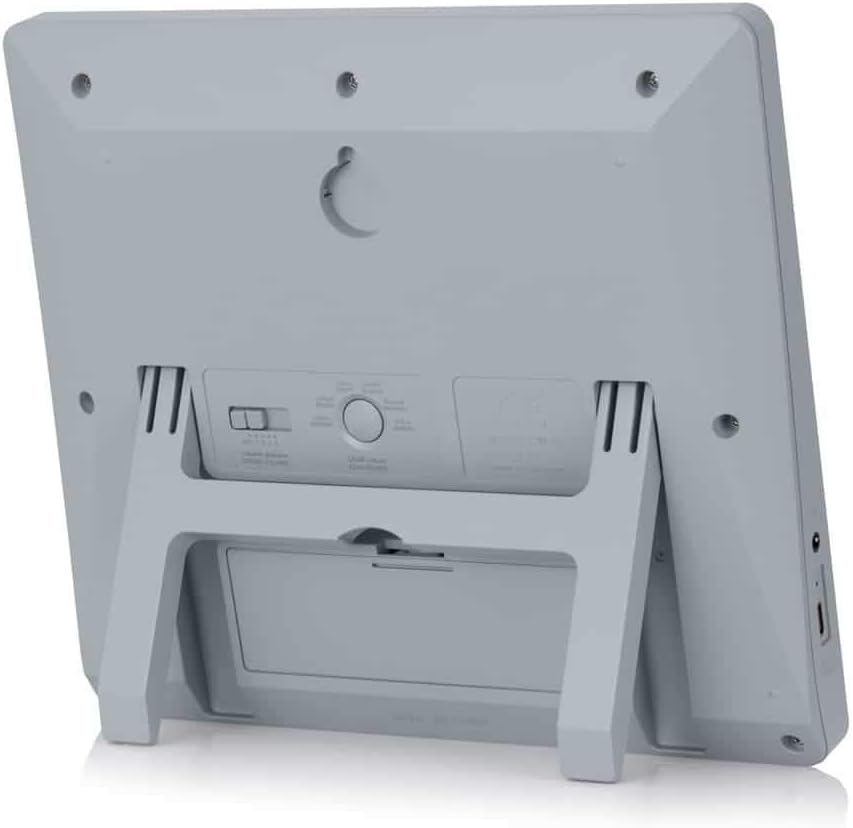
איור 3: אחורי view of the ALFAJR CW-15 clock, highlighting the keyhole for wall mounting and the battery compartment.
2. Table Placement
For table or desk placement:
- Locate the integrated stand on the back of the clock.
- Pull out the stand until it locks into position.
- הנח את השעון על משטח ישר ויציב.

איור 4: צד view of the ALFAJR CW-15 clock, showing the integrated kickstand extended for stable table placement.
תַחזוּקָה
1. ניקיון
כדי לשמור על המראה והפונקציונליות של השעון שלך:
- נגבו את פני השעון בעזרת מטלית רכה ויבשה.
- אין להשתמש בחומרי ניקוי שוחקים, ממסים או תרסיסים כימיים, מכיוון שאלה עלולים לפגוע בתצוגה או במכשיר.asing.
- Avoid getting moisture into the clock's openings.
2. החלפת סוללה
When the display dims or the clock functions become erratic, it's time to replace the batteries.
- פתח את תא הסוללות בגב השעון.
- הסר את סוללות AA הישנות.
- הכניסו ארבע סוללות AA חדשות, תוך הקפדה על הקוטביות הנכונה.
- סגור את תא הסוללות.
- You may need to re-enter the time and location settings after battery replacement.
פתרון בעיות
| בְּעָיָה | סיבה אפשרית | פִּתָרוֹן |
|---|---|---|
| השעון לא נדלק. | Batteries are dead or incorrectly inserted. No USB-C power. | Check battery polarity. Replace with new batteries. Ensure USB-C cable (if used) is connected and power source is active. |
| Azan times are incorrect. | Incorrect city/location settings. Wrong calculation method. DST setting incorrect. | Verify city, latitude, longitude, and GMT offset. Select the correct Azan calculation method for your region. Check DST setting. |
| Azan sound is too low or too high. | יש צורך בכוונון הגדרת עוצמת הקול. | Adjust the volume using the dedicated buttons or through the menu. |
| התצוגה עמומה או מהבהבת. | כוח סוללה נמוך. | החליפו את כל 4 סוללות ה-AA בחדשות. |
| Clock resets unexpectedly. | Intermittent power loss or very low batteries. | Ensure batteries are fresh and securely seated. If using USB-C, check the connection and power source stability. |
מפרטים
- דֶגֶם: CW-15
- מותג: אלפאג'ר
- סוג תצוגה: דִיגִיטָלי
- צֶבַע: אָפוֹר
- חוֹמֶר: פּלָסטִי
- מידות המוצר: 8.5 אינץ' (W) x 9 אינץ' (H)
- משקל פריט: 3 אונקיות
- מקור כוח: 4 AA batteries (included) or USB-C (cable not included)
- סוג הרכבה: מתקן קיר / מעמד לשולחן
- מאפיינים מיוחדים: Automatic Azan, Multiple Azan Reciters, Gregorian/Hijri Calendar, Temperature Display, Daylight Saving Time
- שפות: אנגלית, ערבית
אחריות ותמיכה
אחריות מוגבלת
The ALFAJR CW-15 Azan Clock comes with a limited warranty. Please refer to the warranty card included in your original packaging for specific terms, conditions, and duration. This warranty typically covers manufacturing defects under normal use.
תמיכת לקוחות
For technical assistance, troubleshooting not covered in this manual, or warranty claims, please contact ALFAJR customer support through their official website or the retailer from whom you purchased the product. Please have your model number (CW-15) and purchase date available when contacting support.