
ITECH IT6952A
מדריך למשתמש של ספק כוח DC לתכנות ITECH IT6952A
Model: IT6952A | Brand: ITECH
1. הקדמה
This user manual provides essential information for the safe and effective operation of your ITECH IT6952A Programmable DC Power Supply. Please read this manual thoroughly before using the device to ensure proper functionality and to prevent damage or injury. The IT6952A is a high-performance, programmable DC power supply designed for laboratory and industrial applications, offering precise control over voltage ופלט נוכחי.
2. מידע בטיחות
Always observe the following safety precautions to prevent electric shock, injury, or damage to the instrument:
- Ensure the power supply is connected to a grounded AC outlet.
- אין להפעיל את המכשיר ברטוב או דamp תנאים.
- אל תפתח את ה-casinז; אין חלקים בפנים הניתנים לתיקון על ידי המשתמש. יש לפנות לכל טיפול וטיפול באנשי מקצוע מוסמכים.
- ודא שנפח הקלטtagיש להתאים את דירוג ספק הכוח לפני חיבורו לרשת החשמל.
- Avoid short-circuiting the output terminals, especially at high power settings.
- ודא אוורור נאות סביב היחידה כדי למנוע התחממות יתר.
3. המוצר נגמרview
The ITECH IT6952A features a clear VFD display and intuitive controls for easy operation.
3.1 פריסת הפאנל הקדמי

Figure 3.1: Front Panel of IT6952A
The front panel includes the VFD display for voltage and current readings, a rotary knob for precise adjustments, number keys (0-9) and ESC for direct input, function keys (V-SET, I-SET, Save, Recall, Meter, Trigger, Enter, On/Off) for various operations, navigation keys (UP/DOWN/LEFT/RIGHT) for cursor movement, and output terminals for connecting loads. The 'Shift' and 'Local' keys provide additional control options, and the main power switch is integrated.
3.2 פריסת לוח אחורי
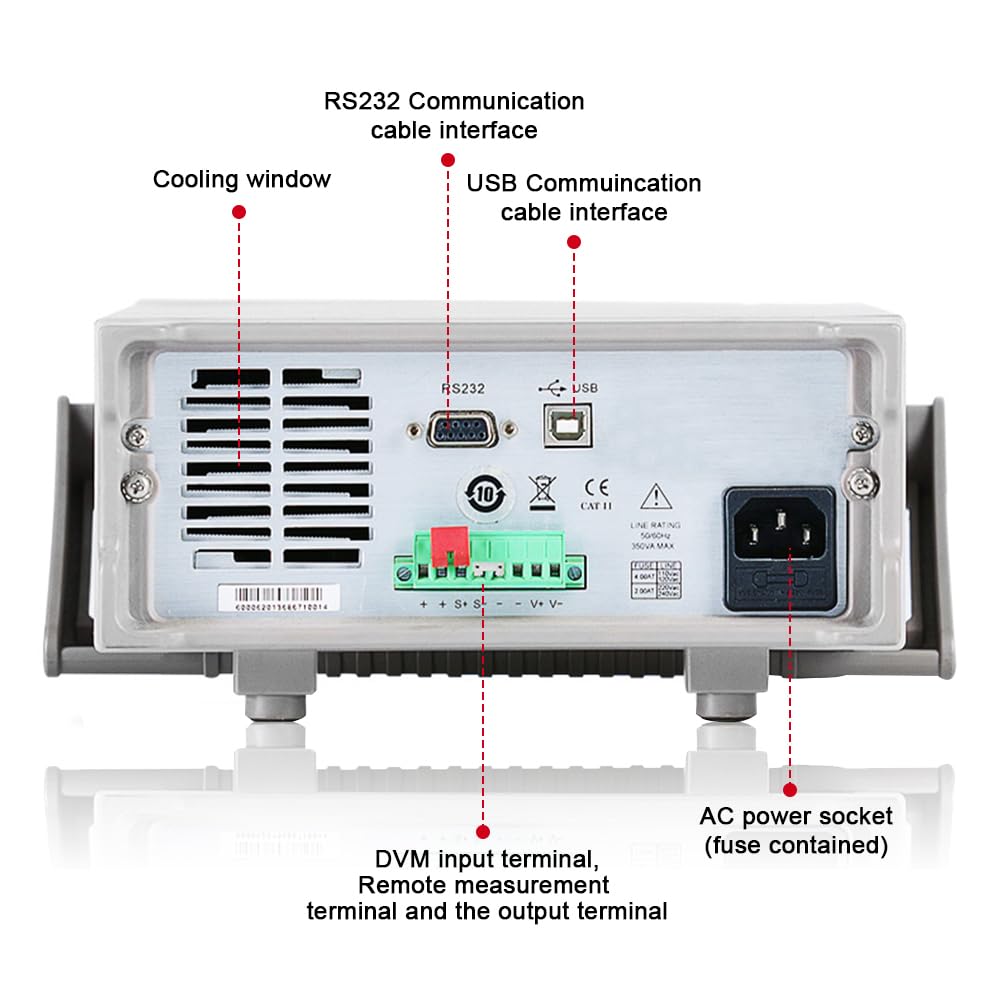
Figure 3.2: Rear Panel of IT6952A
The rear panel features the AC power socket (with integrated fuse), cooling windows for heat dissipation, an RS232 communication cable interface, a USB communication cable interface, and DVM input terminals along with remote measurement terminals and additional output terminals for specific applications.
4. התקנה
בצע את השלבים הבאים להגדרה ראשונית:
- פריקת אריזה: הוצא בזהירות את ספק הכוח מאריזתו. בדוק אם יש סימני נזק במהלך ההובלה.
- מיקום: Place the unit on a stable, level surface with adequate ventilation around all sides. Do not block the cooling vents on the sides and rear.
- חיבור חשמל: Connect the provided AC power cord to the AC power socket on the rear panel of the IT6952A. Plug the other end into a grounded electrical outlet.
- הפעלה: Press the main power switch on the front panel to turn on the unit. The VFD display should illuminate.
- חיבור פלט: Connect your load to the output terminals on the front panel using appropriate test leads. Ensure correct polarity (positive to positive, negative to negative).
5. הוראות הפעלה
This section covers basic operation of the IT6952A.
5.1 הגדרה כרךtage ו-Current
- סט כרךtage: הקש על V-SET כפתור. עוצמת הקולtage display will become active. Use the rotary knob to adjust the voltage, or use the number keys for direct input followed by לְהַכנִיס.
- הגדר זרם: הקש על I-SET button. The current display will become active. Use the rotary knob to adjust the current limit, or use the number keys for direct input followed by לְהַכנִיס.
- הפעל פלט: לאחר הגדרת עוצמת הקול הרצויהtage והזרם, לחץ על הפעלה/כיבוי button to enable the output. The output indicator will illuminate.
- השבתת פלט: כדי להשבית את הפלט, לחצו על הפעלה/כיבוי כפתור שוב.
5.2 Using Memory Functions (Save/Recall)
The IT6952A allows you to save and recall frequently used voltage וההגדרות הנוכחיות.
- שמור הגדרה: הגדר את הכרך הרצויtage and current. Press the לְהַצִיל button. Use the navigation keys or number keys to select a memory location (e.g., 0-9) and press לְהַכנִיס to store the settings.
- Recall Setting: הקש על לִזכּוֹר button. Use the navigation keys or number keys to select the desired memory location and press לְהַכנִיס to load the stored settings.
6. תחזוקה
Proper maintenance ensures the longevity and reliability of your power supply.
- ניקוי: נתקו את אספקת החשמל מרשת החשמל לפני הניקוי. השתמשו במטלית רכה ויבשה לניגוב החלק החיצוני. במקרה של לכלוך עיקש, נקו מעטamp cloth with mild detergent can be used, ensuring no liquid enters the unit.
- אוורור: Regularly check that the cooling vents are free from dust and obstructions. Use compressed air to clear dust if necessary.
- אִחסוּן: When not in use for extended periods, store the power supply in a cool, dry, and dust-free environment.
7. פתרון תקלות
If you encounter issues with your IT6952A, refer to the following common problems and solutions:
| בְּעָיָה | סיבה אפשרית | פִּתָרוֹן |
|---|---|---|
| אין חשמל בעת הפעלה | Power cord not connected; Blown fuse; No power from outlet | Check power cord connection; Replace fuse (refer to specifications for type); Test outlet with another device |
| אין פלט כרךtage/נוכחי | Output disabled; Overload protection activated; Incorrect settings | לִלְחוֹץ הפעלה/כיבוי to enable output; Reduce load or increase current limit; Verify voltagהגדרות אלקטרוניות/נוכחיות |
| התצוגה מציגה 'שגיאה' | Internal fault; Over-temperature | Turn off unit, wait 5 minutes, restart; Ensure proper ventilation, allow unit to cool down. If error persists, contact support. |
| קריאות לא מדויקות | Poor connection; Calibration needed | Check all connections; Contact ITECH support for calibration information. |
8. מפרטים
Key technical specifications for the ITECH IT6952A Programmable DC Power Supply:
| מִפרָט | עֵרֶך |
|---|---|
| מותג | ITECH |
| דֶגֶם | IT6952A |
| פלט כרךtage | 60 וולט |
| Ampלמחוק | 25 Amps |
| פלט וואטtage | 600 וואט |
| גורם צורה | שולחן עבודה |
| סוג מחבר | USB |
| חוֹמֶר | מַתֶכֶת |
| צֶבַע | אדום שחור |
9. אחריות ותמיכה
ITECH products are designed for reliability and performance. For warranty information, technical support, or service inquiries, please refer to the warranty card included with your product or visit the official ITECH webאתר. שמור את קבלת הרכישה כהוכחת קנייה לתביעות אחריות.
For further assistance, you may contact ITECH customer service through their official channels. Always provide your product model (IT6952A) and serial number when seeking support.
Ask a question about this manual
Ask about setup, troubleshooting, compatibility, parts, safety, or missing instructions. Manuals+ will review the question and use this page’s manual context to help answer it.