
1. הקדמה
תודה על הרכישהasing the QFX E-B3 Bluetooth Professional High-Power Speaker. This manual provides essential information for the safe and efficient operation of your speaker. Please read it thoroughly before use and retain it for future reference.
The QFX E-B3 is designed to deliver powerful audio with features including Bluetooth connectivity, FM radio, USB/SD card playback, LED party lights, and a 250W power amplifier. It also supports True Wireless System (TWS) for stereo pairing with another compatible speaker.
2. מידע בטיחות
- מקור כוח: Connect the speaker only to the specified power supply as indicated on the unit.
- אוורור: ודאו אוורור נאות סביב הרמקול. אין לחסום פתחי אוורור.
- מים ולחות: This speaker is not waterproof. Do not expose it to rain, moisture, or any liquids to prevent electric shock or fire.
- חוֹם: הרחק את הרמקול ממקורות חום כגון רדיאטורים, אוגרי חום, תנורים או מכשירים אחרים המייצרים חום.
- ניקוי: Unplug the speaker from the power outlet before cleaning. Use a dry cloth for cleaning. Do not use liquid cleaners or aerosol cleaners.
- שֵׁרוּת: אל תנסה לתת שירות למוצר זה בעצמך. הפנה את כל השירות לאנשי שירות מוסמכים.
- מיקום: הנח את הרמקול על משטח יציב ושטוח כדי למנוע ממנו ליפול.
3. תכולת החבילה
ודא שכל הפריטים נמצאים בחבילה:
- QFX E-B3 High-Power Speaker
- מִיקרוֹפוֹן
- שְׁלַט רָחוֹק
- כבל חשמל
- מדריך למשתמש (מסמך זה)
4. המוצר נגמרview
The QFX E-B3 speaker features dual 15-inch woofers and a 1-inch tweeter, protected by a metal grill. It includes integrated handles and wheels for portability.

איור 4.1: חזית view of the QFX E-B3 Speaker.
פקדים ויציאות בפאנל האחורי
The rear panel houses all input/output connections and control knobs.
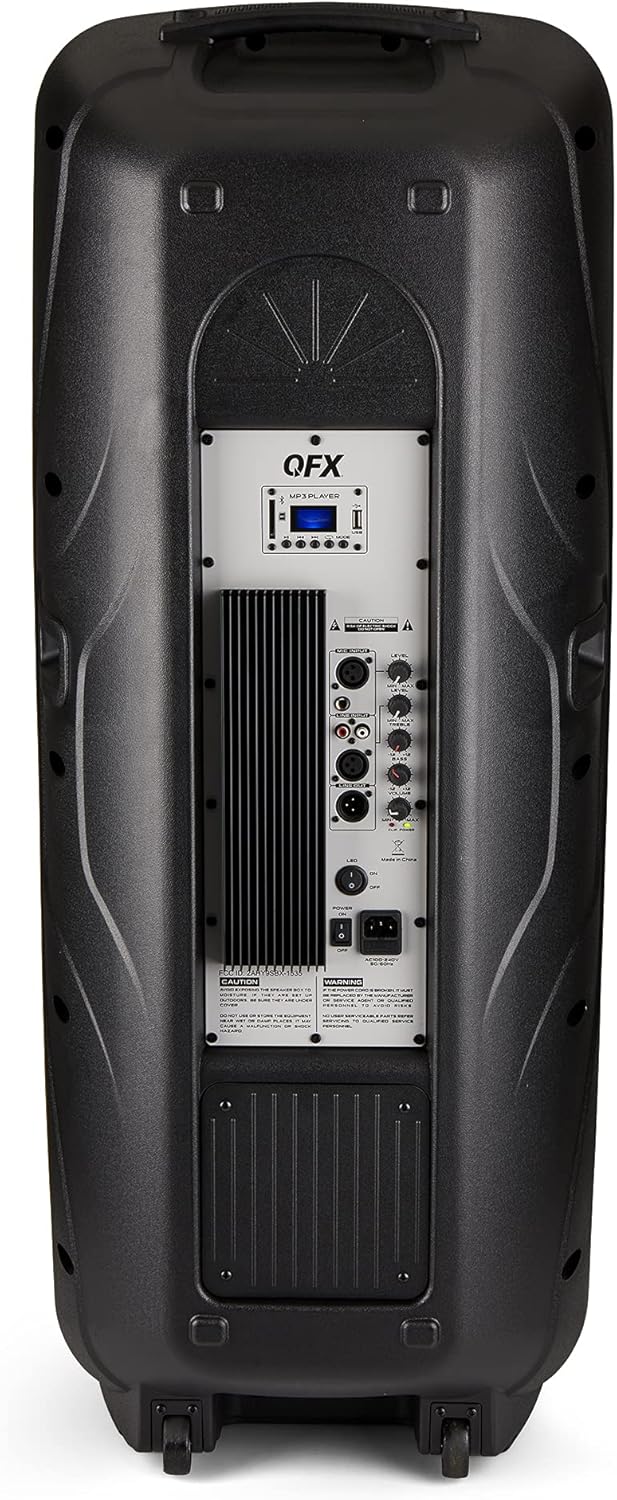
Figure 4.2: Rear panel with controls and ports.
- מתג הפעלה: מפעיל/מכבה את הרמקול.
- כניסת AC: Connects the AC power cable.
- USB/SD Card Ports: להשמעת אודיו fileמכונני USB או כרטיסי SD.
- מסך תצוגה: מציג את המצב הנוכחי ומידע על הרצועה.
- לחצן מצב: Switches between input modes (Bluetooth, FM, USB, SD, RCA).
- לחצן הפעלה/השהה: Controls playback for USB/SD/Bluetooth.
- לחצני המסלול הקודם/הבא: ניווט בין רצועות או תחנות FM.
- כפתור עוצמת הקול הראשי: מכוונן את הווליום הכללי.
- Bass/Treble Control Knobs: Adjusts low and high frequencies.
- כניסת מיקרופון XLR: Connects a wired microphone.
- כפתורי עוצמת קול/הד של המיקרופון: Adjusts microphone volume and echo effect.
- כניסת RCA (שמאל/ימין): Connects external audio devices via RCA cables.
- XLR Line Input/Output: For connecting to other audio equipment.
5. התקנה
השמה ראשונית
Place the speaker on a stable, flat surface. For optimal sound, position it in a central location within the listening area. The integrated wheels and handle allow for easy transport.

Figure 5.1: Speaker being moved with handle and wheels.
חיבור חשמל
- ודא שמתג ההפעלה של הרמקול נמצא במצב כבוי.
- Connect the AC power cable to the AC input on the rear panel of the speaker.
- חבר את הקצה השני של כבל החשמל AC לשקע חשמל רגיל בקיר.
- Flip the power switch to the ON position. The display screen will illuminate.
6. הוראות הפעלה
Bluetooth
- Turn on the QFX E-B3 speaker.
- הקש על MODE button on the speaker or remote control until "BLUE" appears on the display screen, indicating Bluetooth mode.
- הפעל את בלוטות' במכשיר הנייד שלך (סמארטפון, טאבלט וכו').
- חפש available Bluetooth devices and select "QFX E-B3" from the list.
- לאחר הצימוד, הרמקול ישמיע צליל אישור. כעת תוכלו להשמיע אודיו מהמכשיר שלכם דרך הרמקול.
True Wireless System (TWS) Pairing
TWS allows two QFX E-B3 speakers to connect wirelessly for a stereo sound experience. This feature works only in Bluetooth mode.
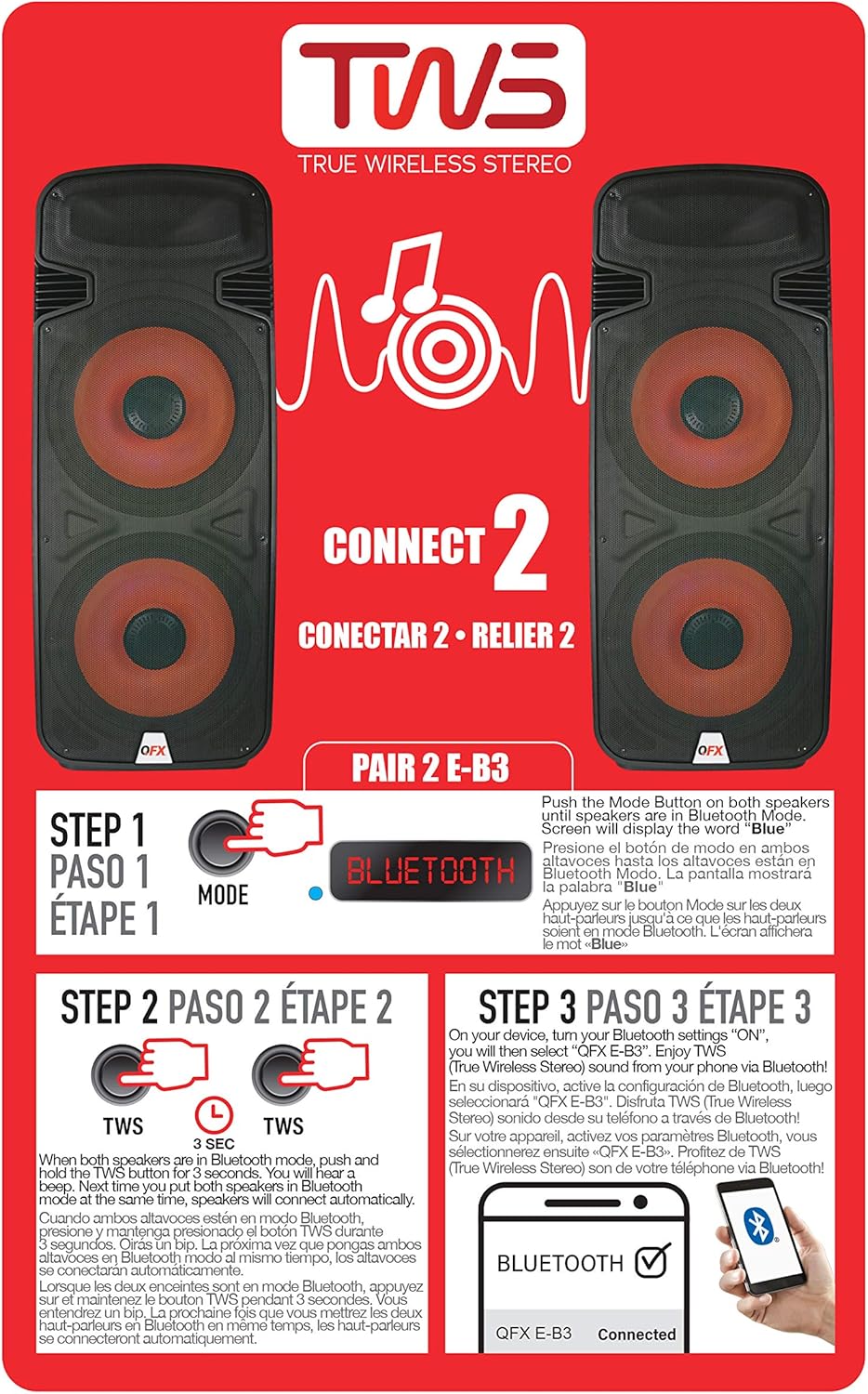
Figure 6.1: TWS Pairing Instructions.
- Ensure both QFX E-B3 speakers are powered on and in Bluetooth mode. The display on both speakers should show "BLUE".
- באחד הרמקולים (זה יהיה הרמקול הראשי שלך), לחץ והחזק את המקש TWS button for approximately 3 seconds. The speakers will attempt to connect to each other.
- Once successfully paired, you will hear a confirmation sound, and the display on the primary speaker will show "BLUE" while the secondary speaker will show "BLUE" as well.
- On your Bluetooth-enabled device, search for and select "QFX E-B3". The two speakers will now play audio in stereo.
תפעול רדיו FM
- הקש על MODE button to switch to FM radio mode. The display will show the FM frequency.
- לחץ והחזק את הפעל/השהה button to initiate an automatic scan for FM stations. The speaker will save all found stations.
- השתמש ב- המסלול הקודם/הבא כפתורים כדי לנווט בין תחנות ה-FM השמורות.
הפעלת כרטיס USB/SD
- Insert a USB flash drive or SD card (with compatible audio files) ליציאה המתאימה בפאנל האחורי.
- The speaker will automatically switch to USB/SD mode and begin playing the audio fileאם לא, לחץ על MODE כפתור כדי לבחור מצב USB או SD.
- השתמש ב- הפעל/השהה ו המסלול הקודם/הבא לחצנים לשליטה בהפעלה.
כניסת מיקרופון
- Connect a microphone to the XLR Microphone Input on the rear panel.
- Adjust the Microphone Volume and Echo knobs to achieve the desired sound.
קלט RCA
- Connect an external audio source (e.g., CD player, mixer) to the RCA Input (L/R) ports using appropriate RCA cables.
- הקש על MODE button to select RCA input mode.
- Adjust the master volume on the speaker and the volume on your external audio source.
נורות LED למסיבה
The speaker features integrated LED party lights that activate automatically when the speaker is powered on. There are no specific controls for the LED lights mentioned; they are designed to enhance the audio experience.
7. תחזוקה
ניקוי
- Always unplug the speaker before cleaning.
- השתמש במטלית רכה ויבשה כדי לנגב את המשטחים החיצוניים של הרמקול.
- אין להשתמש בחומרי ניקוי שוחקים, שעווה או ממיסים מכיוון שהם עלולים לפגוע בגימור.
- שמרו על פתחי האוורור נקיים מאבק ופסולת.
אִחסוּן
When not in use for extended periods, store the speaker in a cool, dry place, away from direct sunlight and extreme temperatures. Cover the speaker to protect it from dust.
8. פתרון תקלות
If you encounter issues with your QFX E-B3 speaker, refer to the following common problems and solutions:
| בְּעָיָה | סיבה אפשרית | פִּתָרוֹן |
|---|---|---|
| אין כוח | כבל חשמל לא מחובר; שקע החשמל אינו פעיל; הרמקול כבוי. | Ensure AC cable is securely connected to speaker and outlet. Check if outlet is working. Turn speaker power switch ON. |
| אין קול | Volume too low; Incorrect input mode selected; Audio source not playing. | Increase master volume. Press MODE button to select correct input. Ensure audio source is playing and its volume is up. |
| בלוטות' לא מתחבר | Speaker not in Bluetooth mode; Device Bluetooth off; Speaker already paired to another device; Device too far. | Ensure speaker is in Bluetooth mode ("BLUE" on display). Turn on device Bluetooth. Disconnect from other devices. Move device closer to speaker (within 30 feet). |
| צימוד TWS נכשל | הרמקולים אינם במצב בלוטות'; כפתור TWS לא לחוץ מספיק זמן. | Ensure both speakers are in Bluetooth mode. Press and hold the TWS button on one speaker for 3 seconds. |
| ניגון USB/SD לא עובד | מצב שגוי; לא תואם file format; Corrupted USB/SD card. | Press MODE to select USB/SD. Ensure audio files are in a compatible format (e.g., MP3). Try a different USB/SD card. |
9. מפרטים
| תכונה | מִפרָט |
|---|---|
| מותג | QFX |
| מספר דגם | E-B3 |
| רמקול כוח פלט מרבי | 250 וואט |
| טכנולוגיית קישוריות | USB, בלוטות' |
| מצב פלט שמע | סטריאו |
| סוג הרכבה | הרכבה על תקע, הרכבה על גלגל |
| סוג רמקול | Woofer (Dual 15 Inches) |
| סוג בקר | שְׁלַט רָחוֹק |
| צֶבַע | Party LED |
| הוא עמיד למים | שֶׁקֶר |
| שיטת בקרה | מְרוּחָק |
| קוטר וופר | 15 אינץ' |
| מספר ערוצי אודיו | 2.0 |
| טכנולוגיה אלחוטית | בלוטות' |
| פרוטוקול קישוריות | בלוטות' |
| מקור כוח | חשמלי עם כבלים |
| סוג מנהל התקן שמע | מנהל התקן דינמי |
| גודל מנהל התקן שמע | 15 אינץ' |
| מידות פריט (D x W x H) | 16.77" D x 13.98" W x 23.74" H |
| משקל פריט | 13.2 פאונד |
| מכשירים תואמים | מחשב נייד, נגן MP3, סמארטפון, טאבלט, טלוויזיה |
| UPC | 606540039618 |
10. מידע על אחריות
This product is covered by a limited warranty. For specific details regarding warranty coverage and terms, please refer to the warranty information provided at the point of purchase or contact QFX customer support directly. The warranty is typically per contract with the retailer.
11. תמיכה
For technical assistance, troubleshooting beyond this manual, or inquiries about your QFX E-B3 speaker, please contact QFX customer support or your retailer. Contact information can usually be found on the manufacturer's webבאתר או על גבי קבלת הרכישה שלך.