1. הקדמה
This manual provides essential information for the safe and efficient operation of your EDECOA 3000 Watt 24 Volt Pure Sine Wave Power Inverter. This device converts DC 24V battery power into 110V/120V AC household electricity, suitable for various applications. Please read this manual thoroughly before installation and use.

Image 1: EDECOA 3000W 24V Pure Sine Wave Power Inverter and included accessories. The inverter is green with black end caps, featuring AC outlets and an AC terminal block. Accessories include battery cables, a remote controller, and a remote cable.
2. מידע בטיחות
Observe the following safety precautions to prevent injury or damage to the inverter and connected devices:
- יש לוודא אוורור נאות סביב הממיר. אין לחסום פתחי אוורור לקירור.
- הרחק את הממיר ממים, לחות וחומרים דליקים.
- אין לפתוח את הממיר גasinז. יש לפנות לטיפול בטכנאי מוסמך.
- חבר את הממיר רק למקור מתח של 24 וולט DC.
- Ensure correct polarity when connecting battery cables (positive to positive, negative to negative). Reverse polarity protection is built-in, but incorrect connection can still cause issues.
- הימנע מעומס יתר של הממיר מעבר לדירוג ההספק הרציף שלו של 3000W.
- The inverter features multiple protection mechanisms:
- קלט נמוך כרךtage הגנה
- Input Over Voltage הגנה
- הגנת קוטביות הפוכה
- הגנת עומס יתר
- הגנה מפני קצר חשמלי
- הגנה מפני טמפרטורות גבוהות

Image 2: Diagram illustrating the intelligent alarm system for the inverter, indicating alerts for low input voltagה, נפח קלט גבוהtage, overheat, and overload conditions.
3. מה בקופסה
לאחר הוצאת המזוודה, יש לוודא שכל הפריטים נמצאים:
- EDECOA 3000 Watts 24 Volts Pure Sine Wave Inverter
- Remote Controller (Model: ED-RC)
- Remote Controller Cable (approximately 157 inches / 4 meters)
- 2 pairs of 3AWG Battery Cables (approximately 31.5 inches / 80 cm each)
- Input Port Covers
- מדריך למשתמש (מסמך זה)

Image 3: A visual representation of the accessories included with the EDECOA power inverter: remote controller, remote controller cable, two pairs of battery cables, and input port covers.
4. התקנה והתקנה
בצע את השלבים הבאים להתקנה נכונה:
- בחר מיקום: Select a dry, well-ventilated area for the inverter, away from direct sunlight, heat sources, and flammable materials. Ensure sufficient space for air circulation around the cooling fan.
- חיבור כבלי סוללה:
- Connect the red battery cable to the positive (+) terminal of the 24V battery bank and the positive (+) terminal on the inverter.
- Connect the black battery cable to the negative (-) terminal of the 24V battery bank and the negative (-) terminal on the inverter.
- ודאו שכל החיבורים מהודקים ומאובטחים כדי למנוע קשתות וחימום יתר.
- הַאֲרָקָה: Connect the inverter's ground wire port to a proper earth ground.
- Connect Remote Controller (Optional): Insert the remote controller cable into the "REMOTE" port on the inverter and the corresponding port on the remote controller.
- בלוק מסוף AC: For appliances requiring more than 1800 Watts, use the AC terminal block for a direct wired connection. Consult a qualified electrician for this type of installation.

Image 4: Rear panel of the EDECOA inverter showing the 3 AC outlets, indicator light, ON/OFF switch, remote controller port, ground wire port, and AC terminal block. The cooling fan and copper terminals with safe covers are visible on the side.

תמונה 5: תקריב view of the AC Terminal Block on the EDECOA inverter, designed for direct wiring of high-power appliances (over 1800 Watts).
5. הוראות הפעלה
To operate your EDECOA power inverter:
- הפעלה: After all connections are secure, switch the ON/OFF button on the inverter to the "ON" position. The indicator light should illuminate. Alternatively, use the remote controller to switch the inverter ON.
- חבר מכשירי חשמל: Plug your AC appliances into the inverter's AC outlets or ensure they are properly connected to the AC terminal block.
- עומס צג: Avoid exceeding the inverter's continuous power rating (3000W). The inverter will provide a surge power of up to 6000W for brief periods (less than 10ms) for starting motors.
- פונקציות שלט רחוק: The remote controller allows you to switch the inverter ON/OFF and provides visual indicators for battery capacity and low input voltagאזהרות אלקטרוניות.
- כיבוי: When finished, switch the ON/OFF button on the inverter or the remote controller to the "OFF" position.

Image 6: The EDECOA remote controller connected to the inverter via a standard network cable. The remote features an ON/OFF switch, battery level indicator, and low input voltage warning light.

Image 7: The EDECOA power inverter providing electricity in an outdoor camping setting, demonstrating its utility for remote power needs.
6. תחזוקה
The EDECOA power inverter requires minimal maintenance. To ensure optimal performance and longevity:
- Regularly inspect battery cables and connections for tightness and corrosion.
- Keep the inverter's cooling vents clear of dust and debris. Use compressed air to clean if necessary.
- יש לאחסן את הממיר במקום קריר ויבש כאשר אינו בשימוש.
7. פתרון תקלות
אם נתקלת בבעיות עם הממיר שלך, עיין בבעיות הנפוצות ובפתרונות הבאות:
| בְּעָיָה | סיבה אפשרית | פִּתָרוֹן |
|---|---|---|
| הממיר לא נדלק. |
|
|
| אין יציאת מתח. |
|
|
| Remote controller not working correctly (e.g., turns on but not off). |
|
|
| Inverter makes a beeping sound. |
|
|
8. מפרטים
Key technical specifications for the EDECOA 3000W 24V Pure Sine Wave Power Inverter:
| תכונה | מִפרָט |
|---|---|
| דֶגֶם | 3000W-24V |
| כוח מתמשך | 3000 וואט |
| כוח נחשול | 6000 וואט (<10ms) |
| קלט DC כרךtage | 24 וולט |
| פלט AC Voltage | 110V/120V AC |
| צורת גל פלט | גל סינוס טהור (THD <5%) |
| שקעי AC | 3 |
| פלט נוסף | 1 בלוק מסופי AC |
| תכונות הגנה | Input Low/Over Voltage, Reverse Polarity, Overload, Short Circuit, Over-temperature |
| הִתקָרְרוּת | Intelligent Fan Control (IFC), 1 Efficient Cooling Fan, 2 Built-in Heat Dissipation Plates |
| מידות | 16.85 x 8.07 x 0.01 אינץ' (מוצר) |
| משקל פריט | 21.8 פאונד |
| הסמכות | CE, EMC, LVD |
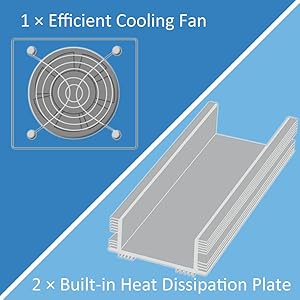
Image 8: Diagram illustrating the inverter's cooling system, featuring one efficient cooling fan and two built-in heat dissipation plates for thermal management.

Image 9: Illustration of the pure sine wave output (THD < 5%) provided by the inverter, alongside examples of its use in motor homes, camping, and as an indoor power supply.

Image 10: Graph illustrating the soft start function of the inverter, showing a gradual voltage increase to 120V over time.
9. אחריות ותמיכה
For warranty information or technical support, please refer to the EDECOA official website or contact their customer service directly. Protection plans may be available for extended coverage.
בקר ב EDECOA Store on Amazon למוצרים ומידע נוסף.