
Goshyda KX-T6001CID
Goshyda KX-T6001CID Big Button Corded Telephone User Manual
Model: KX-T6001CID | Brand: Goshyda
מָבוֹא
Thank you for choosing the Goshyda KX-T6001CID Big Button Corded Telephone. This manual provides detailed instructions to help you set up, operate, and maintain your new telephone. Please read this manual thoroughly before use to ensure proper functionality and to take full advantagהתכונות שלו.
מידע בטיחות
- Do not expose the telephone to water or moisture.
- Avoid placing the telephone in direct sunlight or near heat sources.
- Use only the provided telephone line cord.
- Do not attempt to open or repair the telephone yourself. Refer all servicing to qualified personnel.
- הרחק מהישג ידם של ילדים.
תוכן החבילה
ודא שכל הפריטים נמצאים בחבילה:
- 1 x שפופרת
- 1 x Telephone Base Unit
- 1 x Handset Cord
- 1 x כבל טלפון
- 1 x מדריך למשתמש

Image: The Goshyda KX-T6001CID telephone, showing the base unit, handset, and coiled cord.
המוצר נגמרview
Familiarize yourself with the main components and controls of your telephone.

תמונה: חזית view of the telephone, highlighting the LCD display, large numeric keypad, and function buttons.
Keypad and Display:
- מקלדת מספרית (0-9, *, #): For dialing phone numbers.
- תצוגת LCD: Shows caller ID, time, date, and menu options.
- לחצני M1/M2: One-touch memory dialing keys.
- SET/STORE Button: Used for entering settings menu and saving entries.
- לחצני למעלה/מטה: Navigate through menu options or adjust volume.
- RING Button: Adjust ringer volume.
- לחצן VOL: Adjust earpiece/speaker volume.
- FL/BRT (Flash/Brightness) Button: Flash function for call waiting, also adjusts LCD brightness.
- REDIAL Button: מחייג מחדש למספר האחרון שחוייג.
- H.F (Hands-Free) Button: Activates speakerphone mode.

תמונה: תקריב view of the large, easy-to-read buttons on the telephone's keypad.
הגדרה
1. Connecting the Telephone:
- Connect one end of the coiled handset cord to the handset and the other end to the handset jack on the left side of the telephone base unit.
- Connect one end of the telephone line cord to the LINE jack on the back of the telephone base unit.
- חבר את הקצה השני של כבל הטלפון לשקע הטלפון בקיר.
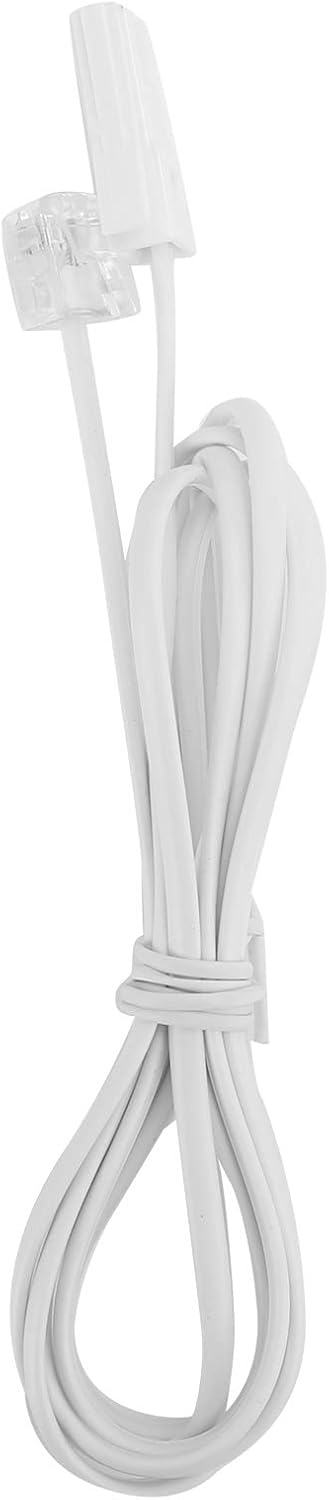
Image: The telephone line cord, used to connect the phone to the wall jack.
2. הגדרות ראשוניות:
Upon initial connection, the LCD display may prompt you to set the date and time. Follow the on-screen instructions using the UP ו לְמַטָה buttons to adjust values and the הגדר/חנות לחצן לאישור.
הוראות הפעלה
להתקשר:
- הרם את השפופרת או לחץ על HF button for speakerphone.
- חייג את מספר הטלפון הרצוי באמצעות לוח המקשים המספרי.
- המתן עד שהשיחה תתחבר.
- כדי לסיים את השיחה, הניחו את השפופרת או לחצו על הלחצן HF כפתור שוב.
מענה לשיחה:
כאשר הטלפון מצלצל, הרימו את השפופרת או לחצו על הלחצן HF כפתור כדי לענות.
חיוג חוזר:
הרם את השפופרת או לחץ HF, ואז הקש על החזרה כפתור כדי לחייג למספר האחרון שחוייג.
Using Memory Keys (M1/M2):
אחסון מספר:
- הרם את השפופרת או לחץ HF.
- לִלְחוֹץ הגדר/חנות.
- Dial the phone number you wish to store.
- לִלְחוֹץ הגדר/חנות שׁוּב.
- לחץ על אחד מהם M1 or M2 to save the number to that memory key.
Dialing from Memory:
הרם את השפופרת או לחץ HF, then press either M1 or M2 to dial the stored number.
תכונות
- DTMF/FSK Dual System Caller ID: Supports both DTMF and FSK caller ID systems for displaying incoming call information.

Image: The telephone's display, showing its capability for DTMF/FSK dual system caller ID function.
- FLASH Time Adjustment: Adjustable FLASH time (90/95/100/120/180/300/600/1000ms) for compatibility with various PBX systems or call waiting services.
- 16 Ringtone Options: Choose from 16 different ringtones.

Image: The telephone with graphic elements suggesting a choice of 16 ringtones.
- Adjustable LCD Brightness: Five levels of LCD screen brightness adjustment for optimal viewing.
- 3 Alarm Clock Functions: Set up to 3 different alarm clocks, each with unique alarm sounds.
- 10 Groups of Dual Key Memory: Store up to 10 frequently called numbers using dual-key memory functions.
- 1-99 Hours Do Not Disturb Function: Set a "Do Not Disturb" period from 1 to 99 hours.
תַחזוּקָה
- נקו את הטלפון בעזרת מטלית רכהamp בַּד. אין להשתמש בחומרי ניקוי שוחקים או ממסים.
- Keep the telephone away from dust and extreme temperatures.
- Ensure cords are not tangled or pinched to prevent damage.
פתרון בעיות
| בְּעָיָה | סיבה אפשרית | פִּתָרוֹן |
|---|---|---|
| אין צליל חיוג | כבל קו הטלפון מנותק או פגום. | Check all cable connections. Try a different telephone line cord. Test the wall jack with another phone. |
| לא ניתן לבצע או לקבל שיחות | Line issue, or phone is in "Do Not Disturb" mode. | Verify phone line service. Check if "Do Not Disturb" is active and disable it. |
| זיהוי מתקשר לא מוצג | Caller ID service not subscribed or incompatible system. | Contact your telephone service provider to ensure Caller ID service is active. |
| התצוגה עמומה או ריקה | LCD brightness setting is too low. | Adjust the LCD brightness using the FL/BRT button or menu settings. |
מפרטים
| תכונה | פְּרָט |
|---|---|
| דֶגֶם | KX-T6001CID |
| מותג | Goshyda |
| חוֹמֶר | אקרילוניטריל בוטאדיאן סטירן (ABS) |
| צֶבַע | לָבָן |
| סוּג | טלפון מקושר |
| סוג חייגן | לוח מקשים בודד |
| זיהוי מתקשר | Yes (DTMF/FSK Dual System) |
| זמן פלאש | 90/95/100/120/180/300/600/1000ms |
| רינגטונים | 16 אפשרויות |
| בהירות LCD | 5 רמות מתכווננות |
| פונקציות אזעקה | 3 קבוצות |
| פונקציית זיכרון | 10 groups of dual key memory |
| אל תפריע | 1-99 שעות |
| משקל פריט | 481 גרם |
| מידות (L x W x H) | 10 x 10 x 10 מילימטרים (בקירוב) |
| מקור כוח | Battery Powered (likely referring to LCD/memory backup, as corded phones are line-powered for basic functions) |
אחריות ותמיכה
This Goshyda product is covered by a standard manufacturer's warranty. For specific warranty details, please refer to the documentation included with your purchase or contact Goshyda customer support.
For technical assistance or further inquiries, please contact Goshyda customer service through their official webאתר או פרטי הקשר שסופקו עם המוצר שלך.
Ask a question about this manual
Ask about setup, troubleshooting, compatibility, parts, safety, or missing instructions. Manuals+ will review the question and use this page’s manual context to help answer it.