
מָבוֹא
The Clean Remote CR3HOME is a universal TV remote control designed for simplicity and ease of use. It features a nonporous, sealed membrane surface for easy cleaning and enhanced hygiene. This remote is compatible with nearly all TV brands and cable boxes, offering a streamlined control experience without unnecessary buttons.
This manual provides instructions for setting up, operating, maintaining, and troubleshooting your CR3HOME remote control.
המוצר נגמרview
The Clean Remote CR3HOME features a basic key layout, focusing on essential functions for TV and cable box control. It is designed to be user-friendly for all ages.

תמונה: חזית view of the Clean Remote CR3HOME, highlighting its simple key layout and absence of input, menu, or guide buttons.
תכונות מפתח כוללות:
- Universal compatibility with most TV brands and cable boxes.
- Nonporous, sealed membrane surface for easy cleaning.
- Simplified button layout: No Input, Menu, or Guide buttons.
- Large, easy-to-press buttons.
הוראות התקנה
1. התקנת סוללה
- אתר את תא הסוללות בגב השלט הרחוק.
- החלק את מכסה הסוללה כלפי מטה כדי לפתוח.
- הכניסו שתי (2) סוללות AAA, תוך הקפדה על הקוטביות הנכונה (+ ו-) כפי שמסומן בתוך התא.
- החזר את מכסה הסוללה למקומו על ידי החלקתו בחזרה עד שיישמע קליק.
2. TV Pairing
The CR3HOME remote is designed for quick setup with most televisions.
- For Samsung and LG TVs: The remote instantly replaces and works with these brands without any setup required. Simply point and use.
- For All Other TV Brands (One-Touch Setup):
- Ensure your TV is turned ON.
- Point the CR3HOME remote at your TV.
- לחץ והחזק את הגדרה button until the red indicator light on the remote turns on and stays lit.
- תוך כדי החזקת הגדרה לחצן, לחץ על כוח טלוויזיה לחצן פעם אחת. האור האדום יהבהב.
- Release both buttons. The remote will now attempt to find the correct code for your TV. Test the remote by pressing the כוח טלוויזיה button. If the TV turns off, the setup is complete.
- If the TV does not turn off, repeat steps 3-5. The remote cycles through codes quickly, so you may need to try a few times.
3. Cable Box Setup
The CR3HOME remote offers simple setup for cable boxes.
- Ensure your cable box is turned ON.
- Point the CR3HOME remote at your cable box.
- לחץ והחזק את הגדרה button until the red indicator light on the remote turns on and stays lit.
- תוך כדי החזקת הגדרה לחצן, לחץ על CBL לחצן פעם אחת. האור האדום יהבהב.
- Release both buttons. The remote will now attempt to find the correct code for your cable box. Test the remote by pressing the CH+ or CH- buttons. If the channel changes, the setup is complete.
- If the channel does not change, repeat steps 3-5.
הוראות הפעלה
The Clean Remote CR3HOME is designed for straightforward operation with its essential buttons.
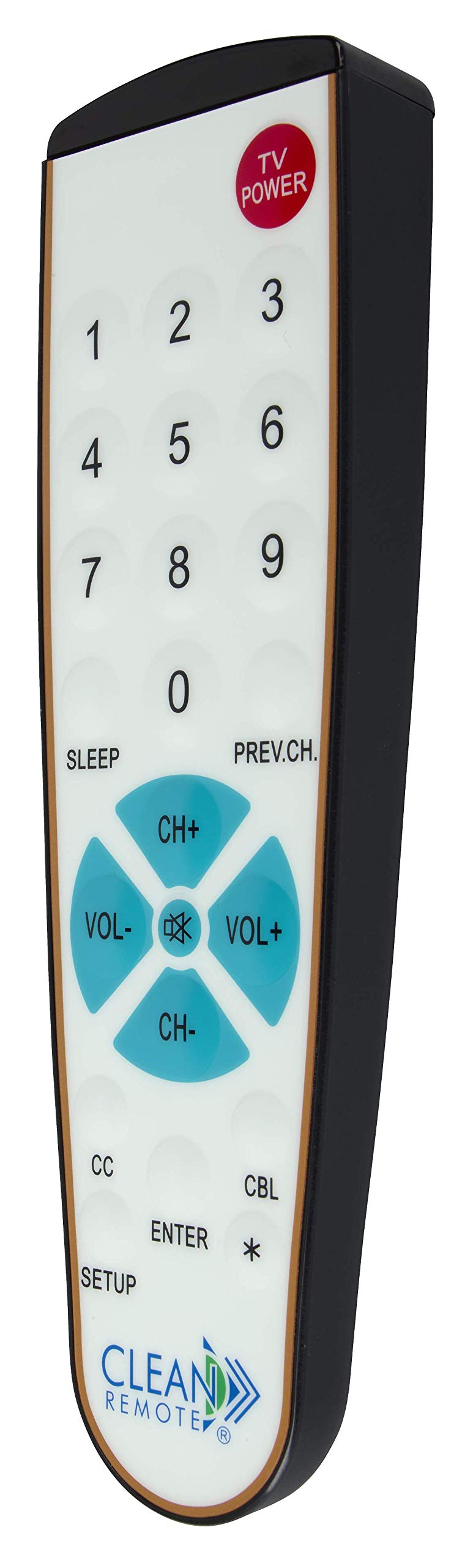
תמונה: מפורט view of the Clean Remote CR3HOME, illustrating the layout of its power, number, volume, and channel buttons.
- TV POWER: מדליק או מכבה את הטלוויזיה שלך.
- לחצני מספרים (0-9): Used to directly enter channel numbers.
- VOL+ / VOL-: מגביר או מפחית את עוצמת הקול.
- CH+ / CH-: משנה את הערוץ למעלה או למטה.
- PREV.CH: חוזר לקודם viewערוץ ed.
- לִישׁוֹן: Activates the TV's sleep timer function (if supported by your TV).
- כתוביות (CC): Toggles closed captioning on or off (if supported by your TV).
- להיכנס: Confirms selections or channel entries.
- *: May function as a dash or special character depending on the TV/cable box.
פֶּתֶק: This remote intentionally omits Input, Menu, and Guide buttons to prevent accidental changes to TV settings, making it ideal for environments where simplicity is key.
תַחזוּקָה
The Clean Remote CR3HOME is designed for easy maintenance due to its spill-proof and sealed construction.
- ניקוי: To clean the remote, simply wipe its nonporous, sealed membrane surface with a damp cloth or a mild disinfectant wipe. Avoid using abrasive cleaners or submerging the remote in liquid.
- החלפת סוללה: Replace batteries when the remote's indicator light becomes dim or the remote becomes unresponsive. Always use fresh AAA batteries.
- אִחסוּן: Store the remote in a dry place away from extreme temperatures.
פתרון בעיות
- השלט לא מגיב:
- בדוק אם הסוללות הוכנסו כהלכה ואינן ריקות. החלף במידת הצורך.
- Ensure there is a clear line of sight between the remote and the TV/cable box. Remove any obstructions.
- Make sure you are within the effective range of the remote (typically up to 20 feet).
- Remote not controlling TV/Cable Box after setup:
- Repeat the TV Pairing or Cable Box Setup steps carefully. The remote cycles through codes, and sometimes it may require multiple attempts to find the correct one.
- Ensure the TV/cable box is powered on during the setup process.
- חלק מהכפתורים לא עובדים:
- Verify that the button functionality is supported by your specific TV or cable box model.
- Remember that the CR3HOME intentionally does not have Input, Menu, or Guide buttons.
מפרטים
| מותג | מרחוק נקי |
| מספר דגם | CR3HOME |
| תכונה מיוחדת | Spillproof, Universal |
| מכשירים תואמים | Television, Cable Box |
| טכנולוגיית קישוריות | אינפרא אדום |
| סוג בקר | בקרת כפתור |
| מקור כוח | 2 x סוללות AAA (לא כלולות) |
| UPC | 816466021271 |
מידע על אחריות
Clean Remote products are typically covered by a limited manufacturer's warranty. Please refer to the packaging or the official Clean Remote webבאתר לקבלת תנאי האחריות הספציפיים, כולל פרטי משך הזמן והכיסוי. שמור את הוכחת הרכישה שלך לצורך תביעות אחריות.
תמיכת לקוחות
For further assistance, technical support, or inquiries regarding your Clean Remote CR3HOME, please visit the official Clean Remote webאתר או צרו קשר עם מחלקת שירות הלקוחות שלהם. פרטי קשר ניתן למצוא בדרך כלל על אריזת המוצר או על כתב היצרן webאֲתַר.