הוראות בטיחות חשובות
Please read all instructions carefully before using the projector and retain this manual for future reference. Failure to follow these instructions may result in electric shock, fire, or other injuries or damage.
- אין לחסום פתחי אוורור. יש לוודא מרווח מספיק סביב המקרן לזרימת אוויר תקינה.
- אין לחשוף את המקרן לגשם או לחות כדי להפחית את הסיכון לשריפה או התחשמלות.
- השתמש רק בתוספות/אביזרים שצוינו על ידי היצרן.
- נתק את המקרן מהחשמל במהלך סופות ברקים או כאשר אינו בשימוש למשך תקופות ארוכות.
- הפנה כל טיפול לצוות שירות מוסמך.
- הימנע מחשיפה ישירה של העיניים לעדשת המקרן כאשר ה-lamp פועל.
תוכן החבילה
ודא שכל הפריטים המפורטים להלן כלולים בחבילה שלך:
- EKASN Creative E450 Mini Projector
- שְׁלַט רָחוֹק
- כבל חשמל
- כבל HDMI
- כבל AV
- מדריך למשתמש
המוצר נגמרview
Familiarize yourself with the components and interfaces of your EKASN Creative E450 projector.

Image: The EKASN Creative E450 Mini Projector, showcasing its compact design, front lens, and included remote control and connection cables.
ממשקים ויציאות
The projector features multiple ports for versatile connectivity with various devices.

תמונה: צד view of the EKASN Creative E450 Mini Projector highlighting its various input and output ports, including VGA, Headset, Power, USB, AV, and HDMI.
- יציאת VGA: For connecting to computers or laptops with a VGA output.
- Headset/Audio Out: שקע שמע 3.5 מ"מ לחיבור רמקולים חיצוניים או אוזניות.
- קלט כוח: מתחבר למתאם החשמל.
- יציאת USB: Supports USB flash drives for media playback. Note: Does not support cord connection or data transfer from devices.
- יציאת AV: For connecting devices using an AV cable (e.g., DVD players).
- יציאת HDMI: For high-definition video and audio input from devices like TV sticks, Apple TV, Roku, PCs, PS4, laptops, and MacBooks.
מדריך התקנה
1. Initial Placement and Screen Size
Place the projector on a stable, flat surface. The projection size can be adjusted by changing the distance between the projector and the screen/wall. For optimal viewing, use the projector in a relatively dark environment.

Image: A diagram illustrating various projection screen sizes (38" to 160") achievable at different projection distances (3.9ft to 13.3ft) with the EKASN Creative E450 Mini Projector.
- Minimum Projection Size: Approximately 33 inches (at 3.7 feet distance).
- גודל הקרנה מקסימלי: Up to 170 inches (at 19.7 feet distance).
- מרחק מומלץ: Adjust to achieve desired screen size and clarity.
2. הפעלה
- חבר את כבל החשמל לשקע החשמל של המקרן.
- חבר את הקצה השני של כבל החשמל לשקע חשמל.
- לחץ על לחצן ההפעלה במקרן או בשלט הרחוק כדי להפעיל את המכשיר.
3. תיקון מיקוד ותיקון טרפז
To achieve a clear and rectangular image, adjust the focus and keystone correction.

Image: A visual representation of keystone correction, showing how the projected image can be adjusted by ±15 degrees to achieve a perfectly rectangular display.
- תיקון אבן מפתח: Locate the keystone adjustment ring/knob near the lens. Rotate it to correct any trapezoidal distortion in the image, making it rectangular. The projector supports manual keystone correction of ±15 degrees.
- התאמת מיקוד: After correcting the keystone, rotate the focus ring/knob around the lens until the image appears sharp and clear.
4. התקני חיבור
The EKASN Creative E450 supports various input sources.
- חיבור HDMI: Connect your TV Stick, Apple TV, Roku, PC, PS4, DVD player, laptop, or MacBook to the projector's HDMI port using an HDMI cable.
- חיבור לסמארטפון:

Image: A visual guide demonstrating how to connect an iPhone (via Lightning to HDMI adapter) and an Android phone (via Micro USB/Type C to HDMI adapter) to the EKASN Creative E450 Mini Projector. Adapters are not included.
- For iPhone: An external Lightning to HDMI adapter is required (not included).
- For Android Phone: A Micro USB/Type C to HDMI adapter is required (not included).
- After connecting the adapter and HDMI cable, ensure you select HDMI as the input source on the projector.
- חיבור USB: Insert a USB flash drive containing your media files into the USB port. Navigate to the USB input source and select the desired file for playback. Supported formats may vary.
- חיבור AV: Use the provided AV cable to connect devices with AV output.
- חיבור VGA: Connect to a computer or laptop using a VGA cable.
5. שיטות התקנה מרובות
The projector offers flexible installation options to suit your environment.
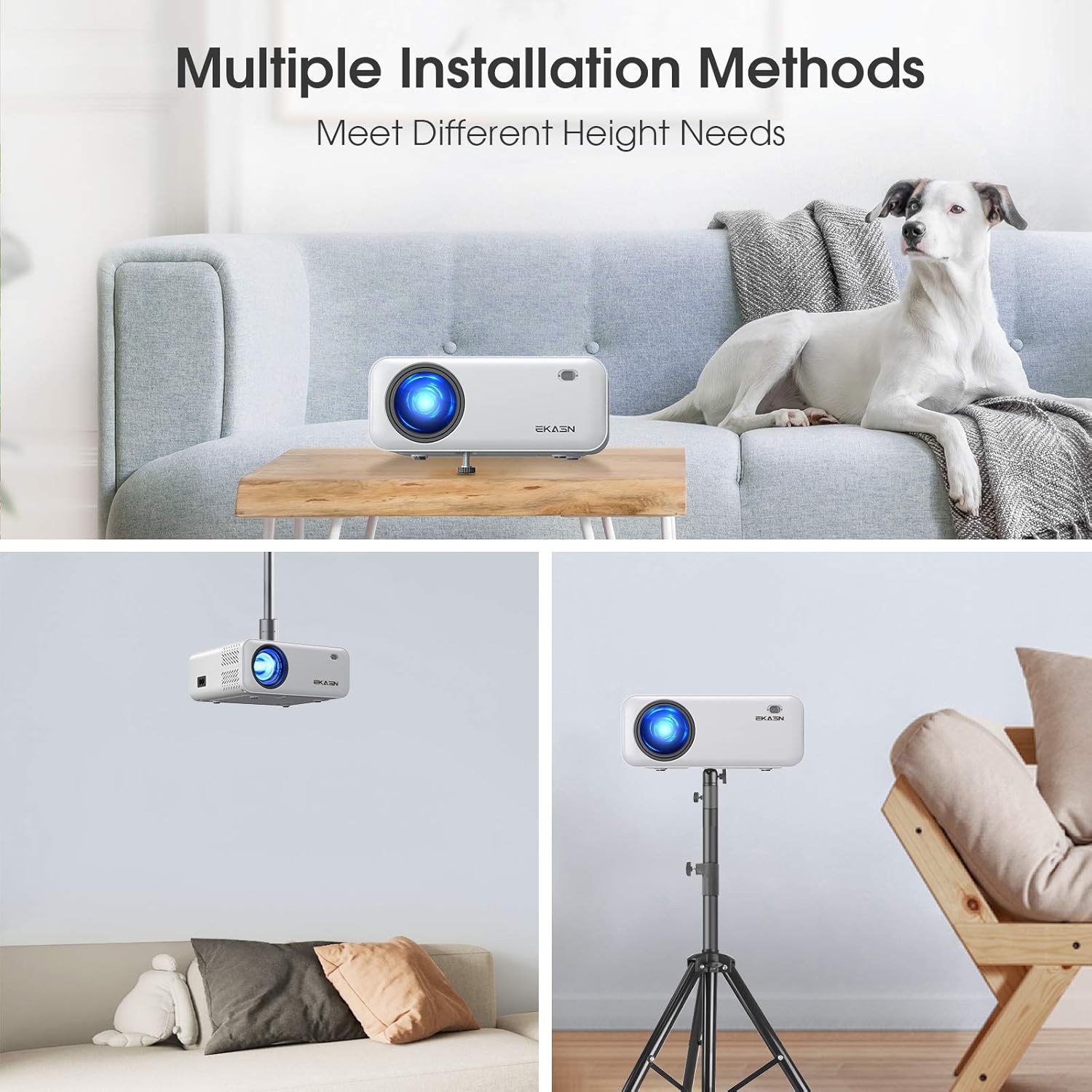
תמונה: שלושה לשעברamples of installation methods for the EKASN Creative E450 Mini Projector: tabletop placement, ceiling mount, and tripod mount.
- תושבת לשולחן: Place the projector directly on a table or flat surface. You can adjust the height using the screw on the bottom.
- תקרת הר: The projector has a screw hole on its bottom for universal tripod or ceiling mounting. Ensure proper mounting hardware is used (not included).
- מתקן חצובה: Attach the projector to a compatible tripod using the screw hole on the bottom.
הוראות הפעלה
1. Basic Operation and Menu Navigation
Use the included remote control or the buttons on the projector to navigate the menu and control playback.
- לחצן הפעלה: מפעיל/כיבוי את המקרן.
- לחצן המקור: Selects the input source (HDMI, AV, USB, VGA).
- לחצן תפריט: גישה לתפריט ההגדרות של המקרן.
- Navigation Buttons (Arrow Keys): מעבר בין אפשרויות התפריט.
- לחצן אישור: מאשר בחירות.
- לחצני עוצמת הקול: כוונן את עוצמת השמע.
2. בחירת מקור קלט
After connecting your device, press the "Source" button on the remote or projector to select the corresponding input (e.g., HDMI1, AV, USB, VGA).
3. הגדרות שמע
The projector has built-in stereo speakers. For enhanced audio, you can connect external speakers or headphones via the 3.5mm audio output jack.
Important Note on Dolby Sound: The projector does לֹא support Dolby sound. If you experience no sound while playing videos from streaming services like Netflix or Amazon Prime Video, you must turn off Dolby sound in the settings of your connected device (e.g., TV Stick, media player). Typically, this setting can be found under: Settings > Display & Sounds > Audio > Dolby Digital Output > Turn Dolby Digital Plus OFF.
4. Media Playback from USB
Insert a USB flash drive containing your media files into the USB port. Navigate to the USB input source and select the desired file for playback. Supported formats may vary.
תַחזוּקָה
תחזוקה שוטפת מסייעת להבטיח את אורך החיים והביצועים האופטימליים של המקרן שלך.
- ניקוי העדשה: השתמשו במטלית רכה ונטולת סיבים המיועדת במיוחד לעדשות אופטיות. אין להשתמש בחומרי ניקוי שוחקים או במטליות שעלולות לשרוט את העדשה.
- ניקוי גוף המקרן: נגבו את החלק החיצוני במטלית רכה ויבשה. עבור כתמים עקשניים, נגבו מעטamp ניתן להשתמש במטלית, ולאחר מכן לנגב יבש.
- אוורור: Ensure the ventilation openings are clear of dust and debris. Do not block them during operation. Periodically clean the vents with a soft brush or compressed air.
- אִחסוּן: כאשר המקרן אינו בשימוש למשך תקופות ממושכות, יש לאחסן אותו במקום קריר ויבש, הרחק מאור שמש ישיר וטמפרטורות קיצוניות.
פתרון בעיות
אם נתקלת בבעיות עם המקרן שלך, עיין בבעיות הנפוצות ובפתרונות הבאים:
| בְּעָיָה | סיבה / פתרון אפשרי |
|---|---|
| תמונה מטושטשת |
|
| No Sound from Streaming Apps (e.g., Netflix, Amazon Prime Video) | The projector does not support Dolby sound. Turn off Dolby sound output in the audio settings of your connected streaming device (e.g., TV Stick, media player). |
| No Signal / No Picture |
|
| USB Port Not Working for Phone Connection/Data Transfer | The USB port only supports USB flash drives for media playback. It does NOT support cord connection for smartphones or data transfer. For smartphone mirroring, an external HDMI adapter is required. |
| התמונה היא טרפזית | Adjust the keystone correction knob until the image is rectangular. |
מפרטים
Detailed technical specifications for the EKASN Creative E450 Mini Projector.
| תכונה | פְּרָט |
|---|---|
| מותג | EKASN |
| דֶגֶם | Creative E450 |
| טכנולוגיית תצוגה | LCD |
| רזולוציה מקורית | 1280 x 720 פיקסלים |
| רזולוציה נתמכת | Up to 1920 x 1080 Pixels (1080P Full HD) |
| בְּהִירוּת | 5500 לוקס |
| יחס ניגודיות | 2000:1 |
| יחס גובה-רוחב תמונה | 16:9 |
| גודל הקרנה | 33 אינץ' עד 170 אינץ' |
| מרחק הקרנה | 3.7ft to 19.7ft |
| תיקון קיסטון | ידני ±15° |
| ממשק חומרה | 3.5mm Audio, HDMI, USB, VGA, AV |
| מכשירים תואמים | iPhone, Android Phones, TV Box, TV Stick, PCs, PS4, DVD, Laptops, Tablets, MacBook, USB Flash Drive, Media Players |
| פלט אודיו | Built-in Stereo Speakers, 3.5mm Audio Out |
| מהtage | 60 וואט |
| גורם צורה | נייד |
| סוג הרכבה | Tabletop Mount, Ceiling Mount, Tripod Mount |
| מידות המוצר | 19.28 x 16.48 x 7.62 ס"מ; 1.51 ק"ג |
אחריות ותמיכה
EKASN provides comprehensive support for your projector.
- אַחֲרָיוּת: The EKASN Creative E450 Mini Projector comes with a 2-year warranty.
- תמיכה טכנית: תמיכה טכנית מקצועית לכל החיים זמינה.
- For any problems or inquiries, please contact EKASN customer service. Refer to your product packaging or the official EKASN webאתר לקבלת פרטי התקשרות ספציפיים.