
R-MUSIC Booster S (RM301891)
R-MUSIC High Power Wireless Bluetooth Speaker - Booster S
דגם: RM301891
1. הקדמה
Thank you for choosing the R-MUSIC Booster S High Power Wireless Bluetooth Speaker. This manual provides important information regarding the setup, operation, and maintenance of your new speaker. Please read this manual thoroughly before using the product to ensure proper function and to prevent damage.
2. תכולת החבילה
אנא בדקו את תוכן האריזה בעת פתיחת הקופסה. אם חסרים פריטים או פגומים, צרו קשר עם הקמעונאי שלכם.
- R-MUSIC Booster S Speaker Unit
- מתאם חשמל/כבל טעינה
- Wired Microphone (if included with your model)
- מדריך למשתמש

Image: Wired Microphone. This microphone is typically included for karaoke or public address functions.
3. תכונות מוצר
The R-MUSIC Booster S speaker is designed for powerful and versatile audio playback. Key features include:
- High Power Audio Output (40 Watts Max)
- קישוריות Bluetooth אלחוטית
- USB Port for MP3 Playback
- MicroSD Card Reader for MP3 Playback
- 3.5mm AUX Input for Wired Connections
- Microphone Input with Echo Control
- Integrated LED Display
- מופע אורות לד דינמי
- Portable Design with Integrated Handle

תמונה: חזית view of the R-MUSIC Booster S speaker, highlighting the speaker grille and LED lighting.

תמונה: בזווית view של הדובר, הצגasing its compact yet powerful design.
4. בקרות וחיבורים
Familiarize yourself with the control panel located on the rear of the speaker.
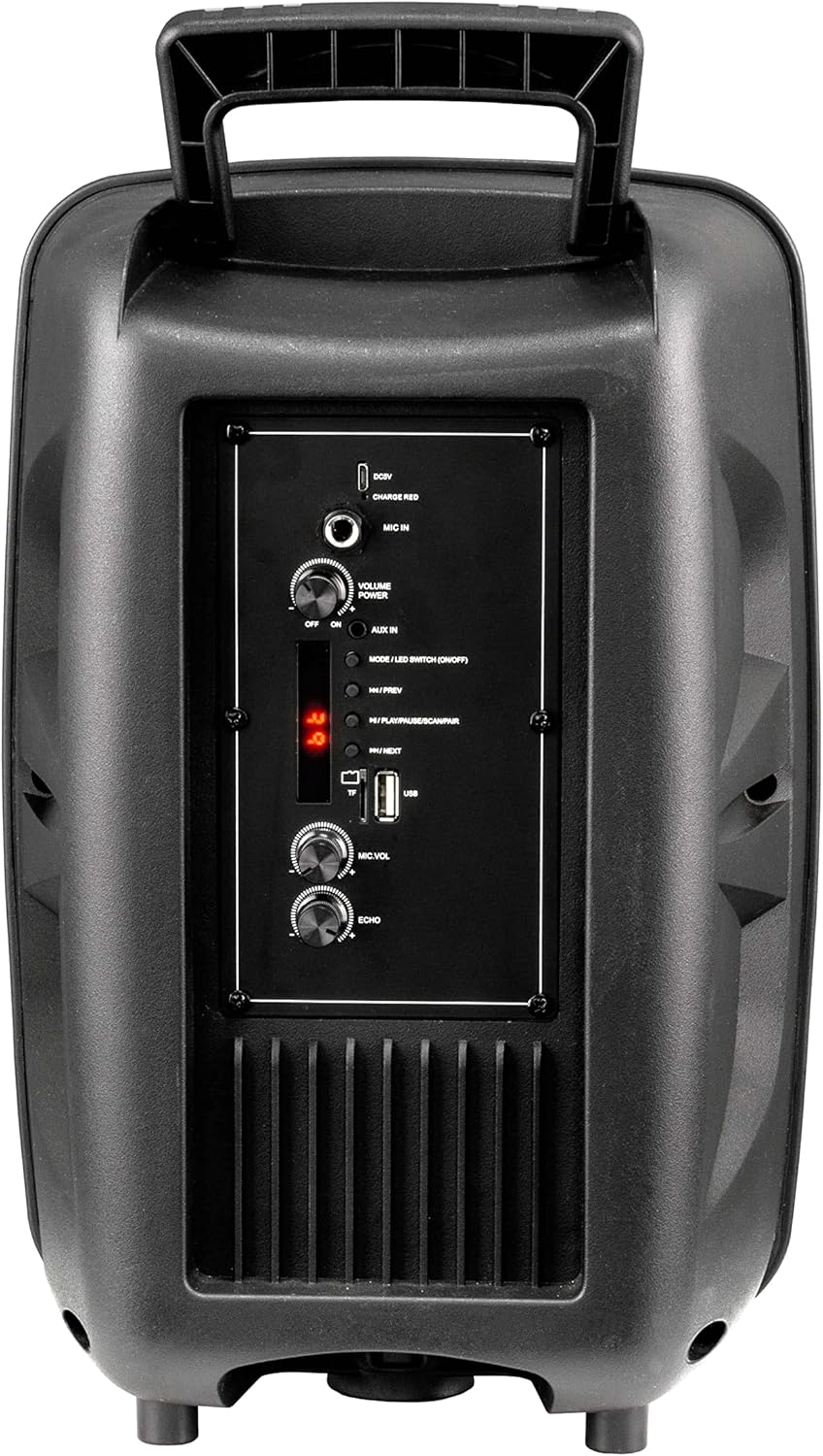
Image: Rear Control Panel Overview.
- כניסת DC 5V: כניסת חשמל לטעינת הרמקול.
- CHARGE RED Indicator: Lights up red when charging.
- כניסת מיקרופון: 6.35mm jack for connecting a wired microphone.
- VOLUME POWER (OFF/ON): Rotary knob to turn the speaker ON/OFF and adjust the master volume.
- AUX IN: 3.5mm audio input for connecting external audio devices.
- MODE / LED SWITCH (ON/OFF): Press to switch between input modes (Bluetooth, USB, MicroSD, AUX). Press and hold to turn the LED light show ON/OFF.
- |<< / PREV: לחץ כדי לעבור לרצועה הקודמת.
- >>| / NEXT: לחץ כדי לעבור לשיר הבא.
- >|| / PLAY/PAUSE / SCAN/PAIR: Press to play or pause audio. In FM mode, press and hold to scan for stations. In Bluetooth mode, press and hold to initiate pairing.
- חריץ לכרטיס TF (MicroSD): Insert a MicroSD card for MP3 playback.
- יציאת USB: הכנס כונן הבזק מסוג USB להשמעת MP3.
- MIC.VOL: כפתור סיבובי לכוונון עוצמת המיקרופון.
- הֵד: Rotary knob to adjust the microphone echo effect.
5. התקנה
5.1. טעינת הרמקול
Before first use, fully charge the speaker. Connect the provided charging cable to the DC 5V input on the rear panel and plug the other end into a suitable USB power source (e.g., USB wall adapter, computer USB port). The "CHARGE RED" indicator will light up during charging and turn off when fully charged.
5.2. הפעלה / כיבוי
Rotate the "VOLUME POWER" knob clockwise to turn the speaker ON. Rotate it counter-clockwise until it clicks to turn the speaker OFF.
6. הוראות הפעלה
6.1. מצב Bluetooth
- Turn on the speaker. It will automatically enter Bluetooth pairing mode, indicated by a flashing "BLUE" on the LED display.
- הפעל את בלוטות' במכשיר הנייד שלך (סמארטפון, טאבלט, מחשב).
- חפש "R-MUSIC BOOSTER S" (or similar name) in your device's Bluetooth list and select it to pair.
- לאחר צימוד מוצלח, הרמקול ישמיע צליל אישור, והנורית "BLUE" תפסיק להבהב.
- You can now play audio from your device through the speaker. Use the speaker's control buttons or your device to control playback.
6.2. ניגון באמצעות כרטיס USB / MicroSD
- Insert a USB flash drive or MicroSD card (pre-loaded with MP3 audio files) into the respective port.
- The speaker will automatically switch to USB or TF (MicroSD) mode and begin playing the first compatible audio file.
- Use the "|<<" and ">>|" buttons to navigate between tracks. Use the ">||" button to play or pause.
6.3. מצב קלט AUX
- חבר קצה אחד של כבל שמע 3.5 מ"מ (לא כלול) ליציאת AUX IN ברמקול.
- חבר את הקצה השני לשקע האוזניות או ליציאת השמע של המכשיר החיצוני שלך (למשל, נגן MP3, מחשב נייד).
- Press the "MODE" button until "AUX" is displayed on the LED screen.
- Play audio from your external device. Volume can be controlled via the speaker's master volume knob or your external device.
6.4. שימוש במיקרופון
- Connect a wired microphone to the "MIC IN" jack.
- כוונן את עוצמת המיקרופון באמצעות כפתור "MIC.VOL".
- Adjust the echo effect using the "ECHO" knob.
6.5. LED Light Show
Press and hold the "MODE / LED SWITCH" button to toggle the dynamic LED light show ON or OFF.
7. תחזוקה
- נקו את הרמקול בעזרת מטלית רכה ויבשה. אין להשתמש בחומרי ניקוי שוחקים או ממסים.
- הרחק את הרמקול ממים, לחות וטמפרטורות קיצוניות.
- אין לחסום את פתחי האוורור.
- אחסנו את הרמקול במקום קריר ויבש כאשר אינו בשימוש למשך תקופות ממושכות.
8. פתרון תקלות
| בְּעָיָה | סיבה אפשרית | פִּתָרוֹן |
|---|---|---|
| אין כוח | Battery is depleted; Power knob is off. | Charge the speaker; Rotate the VOLUME POWER knob clockwise to turn on. |
| אין קול | Volume too low; Incorrect mode selected; Device not paired (Bluetooth); Cable not connected (AUX). | Increase volume; Press MODE button to select correct input; Re-pair Bluetooth device; Check AUX cable connection. |
| התאמת Bluetooth נכשלה | הרמקול לא במצב צימוד; המכשיר רחוק מדי; הפרעות. | Ensure speaker is in Bluetooth mode (flashing BLUE); Move device closer; Turn off other Bluetooth devices. |
| USB/MicroSD not playing | לא נתמך file פורמט; פגום fileכרטיס/כונן לא הוכנס כהלכה. | לְהַבטִיחַ files are MP3 format; Try another USB/MicroSD; Re-insert card/drive. |
9. מפרטים
- דֶגֶם: RM301891 (Booster S)
- מותג: R-MUSIC
- קישוריות: Bluetooth, USB, MicroSD, 3.5mm AUX
- כוח פלט מקסימלי: 40 וואט
- סוג רמקול: Subwoofer (as per product data, likely refers to bass capability)
- סוג הרכבה: קומה עומדת
- מידות (אריזה): 44.4 x 30.1 x 22.6 ס"מ (כ-17.5 x 11.8 x 8.9 אינץ')
- משקל (אריזה): 1.9 קילוגרם (כ-4.2 פאונד)
- קלט כוח: DC 5V
10. מידע בטיחות
- Do not disassemble or modify the speaker. This may cause electric shock, fire, or product damage.
- אין לחשוף את הרמקול לגשם, לחות או טמפרטורות קיצוניות.
- הימנע מהפלת הרמקול או הכפיפה למכות חזקות.
- הרחק מהישג ידם של ילדים.
- השתמשו רק בכבל הטעינה ובמתאם החשמל שצוינו.
- האזנה ממושכת בעוצמת קול גבוהה עלולה לגרום לנזק שמיעה.
11. אחריות ותמיכה
R-MUSIC products are designed and manufactured to the highest quality standards. For warranty information and technical support, please refer to the warranty card included with your product or contact your local retailer. Keep your purchase receipt as proof of purchase.
For further assistance, you may visit the official R-MUSIC webלאתר או לפנות למחלקת שירות הלקוחות שלהם.
Ask a question about this manual
Ask about setup, troubleshooting, compatibility, parts, safety, or missing instructions. Manuals+ will review the question and use this page’s manual context to help answer it.