
מָבוֹא
This manual provides detailed instructions for the setup, operation, maintenance, and troubleshooting of your GoolRC Flysky FS-i6X 2.4GHz 10CH RC Transmitter and FS-iA10B Receiver. Please read this manual thoroughly before using the product to ensure safe and efficient operation.
The FS-i6X utilizes AFHDS 2A (Automatic Frequency Hopping Digital System Second Generation) technology, offering enhanced interference protection, low power consumption, and reliable receiver sensitivity. Each transmitter and receiver pair has a unique ID to prevent interference.
תוכן החבילה
ודא שכל הפריטים נמצאים בחבילה שלך:
- FS-i6X RC Transmitter
- FS-iA10B Receiver
- תקע קשר
- מדריך הוראות
- שדרוג כבל

Image: The complete package contents including the FS-i6X transmitter, FS-iA10B receiver, bind plug, manual, and upgrade cable.
הגדרה
1. משדר מעלview

Image: Labeled diagram of the FS-i6X transmitter showing controls like joysticks, switches, fine-tuning rods, and the LCD display.
Familiarize yourself with the transmitter's components:
- אַנטֶנָה: משדר את אות הרדיו.
- יָדִית: For carrying and holding the transmitter.
- VRA/VRB: Rotary potentiometers for proportional control.
- מתגים A, B, C, D: Toggle switches for various functions.
- ג'ויסטיק שמאלי/ימני: Main control sticks for aircraft movement.
- Fine-tuning rods 1-4: Trim adjustments for precise control.
- UP/Down buttons: Navigation buttons for menu.
- OK/Cancel buttons: Menu selection and exit.
- Bind key: משמש לצימוד המשדר עם המקלט.
- לחצן הפעלה: מפעיל/כיבוי את המשדר.
- תצוגת LCD: Shows operational data and menu options.
2. התקנת סוללה
The FS-i6X transmitter requires 4 AA batteries (not included).
- אתר את תא הסוללות בגב המשדר.
- פתח את מכסה תא הסוללות.
- הכנס 4 סוללות AA, תוך הקפדה על קוטביות נכונה (+/-).
- סגור היטב את מכסה תא הסוללות.
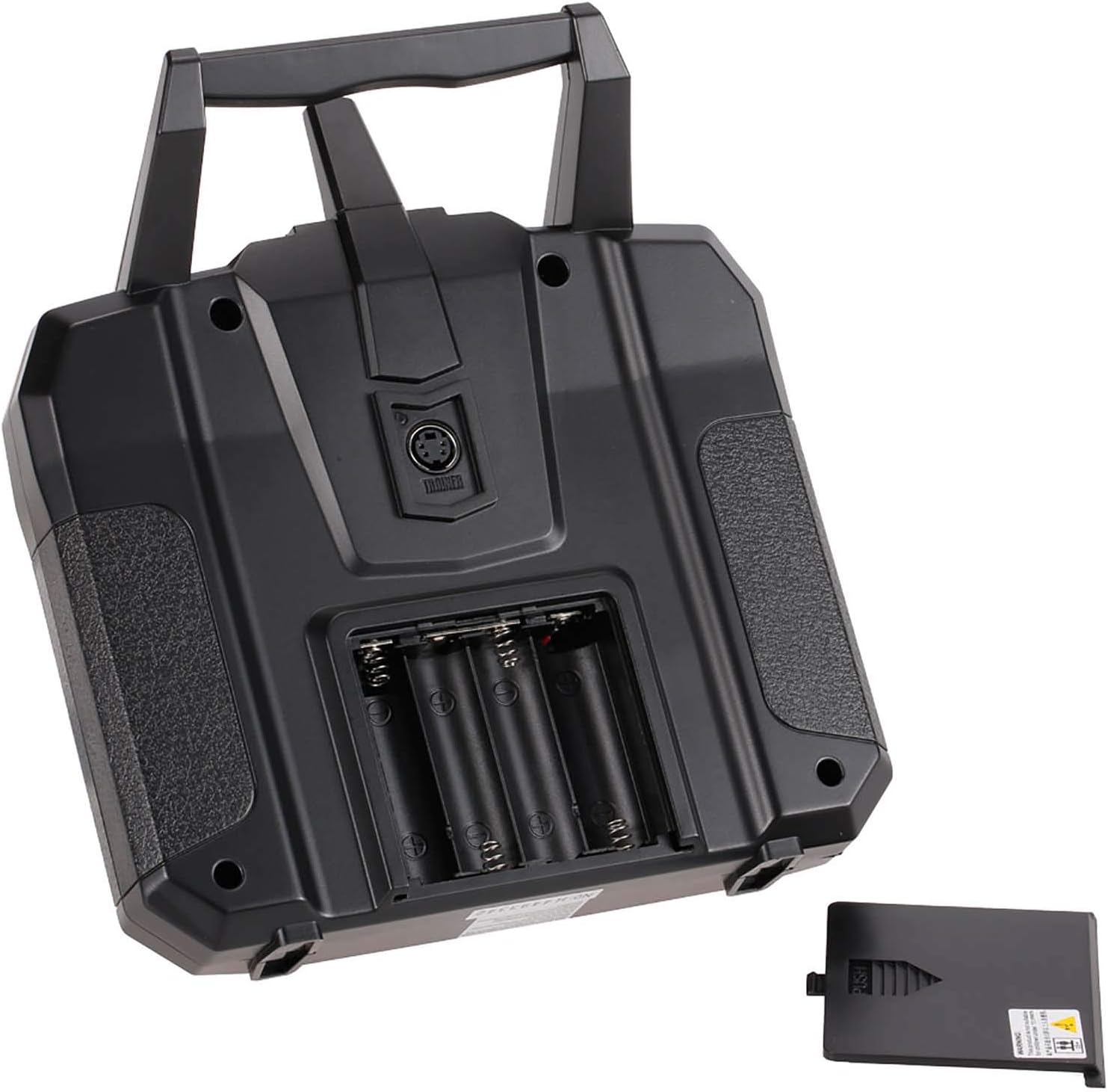
תמונה: החלק האחורי view of the FS-i6X transmitter showing the open battery compartment for 4 AA batteries.
3. Receiver Connection (FS-iA10B)
Connect the FS-iA10B receiver to your RC model's flight controller or servos. The receiver supports 10 PWM channels and features i-BUS serial interface and i-BUS sensor interface.

Image: A detailed wiring diagram illustrating how to connect the FS-iA10B receiver to various components like servos for rudder, throttle, elevator, and aileron, along with battery and bind cable connections.
Note: Do not power on the receiver during the setup process to prevent loss of control.
Ensure the receiver antennas are positioned correctly for optimal signal reception. The antennas should be at a 90-degree angle to each other and away from conductive materials.

Image: Diagrams showing recommended antenna placement for the FS-iA10B receiver, emphasizing a 90-degree orientation for optimal signal.
4. חיבור המשדר והמקלט
To establish communication between the transmitter and receiver, a binding process is required:
- ודא שהמשדר כבוי.
- Connect the bind plug to the B/VCC port on the FS-iA10B receiver.
- Apply power to the receiver (e.g., from the flight controller or a separate battery). The receiver's LED should flash rapidly.
- While holding down the "Bind key" on the transmitter, power on the transmitter.
- The transmitter's LCD will display "Binding..." or similar. Once binding is successful, the receiver's LED will turn solid.
- Release the bind key on the transmitter.
- כבה את המקלט ואת המשדר כאחד.
- הסר את תקע הכריכה מהמקלט.
- Power on the transmitter first, then the receiver. The receiver's LED should now be solid, indicating a successful bind.
הוראות הפעלה
1. Powering On and Initial Checks
When powering on the transmitter, ensure the throttle stick is at its lowest position. If not, a "Throttle Warning" will appear on the LCD. Move the throttle stick to the lowest position or press any key to bypass the warning.
2. בקרות ופונקציות בסיסיות
The FS-i6X transmitter is designed for various RC models, including airplanes, gliders, and helicopters. Its 10 channels (6 default) provide extensive control capabilities.
- ג'ויסטיקים: Control primary flight surfaces (aileron, elevator, rudder) and throttle.
- מתגים: Activate auxiliary functions such as landing gear, flaps, or flight modes.
- Rotary Knobs (VRA/VRB): Provide proportional control for specific functions.
- Fine-tuning Rods: Used for minor adjustments to channel outputs to achieve neutral trim.

Image: The FS-i6X transmitter shown alongside various compatible RC models including an RC plane, drone, robot, car, helicopter, and boat.
3. AFHDS 2A Technology
The Automatic Frequency Hopping Digital System Second Generation (AFHDS 2A) ensures a robust and reliable connection:
- הגנה מפני הפרעות: Utilizes multi-channel hopping frequency to minimize interference from other radio sources.
- צריכת חשמל נמוכה: מיועד לחיי סוללה ממושכים.
- Unique ID System: Each transmitter and receiver pair has a unique ID, preventing cross-interference with other systems.

Image: The FS-i6X transmitter display showing AFHDS 2A, emphasizing the advanced digital system for reliable communication.
4. LCD Screen and Menu Navigation
The dot matrix backlit LCD screen provides clear information and allows for easy menu navigation. Use the UP/DOWN buttons to scroll through options and the OK/CANCEL buttons to select or exit.

Image: Close-up of the FS-i6X transmitter's dot matrix backlit LCD screen displaying system information.
To save changes made in the menu, you typically need to hold the CANCEL button. Refer to the on-screen prompts for specific saving procedures.
תַחזוּקָה
- ניקוי: השתמשו במטלית רכה ויבשה לניקוי המשדר והמקלט. הימנעו משימוש בממסים או בחומרי ניקוי שוחקים.
- אִחסוּן: יש לאחסן את המכשיר במקום קריר ויבש, הרחק מאור שמש ישיר וטמפרטורות קיצוניות. יש להסיר את הסוללות אם מאחסנים אותו לתקופות ממושכות.
- טיפול בסוללה: Replace AA batteries when the low voltage alarm activates (below 4.2V).
- עדכוני קושחה: The transmitter supports online firmware updates via the upgrade cable. Check the manufacturer's webאתר לגרסאות הקושחה וההוראות העדכניות ביותר.
פתרון בעיות
| בְּעָיָה | סיבה אפשרית | פִּתָרוֹן |
|---|---|---|
| "Throttle Warning" on startup | מקל המצערת אינו נמצא במצב הנמוך ביותר. | Move the throttle stick to the lowest position. Press any key to skip the warning. |
| Menu changes not saving | Incorrect save procedure. | After making changes, hold the CANCEL button to save. Refer to the specific menu's instructions. |
| Channels 7-10 not responding | Channels are turned off by default. | Access the transmitter's menu to manually enable channels 7-10 and assign them to desired switches. |
| Transmitter not binding with receiver | Incorrect binding procedure, receiver not powered, or bind plug not used. | Review the binding steps in the "Setup" section. Ensure the bind plug is correctly inserted and the receiver is powered during the binding process. |
| Firmware update cable not working | Faulty cable or driver issues. | Ensure correct drivers are installed. Try a different USB port or cable if available. Contact support if the issue persists. |
| Drift in control sticks | Calibration issue or wear. | Perform a stick calibration through the transmitter's menu. Use trim adjustments for minor corrections. For persistent issues, professional repair may be needed. |
מפרטים
מפרט משדר FS-i6X:
| תכונה | פְּרָט |
|---|---|
| דגם מוצר | FS-i6X |
| ערוצים | 6-10 (ברירת מחדל 6) |
| צֶבַע | שָׁחוֹר |
| דגמים תואמים | Fixed wing, glider, helicopter, boat |
| תדר אלחוטי | 2.4GHz |
| סוג אנטנה | אנטנה כפולה |
| כוח הילוכים | < 20dBm |
| כרך נמוךtagאזעקה | < 4.2V |
| פרוטוקול אלחוטי | AFHDS 2A |
| יציאת נתונים | PS/2 (PPM) |
| לָנוּעַ | 500 ~ 1500m (in the air) |
| רזולוציית ערוצים | 4096 |
| סוֹלְלָה | 1.5V AA * 4 |
| עדכון מקוון | כֵּן |
| שָׂפָה | סינית ואנגלית |
| לְהַצִיג | STN transflective display, LCD 128x64 dot matrix |
| טווח טמפרטורה | -10 °C ~ +60 °C |
| טווח לחות | 20% - 95% |
| מידות | 174 x 89 x 190 מ"מ |
| משקל גוף | 392 גרם |
| הסמכות | CE certification, FCC ID: N4ZFLYSKYI6X |

Image: Visual representation of the FS-i6X transmitter and its detailed specifications.
מפרט מקלט FS-iA10B:
| תכונה | פְּרָט |
|---|---|
| דגם מוצר | FS-iA10B |
| ערוצי PWM | 10 |
| תדר אלחוטי | 2.4GHz |
| פרוטוקול אלחוטי | AFHDS 2A |
| לָנוּעַ | 500 ~ 1500m (in the air) |
| סוג אנטנה | Dual copper tube antenna (150mm * 2) |
| כּוֹחַ | 4.0-6.5V/DC |
| RSSI | נתמך |
| יציאת נתונים | PWM / i.bus / s.bus |
| טווח טמפרטורה | -10 °C ~ +60 °C |
| טווח לחות | 20% - 95% |
| עדכון מקוון | כֵּן |
| מידות | 47 * 33.1 * 14.7 מ"מ |
| מִשׁקָל | 19.3 גרם |
| הסמכות | CE certification, FCC ID: N4ZFLYSKYIA10 |

Image: Visual representation of the FS-iA10B receiver and its detailed specifications.
מידע על אחריות
GoolRC provides a warranty for this product. If you encounter any problems, please contact the store where you purchased the product in a timely manner. The manufacturer is committed to providing a satisfactory solution.
תְמִיכָה
For further assistance, technical support, or additional resources, please refer to the official GoolRC webאתר או צרו קשר עם מחלקת שירות הלקוחות שלהם. שמרו את קבלת הרכישה שלכם לצורך תביעות אחריות.
Official GoolRC Store: GoolRC Amazon Store