
1. הקדמה
This manual provides instructions for the installation, operation, and maintenance of the Gecko in.k600 Electronic Keypad. This keypad is designed for use with Gecko's X (in.xm, in.xe) and Y series (in.yt, in.ye, in.yj) control systems for spas. Please read these instructions carefully before using your keypad to ensure proper function and longevity.
2. המוצר נגמרview
The Gecko in.k600 keypad features a large LCD display and 11 raised keys, providing a streamlined interface for controlling your spa's functions. Its low-profile design ensures easy integration into your spa environment.
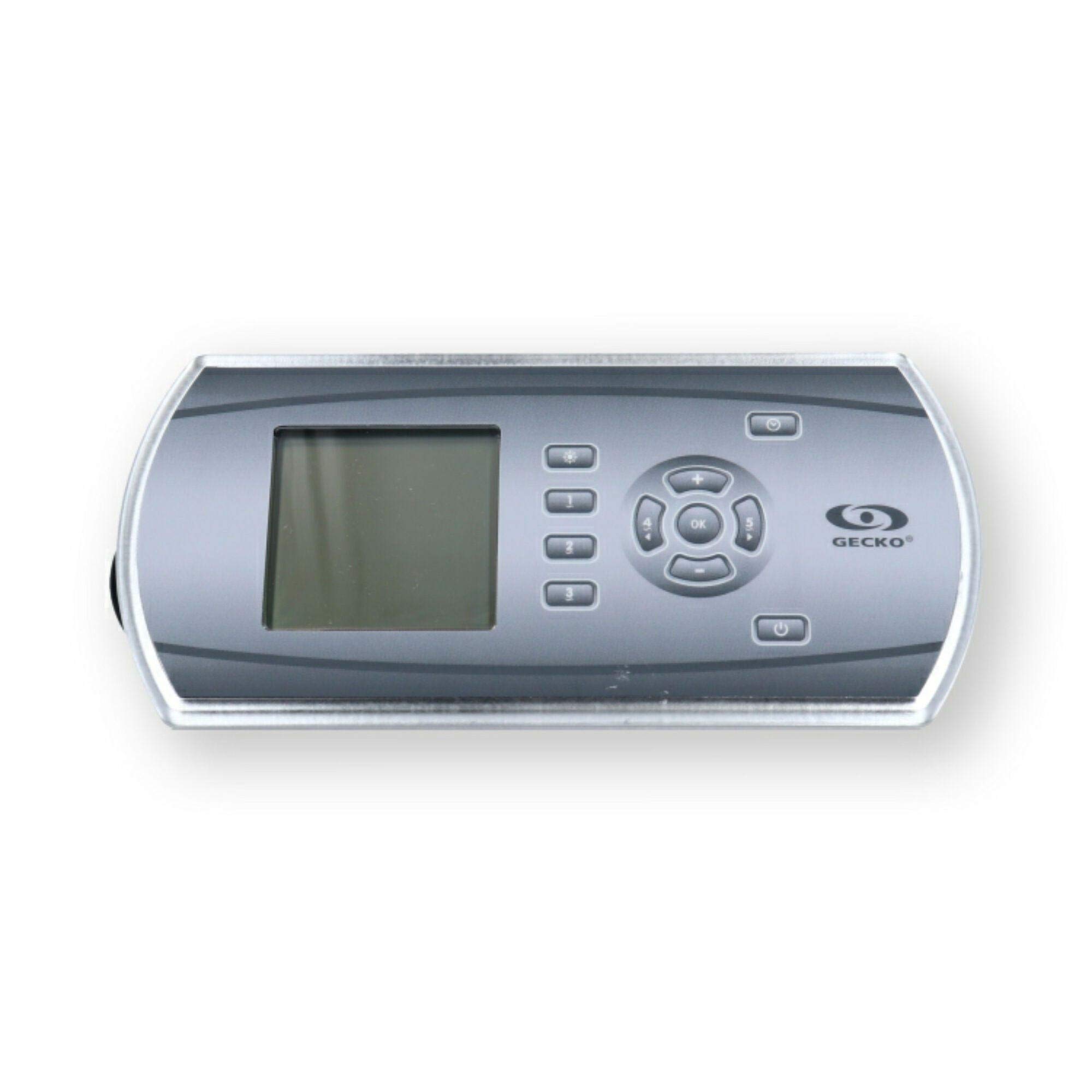
איור 1: Gecko in.k600 Electronic Keypad. This image shows the rectangular keypad with a large LCD screen on the left and a cluster of 11 buttons on the right, including a central 'OK' button surrounded by directional arrows, and dedicated buttons for light, pumps, temperature, program, and power.
תכונות עיקריות:
- Large LCD display for clear information readout.
- 11 raised keys for tactile control.
- Compatible with Gecko in.xm, in.xe, in.yt, in.ye, and in.yj control systems.
- In.Link Plug with 10-foot cord for connection.
- Dimensions: Approximately 8.75" x 4.25" (Rectangle with Rounded Sides).
3. התקנה והתקנה
The Gecko in.k600 keypad is designed for integration with compatible Gecko spa control systems. Installation should ideally be performed by a qualified technician.
- ניתוק חשמל: Ensure the main power to the spa control system is completely disconnected before beginning installation.
- הַרכָּבָה: Mount the keypad in the designated location on your spa. Ensure the opening is correctly sized for the keypad's dimensions (approximately 8.75" x 4.25").
- קֶשֶׁר: Connect the in.Link plug from the keypad's 10-foot cord to the corresponding port on your Gecko control system (in.xm, in.xe, in.yt, in.ye, or in.yj). Ensure the connection is secure.
- אִטוּם: Ensure proper sealing around the keypad to prevent water ingress into the spa's electronics compartment.
- חיבור מחדש של החשמל: Once the keypad is securely installed and connected, restore power to the spa control system.
פֶּתֶק: Refer to your specific spa control system's manual for detailed wiring diagrams and installation procedures.
4. הוראות הפעלה
The in.k600 keypad provides intuitive control over your spa's functions. Below is a general guide to the button functions:
| לַחְצָן | פוּנקצִיָה |
|---|---|
| אוֹר | Activates or deactivates the spa's lighting system. Multiple presses may cycle through light modes or colors. |
| Pump 1-5 | Activates or deactivates the corresponding spa pump. Some pumps may have multiple speeds (e.g., low/high) which can be cycled by pressing the button repeatedly. |
| OK | מאשר בחירות או מזין אפשרויות תפריט. |
| Temp+ / Temp- | Adjusts the desired water temperature setting. |
| תָכְנִית | Accesses programming menus for settings such as filtration cycles, economy modes, or clock adjustments. |
| כּוֹחַ | Turns the spa system on or off (standby mode). |
For detailed operation of specific spa functions and programming, consult the user manual for your Gecko spa control system.
5. תחזוקה
To ensure the longevity and proper functioning of your Gecko in.k600 keypad, follow these maintenance guidelines:
- ניקוי: Clean the keypad surface regularly with a soft, damp מטלית. הימנעו מחומרי ניקוי שוחקים, ממסים או כימיקלים חזקים, מכיוון שאלה עלולים לפגוע בתצוגה ובכפתורים.
- חשיפה למים: While designed for spa environments, avoid prolonged direct exposure to strong jets of water or submersion. Ensure the overlay remains intact to protect internal components.
- בְּדִיקָה: Periodically inspect the keypad and its cord for any signs of wear, damage, or loose connections.
6. פתרון תקלות
If you encounter issues with your in.k600 keypad, consider the following common troubleshooting steps:
- לוח המקשים לא מגיב:
- Check if the spa control system has power.
- Ensure the in.Link cable is securely connected to both the keypad and the control system.
- Try cycling the power to the entire spa system (turn off at the breaker for a few minutes, then turn back on).
- Blank or Malfunctioning LCD Display:
- Verify power to the spa.
- Check the keypad's connection cable.
- If the display remains blank or shows erratic characters after power cycling, the keypad may require replacement.
- כפתורים לא מגיבים:
- Ensure the keypad surface is clean and free of debris that might obstruct button presses.
- If individual buttons consistently fail, the keypad membrane may be faulty, indicating a need for replacement.
For complex issues or if troubleshooting steps do not resolve the problem, contact a qualified spa technician or Gecko customer support.
7. מפרטים
| תכונה | פְּרָט |
|---|---|
| דֶגֶם | in.k600 |
| מספרי חלק | 0607-008064, 3-00-7250, BDLINK6005OP, BDLK6005OP, IN.K600-5OP, 58-337-1612, 14233 |
| סוג תצוגה | LCD גדול |
| מספר כפתורים | 11 (Light, Pump 1-5, OK, Temp+, Temp-, Program, Power) |
| תְאִימוּת | Gecko in.xm, in.xe, in.yt, in.ye, in.yj control systems |
| קֶשֶׁר | In.Link Plug w/10' Cord |
| מידות | Approx. 8.75" x 4.25" (Rectangle with Rounded Sides) |
| יַצרָן | שְׂמָמִית |
8. מידע על אחריות
Warranty terms and conditions for the Gecko in.k600 Electronic Keypad are provided by the manufacturer, Gecko, or the authorized seller at the time of purchase. Please retain your proof of purchase for warranty claims. For specific details regarding your product's warranty, refer to the documentation included with your purchase or contact the seller directly.
9. תמיכה
For technical assistance, replacement parts, or further inquiries regarding your Gecko in.k600 keypad, please contact your authorized dealer or the manufacturer, Gecko. You may also visit the official Gecko webאתר למשאבי תמיכה.
Gecko Store Link: Gecko Depot USA on Amazon