
1. הקדמה
תודה על הרכישהasing the JVC XS-N2239TC Wireless Stereo Speaker System. This manual provides essential information for the safe and efficient use of your new speaker system. Please read these instructions thoroughly before operating the device and retain them for future reference.
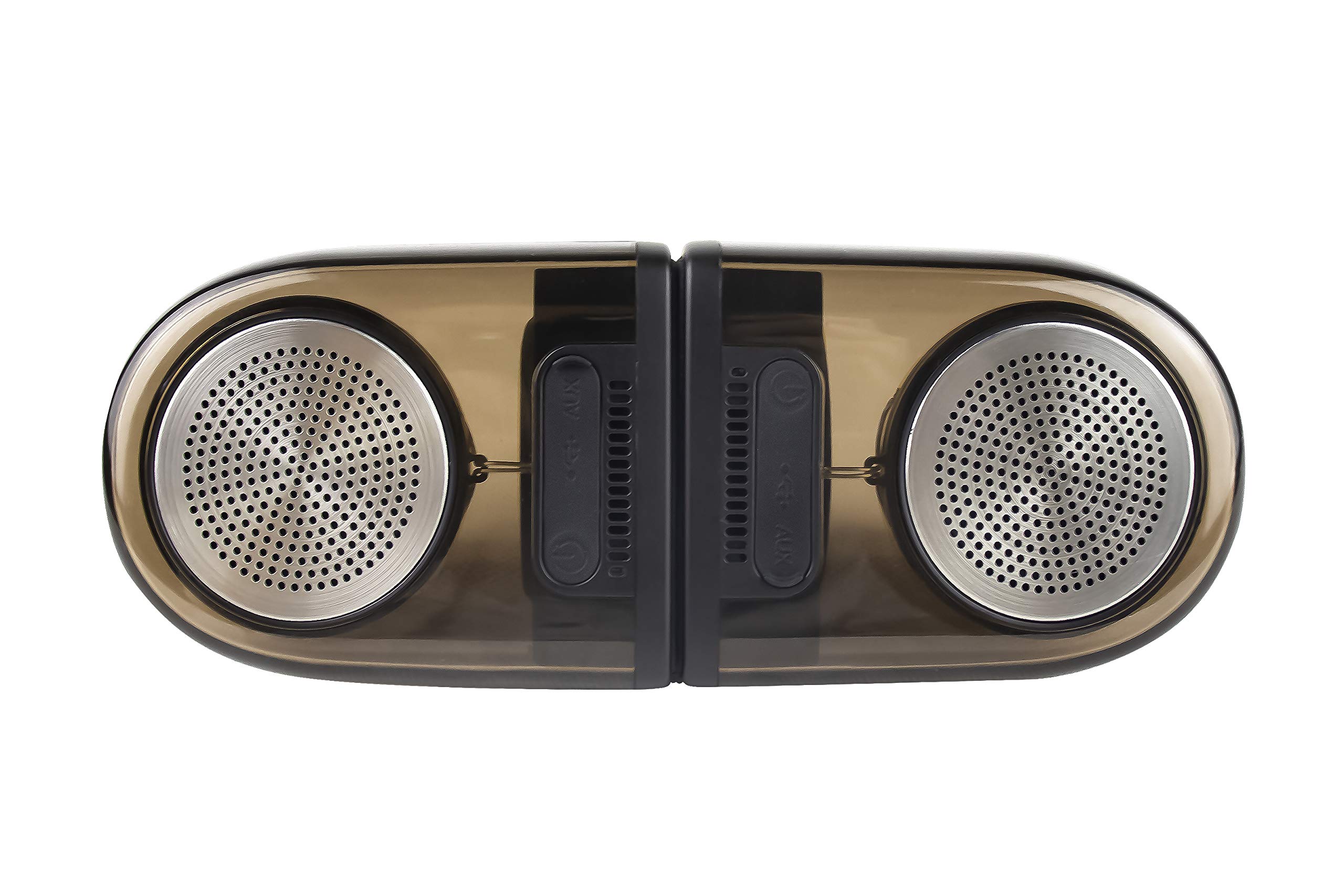
Image of the JVC XS-N2239TC speaker system, showcasinהעיצוב והרכיבים שלו.
2. תוכן התיבה
אנא ודאו שכל הפריטים הבאים כלולים בחבילה שלכם:
- 1 x JVC XS-N2239TC Speaker Unit
- 1 x כבל AUX
- מדריך למשתמש אחד (מסמך זה)
- 1 x כבל טעינה
- 1 x תעודת אחריות
3. התקנה
3.1 מיקום
The JVC XS-N2239TC speakers are designed for versatile placement, suitable as Bookshelf or Floor Standing units. Ensure the speakers are placed on a stable, flat surface or floor, away from direct sunlight, heat sources, and moisture. For optimal stereo sound, position the two speakers appropriately within your listening area.
3.2 חיבור מתח
- Connect the charging cable to the speaker's power input port.
- חבר את הקצה השני של כבל הטעינה לשקע חשמל מתאים.
- Ensure the speaker is fully charged before initial use for optimal battery life.
4. הוראות הפעלה
4.1 הפעלה/כיבוי
Locate the power button on the speaker unit. Press and hold the button for a few seconds to power the speaker on or off. An indicator light will typically confirm the power status.
4.2 קישוריות
4.2.1 חיבור אלחוטי
The speaker supports wireless streaming. To connect wirelessly:
- Ensure the speaker is powered on and in pairing mode (refer to the speaker's indicator lights for status).
- On your device (e.g., smartphone, tablet, television), enable wireless functionality.
- חפש available devices and select "JVC XS-N2239TC" from the list.
- Once connected, you can stream audio wirelessly to the speaker system.
4.2.2 חיבור USB
The speaker features a plug-and-play USB card reader. Insert a USB storage device containing audio files into the designated USB port on the speaker. The speaker will automatically detect and begin playing compatible audio files.
4.2.3 חיבור AUX
Use the provided AUX cable to connect the speaker to devices with a 3.5mm audio output jack, such as televisions or other audio sources. Plug one end of the AUX cable into the speaker's AUX input and the other end into your audio source's output.
4.3 בקרות
4.3.1 Multifunctional Panel Keys
The speaker unit is equipped with multifunctional panel keys. These keys allow you to:
- Adjust volume (increase/decrease).
- הפעל/השהה השמעת אודיו.
- Navigate tracks (forward/backward) when playing from USB or wireless sources.
שלט רחוק 4.3.2
The included remote control provides convenient access to various functions from a distance. Use the remote to:
- הדלקה/כיבוי של הרמקול.
- התאם את עוצמת הקול.
- Control playback (play, pause, skip tracks).
- Switch input modes (e.g., Wireless, USB, AUX).
5. תחזוקה
5.1 ניקוי
לניקוי הרמקול, השתמשו במטלית רכה ויבשה. אין להשתמש בחומרי ניקוי שוחקים, שעווה או ממיסים מכיוון שהם עלולים לפגוע בגימור. ודאו שהרמקול כבוי ומנותק מהחשמל לפני הניקוי.
5.2 עמידות במים
The JVC XS-N2239TC speaker is designed with water resistance. While it can withstand splashes, it is not intended for submersion. Avoid exposing the speaker to excessive moisture or direct water jets to prevent damage.
6. פתרון תקלות
If you encounter issues with your speaker system, please refer to the following common solutions:
- אין כוח: Ensure the charging cable is securely connected to both the speaker and a working power outlet. Check if the power button has been pressed correctly.
- אין צליל: Verify the volume level on both the speaker and your connected device. Ensure the correct input mode (Wireless, USB, AUX) is selected. Check all cable connections.
- בעיות חיבור אלחוטי: Make sure the speaker is within range of your device. Try unpairing and re-pairing the speaker with your device. Ensure no other devices are interfering with the wireless signal.
- בעיות ניגון ב-USB: Confirm the USB device is formatted correctly and contains compatible audio fileנסה התקן USB אחר.
- השלט הרחוק לא עובד: Check the remote control's batteries and replace them if necessary. Ensure there are no obstructions between the remote and the speaker's sensor.
אם הבעיה נמשכת, אנא פנו לתמיכת הלקוחות.
7. מפרטים
| תכונה | פְּרָט |
|---|---|
| מותג | JVC |
| שם הדגם | JVC XS-N2239TC |
| טכנולוגיית קישוריות | USB, אלחוטי |
| סוג טכנולוגיה אלחוטית | אַלחוּט |
| פרוטוקול קישוריות | USB |
| מצב פלט שמע | סטריאו |
| סוג רמקול | מדף ספרים |
| סוג הרכבה | קומה עומדת |
| תכונות המוצר | שְׁלַט רָחוֹק |
| שיטת בקרה | מְרוּחָק |
| מכשירים תואמים | טֵלֶוִיזִיָה |
| מספר ערוצי אודיו | 2.1 |
| גודל רמקול | 7.5 סנטימטרים |
| Subwoofer Speaker Diameter | 5 אינץ' |
| Tweeter Driver Diameter | 1 אינץ' |
| סוג מנהל התקן שמע | מנהל התקן דינמי |
| צֶבַע | שָׁחוֹר |
| הוא עמיד למים | נָכוֹן |
| רמת עמידות במים | אֲטִימוּת |
| שימושים ספציפיים למוצר | מערכות בידור ביתיות |
| חיי סוללה ממוצעים | 6 שעות |
| משקל פריט | 0.56 קילוגרם |
8. אחריות ותמיכה
8.1 מידע אחריות
מוצר זה מגיע עם א שנתיים אחריות המסופק על ידי היצרן ממועד הרכישה. אנא שמור את קבלת הרכישה ואת כרטיס האחריות עבור כל תביעת אחריות.
8.2 תמיכת לקוחות
For any complaints, technical assistance, or support regarding your JVC XS-N2239TC speaker system, please contact JVC customer care:
- מספר שירות לקוחות: +91-9910332380
אנא ודאו כי מספר הדגם ופרטי הרכישה של המוצר שלכם מוכנים בעת פנייה לתמיכה.