
המוצר נגמרview
The XIAOMI Redmi 9I is a feature-rich smartphone designed for everyday use. This manual provides essential information for setting up, operating, maintaining, and troubleshooting your device.
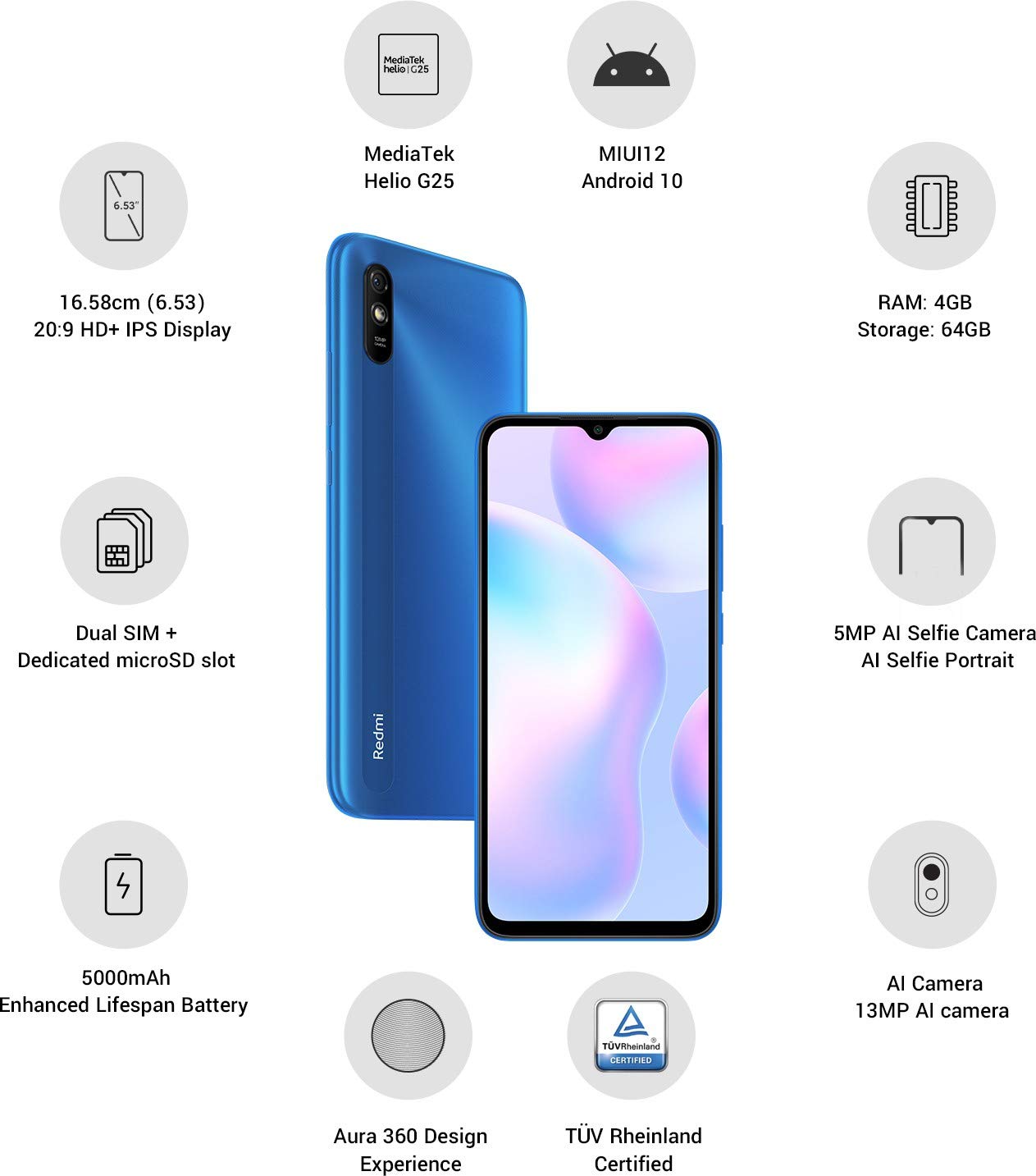
תמונה: מעלview of the Xiaomi Redmi 9I highlighting key features such as the 6.53-inch HD+ IPS Display, MediaTek Helio G25 processor, MIUI12 Android 10, 4GB RAM, 64GB Storage, Dual SIM + dedicated microSD slot, 5000mAh battery, 5MP AI Selfie Camera, 13MP AI Camera, Aura 360 Design Experience, and TÜV Rheinland Certification.
מדריך התקנה
1. Unboxing ובדיקה ראשונית
הוציאו בזהירות את כל הפריטים מהאריזה. ודאו שהרכיבים הבאים קיימים:
- XIAOMI Redmi 9I Smartphone
- מתאם מתח
- כבל USB מסוג C
- כלי מפלט סים
- מדריך התחלה מהירה (אם כלול)
2. הכנסת כרטיסי SIM וכרטיס MicroSD
Locate the SIM card tray on the side of your device. Use the provided SIM ejector tool to open the tray. Insert your Nano SIM card(s) and/or a microSD card into the designated slots. Ensure the cards are correctly oriented as shown in the diagram below. Gently push the tray back into the phone until it clicks into place.

תמונה: צד view of the Xiaomi Redmi 9I, illustrating the location of the SIM card tray. The tray is designed to hold dual Nano SIM cards and a dedicated microSD card.
3. טעינת ההתקן
Before first use, fully charge your Redmi 9I. Connect the USB Type-C cable to the phone's charging port (located at the bottom) and the other end to the power adapter. Plug the adapter into a wall outlet. The charging indicator will appear on the screen.

תמונה: תחתית view of the Xiaomi Redmi 9I, showing the USB Type-C charging port and speaker grille.
4. הפעלה ותצורה ראשונית
Press and hold the Power button (located on the right side of the device) until the XIAOMI logo appears. Follow the on-screen instructions to complete the initial setup, including language selection, Wi-Fi connection, Google account setup, and security settings.

תמונה: צד view of the Xiaomi Redmi 9I, clearly showing the power button and volume rocker on the right edge of the device.
הוראות הפעלה
ניווט בסיסי
- לָגַעַת: הקש על סמלים כדי לפתוח אפליקציות, לבחור פריטים או לאשר פעולות.
- לִגנוֹב: Slide your finger across the screen to scroll, switch between home screens, or navigate within apps.
- קַמצוּץ: השתמשו בשתי אצבעות כדי להגדיל או להקטין את התצוגה של תמונות ו web דפים.
- לחיצה ארוכה: Press and hold an item for additional options or to move icons.
ביצוע שיחות ושליחת הודעות
Tap the Phone icon to access the dialer. Enter a number or select a contact. Tap the Messages icon to compose and send text messages.
חיבור לרשתות
- Wi-Fi: עבור אל הגדרות > Wi-Fi, turn Wi-Fi on, and select your desired network. Enter the password if prompted.
- בלוטות': עבור אל הגדרות > Bluetooth, turn Bluetooth on, and pair with compatible devices.
- גלישה סלולרית (4G): ודא שכרטיס ה-SIM שלך פעיל ושהנתונים הסלולריים מופעלים ב הגדרות > כרטיסי SIM ורשתות סלולריות.
שימוש במצלמה
Tap the Camera icon to open the camera application. The Redmi 9I features a 13MP rear camera and a 5MP front camera. Switch between modes (Photo, Video, Portrait, etc.) by swiping across the screen. Tap the shutter button to capture photos or start/stop video recording.

תמונה: אחורי view of the Xiaomi Redmi 9I, showcasing the 13MP AI camera module and the Redmi branding.
תַחזוּקָה
ניקוי המכשיר שלך
השתמשו במטלית רכה ונטולת סיבים לניקוי המסך וגוף הטלפון. הימנעו משימוש בכימיקלים חזקים או בחומרים שוחקים, העלולים לפגוע בתצוגה או בגימור. עבור כתמים עקשניים, נגבו מעטampנקו את המטלית במים או בחומר ניקוי מסכים המיועד לאלקטרוניקה.
עדכוני תוכנה
בדוק באופן קבוע אם קיימים עדכוני תוכנה והתקן אותם כדי להבטיח ביצועים אופטימליים, אבטחה וגישה לתכונות חדשות. עבור אל הגדרות > אודות הטלפון > גרסת MIUI כדי לבדוק אם יש עדכונים.
טיפול בסוללה
The Redmi 9I is equipped with a 5000 mAh Lithium-Polymer battery. To prolong battery life:
- הימנע מטמפרטורות קיצוניות.
- אל תתנו לסוללה להתרוקן לחלוטין לפני טעינה תכופה.
- השתמש במטען ובכבל המקוריים.
- Optimize battery usage in הגדרות > סוללה וביצועים.
ניהול אחסון
המכשיר שלך מגיע עם 64GB של אחסון פנימי. כדי לנהל את האחסון ביעילות:
- מחקו באופן קבוע דברים מיותרים files, תמונות וסרטונים.
- הסר את ההתקנה של יישומים שאינם בשימוש.
- השתמשו בשירותי אחסון בענן.
- העברה גדולה fileלכרטיס microSD שהוכנס.
פתרון בעיות
This section addresses common issues you might encounter with your Redmi 9I.
המכשיר לא מופעל
- ודא שהסוללה טעונה. חבר את הטלפון למטען למשך 30 דקות לפחות.
- לחץ והחזק את לחצן ההפעלה למשך 10-15 שניות כדי לאלץ הפעלה מחדש.
קישוריות רשת גרועה
- בדוק אם כרטיס ה-SIM שלך מוכנס כראוי.
- Toggle Airplane Mode on and off (swipe down from the top for Quick Settings).
- הפעל מחדש את המכשיר שלך.
- Verify your mobile data plan is active and you are in an area with network coverage.
אפליקציות קורסות או קופאות
- סגור ופתח מחדש את האפליקציה הבעייתית.
- נקה את המטמון והנתונים של האפליקציה (הגדרות > אפליקציות > ניהול אפליקציות > [שם אפליקציה] > נקה נתונים).
- ודא שהאפליקציה מעודכנת לגרסה העדכנית ביותר שלה.
- הפעל מחדש את הטלפון שלך.
מסך לא מגיב
- כפה הפעלה מחדש של המכשיר על ידי לחיצה ממושכת על לחצן ההפעלה.
- If the issue persists, consider a factory reset (אזהרה: פעולה זו תמחק את כל הנתונים בטלפון שלך. גבה תחילה נתונים חשובים. עבור אל הגדרות > מידע על הטלפון > איפוס להגדרות היצרן).
מפרטים
| תכונה | פְּרָט |
|---|---|
| מותג | שיאומי |
| דֶגֶם | Redmi 9I |
| מַעֲרֶכֶת הַפעָלָה | Android 9.0 (MIUI12) |
| אַיִל | 4 ג'יגה-בייט |
| אחסון פנימי | 64 ג'יגה-בייט |
| מעבד | סנאפדרגון (מהירות מעבד 2 גיגה-הרץ) |
| סוג תצוגה | LCD |
| גודל מסך | 6.53 אינץ' |
| מצלמה אחורית | 13 מגה פיקסל |
| מצלמה קדמית | 5 מגה פיקסל |
| קיבולת סוללה | 5000 מיליamp Hours (Lithium-Polymer) |
| חריץ לכרטיס SIM | Dual SIM (Nano) |
| קישוריות | 4G, Wi-Fi, Bluetooth, USB Type C |
| GPS | GLONASS |
| חוֹמֶר | פּלָסטִי |
| רמת עמידות במים | עמיד במים |
מידע על אחריות
The XIAOMI Redmi 9I comes with a אחריות יצרן לשנה from the date of purchase. This warranty covers manufacturing defects under normal use. For detailed terms and conditions, please refer to the warranty card included in your product packaging or visit the official XIAOMI support webאֲתַר.
תמיכת לקוחות
If you encounter issues not covered in this manual or require further assistance, please contact XIAOMI customer support. You can typically find contact information (phone numbers, email, chat support) on the official XIAOMI webבאתר או דרך מדור התמיכה בהגדרות המכשיר שלך.
Before contacting support, please have your device's model number (Redmi 9I) and serial number ready. The serial number can usually be found in הגדרות > מידע על הטלפון > סטטוס.