
מָבוֹא
Thank you for choosing the Docooler HXSJ A876 Wired Gaming Mouse. This manual provides detailed instructions for setting up, operating, and maintaining your new gaming mouse. Please read this manual carefully before use to ensure optimal performance and longevity of your device.
תכונות המוצר
- DPI מתכוונן: Supports 800, 1600, 3200, and 6400 DPI settings for precise control.
- אור נשימה 7 צבעים: Synchronized lighting provides a dynamic visual effect.
- עיצוב ארגונומי: Engineered for comfort during extended use, fitting naturally in the palm.
- מתגים עמידים: Equipped with high-performance mechanical micro-switches rated for 10 million clicks.
- Anti-slip Scroll Wheel: Designed for smooth and precise scrolling.
- Wired USB Connectivity: Ensures stable and reliable performance.
תוכן החבילה
- 1 x Docooler HXSJ A876 Wired Gaming Mouse
- 1 x מדריך למשתמש
הגדרה
- Unpack the Docooler HXSJ A876 Wired Gaming Mouse and its accessories from the packaging.
- Locate an available USB port on your computer (PC or laptop).
- חבר את מחבר ה-USB של העכבר ליציאת ה-USB.
- The mouse is plug-and-play and should be automatically recognized by your operating system. No additional drivers are typically required.
הוראות הפעלה
התאמת DPI
The HXSJ A876 mouse features adjustable DPI settings, allowing you to switch sensitivity on the fly. Use the dedicated DPI buttons (DPI Loop + and DPI Loop -) located near the scroll wheel to cycle through the available DPI levels.
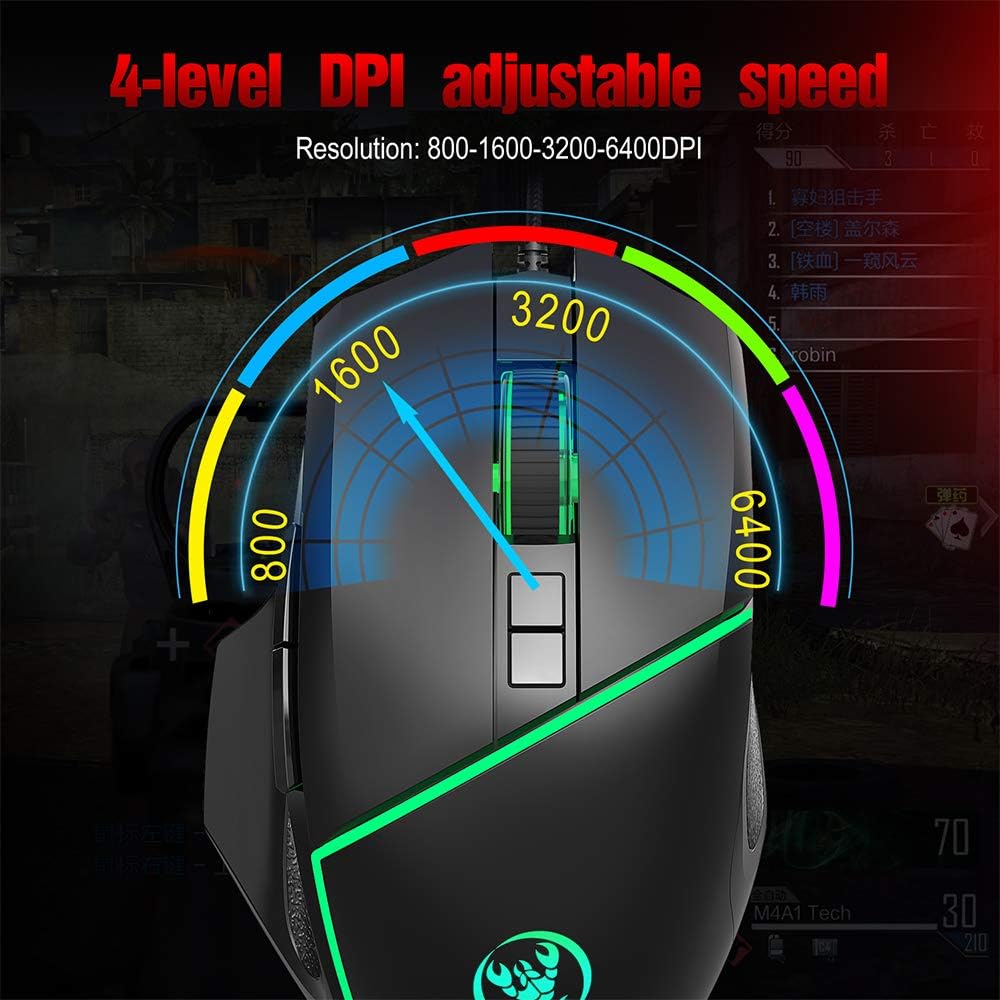
Visual representation of the 4-level adjustable DPI settings on the HXSJ A876 gaming mouse. The graphic indicates how the DPI can be cycled through different resolutions for varied gaming and work needs.
- 800 DPI: Suitable for precise tasks.
- 1600 DPI: הגדרה מאוזנת לשימוש כללי.
- 3200 DPI: Increased sensitivity for faster cursor movement.
- 6400 DPI: High sensitivity for rapid movements in gaming.
DPI Indicator Feedback
The mouse provides visual feedback for the current DPI setting:

This image demonstrates the HXSJ A876 gaming mouse on a desk, detailing how to turn the lights on and off by pressing the Mid button + DPI +. It also explains the DPI indicator feedback: red light flashes once for 800 DPI, twice for 1600 DPI, three times for 3200 DPI, and four times for 6400 DPI.
- When 800 DPI is selected, the DPI indicator flashes red once.
- When 1600 DPI is selected, the DPI indicator blinks red twice.
- When 3200 DPI is selected, the DPI indicator blinks red three times.
- When 6400 DPI is selected, the DPI indicator flashes red four times.
פונקציות כפתור
The HXSJ A876 mouse features a seven-button design for enhanced functionality:

A clear diagram labeling the seven buttons on the HXSJ A876 gaming mouse: Left Button, Right Button, Mid Button (scroll wheel), DPI Loop +, DPI Loop -, Forward Button, Backward Button, and Fire Key. This helps users identify each control.
- כפתור שמאל: פונקציית קליק ראשונית.
- כפתור ימין: פונקציית לחיצה משנית (תפריט הקשר).
- Mid Button (Scroll Wheel): Scrolls pages up/down; click for middle-click function.
- DPI Loop +: מגביר את רגישות ה-DPI.
- DPI Loop -: מפחית את רגישות ה-DPI.
- לחצן קדימה: מנווט קדימה ב web דפדפנים או file חוקרים.
- לחצן אחורה: מנווט אחורה ב web דפדפנים או file חוקרים.
- מפתח אש: Programmable button, often used for rapid firing in games.
בקרת תאורה
To toggle the synchronized 7-color breathing light on or off, press the כפתור אמצע ואת כפתור DPI + בּוֹ זְמַנִית.

This image displays the HXSJ A876 wired gaming mouse, emphasizing its 6400 DPI high precision capability for stable transmission and accurate analysis. The mouse features a sleek black design with red accents.
תַחזוּקָה
- ניקוי: השתמשו במטלית רכה ויבשה לניקוי פני השטח של העכבר. במקרה של לכלוך עיקש, נגבו מעטampשטפו את המטלית במים. הימנעו משימוש בכימיקלים חזקים או בחומרים שוחקים.
- אִחסוּן: יש לאחסן את העכבר בסביבה נקייה ויבשה, הרחק מטמפרטורות קיצוניות ואור שמש ישיר.
- טיפול בכבלים: הימנעו מכיפוף או פיתול יתר על המידה של כבל ה-USB כדי למנוע נזק.
פתרון בעיות
- עכבר לא מגיב:
- ודא שכבל ה-USB מחובר היטב ליציאת USB תקינה.
- נסה לחבר את העכבר ליציאת USB אחרת במחשב שלך.
- הפעל מחדש את המחשב.
- DPI לא משתנה:
- ודא שאתה לוחץ על כפתורי כוונון ה-DPI הנכונים.
- Check if the DPI indicator light provides feedback when buttons are pressed.
- אורות לא עובדים:
- ודא שהעכבר מחובר כראוי למחשב שלך.
- Try toggling the lights using the Mid button + DPI + combination.
מפרטים
| מותג | דוקולר |
| דֶגֶם | A876 |
| סוּג | עכבר משחקים |
| חוֹמֶר | ABS |
| מצב תאורה | 7-color synchronized breathing light |
| הגדרות DPI | 800-1600-3200-6400DPI (Adjustable) |
| Switch Life | 10 מיליון מחזורים |
| אורך כבל | 150 ס"מ בערך |
| כרך הפעלהtage/נוכחי | DC 5V/100mA |
| מידות (L x W x H) | 12.5 x 8 x 4 ס"מ |
| משקל פריט | בערך 138 גרם |
| טכנולוגיית קישוריות | USB |
| טכנולוגיית זיהוי תנועה | אוֹפּטִי |
| כיוון יד | אמבידקסטרואי |
| שימוש מומלץ | Office, Video Gaming |
| מכשירים תואמים | מחשב אישי, מחשב נייד |

This image shows a hand comfortably gripping the HXSJ A876 gaming mouse, highlighting its ergonomic design. The text indicates that the design is made for a better fit in the palm, ensuring comfort and reducing fatigue during long-term use.

An image depicting the HXSJ A876 gaming mouse in use on a desk, with an overlay indicating a '10,000,000 Times Click Test'. This illustrates the mouse's durability and the longevity of its mechanical switches.
אחריות ותמיכה
למידע על אחריות או תמיכה טכנית, אנא עיין בתיעוד שסופק בעת הרכישה או פנה לספק. שמור את הוכחת הרכישה שלך עבור כל תביעת אחריות.