
1. המוצר נגמרview
The MTM Walkie Talkies XF-638 are designed for reliable two-way communication, featuring 22 channels, hands-free VOX operation, and a clear LCD display. These radios are suitable for various outdoor activities, family events, and general communication needs.

Image: MTM Walkie Talkies XF-638 4-pack in orange color, ready for use.
זיהוי רכיבים
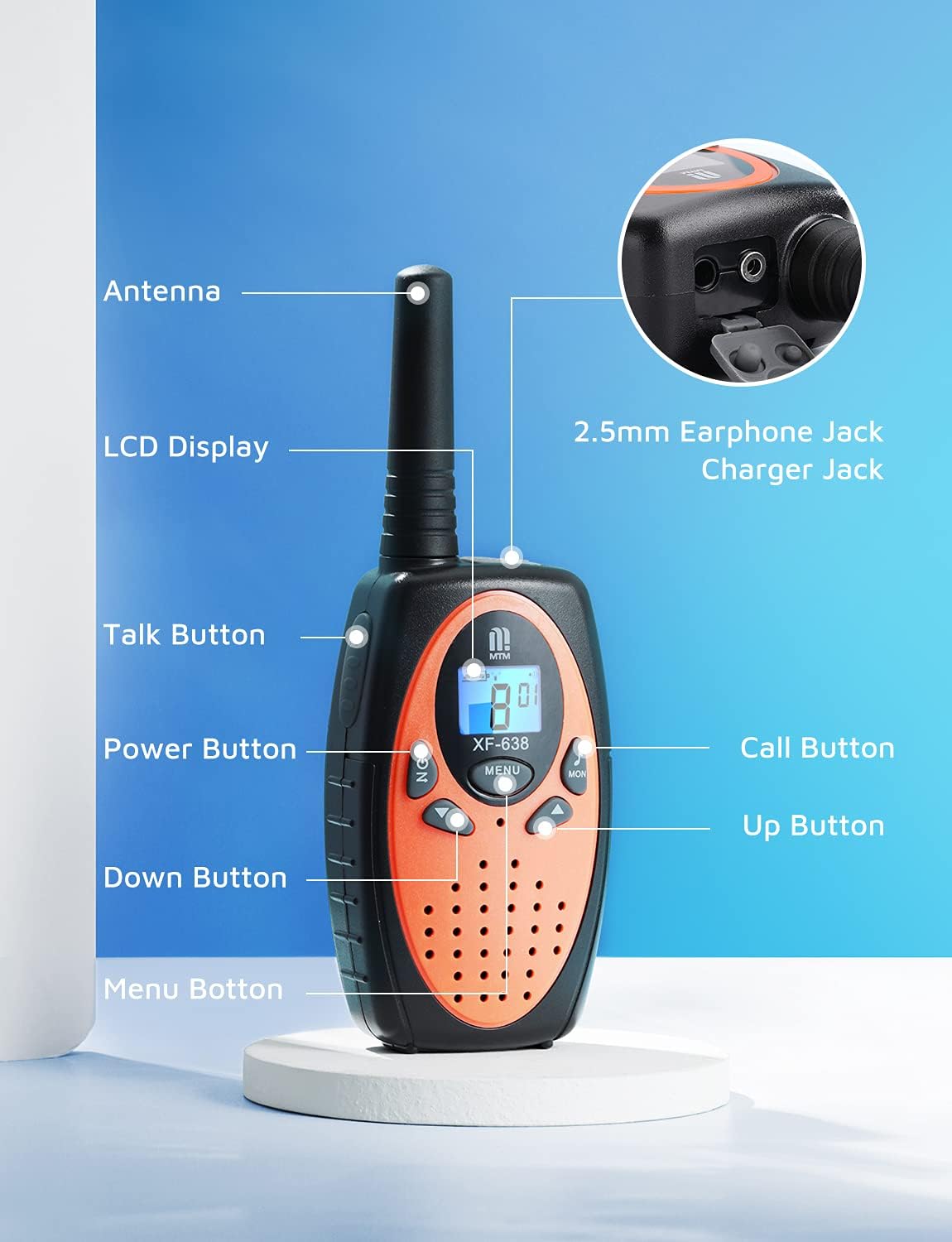
Image: Diagram illustrating the various parts and buttons of the MTM Walkie Talkie XF-638.
- אַנטֶנָה: לשידור וקליטה של אותות.
- תצוגת LCD: Shows channel, volume, battery status, and other indicators.
- כפתור דיבור (PTT): לחץ והחזק כדי להעביר את קולך.
- כפתור הפעלה (הפעלה/כיבוי): לחיצה ארוכה כדי להפעיל או לכבות את היחידה.
- לחצנים למעלה/למטה: Adjust volume, change channels, and navigate menu options.
- לחצן תפריט: Access and confirm settings.
- כפתור חיוג: שולח צליל קריאה למכשירי רדיו אחרים באותו ערוץ.
- לחצן MON: Activates the monitor function to listen for weak signals.
- 2.5mm Earphone Jack/Charger Jack: For connecting an external earphone/microphone or charging (if using rechargeable batteries, not included).
2. התקנה
התקנת סוללה
Each MTM Walkie Talkie requires 3 AAA batteries (not included). Ensure correct polarity when inserting batteries.
- אתר את מכסה תא הסוללה בגב מכשיר הקשר.
- החלק או שחרר בעדינות את המכסה כדי לפתוח את התא.
- Insert 3 AAA batteries, matching the positive (+) and negative (-) terminals as indicated inside the compartment.
- החזר את מכסה תא הסוללה למקומו בנקישה.

תמונה: אחורי view of the walkie talkie with the battery compartment open, showing where to insert 3 AAA batteries.
Belt Clip Attachment
Attach the included belt clip for convenient carrying.
- Align the belt clip with the designated slots on the back of the walkie talkie.
- Slide the clip downwards until it locks securely into place.

Image: A hiker wearing an MTM Walkie Talkie XF-638 attached to their backpack strap with a belt clip.
3. פעולה בסיסית
הפעלה/כיבוי
- כדי להפעיל: לחצו והחזיקו את הפעלה/כיבוי כפתור עד שמסך ה-LCD יידלק.
- כדי לכבות: לחצו והחזיקו את הפעלה/כיבוי כפתור עד כיבוי ה- LCD.
בחירת ערוץ
The MTM Walkie Talkies feature 22 channels. All radios must be on the same channel to communicate.
- הקש על תַפרִיט button once. The channel number on the LCD will flash.
- השתמש ב- UP or לְמַטָה כדי לבחור את הערוץ הרצוי (1-22).
- הקש על תַפרִיט לחצן שוב כדי לאשר את בחירתך.

Image: Close-up of the walkie talkie's LCD screen showing the current channel and battery level.
התאמת עוצמת הקול
Adjust the listening volume to a comfortable level.
- הקש על UP לחצן להגברת עוצמת הקול.
- הקש על לְמַטָה לחצן להורדת עוצמת הקול.

Image: Close-up of the walkie talkie's speaker area, indicating adjustable volume levels.
שידור וקבלה
- כדי לשדר: לחץ והחזק את Talk (PTT) כפתור. דברו בצורה ברורה לתוך המיקרופון.
- To receive: Release the Talk (PTT) לַחְצָן.
התקשר לטון
- To send a call tone: Briefly press the שִׂיחָה button. This alerts other users on the same channel.
פונקציית מוניטור
- להפעלה: לחצו על יום שני button. This allows you to listen for weak signals on the current channel.
- כדי להשבית: לחצו על יום שני כפתור שוב.
4. תכונות מתקדמות
VOX (מרכזיה המופעלת באמצעות קול)
VOX allows for hands-free communication. When activated, the radio automatically transmits when you speak and stops when you are silent.
- הקש על תַפרִיט button multiple times until the VOX icon appears on the LCD.
- השתמש ב- UP or לְמַטָה buttons to select a VOX sensitivity level (e.g., 1-3, with 3 being most sensitive) or turn VOX off.
- הקש על תַפרִיט לחצן לאישור.

Image: A mother and child communicating using walkie talkies, demonstrating long-range and potentially hands-free use.
נעילת מקשים
נעילת המקשים מונעת שינויים מקריים בהגדרות שלך.
- לנעילה: לחצו והחזיקו את תַפרִיט button until a key icon appears on the LCD.
- To unlock: Press and hold the תַפרִיט לחץ שוב על הכפתור עד שסמל המפתח ייעלם.
פונקציות אחרות
- Auto Squelch System: Automatically mutes weak signals or background noise for clearer communication.
- פונקציית זיכרון אוטומטית: Remembers your last used channel and settings.
- Auto Scan Function: Scans all channels for active transmissions.
- חיסכון בחשמל אוטומטי: Extends battery life by entering a low-power mode during periods of inactivity.
- התראת סוללה חלשה: An icon on the LCD display indicates when batteries are low and need replacement.
- Headset Option: Compatible with headsets via the 2.5mm earphone jack for private listening and hands-free talking.

תמונה: למעלה view of the walkie talkie showing the 2.5mm earphone jack and charger port.
5. Range and Usage
The MTM Walkie Talkies XF-638 offer a communication range of up to 3 miles in open fields. The actual range can vary significantly based on terrain, weather conditions, and obstructions.

Image: Graphic illustrating the long-range capability of the MTM Walkie Talkies.
Factors Affecting Range:
- פְּנֵי הַשֵׁטַח: Open areas provide maximum range. Hills, dense foliage, and urban environments with buildings can significantly reduce range.
- חסימות: Metal structures, vehicles, and large buildings can block or weaken signals.
- מֶזֶג אֲוִיר: Heavy rain or fog can interfere with signal transmission.
Recommended Usage Scenarios:
- Outdoor adventures like campחוג, טיולים ודיג.
- Family events and activities where staying connected is important.
- Emergency preparedness.

Children playing outdoors with walkie talkies.

Adults using walkie talkies while kayaking.

Restaurant staff using walkie talkies for coordination.
6. תחזוקה
- ניקוי: נגב את הרדיו עם רך, דamp בַּד. אין להשתמש בכימיקלים קשים או בחומרי ניקוי שוחקים.
- טיפול בסוללה: הסר את הסוללות אם הרדיו לא יהיה בשימוש למשך תקופה ממושכת כדי למנוע דליפות.
- אִחסוּן: יש לאחסן את מכשיר הקשר במקום קריר ויבש, הרחק מאור שמש ישיר וטמפרטורות קיצוניות.
7. פתרון תקלות
| בְּעָיָה | סיבה אפשרית | פִּתָרוֹן |
|---|---|---|
| אין כוח | הסוללות מתות או מותקנות בצורה לא נכונה. | החליפו סוללות או ודאו שהקוטביות נכונה. |
| Poor reception/short range | Obstructions (buildings, hills), low battery, incorrect channel/privacy code. | Move to an open area, replace batteries, verify channel and privacy code settings. |
| לא ניתן לשדר | Keypad locked, low battery, not on the same channel. | Unlock keypad, replace batteries, ensure both radios are on the same channel. |
| הַפרָעָה | Other radios on the same channel or nearby electronic devices. | Change to a different channel or use privacy codes. Move away from interfering devices. |
8. מפרטים
| תכונה | פְּרָט |
|---|---|
| מותג | MTM |
| מספר דגם | XF-638 |
| מספר ערוצים | 22 |
| טווח תדרים | 462 עד 467 מגה-הרץ |
| טווח דיבור מקסימלי | Up to 3 miles (in open fields) |
| תכונות מיוחדות | Keypad Lock, Long Range, VOX, Auto Squelch, LCD Display |
| מקור כוח | 3 x AAA סוללות (לא כלול) |
| רמת עמידות במים | Waterproof (as per specifications, but general care is advised) |
| מזהה FCC | 2AN6WXF-638 |
9. אחריות ותמיכה
MTM provides comprehensive support for your walkie talkies.
- אַחֲרָיוּת: Enjoy a 1-year quality warranty from the date of purchase.
- תמיכה טכנית: Lifetime email support is available for any questions or issues you may encounter.
- מַגָע: If you are not satisfied with your MTM product or require assistance, please contact us. We aim to respond to customer inquiries within 24 hours.
For support, please refer to your order details to find contact information or visit the official MTM store page.