
Refoss RGR545
מדריך למשתמש של לוח מקשים אלחוטי לדלת מוסך Refoss
Model: RGR545
המוצר נגמרview
The Refoss Wireless Garage Door Keypad provides keyless entry for your garage, offering convenience and security. This keypad is designed to work specifically with garage door openers featuring a purple learn button, operating on a 315 MHz frequency. It supports control of up to three individual garage doors with unique PINs.

Image: Refoss Wireless Garage Door Keypad. This image displays the keypad with its protective cover lifted, revealing the numeric buttons and the specific compatibility label for purple learn buttons.
תְאִימוּת
This Refoss Wireless Garage Door Keypad is only compatible with garage door openers that have a PURPLE learn button. It works with Security+ 315 MHz Chamberlain, LiftMaster, and Craftsman garage openers manufactured between 2006 and 2014. Please verify your garage door opener's learn button color before proceeding with installation or programming.
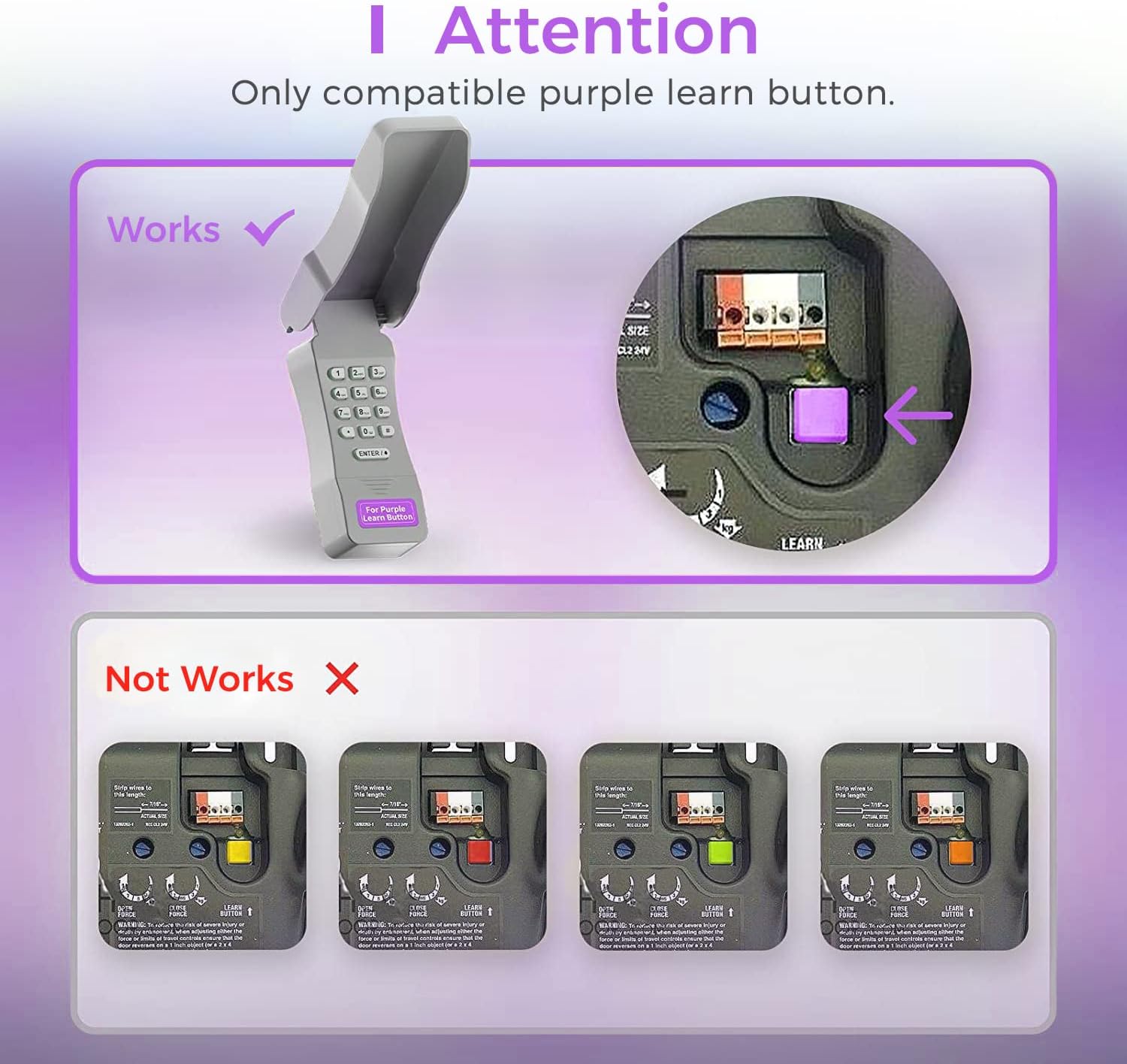
Image: Compatibility Diagram. This visual guide illustrates the correct purple learn button for compatibility and shows examples of incompatible learn button colors (red, orange, green, yellow).
תוכן החבילה
לפני תחילת ההתקנה, יש לוודא שכל הרכיבים נמצאים באריזה:
- 1 x Refoss Wireless Keypad
- מדריך למשתמש אחד (מסמך זה)
- 4 x ברגים
- 4 x עוגני בורג
- 4 x 3M סרט דו צדדי
- 1 x 9V סוללה

Image: Package Contents. This illustration details all items included in the product box, ensuring users can verify they have everything needed for installation.
הגדרה ותכנות
The Refoss Wireless Keypad is designed for easy, wireless programming. Follow these steps carefully to set up your keypad and program it to your garage door opener.
שלב 1: התקן סוללה
- Open the battery compartment on the back of the keypad.
- הכנס את סוללת 9V המצורפת, תוך הקפדה על קוטביות נכונה.
- סגור היטב את תא הסוללות.
שלב 2: תכנות לוח המקשים
This keypad can control up to three garage doors. Each door requires its own unique PIN.
- אתר את PURPLE Learn Button on your garage door opener motor unit. This button is typically found on the back or side panel of the motor.
- לחץ ושחרר מיד את PURPLE Learn Button. The learn indicator light on the opener will glow steadily for 30 seconds.
- Within 30 seconds, enter your desired 4-digit PIN on the Refoss keypad.
- לחץ והחזק את ENTER / # button on the keypad until the garage door opener lights flash or two clicks are heard. This indicates successful programming.
- Test the keypad by entering your PIN and pressing ENTER / #. The garage door should activate.
To program additional garage doors (up to three), repeat Step 2 for each door, using a different 4-digit PIN for each.
הוראות הפעלה
Opening/Closing a Garage Door
- Enter your 4-digit PIN for the desired garage door.
- הקש על ENTER / # לַחְצָן.
- The garage door will open or close.
Controlling Multiple Doors
The keypad supports individual PINs for up to three garage doors. Simply enter the specific PIN for the door you wish to operate.

Image: One Keypad for Three Doors. This image visually represents the keypad's capability to manage up to three distinct garage doors using individual access codes.
תַחזוּקָה
החלפת סוללה
The keypad uses one 9V alkaline battery. When the keypad backlight dims or the keypad becomes unresponsive, it is time to replace the battery.
- Open the battery compartment on the back of the keypad.
- הסר את סוללת ה-9V הישנה.
- הכנס סוללת אלקליין 9V חדשה, תוך הקפדה על קוטביות נכונה.
- סגור היטב את תא הסוללות.
ניקוי
נגבו את משטח לוח המקשים בעזרת מטלית רכהamp בַּד. אין להשתמש בחומרי ניקוי שוחקים או ממסים.
הגנה על מזג האוויר
The keypad features a weatherproof protective cover designed to shield it from various weather conditions. Ensure the cover is properly closed when not in use to maximize its protective capabilities.

Image: Weatherproof and Fluorescent Features. This image demonstrates the keypad's durability against outdoor elements and its illuminated keys for visibility in low-light conditions.
פתרון בעיות
| בְּעָיָה | סיבה אפשרית | פִּתָרוֹן |
|---|---|---|
| לוח המקשים לא מגיב. | סוללה מתה או חלשה. | החלף את סוללת 9 וולט. |
| Garage door does not open/close after entering PIN. | Keypad not programmed correctly or incompatible opener. |
|
| Keypad backlight is dim. | סוללה חלשה. | החלף את סוללת 9 וולט. |
| Cannot program multiple doors. | Incorrect programming sequence for additional doors. | Ensure you are using a unique PIN for each door and repeating the programming steps for each. |
מפרטים
- דֶגֶם: RGR545
- תְאִימוּת: Chamberlain, LiftMaster, Craftsman garage door openers with PURPLE learn button (Security+ 315 MHz, manufactured 2006-2014)
- תֶדֶר: 315 מגה-הרץ
- מספר דלתות נתמכות: עד 3
- מקור כוח: 1x סוללת אלקליין 9V
- מידות: 2 x 6 x 1 אינץ' בערך
- מִשׁקָל: בערך 7.8 אונקיות
- מאפיינים מיוחדים: Weatherproof, Fluorescent Keypad
מידע על אחריות
This Refoss Wireless Garage Door Keypad comes with a אחריות לשנה ממועד הרכישה. אחריות זו מכסה פגמים בחומרים ובביצוע בשימוש רגיל. היא אינה מכסה נזק שנגרם כתוצאה משימוש לרעה, תאונה, שינוי לא מורשה או התקנה לא נכונה.
אנא שמור את הוכחת הרכישה שלך עבור תביעות אחריות.
תמיכת לקוחות
For any questions, technical assistance, or support regarding your Refoss Wireless Garage Door Keypad, please contact our customer support team. We offer caring customer support 7 days a week.
Refer to the product packaging or the Refoss official webאתר לקבלת פרטי הקשר העדכניים ביותר.
Ask a question about this manual
Ask about setup, troubleshooting, compatibility, parts, safety, or missing instructions. Manuals+ will review the question and use this page’s manual context to help answer it.