
מָבוֹא
This manual provides essential information for the safe and efficient operation of your QFX SBX-213 12-inch Portable Bluetooth Speaker. Please read it thoroughly before using the product and retain it for future reference.
הוראות בטיחות
כדי להבטיח פעולה בטוחה ולמנוע נזק, אנא הקפידו על אמצעי הזהירות הבאים:
- אין לחשוף את היחידה לגשם, לחות או טמפרטורות קיצוניות.
- אל תפתח את הרמקול גasinז. הפנה את כל הטיפולים לצוות מוסמך.
- הרחק את הרמקול ממקורות חום, אור שמש ישיר ולהבות גלויות.
- Use only the specified power adapter and charging cable provided with the unit.
- ודאו אוורור נאות סביב הרמקול כדי למנוע התחממות יתר.
- הימנעו מהנחת חפצים כבדים על הרמקול.
תוכן החבילה
בעת פירוק האריזה, אנא ודא שכל הפריטים המפורטים להלן נמצאים ובמצב תקין:
- QFX SBX-213 Portable Bluetooth Speaker
- כבל חשמל
- שְׁלַט רָחוֹק
- מדריך למשתמש (מסמך זה)
המוצר נגמרview
The QFX SBX-213 is a 12-inch portable speaker designed for versatile audio playback. It features Bluetooth connectivity for wireless streaming, an FM radio tuner, and a USB input for playing audio files מכונן הבזק.
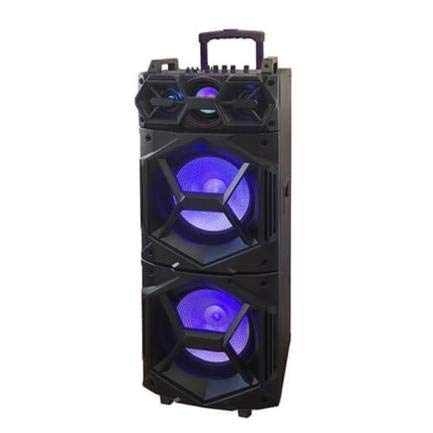
תמונה: חזית view of the QFX SBX-213 Portable Bluetooth Speaker, showcasing its 12-inch driver and robust design. The speaker features a black finish and a protective grille over the main driver.
The speaker's control panel and ports typically include:
- מתג הפעלה/כיבוי
- Mode Button (to switch between Bluetooth, FM, USB inputs)
- Volume Control Knobs or Buttons
- Play/Pause, Previous/Next Track Buttons
- יציאת USB להפעלת מדיה
- Charging Port for power cable connection
- LED Indicator Lights for power, charging, and Bluetooth status
הגדרה
- טעינת הרמקול: Before first use, connect the provided power cable to the speaker's charging port and plug it into a standard electrical outlet. Allow the speaker to fully charge. The charging indicator light will typically change color or turn off when charging is complete.
- מיקום: Place the speaker on a stable, flat surface. For optimal sound dispersion, avoid placing it in enclosed spaces or directly against walls.
הוראות הפעלה
1. הפעלה/כיבוי
To power on the speaker, locate the power switch, usually on the back or side panel, and slide it to the "ON" position. To power off, slide the switch to the "OFF" position.
2. זיווג Bluetooth
- Turn on the speaker. It will typically enter Bluetooth pairing mode automatically, indicated by a flashing LED light and an audible prompt.
- הפעל את בלוטות' במכשיר הנייד שלך (סמארטפון, טאבלט וכו').
- חפש available Bluetooth devices. You should see "QFX SBX-213" or a similar name in the list.
- Select the speaker to pair. Once connected, you will hear a confirmation sound, and the LED indicator will stop flashing.
- כעת ניתן להשמיע אודיו מהמכשיר דרך הרמקול.
3. תפעול רדיו FM
- Press the "MODE" button on the speaker or remote control until "FM" mode is selected.
- Press the "Play/Pause" button to initiate an automatic scan for FM stations. The speaker will save all found stations.
- Use the "Previous/Next Track" buttons to navigate between saved FM stations.
4. השמעת USB
- הכנס כונן הבזק מסוג USB המכיל קובץ שמע MP3 fileליציאת ה-USB ברמקול.
- Press the "MODE" button until "USB" mode is selected. The speaker will automatically begin playing audio files מכונן ה-USB.
- השתמשו בכפתורים "הפעלה/השהיה" ו"רצועה קודמת/הבאה" כדי לשלוט בהשמעה.
5. בקרת עוצמת הקול
Adjust the master volume using the dedicated volume knob or buttons on the speaker. You can also control the volume from your connected Bluetooth device or the remote control.
תַחזוּקָה
- ניקוי: Use a soft, dry cloth to clean the speaker's exterior. Do not use abrasive cleaners, waxes, or solvents, as these may damage the finish.
- אִחסוּן: כאשר הרמקול אינו בשימוש למשך תקופות ממושכות, יש לאחסן אותו במקום קריר ויבש, הרחק מאור שמש ישיר וטמפרטורות קיצוניות.
- טיפול בסוללה: To prolong battery life, avoid fully discharging the battery frequently. Charge the speaker regularly, even if not in use for long periods, to maintain battery health.
פתרון בעיות
If you encounter any issues with your QFX SBX-213 speaker, please refer to the following table for common problems and solutions:
| בְּעָיָה | סיבה אפשרית | פִּתָרוֹן |
|---|---|---|
| אין כוח | Battery discharged; Power cable not connected securely | Charge the speaker fully; Ensure power cable is securely connected to both the speaker and the power outlet. |
| אין חיבור בלוטות' | Bluetooth not enabled on device; Speaker not in pairing mode; Device too far from speaker | Enable Bluetooth on your device; Put the speaker into Bluetooth pairing mode; Move your device closer to the speaker (within 10 meters). |
| אין פלט קול | Volume too low; Incorrect mode selected; Device or speaker is muted | Increase the volume on both the speaker and your connected device; Press the MODE button to select the correct input (Bluetooth, USB, FM); Check if the speaker or device is muted. |
| FM radio static or poor reception | אות חלש; הפרעות | Relocate the speaker to an area with better reception; Perform an auto-scan for stations again; Avoid placing near other electronic devices that may cause interference. |
מפרטים
- מותג: QFX
- דֶגֶם: SBX-213
- גודל רמקול: 12 אינץ'
- טכנולוגיית קישוריות: USB, בלוטות'
- מאפיינים מיוחדים: Lightweight, Portable, FM Radio
- סוג הרכבה: Floor, Table Mount
- סוג בקר: שְׁלַט רָחוֹק
- מקור כוח: כבל חשמלי
- מידות (H x W x D): 113 על 42 על 42 ס"מ בערך
- מִשׁקָל: בערך 4 ק"ג
- UPC: 606540036341
- ASIN: B08GL3SHQP
אחריות ותמיכה
QFX products are designed for reliability and performance. For detailed warranty information or technical support, please refer to the warranty card included with your purchase or visit the official QFX webאתר. שמור את הוכחת הרכישה שלך עבור כל תביעת אחריות.
For further assistance, please contact QFX customer service through their official channels.