
1. הקדמה
This manual provides essential instructions for the safe and efficient operation of your Lenco DIR-250 Internet Radio. Please read this manual thoroughly before using the device and retain it for future reference. The Lenco DIR-250 is a versatile audio system offering Internet Radio, DAB+, FM radio, Bluetooth connectivity, Spotify Connect, and USB playback.
2. מידע בטיחות
- אין לחשוף את המכשיר לגשם או לחות כדי למנוע שריפה או התחשמלות.
- יש לוודא אוורור נאות. אין לחסום פתחי אוורור.
- השתמש רק במתאם החשמל שסופק עם היחידה.
- אל תפתח את ה-casinז. הפנה את כל הטיפולים לצוות מוסמך.
- הרחק את היחידה מאור שמש ישיר, מקורות חום ושדות מגנטיים חזקים.
- הימנע מהנחת חפצים כבדים על גבי היחידה.
3. תכולת החבילה
ודא שכל הפריטים נמצאים בעת הוצאת האריזה:
- Lenco DIR-250 Internet Radio Unit
- מתאם מתח
- שְׁלַט רָחוֹק
- מדריך למשתמש (מסמך זה)
- Antennas (2 included)
4. המוצר נגמרview

איור 4.1: חֲזִית view of the Lenco DIR-250 Internet Radio and its remote control.

איור 4.2: Close-up of the right side of the front panel, featuring the TFT LCD display, volume control knob, Dimmer, and Alarm buttons.
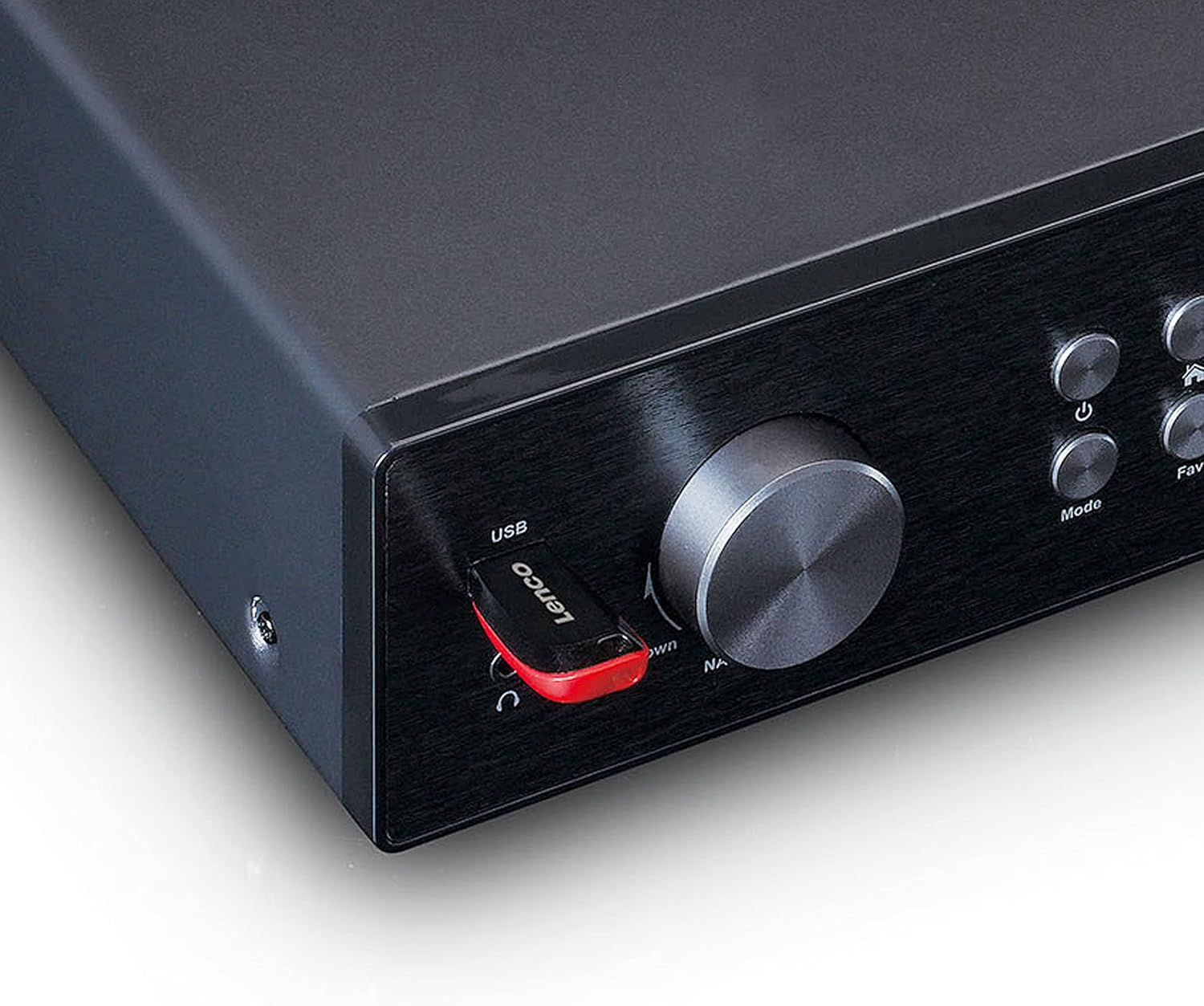
איור 4.3: Close-up of the left side of the front panel, showing the USB port, headphone jack, Navigate/OK knob, Mode, and Favorite buttons.

איור 4.4: Rear panel connections, including DC IN, Audio Output (RCA), Analog Input/Output, Optical Output, Coaxial Output, LAN (RJ45), and Antenna ports.
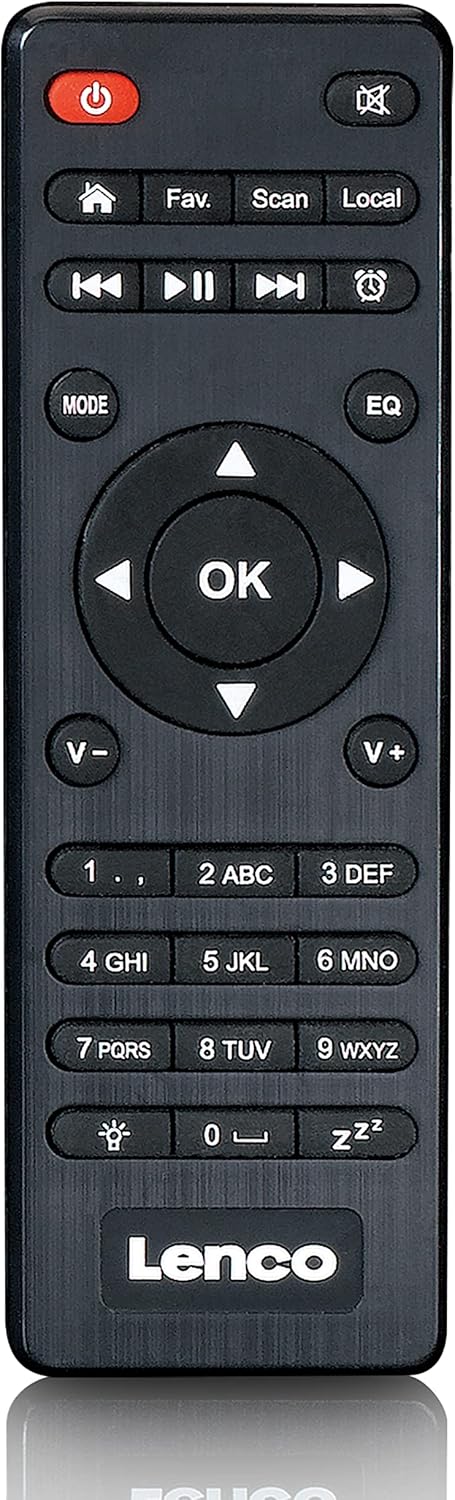
איור 4.5: The included remote control for convenient operation of the Lenco DIR-250.
5. התקנה
5.1. חיבור חשמל
- Connect the supplied power adapter to the DC IN port on the rear of the unit.
- חבר את מתאם החשמל לשקע בקיר.
5.2. חיבור אנטנה
For optimal reception of DAB+ and FM radio, connect the provided antennas to their respective ports on the rear panel. Extend the telescopic antenna fully for best results.
5.3. חיבור לרשת
The DIR-250 supports both Wi-Fi and Ethernet connections for Internet Radio and Spotify Connect.
- Wi-Fi: Upon first power-on, the unit will guide you through the Wi-Fi setup. Select your network from the list and enter the password using the navigation knob and OK button, or the remote control.
- אתרנט: Connect an Ethernet cable from your router to the LAN port on the rear of the unit. The device will automatically detect the wired connection.
5.4. אשף ההתקנה הראשונית
The first time you power on the DIR-250, an initial setup wizard will appear on the display. Follow the on-screen prompts to configure language, time, date, and network settings. This ensures the device is ready for use.
6. הפעלה
6.1. בקרות בסיסיות
The DIR-250 can be operated using the front panel controls or the included remote control.
- לחצן הפעלה: Turns the unit on/off or puts it into standby mode.
- ידית עוצמת הקול: סובבו כדי לכוונן את עוצמת הקול. לחצו כדי להשתיק/לבטל השתקה.
- Navigate/OK Knob: Rotate to scroll through menus and options. Press to confirm a selection.
- לחצן מצב: Cycles through available modes (Internet Radio, DAB+, FM, Bluetooth, USB, AUX).
- Fav. Button: Accesses your list of favorite stations or saves the current station as a favorite.
- כפתור עמום: מכוונן את בהירות התצוגה.
- כפתור אזעקה: Sets or manages alarms.
6.2. רדיו אינטרנט
Access thousands of radio stations worldwide via your internet connection.
- הקש על מצב עד שתבחר "רדיו אינטרנט".
- השתמש ב- Navigate/OK knob or remote control to browse stations by location, genre, or search.
- לִלְחוֹץ OK כדי לבחור תחנה.
- To save a station as a favorite, press and hold the Fav. לַחְצָן.
6.3. רדיו DAB+
תיהנו משידורי רדיו דיגיטליים באיכות גבוהה.
- הקש על מצב button until "DAB+" is selected.
- הרדיו יסרוק אוטומטית אחר תחנות DAB+ זמינות.
- השתמש ב- Navigate/OK knob or remote to select a station from the list.
6.4. רדיו FM
כוונו לתחנות רדיו FM אנלוגיות מסורתיות.
- הקש על מצב עד שתבחר "FM".
- השתמש ב- לִסְרוֹק כפתור בשלט או על Navigate/OK knob to search for stations.
- לִלְחוֹץ OK to listen to a selected station.
6.5. מצב Bluetooth
הזרם אודיו באופן אלחוטי מהסמארטפון, הטאבלט או מכשירים אחרים התומכים ב-Bluetooth.
- הקש על מצב button until "Bluetooth" is selected. The display will show "Pairing".
- On your external device, enable Bluetooth and search for "Lenco DIR-250".
- Select the device to pair. Once connected, you can play audio from your device through the radio.
6.6. Spotify Connect
שלטו במוזיקה שלכם ישירות מאפליקציית Spotify בטלפון החכם או בטאבלט שלכם.
- Ensure your Lenco DIR-250 and your smartphone/tablet are connected to the same Wi-Fi network.
- פתח את אפליקציית Spotify במכשיר שלך.
- Play a song and tap the "Devices Available" icon (usually a speaker or computer icon).
- Select "Lenco DIR-250" from the list of available devices.
6.7. השמעת USB
הפעל אודיו files (MP3, WAV, AAC) from a USB flash drive.
- הכנס כונן הבזק מסוג USB ליציאת ה-USB בלוח הקדמי.
- הקש על מצב עד שתבחר באפשרות "USB".
- השתמש ב- Navigate/OK knob or remote to browse and select audio files.
6.8. קלט AUX
חברו התקני שמע חיצוניים באמצעות כבל שמע 3.5 מ"מ.
- Connect your external audio device to the AUX IN port on the rear panel.
- הקש על מצב עד שתבחר "AUX".
- השמע אודיו מהמכשיר המחובר שלך.
6.9. שעון מעורר וטיימר שינה
Set alarms to wake up to your favorite radio station or use the sleep timer to automatically turn off the radio.
- אַזעָקָה: הקש על אַזעָקָה button on the front panel or remote. Follow the on-screen instructions to set alarm time, source, and volume.
- טיימר שינה: הקש על לִישׁוֹן button on the remote control repeatedly to cycle through available sleep timer durations (e.g., 15, 30, 60 minutes, Off).
7. תחזוקה
7.1. ניקיון
To clean the unit, wipe it with a soft, dry cloth. Do not use abrasive cleaners, waxes, or solvents as these may damage the surface. Ensure the unit is unplugged before cleaning.
7.2. אחסון
אם אינכם מתכננים להשתמש במכשיר למשך תקופה ממושכת, נתקו אותו משקע החשמל ואחסנו אותו במקום קריר ויבש, הרחק מאור שמש ישיר וטמפרטורות קיצוניות.
8. פתרון תקלות
| בְּעָיָה | סיבה אפשרית | פִּתָרוֹן |
|---|---|---|
| אין כוח | מתאם החשמל לא מחובר או ששקע פגום. | בדוק את חיבורי החשמל. נסה שקע אחר. |
| אין קול | Volume too low, muted, or incorrect input selected. | Increase volume. Check if muted. Select correct input mode. |
| לא ניתן להתחבר ל-Wi-Fi | סיסמה שגויה, מחוץ לטווח הקליטה או בעיית נתב. | אמת את סיסמת ה-Wi-Fi. קרב את המכשיר לנתב. הפעל מחדש את הנתב. |
| Internet Radio buffering/disconnecting | Weak Wi-Fi signal or slow internet connection. | Improve Wi-Fi signal strength. Check internet speed. Try wired Ethernet connection. |
| קליטת DAB+/FM גרועה | Antenna not properly connected or extended. | Ensure antennas are fully extended and positioned for best reception. |
| בעיות התאמת בלוטות' | Device not in pairing mode, or already paired with another device. | Ensure DIR-250 is in Bluetooth mode. Disconnect from other devices. |
| היחידה קופאת או מאבדת את התגובות | תקלת תוכנה זמנית. | Unplug the power adapter, wait 10 seconds, then plug it back in to restart the unit. |
9. מפרטים
| מותג | לנקו |
| מספר דגם | A004231 |
| טכנולוגיית תצוגה | LCD |
| קישוריות | Bluetooth V5.0, Ethernet (RJ45), Wi-Fi |
| להקות רדיו נתמכות | רדיו אינטרנט, DAB+, FM |
| תכונות מיוחדות | Spotify Connect, USB Playback, Alarm, Sleep Timer |
| מידות (L x W x H) | 43 x 28.7 x 7.2 ס"מ |
| מִשׁקָל | 1.5 קילוגרם |
| מקור כוח | קווי (מתאם AC) |
| מכשירים תואמים | Tablet, Smartphone, USB storage devices |
10. אחריות
This product comes with a manufacturer's warranty of 24 months from the date of purchase. Please retain your proof of purchase for warranty claims. The warranty covers defects in materials and workmanship under normal use. It does not cover damage caused by misuse, accidents, unauthorized modifications, or normal wear and tear.
11. תמיכה
For technical support, service, or further inquiries regarding your Lenco DIR-250 Internet Radio, please visit the official Lenco website or contact their customer service department. Contact information can typically be found on the Lenco webבאתר או במסמכי האחריות המצורפים למוצר שלך.
Lenco Official Webאֲתַר: www.lenco.com