
GOKOO B08FMBHSWD
GOKOO Smart Watch B08FMBHSWD User Manual
מָבוֹא
This manual provides essential information for the proper setup, operation, and maintenance of your GOKOO Smart Watch B08FMBHSWD. Please read it thoroughly before using the device to ensure optimal performance and longevity.
The GOKOO Smart Watch is a versatile fitness tracker and smartwatch designed to monitor various health metrics and assist with daily activities. It features a full touch screen, heart rate and blood oxygen monitoring, sleep tracking, multiple sports modes, and notification capabilities.
המוצר נגמרview
The GOKOO Smart Watch B08FMBHSWD is equipped with advanced features to support your active lifestyle and health monitoring needs.
- All-day Activity Tracking: Records steps, calories, and mileage. Supports 10 sports modes including walking, running, yoga, and swimming.
- ניטור בריאות מקיף: Continuously monitors heart rate and blood oxygen levels. Features automatic sleep tracking, breathing training, and sedentary reminders.
- עיצוב עמיד ועמיד למים: IP68 waterproof rating suitable for daily use and swimming.
- תצוגה ניתנת להתאמה אישית: 1.3-inch round high-definition screen with personalized UI interfaces.
- התראות חכמות: Synchronizes messages and allows management of incoming calls.
- חיי סוללה ארוכים: Up to 10 days of usage on a single charge (200MA battery).
- תאימות רחבה: Works with Android 5.0+ and iOS 9.0+ devices.

Figure 1: GOKOO Smart Watch highlighting its design and core functionalities.
הגדרה
1. טעינת ההתקן
Before initial use, fully charge your GOKOO Smart Watch. Connect the magnetic charging cable to the charging contacts on the back of the watch and plug the USB end into a power adapter (not included) or a computer's USB port. The watch display will indicate charging status.
A full charge typically takes approximately 2 hours and provides up to 10 days of usage, depending on individual use patterns.

Figure 2: Illustration of the watch's IP68 waterproof capability and its extended battery life.
2. התקנה וצימוד של אפליקציה
- הורד את האפליקציה: חפש the official GOKOO companion app in your smartphone's app store (Apple App Store for iOS, Google Play Store for Android).
- התקנה והרשמה: התקן את האפליקציה ופעל לפי ההוראות שעל המסך כדי ליצור חשבון או להתחבר.
- אפשר Bluetooth: ודא שה-Bluetooth מופעל בטלפון החכם שלך.
- התאם את השעון: Open the GOKOO app, navigate to the device pairing section, and select your GOKOO Smart Watch from the list of available devices. Confirm the pairing request on both your phone and the watch if prompted.
- הענק הרשאות: אפשר הרשאות נחוצות (למשל, התראות, מיקום, נתוני בריאות) כדי שהאפליקציה תפעל כראוי.
The watch will synchronize its language with your phone upon successful connection.
הוראות הפעלה
1. ניווט בסיסי
- מסך מגע: The watch features a full touch screen for interaction.
- החלק למעלה/מטה: גלילה בין תפריטים והתראות.
- החלק שמאלה/ימינה: גישה לווידג'טים או פונקציות מהירות שונות.
- בֶּרֶז: בחר פריט או אשר פעולה.
- כפתור צד: Typically used to return to the home screen or activate/deactivate the display.

Figure 3: The watch interface displaying multiple functions and touch screen interaction methods.
2. מעקב פעילות
The watch automatically tracks your daily steps, calories burned, and distance traveled. For specific activities, you can select from 10 sports modes:
- הליכה
- רִיצָה
- יוֹגָה
- שְׂחִיָה
- רכיבה על אופניים
- טיפוס
- כַּדוּרסַל
- כַּדוּרֶגֶל
- בַּדמִינטוֹן
- דילוג
To start a workout, navigate to the 'Sports' menu on your watch, select the desired activity, and tap to begin. The watch will record your exercise data, which can be reviewבאפליקציה הנלווית.

Figure 4: The watch interface showing available sports monitoring modes.

Figure 5: The watch tracking an outdoor run, displaying distance, calories, and a trajectory map.
3. ניטור בריאות
- דופק: השעון עוקב באופן רציף אחר קצב הלב שלך. View real-time data on the watch or detailed historical data in the app.
- חמצן בדם (SpO2): עקבו אחר רמות החמצן בדם שלכם לאורך כל היום.
- מעקב שינה: The watch automatically records your sleep quality, including deep sleep, light sleep, and wake times. Review sleep patterns in the app to help adjust your habits.
- אימון נשימה: Access guided breathing exercises on the watch to help reduce stress and improve relaxation.
- תזכורות בישיבה: Set reminders in the app to prompt you to move after periods of inactivity.

Figure 6: The watch displaying real-time heart rate and blood oxygen data during exercise.
4. התראות ותכונות חכמות
Once paired with your smartphone, the GOKOO Smart Watch can display notifications for incoming calls, messages, and various app alerts. You can read messages directly on your wrist and manage incoming calls (answer/reject) without reaching for your phone.
- ניהול שיחות: Swipe on the watch screen to accept or reject incoming calls.
- תצוגת הודעות: View text messages and app notifications.
- תחזית מזג האוויר: Access current weather information.
- בקרת מוזיקה: שליטה על השמעת מוזיקה בטלפון החכם שלך.
- שלט רחוק למצלמה: השתמשו בשעון כשלט רחוק למצלמת הטלפון שלכם.
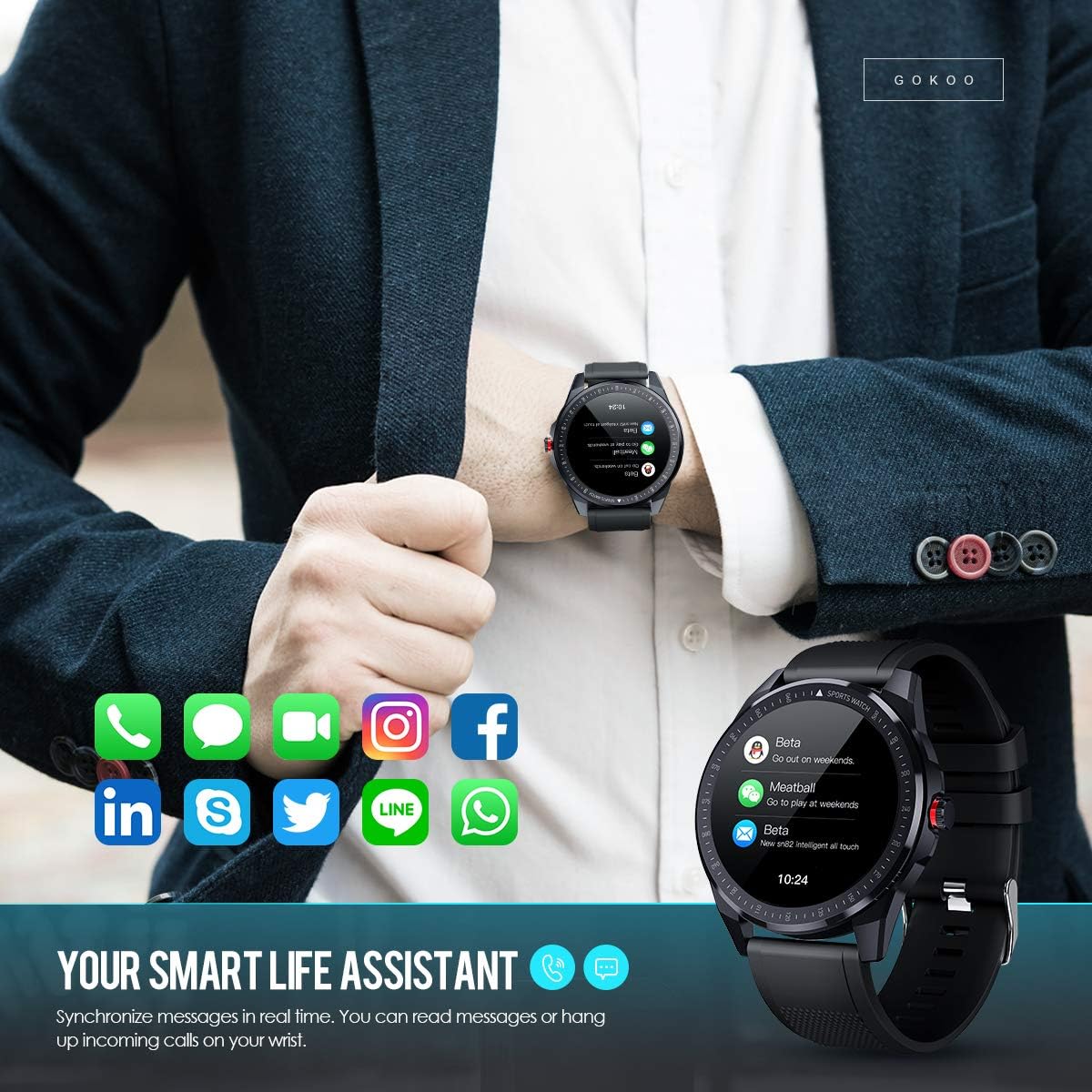
Figure 7: The watch showing synchronized notifications from a smartphone.
5. התאמה אישית
The GOKOO Smart Watch allows for personalization of its interface. You can select from various pre-installed watch faces or download additional styles through the companion app to match your preference.
תַחזוּקָה
1. ניקיון
Regularly clean your watch and strap to prevent skin irritation and maintain device hygiene. Use a soft, lint-free cloth. If necessary, slightly dampשטפו את המטלית במים. הימנעו משימוש בכימיקלים חזקים, חומרי ניקוי שוחקים או תרסיסים.
2. הנחיות לעמידות במים
The GOKOO Smart Watch has an IP68 waterproof rating, meaning it is resistant to dust and can withstand immersion in water up to 1.5 meters for 30 minutes. It is suitable for daily use, hand washing, rain, and swimming.
חָשׁוּב: Do not use the watch in hot water baths, saunas, or during diving. High temperatures and high pressure can compromise the waterproof seals and cause damage.
3. טיפול בסוללה
- הימנעו מפריקת הסוללה באופן מלא לעתים קרובות.
- טען את השעון באמצעות כבל הטעינה המגנטי המצורף.
- אחסנו את השעון במקום קריר ויבש כאשר אינו בשימוש למשך תקופות ממושכות.
פתרון בעיות
- שעון לא נדלק: ודא שהשעון טעון במלואו. חבר אותו למטען למשך 30 דקות לפחות.
- לא ניתן להתאים לטלפון:
- ודא שה-Bluetooth מופעל בטלפון שלך.
- ודא שהשעון נמצא בטווח Bluetooth של הטלפון שלך.
- הפעילו מחדש את הטלפון ואת השעון.
- בדוק אם לאפליקציה יש את ההרשאות הנדרשות.
- נתוני בריאות לא מדויקים: ודאו שהשעון צמוד לפרק כף היד, ברוחב אצבע אחת מעל עצם פרק כף היד. נקו את החיישן בגב השעון.
- התראות שלא מופיעות:
- Verify that notification permissions are granted in the app and your phone's settings.
- ודא שהשעון מחובר דרך בלוטות'.
- בדוק אם מצב 'נא לא להפריע' פעיל בשעון או בטלפון.
- חיי סוללה קצרים: Reduce screen brightness, disable continuous heart rate monitoring if not needed, and limit the number of active notifications.
מפרטים
| תכונה | פְּרָט |
|---|---|
| מותג | GOKOO |
| דֶגֶם | B08FMBHSWD |
| גודל מסך | 1.3 אינץ' |
| מַעֲרֶכֶת הַפעָלָה | אנדרואיד 5.0 ומעלה, iOS 9.0 ומעלה |
| מכשירים תואמים | סמארטפון |
| חיי סוללה | עד 10 ימים (בהתאם לשימוש) |
| סוג סוללה | ליתיום פולימר |
| עמידות במים | IP68 |
| קישוריות אלחוטית | בלוטות' |
| קלט ממשק אנושי | מסך מגע |
| מידות המוצר | 27 x 5 x 1.08 ס"מ; 168 גרם |

Figure 8: Detailed product dimensions of the GOKOO Smart Watch.
אחריות ותמיכה
For warranty information or technical support, please refer to the contact details provided with your purchase or visit the official GOKOO website. If you require a copy of this manual or have any questions regarding your GOKOO Smart Watch B08FMBHSWD, please contact customer service.
Ask a question about this manual
Ask about setup, troubleshooting, compatibility, parts, safety, or missing instructions. Manuals+ will review the question and use this page’s manual context to help answer it.