
PowerPac PPFS212B 2-in-1 Dual-Usage Stand Fan Instruction Manual
Model: PPFS212B
1. מידע בטיחות חשוב
אנא קרא בעיון את כל ההוראות לפני השימוש במכשיר זה ושמור אותן לעיון עתידי. אי הקפדה על הוראות אלה עלולה לגרום להתחשמלות, שריפה או פציעה חמורה.
- ודא את הכרךtagעוצמת החשמל המצוינת בתווית הדירוג תואמת את עוצמת החשמל של רשת החשמל שלך.tage.
- אין לטבול את המאוורר, התקע או הכבל במים או בנוזלים אחרים.
- נתקו את המאוורר משקע החשמל לפני ניקוי, הרכבה או פירוק של חלקים.
- הרחיקו אצבעות, עפרונות או כל חפץ אחר מגשר המאוורר כשהוא פועל.
- אין להפעיל את המאוורר עם כבל או תקע פגומים. פנו לאנשי שירות מוסמכים לצורך תיקון.
- This appliance is equipped with thermal fuse protection against overheating. If the fan stops working unexpectedly, unplug it and allow it to cool before attempting to restart.
- מכשיר זה אינו מיועד לשימוש על ידי אנשים (כולל ילדים) עם יכולות פיזיות, חושיות או נפשיות מופחתות, או חוסר ניסיון וידע, אלא אם כן הם קיבלו פיקוח או הדרכה לגבי השימוש במכשיר על ידי אדם האחראי לבטיחותם. .
2. המוצר נגמרview
The PowerPac PPFS212B is a versatile 2-in-1 dual-usage stand fan designed for efficient cooling in indoor environments. It features 7 blades for maximum airflow, 3-speed settings, and an oscillation function for wider air distribution. The fan is equipped with thermal fuse protection for enhanced safety.
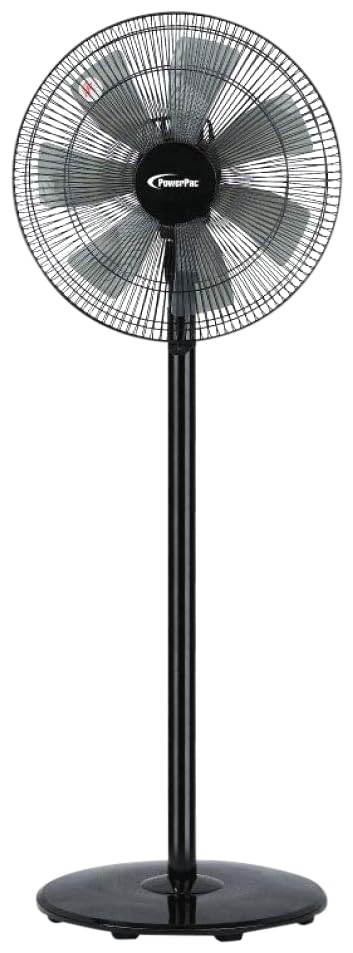
Image: PowerPac PPFS212B 2-in-1 Dual-Usage Stand Fan, showcasing its black finish and stand configuration.
3. תכולת החבילה
אנא בדקו את תוכן האריזה בעת הפתיחה כדי לוודא שכל החלקים קיימים ולא ניזוקו:
- 1 x PowerPac PPFS212B Stand Fan (includes fan head, stand pole, and base)
4. הוראות הרכבה
Follow these steps to assemble your PowerPac PPFS212B fan:
- פרק בזהירות את כל הרכיבים מהאריזה.
- Attach the stand pole to the fan base. Ensure it is securely fastened according to the markings or locking mechanism.
- Mount the fan head assembly onto the top of the stand pole. Align the connection points and secure it firmly.
- Ensure all screws and fasteners are tightened to prevent wobbling during operation.
- הנח את המאוורר המורכב על משטח יציב ושטוח.
Image: Illustrative diagram of the PowerPac PPFS212B fan assembly, showing the base, stand, and fan head components.
5. הוראות הפעלה
To operate your PowerPac PPFS212B fan:
- חבר את כבל החשמל לשקע חשמל מתאים.
- הפעלה/כיבוי: Press the 'ON/OFF' button (or corresponding button) on the control panel to turn the fan on or off.
- התאמת מהירות: Press the 'SPEED' button repeatedly to cycle through the 3 available speed settings (Low, Medium, High).
- פונקצית תנודה: Press the 'OSC' button (or corresponding button) to activate or deactivate the oscillation feature, which allows the fan head to sweep from side to side.
- When finished, press the 'ON/OFF' button to turn off the fan and unplug it from the power outlet.
6. תחזוקה וניקיון
Regular cleaning and maintenance will help ensure optimal performance and longevity of your fan:
- נתק תמיד את המאוורר מהחשמל לפני הניקוי.
- השתמש רך, דamp cloth to wipe the exterior surfaces of the fan. Do not use abrasive cleaners, solvents, or harsh chemicals.
- To clean the fan blades, carefully remove the front grille (if detachable) according to the product design. Wipe the blades with a soft cloth. Ensure all parts are dry before reassembling.
- אל תאפשר למים לטפטף לתוך בית המנוע.
- אחסנו את המאוורר במקום קריר ויבש כאשר אינו בשימוש למשך תקופות ממושכות.
7. פתרון תקלות
If you encounter issues with your fan, refer to the following table for common problems and solutions:
| בְּעָיָה | סיבה אפשרית | פִּתָרוֹן |
|---|---|---|
| המאוורר לא נדלק. | אין ספק כוח. Thermal fuse activated. | בדוק אם התקע מוכנס היטב לשקע. ודא ששקע החשמל תקין. Unplug and allow the fan to cool down for 30 minutes before restarting. |
| זרימת אוויר חלשה או ללא זרימת אוויר כלל. | מהירות המאוורר מוגדרת נמוך מדי. להבי המאוורר מלוכלכים. | הגבר את הגדרת מהירות המאוורר. Unplug the fan and clean the blades as per maintenance instructions. |
| מאוורר אינו מתנודד. | פונקציית התנודה כבויה. | Press the 'OSC' button to activate oscillation. |
| רעש יוצא דופן במהלך הפעולה. | חלקים רופפים. חֲסִימָה. | Unplug the fan and check for any loose components or obstructions around the blades or motor. Tighten any loose parts. |
אם הבעיה נמשכת לאחר ניסיון פתרונות אלה, אנא צור קשר עם תמיכת הלקוחות.
8. מפרטים
| תכונה | מִפרָט |
|---|---|
| מותג | PowerPac |
| מספר דגם | PPFS212B |
| סוּג | 2-in-1 Dual-Usage Stand Fan |
| מספר להבים | 7 |
| מספר מהירויות | 3 |
| מקור כוח | חשמלי עם כבלים |
| מהtage | 50 וואט |
| שיטת בקרה | כפתור לחיצה |
| תכונות מיוחדות | Oscillating, Thermal Fuse Protection |
| חוֹמֶר | פּלָסטִי |
| שימוש בפנים/חוץ | מקורה |
| צֶבַע | שָׁחוֹר |
9. אחריות ותמיכה
This PowerPac PPFS212B fan comes with a אחריות לשנה מתאריך הרכישה. אחריות זו מכסה פגמי ייצור בתנאי שימוש רגילים.
For warranty claims, technical support, or any inquiries regarding your product, please contact PowerPac customer service. Keep your proof of purchase for warranty validation.