
1. הקדמה
The VGEBY YCX-003 MPPT Solar Charge Controller is designed to manage power flow from your solar panels to your battery bank and connected loads. It features an industrial-grade master chip for accurate monitoring and control, ensuring efficient charging and protection for your battery system. This controller automatically adapts to 12V or 24V systems and incorporates advanced Maximum Power Point Tracking (MPPT) technology for high charging efficiency.
פונקציות מפתח כוללות:
- Maintaining optimal battery charge levels.
- Protection against over-charging and over-discharging.
- Prevention of reverse charging from battery to solar panels at night.
- Reverse polarity protection for both battery and solar panels.
- Automatic load cut-off and recovery based on battery voltage.
- Built-in thunder protection.
- Automatic temperature compensation for charging voltage.
2. התקנה והתקנה
התקנה נכונה היא קריטית להפעלה בטוחה ויעילה של בקר הטעינה הסולארי שלך. אנא בצע את השלבים הבאים בקפידה.
2.1 תרשים חיווט

Figure 1: Wiring connections for the solar charge controller.
2.2 שלבי חיבור
Connect the components in the following order to prevent damage to the controller or other system components:
- חבר את הסוללה: First, connect the battery to the controller's battery terminals. Ensure correct polarity (positive to positive, negative to negative). The controller will automatically detect the system voltage (12V או 24V).
- חבר את הפנל הסולארי: לאחר מכן, חברו את הפאנל הסולארי להדקים של הפאנל הסולארי בבקר. ודאו קוטביות נכונה.
- חבר את העומס: לבסוף, חברו את עומסי הזרם הישר שלכם להדקי העומס של הבקר. ודאו קוטביות נכונה.
חָשׁוּב: Always connect the battery first and disconnect the load first when disassembling the system.
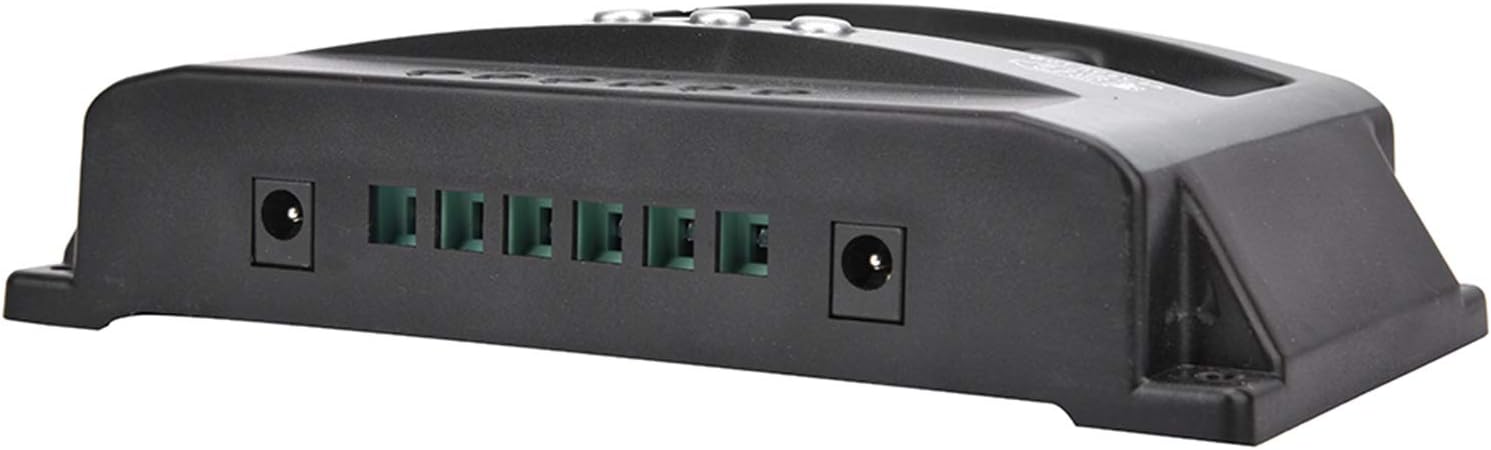
Figure 2: Connection terminals on the side of the controller.
3. הוראות הפעלה
The VGEBY YCX-003 controller features a large LCD display and user-friendly buttons for monitoring and adjusting parameters.
3.1 צג LCD וכפתורים

איור 3: פאנל קדמי עם צג LCD וכפתורי בקרה.
The LCD display provides real-time information on battery voltage, charging current, discharge current, and system status. The buttons allow you to navigate through display modes and adjust certain charging and discharging parameters.
3.2 Adjustable Parameters
The controller allows for adjustment of floating charge voltagה, פריקה ניתוק כרךtage, and discharge recovery voltage. Refer to the on-screen menu for specific adjustment procedures. These parameters are factory-set to default values suitable for most lead-acid batteries but can be customized if needed.
3.3 יציאות USB
The controller includes a 5V/2A USB output for charging small electronic devices. This output is active when the battery has sufficient charge.

איור 4: יכולת טעינה באמצעות USB.
4. תחזוקה
To ensure the longevity and optimal performance of your VGEBY YCX-003 MPPT Solar Charge Controller, periodic maintenance is recommended.
- נִקָיוֹן: שמרו על ניקיון הבקר, ללא אבק ולכלוך. השתמשו במטלית יבשה לניקוי.
- חיבורים: Periodically check all wiring connections to ensure they are secure and free from corrosion. Loose connections can lead to power loss or overheating.
- אוורור: Ensure the controller is installed in a well-ventilated area to prevent overheating.
5. פתרון תקלות
The VGEBY YCX-003 controller is designed with several built-in protection features. If the system is not operating as expected, check the following:
- אין תצוגה/כוח: בדוק את חיבורי הסוללה וודא שיש מספיק מתח לסוללהtage.
- ללא טעינה: Verify solar panel connections and ensure adequate sunlight. Check for reverse polarity on solar panel connections.
- טעינה לא עובדת: Check load connections and ensure the battery voltage is above the discharge recovery voltage. The controller automatically cuts off the load if battery voltage נמוך מדי.
- קודי שגיאה/אזהרות: The controller has built-in protections for overheating, overcurrent, short circuit, open circuit, and reverse connection. If a fault occurs, the controller will automatically recover once the issue is resolved. Consult the display for any specific indicators.
- קוטביות הפוכה: The controller has reverse polarity protection for both the battery and solar panels. If connected incorrectly, the controller will not operate until the polarity is corrected.
6. מפרט טכני

Figure 5: VGEBY YCX-003 MPPT Solar Charge Controller.
| תכונה | מִפרָט |
|---|---|
| דֶגֶם | YCX-003 |
| מערכת כרךtage | 12V/24V Adaptive |
| פאנל סולארי כרךtage | 12 וולט, 18 וולט, 24 וו, 36 וו |
| מטען צף כרךtage | 13.7V (ברירת מחדל, מתכוונן) |
| פריקה ניתוק כרךtage | 10.7V (ברירת מחדל, מתכוונן) |
| פריקה התאוששות כרךtage | 12.6V (ברירת מחדל, מתכוונן) |
| זרם המתנה | <10mA |
| יציאת USB | 5V / 2A מקסימום |
| אפשרויות זרם מדורגות | 40A, 50A, 60A, 100A |
| מקסימום PV Voltage | 50V |
| מקסימום כוח קלט PV | 750W (12V) / 1500W (24V) |
| מידות | מידות בקירוב: 170 x 92 x 45 מ"מ (6.7 x 3.6 x 1.8 אינץ') |
| חוֹמֶר | ABS + ROHS |
| יַצרָן | VGEBY |
7. אחריות ותמיכה
For warranty information or technical support, please refer to the documentation provided at the time of purchase or contact VGEBY customer service directly. Ensure you have your product model number (YCX-003) and purchase details available when seeking support.