
פיטביט FB511BKBK
מדריך למשתמש של Fitbit Versa 3 Health & Fitness Smartwatch
Model: FB511BKBK
מָבוֹא
The Fitbit Versa 3 is a health and fitness smartwatch designed to help you track your activities, monitor your health, and stay connected. It features built-in GPS, 24/7 heart rate tracking, Alexa Built-in, and a long battery life.
This manual provides detailed instructions for setting up, operating, maintaining, and troubleshooting your Fitbit Versa 3.
הגדרה
1. פתיחת האריזה וטעינה ראשונית
Upon unboxing your Fitbit Versa 3, ensure all components are present: the smartwatch, charging cable, and small/large bands. Before first use, fully charge the device.

Image: The Fitbit Versa 3 smartwatch in black, showing the display and the black silicone band.
- חבר את כבל הטעינה למקור מתח USB.
- Align the magnetic charger with the charging contacts on the back of your Versa 3 until it snaps into place.
- A full charge takes approximately 1 hour, providing 6+ days of battery life. A 12-minute fast charge provides 24 hours of battery.
2. Attaching the Bands
The Versa 3 comes with both small and large bands. Choose the size that provides a comfortable, secure fit.
- To attach a band, slide the pin into the notch on the watch's lug.
- Press the lever and slide the other end of the band into place.
- שחררו את הידית ומשכו בעדינות את הרצועה כדי לוודא שהיא מחוברת היטב.
3. צימוד עם המכשיר שלך
The Fitbit Versa 3 requires the Fitbit app for setup and data synchronization. The app is compatible with iPhone and Android devices.
- Download and install the Fitbit app from your device's app store.
- פתחו את אפליקציית Fitbit והתחברו או צרו חשבון חדש.
- Follow the on-screen instructions in the app to pair your Versa 3. This typically involves enabling Bluetooth on your phone and entering a code displayed on the watch.
- Complete the setup process, including connecting to Wi-Fi and setting up voice assistants if desired.
הפעלת ה-Fitbit Versa 3 שלך
ניווט בסיסי
- החלק למטה: Access quick settings (e.g., Do Not Disturb, Sleep Mode, Screen Wake).
- החלק למעלה: View daily stats (e.g., steps, heart rate, Active Zone Minutes).
- החלק שמאלה/ימינה: Navigate through apps and widgets.
- Capacitive Button: Press once firmly to return to the home screen. Press twice for shortcut features. Long press to activate your chosen voice assistant (Alexa or Google Assistant).
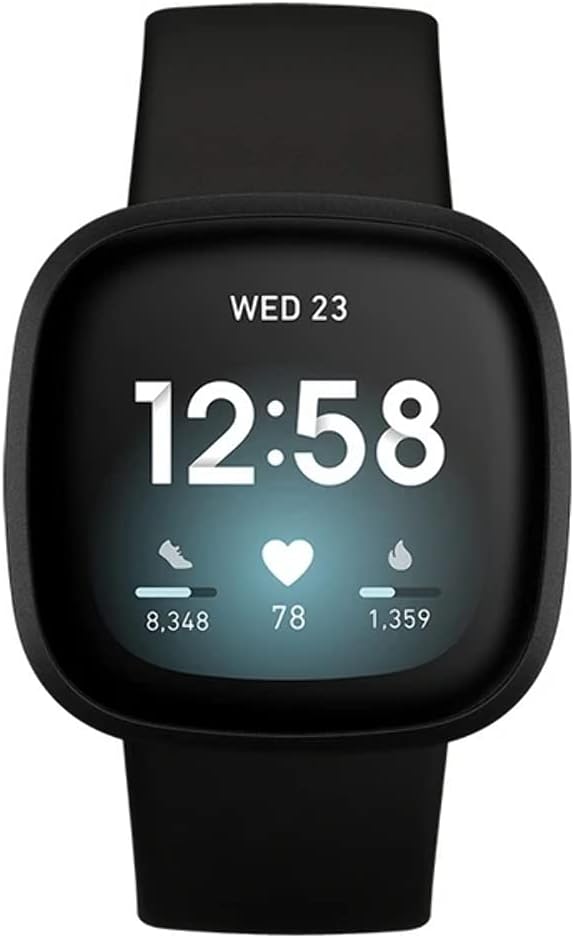
Image: The Fitbit Versa 3 display showing the time, date, steps, heart rate, and calories burned.
תכונות עיקריות ושימוש
- מעקב אחר פעילות: The Versa 3 automatically tracks steps, distance, calories burned, and Active Zone Minutes. View detailed stats in the Fitbit app.
- ניטור קצב הלב: Continuous 24/7 heart rate tracking with PurePulse 2.0 technology.
- GPS מובנה: Track pace and distance during runs, bike rides, and other outdoor activities without your phone. View workout intensity maps in the Fitbit app.
- מעקב שינה: Monitor your time in light, deep, and REM sleep stages. Receive a Sleep Score in the Fitbit app to understand your sleep quality.
- התראות: קבל התראות על שיחות, טקסט ואפליקציות ישירות על פרק כף היד שלך.
- עוזר קולי: Use Amazon Alexa Built-in or Google Assistant to get news, set reminders, control smart home devices, and more.
- בקרת מוזיקה: Control music playback from your wrist. Subscriptions may be required for music services like Spotify.
- Fitbit Pay: Make secure payments from your wrist (check Fitbit app for participating banks).
סרטון: אובר של 23 שניותview of the Fitbit Versa 3, showcasing its design and various angles, including the heart rate sensor on the back. This video highlights the physical aspects of the device.
תַחזוּקָה
Cleaning Your Versa 3
- Regularly clean your Versa 3 and its band to prevent skin irritation and maintain device functionality.
- Remove the watch from your wrist and wipe the device and band with a soft, lint-free cloth.
- For silicone bands, you can use a mild soap-free cleanser if needed, then rinse thoroughly and dry.
- ודא שמגעי הטעינה בגב השעון נקיים ויבשים לפני הטעינה.
עמידות במים
The Fitbit Versa 3 is water resistant to 50 meters. This means it is safe for showering, swimming, and other shallow water activities. It is not recommended for scuba diving or high-velocity water sports.
- After getting the device wet, dry it thoroughly before wearing or charging.
פתרון בעיות
| לְהַנפִּיק | פִּתָרוֹן |
|---|---|
| המכשיר לא נטען | Ensure the charging cable is securely connected to both the watch and the power source. Clean the charging contacts on the back of the watch. Try a different USB port or power adapter. |
| המכשיר לא מסתנכרן | Ensure Bluetooth is enabled on your phone and the Versa 3 is within range. Restart your phone and the Versa 3. Check for app updates. If issues persist, try re-pairing the device. |
| GPS לא מתחבר | ודא שאתה נמצא באזור פתוח עם שדה נקי view of the sky. Wait a few moments for the GPS to acquire a signal. |
| גירוי בעור | Ensure the band is not too tight. Clean the band and your wrist regularly. If irritation persists, consult a dermatologist and consider using a different band material. |
לסיוע נוסף, עיינו בתמיכה הרשמית של Fitbit webאתר או צור קשר עם שירות הלקוחות.
מפרטים
- דֶגֶם: FB511BKBK
- לְהַצִיג: מסך AMOLED בגודל 1.58 אינץ'
- קישוריות: בלוטות', GPS
- חיי סוללה: 6+ days (up to 12 hours with continuous GPS)
- עמידות במים: 50 מטר
- קיבולת אחסון זיכרון: 4 ג'יגה-בייט
- מַעֲרֶכֶת הַפעָלָה: אנדרואיד (תואם ל-iOS)
- מידות: 1.59 x 1.59 x 0.49 אינץ'
- מִשׁקָל: 0.7 אונקיות
- חיישנים: 24/7 Heart Rate Monitor (PurePulse 2.0), SpO2, Temperature Sensor, Accelerometer, Gyroscope, Altimeter
מידע על אחריות
Fitbit products typically come with a limited warranty. For specific warranty terms and conditions, including duration and coverage, please refer to the warranty card included with your product or visit the official Fitbit support webאתר. שמור את הוכחת הרכישה שלך לצורך תביעות אחריות.
תְמִיכָה
For additional support, FAQs, and community forums, please visit the official Fitbit Help Center:
You can also contact Fitbit Customer Support directly through their webאתר לקבלת סיוע אישי.
Ask a question about this manual
Ask about setup, troubleshooting, compatibility, parts, safety, or missing instructions. Manuals+ will review the question and use this page’s manual context to help answer it.