
1. הקדמה
The Obeamiu XK-70D LED Video Light Kit is designed to provide versatile and adjustable lighting for various photography and videography applications. This kit features 70 LED lamp beads, offering soft and realistic lighting with adjustable color temperature and brightness. It is suitable for live videos, video chats, interviews, portraits, weddings, and macro photography.
2. תכולת החבילה
אנא ודא שכל הפריטים המפורטים להלן כלולים בחבילה שלך:
- 3 x USB LED Light Panel with Cable
- 3 x USB Wall Chargers
- 3 x Universal Gimbal
- 3 x מעמד לחצובה
- 3 x 4 Color Filters (Yellow/Red/Blue/White)
- 1 x מדריך למשתמש
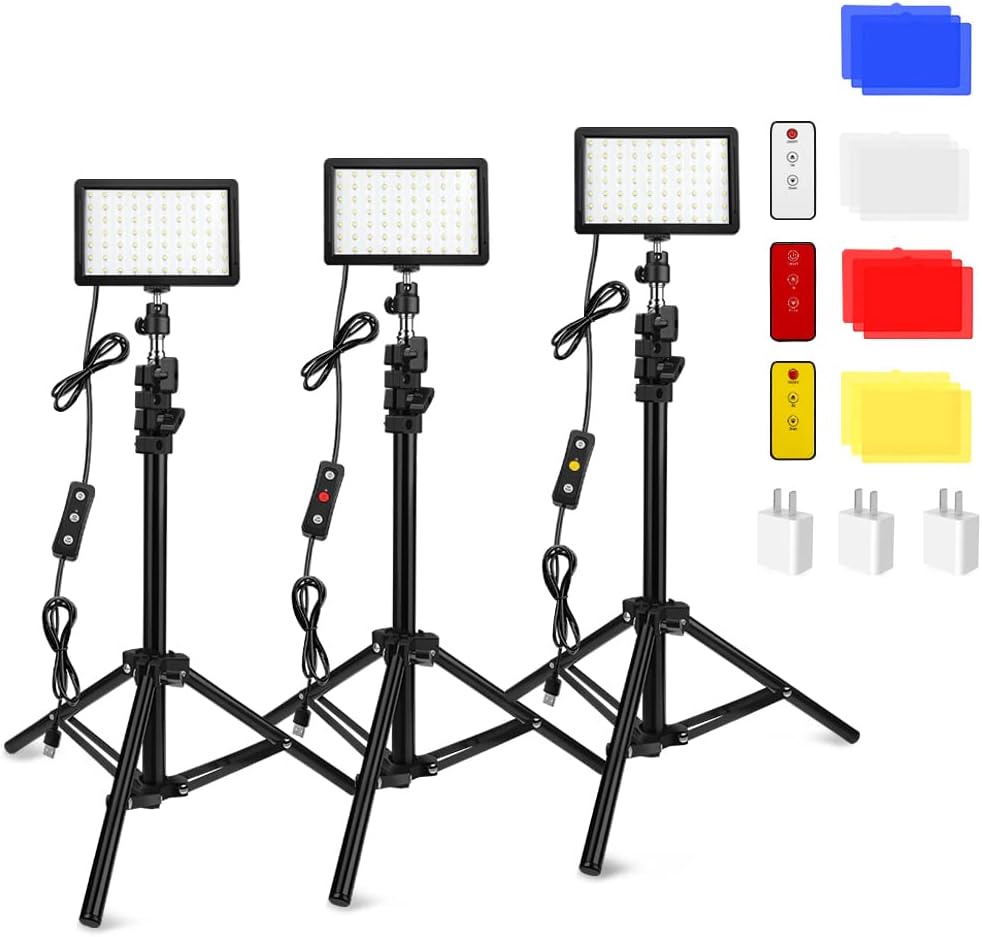
Image 2.1: Contents of the Obeamiu 3 Packs 70 LED Video Light Kit, including three LED panels, tripod stands, USB cables, wall chargers, and color filters.
3. מפרטים
| דֶגֶם | XK-70D |
| כּוֹחַ | 10W |
| לומן | 1000 לומן |
| טווח טמפרטורת צבע | 5400-5800K (ניתן להתאמה) |
| חיי LED | 50,000 שעות |
| LED Bulbs Quantity | 70 יחידות |
| דימר | 10%-100% |
| כניסת חשמל DC | 5V/2A |
| יציאת טעינה | יציאת מיקרו USB |
| אינדקס עיבוד צבע (CRI) | ≥97 |
| TLCI | 97+ |
| מִשׁקָל | 140.5g (per light panel) |
| Dimensions (Light Panel) | 145 x 95 x 19.5 מ"מ (5.71 x 3.74 x 0.77 אינץ') |
| Tripod Stand Height Range | 27.17 אינץ' עד 48.39 אינץ' (69 ס"מ עד 122.9 ס"מ) |

Image 3.1: Detailed product dimensions for the LED light panel and adjustable tripod stand, showing height ranges from 27.17 inches to 48.39 inches.
4. אמצעי בטיחות
- Do not place this product in a high temperature or humid environment.
- זה נורמלי שהמוצר יפיק חום במהלך השימוש.
- Do not place this product in a location with corrosive chemicals, as this may cause damage.
- Ensure the USB power adapter provides at least 5V/2A for each light to ensure proper brightness.
5. הוראות התקנה
- הרכבת מעמד החצובה: Extend the legs of the tripod stand to a stable position. Adjust the height using the quick-flip locks to your desired level (from 27.17" to 48.39").
- Attach the Universal Gimbal: Secure the universal gimbal to the top of the tripod stand.
- Mount the LED Light Panel: Attach the LED light panel to the universal gimbal. The gimbal allows for flexible adjustment of the light panel's angle.
- חבר חשמל: Connect the USB cable from the LED light panel to the provided USB wall charger. Plug the wall charger into a power outlet. Ensure the power adapter meets the 5V/2A requirement for optimal performance.
- Install Color Filters (Optional): If desired, insert the white diffuser into the light panel first, then place one of the colored filters (Yellow, Red, Blue) over it.
6. הוראות הפעלה
6.1 הפעלה/כיבוי וכוונון בהירות
Once connected to power, the LED light panel can be controlled using the inline remote on the USB cable.
- לחץ על כפתור ההפעלה בשלט הרחוק כדי להדליק או לכבות את האור.
- Use the '+' and '-' buttons to adjust the brightness level from 10% to 100%.

תמונה 6.1: דוגמהample of brightness adjustment, showing the visual difference between 30%, 50%, and 70% light brightness settings.

Image 6.2: Visual comparison of light intensity settings at 10%, 30%, 60%, and 90% for illuminating objects.
6.2 שימוש במסנני צבע
The kit includes white, yellow, red, and blue color filters to achieve different lighting effects. Remember to use the white diffuser as the base layer.
- First, insert the white diffuser into the light panel.
- Then, place your desired colored filter (yellow, red, or blue) over the white diffuser.
- These filters can be used to create specific moods or correct color temperatures for your photography or video.

Image 6.3: Visual representation of various lighting effects achieved by applying different color filters to the LED light panel.
6.3 Adjusting Light Angle
The universal gimbal allows for flexible positioning of the light panel.
- Loosen the adjustment knob on the gimbal.
- Tilt or rotate the light panel to the desired angle.
- Tighten the adjustment knob to secure the light panel in place.
7. תחזוקה
- ניקוי: Use a soft, dry cloth to clean the LED light panels and tripod stands. Avoid using abrasive cleaners or solvents.
- אִחסוּן: When not in use, disassemble the kit and store it in a dry, cool place away from direct sunlight and moisture.
- טיפול בכבלים: Do not bend or crimp the USB cables excessively. Store them neatly to prevent damage.
8. פתרון תקלות
- האור לא נדלק:
- Ensure the USB cable is securely connected to both the light panel and the wall charger.
- Verify that the wall charger is properly plugged into a working power outlet.
- Check if the power adapter provides at least 5V/2A. Insufficient power may prevent the light from operating.
- האור עמום או מהבהב:
- Confirm that the power adapter meets the minimum 5V/2A requirement.
- Adjust the brightness using the inline remote.
- Ensure no obstructions are blocking the light output.
- Tripod stand instability:
- ודא שרגלי החצובה פרושות במלואן ונעולות.
- הנח את החצובה על משטח ישר ויציב.
- Do not overload the tripod with additional equipment beyond the intended light panel.
9. Product Information and Support
For further assistance or inquiries, please refer to the contact information provided with your purchase or visit the official Obeamiu webאֲתַר.
Product design and specifications are subject to change without prior notice or obligation.