
מָבוֹא
This manual provides detailed instructions for the installation, operation, maintenance, and troubleshooting of the HP ProDesk 400 G3 MS-7957 motherboard. Please read this manual thoroughly before proceeding with any installation or operation to ensure proper functionality and safety.
מידע בטיחות
יש להקפיד תמיד על אמצעי הזהירות הבאים כדי למנוע נזק ללוח האם או פגיעה עצמית:
- נתק את ספק הכוח משקע הקיר לפני התקנה או הסרה של רכיבים כלשהם.
- ענדו רצועת כף יד אנטי-סטטית או געו לעתים קרובות בחפץ מתכת מוארק כדי לפרוק חשמל סטטי לפני הטיפול בלוח האם.
- יש להחזיק את לוח האם בקצוותיו כדי להימנע ממגע עם רכיבים רגישים.
- ודא אוורור נאות בתוך מארז המחשב כדי למנוע התחממות יתר.
- הרחק את לוח האם מלחות וטמפרטורות קיצוניות.
המוצר נגמרview
The HP ProDesk 400 G3 MS-7957 is a MicroATX motherboard designed for Intel processors with an LGA 1151 socket. It supports DDR4 RAM and features a B250 chipset, offering a reliable foundation for desktop computing.
תכונות מפתח
- Compatible CPU Brand: אינטל
- סוג שקע: LGA 1151/Socket H4
- גורם צורה: MicroATX
- מחברי I/O: Ethernet (RJ-45), USB 2.0, USB 3.0, VGA, DisplayPort, HD Audio Jack
זיהוי רכיבים
Familiarize yourself with the layout of the motherboard to facilitate proper installation and connection of components.

איור 1: זוויתי view of the HP ProDesk 400 G3 MS-7957 motherboard. This image highlights the CPU socket (LGA 1151), four DDR4 RAM slots, PCIe slots, and various headers for front panel connections and storage devices.
התקנה והתקנה
לפני שאתה מתחיל
- Ensure your computer case is compatible with the MicroATX form factor.
- Gather all necessary components: CPU, RAM, CPU cooler, power supply, storage devices, and graphics card (if not using integrated graphics).
- Prepare your workspace by ensuring it is clean, well-lit, and static-free.
התקנת לוח אם
- Install the CPU into the LGA 1151 socket. Carefully align the CPU with the socket's notch and gently lower it into place. Close the retention arm.
- מרחו משחה תרמית על המעבד והתקינו את מקרר המעבד בהתאם להוראות היצרן.
- Install the DDR4 RAM modules into the designated slots. Ensure they are fully seated until the clips lock into place.
- Mount the motherboard into the computer case using the appropriate standoffs and screws.
- חבר את מחבר החשמל הראשי של 24 פינים מסוג ATX ואת מחבר החשמל של המעבד בן 4 או 8 פינים מספק הכוח שלך ללוח האם.
- Install any expansion cards (e.g., graphics card) into the PCIe slots.

איור 2: זווית מלמעלה למטה view of the HP ProDesk 400 G3 MS-7957 motherboard. This perspective provides a clear view of the processor socket, memory slots, and the layout of the various internal connectors and components.
חיבור ציוד היקפי
- Connect SATA storage devices (HDDs/SSDs) to the SATA ports on the motherboard.
- Connect front panel headers (power button, reset button, USB ports, audio jacks) to their respective pins on the motherboard. Refer to your case manual for specific pin assignments.
- Connect external peripherals such as monitor, keyboard, mouse, and Ethernet cable to the rear I/O panel.
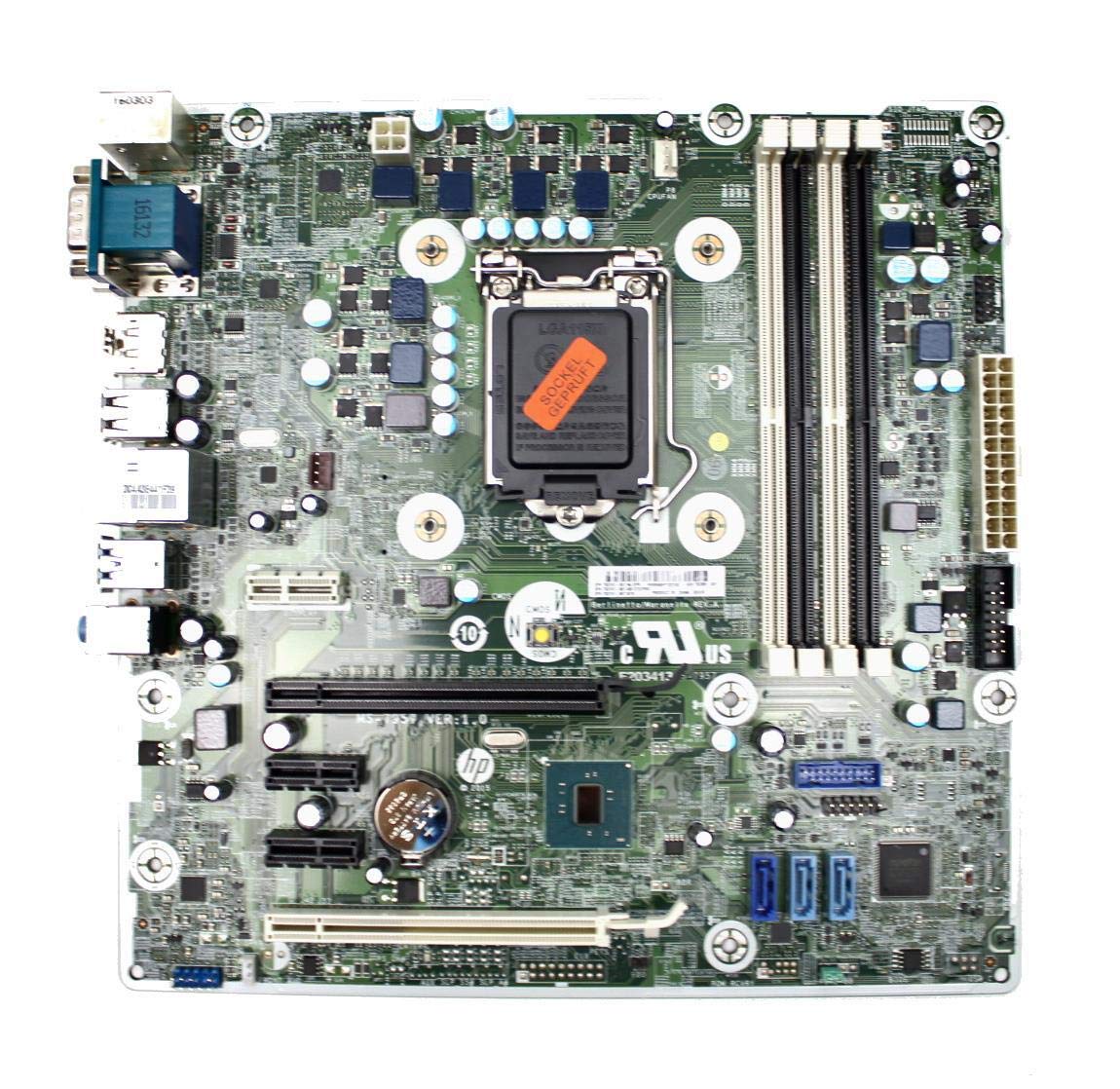
Figure 3: Rear I/O panel of the HP ProDesk 400 G3 MS-7957 motherboard. This image displays the available external connectivity options, including PS/2 ports, serial port, VGA, DisplayPort, USB 2.0, USB 3.0, Ethernet (RJ-45), and HD audio jacks.
הוראות הפעלה
הפעלה ראשונית
After all components are installed and connected, connect the power cable to the power supply and press the power button on your computer case. The system should initiate the boot process.
תצורת BIOS/UEFI
כדי לגשת לכלי ההתקנה של BIOS/UEFI, לחצו על המקש הייעודי (בדרך כלל דל, F2, F10, או F12) during the initial boot sequence. Here you can configure boot order, system time, and other hardware settings.
התקנת דרייבר
After installing your operating system, it is crucial to install the latest drivers for your motherboard's chipset, integrated graphics, audio, and network adapter. These drivers can typically be found on the HP support webאתר או של יצרן ערכת השבבים webאֲתַר.
תַחזוּקָה
- ניקוי: יש לנקות באופן קבוע אבק מלוח האם והרכיבים באמצעות אוויר דחוס. יש לוודא שהמערכת כבויה ומנותקת מהחשמל לפני הניקוי.
- עדכוני BIOS/UEFI: Periodically check for BIOS/UEFI updates from HP's official support website. Updates can improve stability, compatibility, and performance. Follow update instructions carefully to avoid system damage.
- עדכוני דרייבר: עדכן את כל מנהלי ההתקנים של המערכת כדי להבטיח ביצועים אופטימליים ותאימות עם תוכנות וחומרה חדשות.
פתרון בעיות
סעיף זה מספק פתרונות לבעיות נפוצות שאתה עשוי להיתקל בהן:
- אין כוח: Check all power connections, including the 24-pin ATX and CPU power cables. Ensure the power supply is switched on and the wall outlet is functional.
- אין תצוגה: Verify that your monitor is connected to the correct video output (VGA or DisplayPort) and is powered on. Reseat the graphics card (if applicable) and RAM modules.
- חוסר יציבות/קריסות מערכת: This could be due to overheating, faulty RAM, or outdated drivers. Check CPU and GPU temperatures, run memory diagnostic tools, and update drivers.
- לא זוהה ציוד היקפי: Ensure the peripheral is properly connected. Try a different port or update the relevant drivers.
- בעיות BIOS/UEFI: If you encounter issues after changing BIOS settings, try resetting the CMOS by removing the CMOS battery for a few minutes or using the clear CMOS jumper (refer to motherboard diagram for location).
מפרטים
| תכונה | מִפרָט |
|---|---|
| מותג | HP |
| שקע מעבד | LGA 1151 |
| מכשירים תואמים | מחשב שולחני |
| טכנולוגיית זיכרון RAM | DDR4 |
| מעבדים תואמים | Intel Core i3-6xxx, Intel Core i5-6xxx, Intel Core i7-6xxx, Intel Core i3-7xxx, Intel Core i5-7xxx, Intel Core i7-7xxx, Intel Core i3-8xxx, Intel Core i5-8xxx, Intel Core i7-8xxx |
| סוג ערכת שבבים | אינטל B250 |
| פּלַטפוֹרמָה | חלונות |
| שם הדגם | MS-7957 |
| דגם מעבד | ליבה i3 (Note: Supports i3, i5, i7 as listed above) |
| סוג מחבר מתח ראשי | 24 פינים |
| ממשק כרטיס מסך | PCI Express |
| Available Memory Slots | 4 |
| Total SATA Ports | 6 |
| סך כל יציאות USB | 2 (Note: Refers to internal headers, rear I/O has more) |
| סך הכל יציאות Ethernet | 1 |
| Total PCIe Ports | 3 |
| יַצרָן | Computer Store Berlin (Reseller/Supplier) |
| מספר חלק | 4061435962741 |
| ASIN | B08CS13PTQ |
אחריות ותמיכה
מוצר זה מגיע עם א אחריות לשנה מתאריך הרכישה. אחריות זו מכסה פגמים בחומרים ובעבודה בשימוש רגיל.
For technical support, warranty claims, or further assistance, please contact your point of purchase or refer to the official HP support resources for the ProDesk 400 G3 series.