
1. הקדמה
This manual provides essential information for the safe and efficient use of your FLEXISPOT EG1 Electric Height Adjustable Standing Desk. Please read this manual thoroughly before assembly and operation to ensure proper functionality and to prevent damage or injury.
The FLEXISPOT EG1 desk is designed to offer a versatile workspace, allowing users to easily switch between sitting and standing positions. It features a robust electric lifting system, a spacious desktop, and a user-friendly control panel.

Figure 1.1: FLEXISPOT EG1 Electric Height Adjustable Standing Desk.
2. מידע בטיחות
- ודא שכל הרכיבים מהודקים היטב לפני השימוש.
- הרחק ילדים וחיות מחמד מהשולחן במהלך הפעולה.
- Do not place hands or objects near moving parts during height adjustment.
- Avoid overloading the desk. The maximum load capacity is 70 kg (excluding desktop weight).
- נתק את החשמל לפני ניקוי או תחזוקה.
- Operate the desk only in a dry environment.
- The desk features an anti-collision rebound function. If an obstruction is detected, the desk will stop and slightly reverse its movement.

Figure 2.1: Anti-Collision Rebound Function in action.
3. תכולת החבילה
Before assembly, verify that all parts are present and undamaged. Refer to the detailed parts list provided in your physical assembly manual. Typical components include:
- Desktop (Maple Top)
- מסגרת שולחן (לבן)
- Lifting Columns (Legs)
- תיבת בקרה
- Control Panel (2-Button)
- כבל חשמל
- חומרת הרכבה (ברגים, כלים)
- מגש לניהול כבלים
- Side Hooks (Set of 2)
4. הוראות הרכבה
Assembly of the FLEXISPOT EG1 desk is designed to be straightforward and typically takes less than 30 minutes. For detailed, step-by-step instructions, please refer to the dedicated assembly manual included in your product packaging. The following provides a general overview:
- פרק רכיבים: הוצא בזהירות את כל החלקים מהאריזה והנח אותם על משטח נקי ושטוח. ודא מול רשימת החלקים.
- להרכיב מסגרת: Attach the lifting columns to the crossbar and feet according to the manual's diagrams.
- צרף שולחן עבודה: Securely fasten the desktop to the assembled frame using the provided screws.
- Install Control Box and Panel: Mount the control box and connect the motor and control panel cables. Position the 2-button control panel conveniently under the desktop.
- ניהול כבלים: Utilize the included cable management tray and side hooks to organize power cords and accessories for a tidy workspace.
- חבר חשמל: Plug the power cable into the control box and then into a wall outlet.
פֶּתֶק: The industrial-grade steel frame ensures solid construction. Ensure all connections are tight for stability.

Figure 4.1: Integrated cable organizer and side hooks for convenience.
5. הוראות הפעלה
The FLEXISPOT EG1 desk features an intuitive 2-button control panel for easy height adjustment.
5.1. לוח הבקרה נגמרview
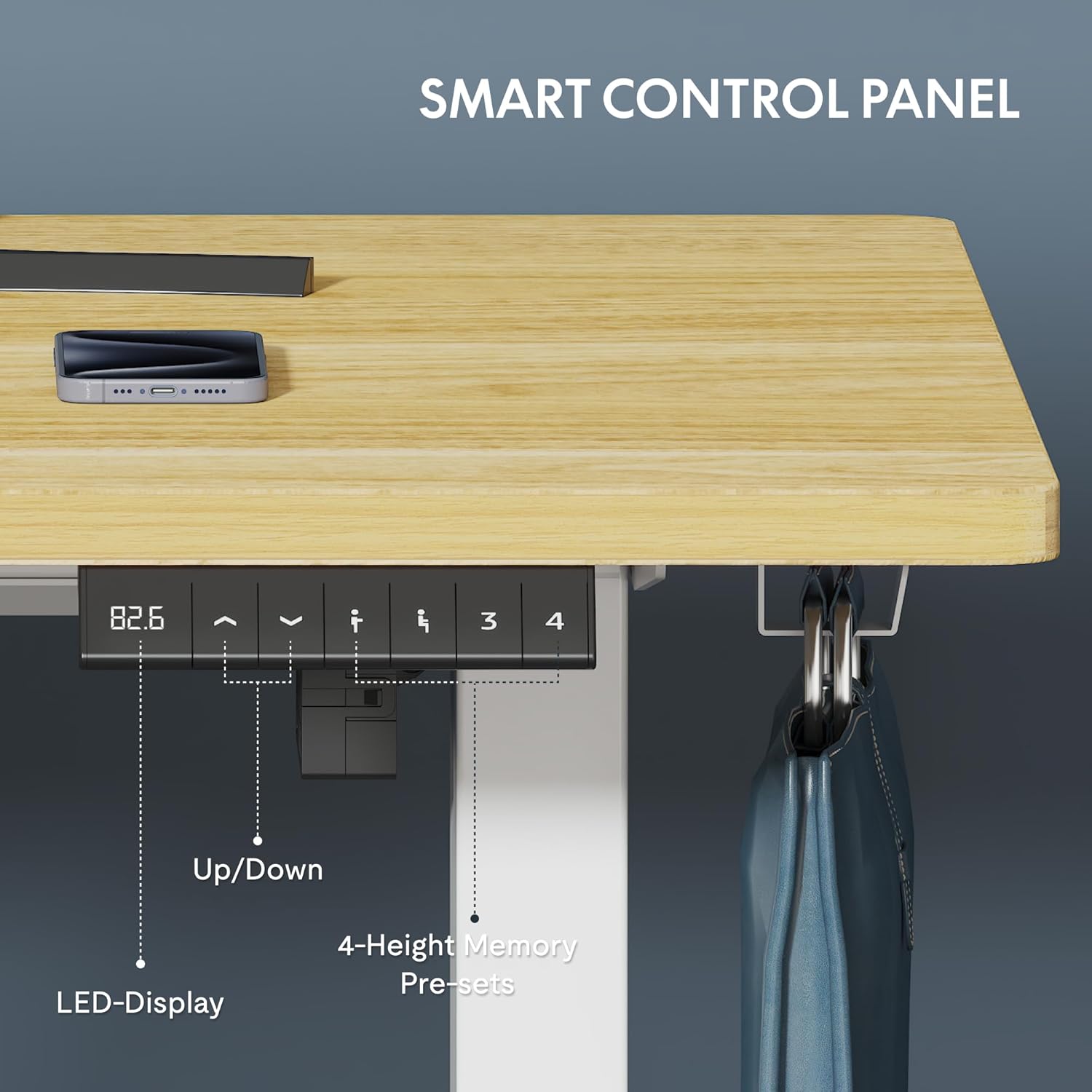
Figure 5.1: Smart Control Panel with LED Display.
- לחצנים למעלה/למטה: Use the arrow buttons to smoothly adjust the desk height. The LED display shows the current height in centimeters.
- טווח גובה: The desk can be adjusted from 73 cm (minimum) to 121 cm (maximum).
- מְהִירוּת: The desk adjusts at a maximum speed of 2.5 cm/second.
- רמת רעש: Operation is quiet, with a noise level of less than 50 dB.

Figure 5.2: Large Adjustment Range for various user heights and activities.
5.2. התאמת גובה
כדי להתאים את גובה השולחן:
- לחץ והחזק את Up arrow button to raise the desk.
- לחץ והחזק את לְמַטָה arrow button to lower the desk.
- שחררו את הכפתור כאשר הגובה הרצוי מגיע.
The desk transitions smoothly between sitting and standing positions in less than 10 seconds, making it ideal for dynamic work environments.
6. תחזוקה וטיפול
Regular maintenance ensures the longevity and optimal performance of your FLEXISPOT EG1 desk.
- ניקוי: נגבו את שולחן העבודה והמסגרת בעזרת מטלית רכהamp מטלית. הימנעו מחומרי ניקוי שוחקים או כימיקלים חזקים שעלולים לפגוע בגימור.
- ניהול כבלים: Periodically check and tidy cables to prevent tangling or damage, especially during height adjustments.
- מחברים: בדקו מדי פעם את כל הברגים והברגים כדי לוודא שהם נשארים מהודקים היטב. הדקו מחדש במידת הצורך.
- בדיקת מנוע: While the motor is designed for 20,000 cycles, listen for any unusual noises during operation. If you notice any issues, refer to the troubleshooting section or contact support.
7. פתרון תקלות
If you encounter issues with your FLEXISPOT EG1 desk, refer to the common problems and solutions below. If the problem persists, contact customer support.
| בְּעָיָה | סיבה אפשרית | פִּתָרוֹן |
|---|---|---|
| שולחן העבודה לא זז | Power cable disconnected; Control box error; Overload | Check power connection; Reset the desk (unplug for 30s, then replug); Reduce weight on desk |
| התאמת גובה לא אחידה | Obstruction; Loose connections | Clear any obstructions; Check all frame connections and tighten if loose |
| Desk stops unexpectedly | Anti-collision activated; Overheating | Check for obstructions; Allow motor to cool down for 20 minutes before resuming operation |
| רעשים חריגים במהלך הפעולה | רכיבים רופפים; בעיה במנוע | Ensure all screws are tight; Contact customer support if noise persists |
8. מפרטים
| תכונה | פְּרָט |
|---|---|
| מספר דגם | EC1W-EU+PR1206-Maple |
| מותג | FLEXISPOT |
| מידות שולחן עבודה (אורך x רוחב) | 120 ס"מ x 60 ס"מ (47.24 x 23.62 אינץ') |
| טווח כוונון גובה | 73 ס"מ עד 121 ס"מ (28.7 עד 47.6 אינץ') |
| מהירות הרמה | Max 2.5 cm/second |
| רמת רעש | פחות מ-50 dB |
| כושר העמסה | 70 kg (without desktop) |
| חומר מסגרת | Industrial-grade Steel |
| חומר שולחן עבודה | Engineered Wood (Maple finish) |
| לוּחַ בַּקָרָה | 2-Button with LED Display |
| הסמכות | CE, ROHS |
| משקל פריט | 29.4 קילוגרם |
9. אחריות ותמיכה
FLEXISPOT stands by the quality of its products. Your EG1 desk is covered by the following warranties:
- 5 שנות אחריות: Covers the desk frame, motor, and other mechanical components.
- 2 שנות אחריות: Covers the controller, switch, and electronic components.
For warranty claims, technical assistance, or any questions not covered in this manual, please contact FLEXISPOT customer support. Please have your model number (EC1W-EU+PR1206-Maple) and purchase information ready when contacting support.

Figure 9.1: FLEXISPOT Warranty Information.