
1. הקדמה
This manual provides detailed instructions for the safe and effective use of the Walfront PM6508 Digital Temperature Humidity Meter. This device is designed for high-precision measurement of ambient temperature and relative humidity, offering features such as data hold, backlight display, and wet bulb/dew point temperature calculations. It is suitable for various applications including home, office, industrial settings, and environmental monitoring.
2. מידע בטיחות
Please read and understand all safety warnings and operating instructions before using this instrument. Failure to follow these instructions may result in electric shock, fire, or injury.
- אין להפעיל את המונה אם הוא נראה פגום או אם מכסה הסוללה אינו סגור כראוי.
- Avoid exposing the meter to extreme temperatures, direct sunlight, or high humidity for prolonged periods.
- אל תנסה לתקן או לשנות את המונה. יש לפנות לכל טיפול וטיפול באנשי מקצוע מוסמכים.
- Remove batteries if the meter is not used for an extended period to prevent leakage.
- Keep the sensor area clean and free from obstructions to ensure accurate readings.
3. המוצר נגמרview
The Walfront PM6508 is a compact and portable digital meter designed for accurate environmental measurements. It features an easy-to-read LCD display with backlight and intuitive button controls.

איור 3.1: חֲזִית view of the Walfront PM6508 meter with key components labeled. This includes the temperature and humidity sensor at the top, the HD display, various control buttons (Power, Max/Min, Data Hold, Data Storage, Unit Switch, Backlight), and an anti-fall protective sleeve.
3.1 תכונות עיקריות
- חיישן דיוק גבוה: Provides accurate temperature and humidity readings.
- צג LCD עם תאורה אחורית: מבטיח קריאות ברורה בתנאי תאורה שונים.
- פונקציית החזקת נתונים: מקפיא את הקריאה הנוכחית על הצג.
- אחסון נתונים: Stores up to 100 groups of measurement data.
- Wet Bulb & Dew Point Temperature: Calculates and displays these critical environmental parameters.
- החלפת יחידה: מעבר קל בין צלזיוס (°C) לפרנהייט (°F).
- כיבוי אוטומטי: חוסך חיי סוללה.
- מחוון צריכת חשמל נמוכה: מתריע כאשר יש צורך להחליף סוללות.
3.2 תכולת החבילה

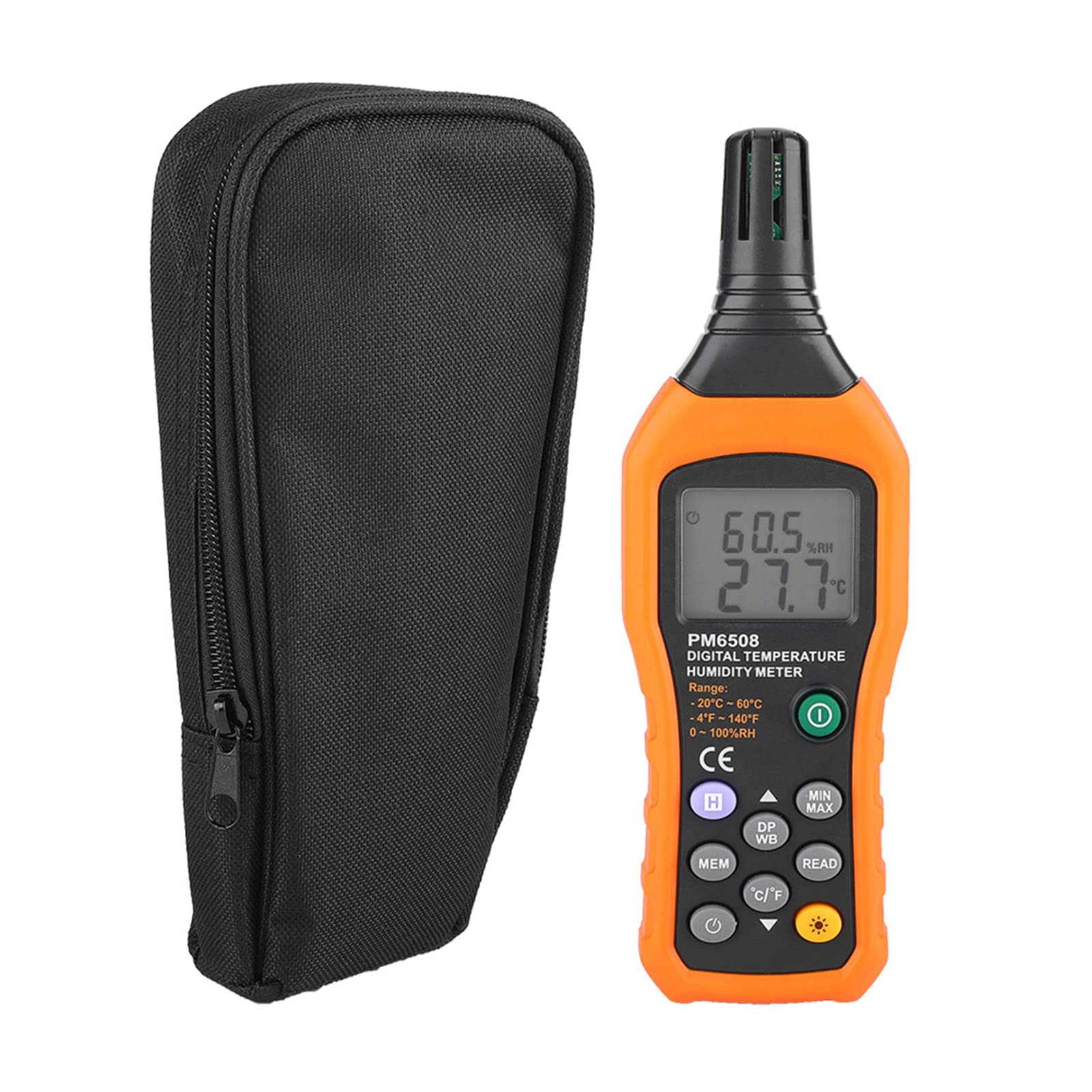
איור 3.2: The Walfront PM6508 meter shown alongside its portable storage bag, indicating typical package contents.
- Walfront PM6508 Digital Temperature Humidity Meter
- תיק אחסון נייד
- מדריך למשתמש
4. התקנה
4.1 התקנת סוללה
The PM6508 meter requires 4 x 1.5V AAA batteries (not included) for operation.
- אתר את מכסה תא הסוללה בגב המונה.
- החלק את מכסה הסוללה כלפי מטה כדי לפתוח אותו.
- Insert four AAA batteries, ensuring correct polarity (+ and -) as indicated inside the compartment.
- החזר את מכסה הסוללה למקומו על ידי החלקתו בחזרה עד שיישמע נקישה.
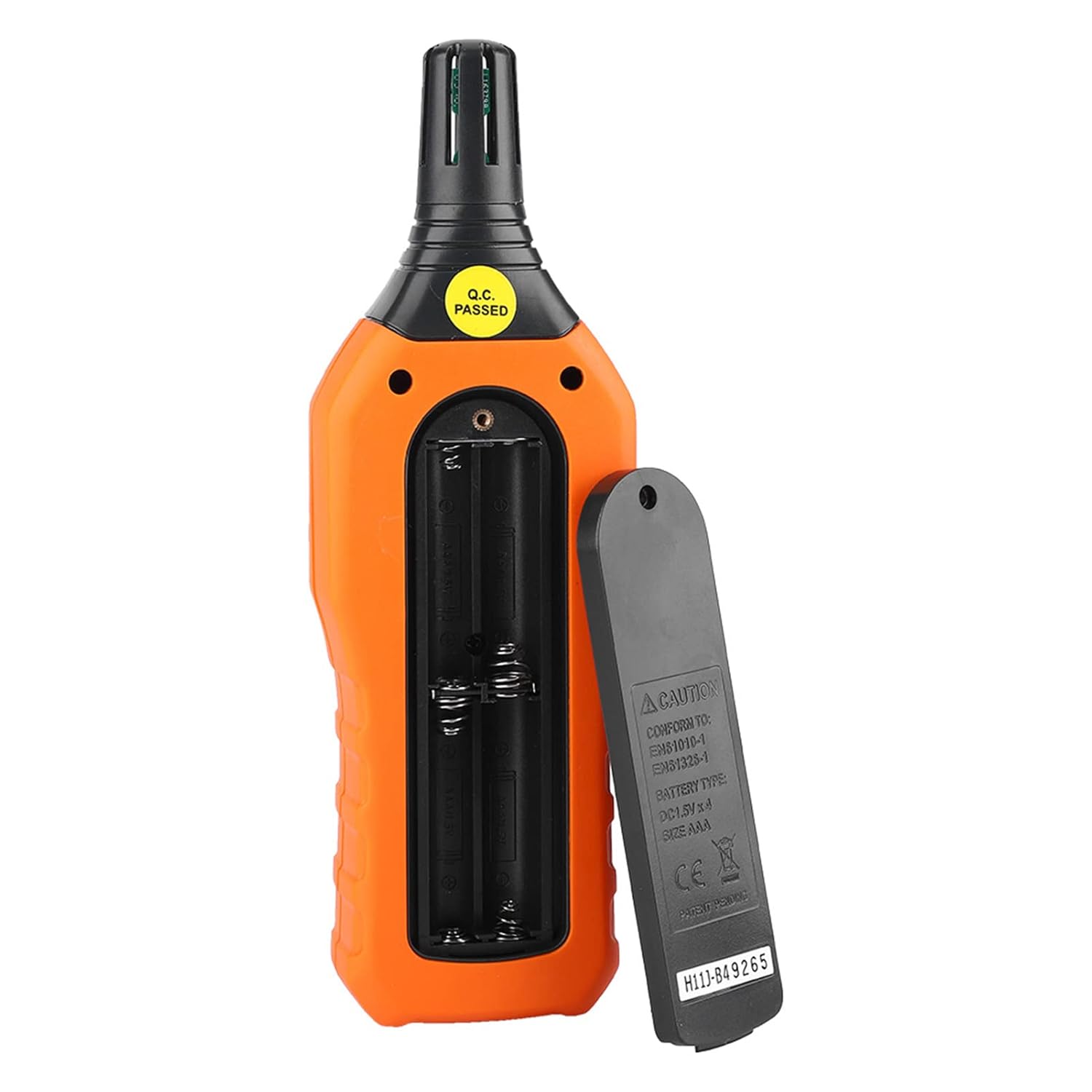
איור 4.1: אֲחוֹרִי view of the meter showing the open battery compartment for AAA battery installation.
5. הוראות הפעלה
5.1 הפעלה/כיבוי
- הקש על green power button (
 ) to turn the meter on.
 - לחץ והחזק את gray power button () for approximately 2 seconds to turn the meter off. The meter also features an automatic shut-down function to conserve battery life.
5.2 לקיחת מדידות
Once powered on, the meter will immediately begin displaying real-time temperature and humidity readings on the LCD screen. Ensure the sensor at the top of the device is exposed to the environment you wish to measure.

איור 5.1: The meter in use, displaying temperature and humidity readings on its LCD screen.
5.3 החלפת יחידות (°C/°F)
כדי לעבור בין יחידות טמפרטורה של צלזיוס (°C) ופרנהייט (°F):
- הקש על לחצן °C/°F () located on the keypad. The display will update to show readings in the selected unit.
5.4 פונקציית תאורה אחורית
To activate or deactivate the display backlight:
- הקש על כפתור תאורה אחורית () to toggle the backlight on or off. This is useful for reading in low-light conditions.
5.5 שמירת נתונים (H)
To freeze the current readings on the display:
- הקש על כפתור H (). The "H" icon will appear on the display, indicating that the data is held.
- הקש על כפתור H again to release the data hold and resume real-time measurements.
5.6 Maximum/Minimum (MIN/MAX) Measurement
אֶל view the maximum or minimum recorded values:
- הקש על לחצן MIN/MAX () once to display the maximum temperature and humidity recorded since the meter was powered on or the function was reset.
- הקש על לחצן MIN/MAX again to display the minimum temperature and humidity.
- הקש על לחצן MIN/MAX a third time to exit the MIN/MAX mode and return to real-time readings.
5.7 Data Storage (MEM) and Retrieval (READ)
The meter can store up to 100 groups of measurement data.
- To Store Data: הקש על כפתור MEM () to save the current temperature and humidity readings. The display will briefly show a memory location number.
- To Retrieve Data: הקש על כפתור READ () to enter data retrieval mode. Use the כפתור MEM to scroll through stored data records.
- To Exit Retrieval: הקש על כפתור READ again to exit data retrieval mode.
5.8 Wet Bulb (WB) and Dew Point (DP) Temperature
To display Wet Bulb or Dew Point temperatures:
- הקש על DP/WB button () once to display the Dew Point temperature.
- הקש על DP/WB button again to display the Wet Bulb temperature.
- הקש על DP/WB button a third time to return to standard temperature and humidity display.
6. תחזוקה
6.1 ניקוי
- נגב את ה-c של המונהasinז עם רך, דamp בַּד. אין להשתמש בחומרי ניקוי שוחקים או ממסים.
- Keep the sensor area clean and free from dust or debris to ensure accurate readings. Do not insert any objects into the sensor opening.
6.2 אחסון
- כאשר המכשיר אינו בשימוש למשך תקופות ממושכות, יש להוציא את הסוללות כדי למנוע דליפה ונזק למכשיר.
- יש לאחסן את המונה במקום קריר ויבש, הרחק מאור שמש ישיר וטמפרטורות קיצוניות.
- Utilize the provided portable storage bag for protection during storage and transport.
7. פתרון תקלות
| בְּעָיָה | סיבה אפשרית | פִּתָרוֹן |
|---|---|---|
| המד לא נדלק. |
|
|
| קריאות לא מדויקות. |
|
|
| התצוגה עמומה או מהבהבת. |
|
|
| Cannot store or retrieve data. |
|
|
8. מפרטים
The following table outlines the technical specifications for the Walfront PM6508 Digital Temperature Humidity Meter.


איור 8.1: Detailed technical specifications including ranges, resolution, and precision for temperature, humidity, wet bulb, and dew point measurements, along with general parameters.
| פָּרָמֶטֶר | עֵרֶך |
|---|---|
| דֶגֶם | PM6508 |
| טווח טמפרטורות סביבה | -20 עד 60 מעלות צלזיוס (-4 עד 140 מעלות פרנהייט) |
| Ambient Temperature Precision | ±1.5 °C (-20 to 0 °C, 45 to 60 °C), ±0.5 °C (0 to 45 °C) |
| טווח לחות יחסית | 0% - 100% לחות יחסית |
| Relative Humidity Precision | ±4.0% (0-20%, 80-100%), ±3.0% (20-80%) |
| טווח טמפרטורות נורה רטובה | -20 עד 60 מעלות צלזיוס (4 עד 140 מעלות פרנהייט) |
| Wet Bulb Temperature Precision | ±1.5 °C (-20 to 0 °C, 45 to 60 °C), ±0.5 °C (0 to 45 °C) |
| טווח טמפרטורות נקודת טל | -50 עד 60 מעלות צלזיוס (-58 עד 140 מעלות פרנהייט) |
| Dew Point Temperature Precision | ±1.5 °C (-50 to 0 °C, 45 to 60 °C), ±0.5 °C (0 to 45 °C) |
| הַחְלָטָה | 0.1 °C / °F / %RH |
| אחסון נתונים | 100 קבוצות |
| ספק כוח | 4 x 1.5V AAA Battery (not included) |
| מידות (L x W x H) | 180 x 60 x 29 מ"מ (7.1 x 2.4 x 1.1 אינץ') |
| מִשׁקָל | 254 גרם (9 אונקיות) |
| לחות הפעלה | 0% - 100% (ללא עיבוי) |
9. יישומים
The Walfront PM6508 is suitable for a wide range of applications requiring accurate temperature and humidity monitoring.

איור 9.1: Examples of environments where the PM6508 meter can be effectively used for temperature and humidity monitoring.
- Residential and Office Environments: Monitoring indoor climate for comfort and health.
- Industrial Production: Ensuring optimal conditions for manufacturing processes.
- Warehousing and Storage: Protecting goods sensitive to temperature and humidity, such as in wine cellars or general storage.
- חַקלָאוּת: Monitoring conditions in planting sheds, greenhouses, and aquaculture.
- Research and Development Laboratories: Maintaining precise environmental controls for experiments.
- מערכות HVAC: Assisting in the evaluation and maintenance of heating, ventilation, and air conditioning systems.
10. אחריות ותמיכה
Walfront products are designed for reliability and performance. For warranty information, technical support, or service inquiries, please refer to the contact information provided with your purchase or visit the official Walfront webאתר. אנא שמור את הוכחת הרכישה שלך לצורך תביעות אחריות.