
1. מבוא ומעלהview
This manual provides instructions for the MAG Headshell and Moving Magnet Cartridge, Model CB1. This unit is designed to enhance audio playback on compatible DENON turntables by providing a high-quality, pre-assembled cartridge and headshell combination. It features gold-plated wiring and brass fittings for optimal signal transfer and tracking.
2. תכונות מוצר
- Hand-Assembled: Each unit is carefully assembled by hand to ensure quality and precision.
- Moving Magnet Black Cartridge: Equipped with a high-quality moving magnet cartridge for accurate sound reproduction.
- High Quality HS3B Headshell: Features a robust HS3B headshell for secure mounting.
- Gold-Plated OFC Wires: Utilizes gold-plated Oxygen-Free Copper (OFC) wires for perfect signal transfer and minimal interference.
- Brass Fittings: Incorporates brass fittings for additional mass, contributing to improved tracking stability.
- בנייה קלה: Designed with a lightweight build for optimal tonearm performance.
- קישוריות קווית: Ensures reliable wired connection for consistent audio performance.
- Top-Mounted Securing Screw: Designed for tonearms with a top-mounted securing screw for easy and secure attachment.
3. מפרטים
| מִפרָט | עֵרֶך |
|---|---|
| תגובת תדר | 20-20,000 הרץ |
| הפרדת ערוצים (ב-1kHz) | > 15dB |
| טווח כוח נמוך | 2.5-3.5 גרם |
| סוג מחסנית | Moving Magnet Black Cartridge |
| דגם ראש | HS3B |
| קישוריות | חוטי |
| יַצרָן | MAG |
| מספר דגם | CB1 |
4. תאימות
The MAG Headshell and Moving Magnet Cartridge (Model CB1) is compatible with the following DENON turntable models:
- DENON DP-30L
- DENON DP-35F
- DENON DP-37F
- DENON DP-45F
- DENON DP-47F
- DENON DP-51F
- DENON DP-52F
- DENON DP-23F
5. התקנה והתקנה
Proper installation is crucial for optimal performance. Please follow these steps carefully:
- כיבוי: Ensure your turntable is powered off and unplugged from the mains electricity before beginning installation.
- Remove Old Headshell (if applicable): Gently twist and pull the existing headshell from the tonearm. Be careful not to damage the tonearm wires.
- Attach New Headshell: Insert the MAG Headshell into the tonearm socket. Twist it gently until it is firmly seated and the alignment pin engages.
- Secure Headshell: Tighten the top-mounted securing screw on the tonearm to firmly hold the headshell in place. Do not overtighten.
- חיבור חוטים: The headshell wires are color-coded. Carefully connect them to the corresponding pins on your tonearm. Ensure a secure connection without bending the pins.
- זרוע איזון: Follow your turntable's instruction manual to properly balance the tonearm. This involves adjusting the counterweight until the tonearm floats freely.
- Set Downforce: Using a stylus force gauge (recommended) or your turntable's built-in scale, set the downforce to the recommended range of 2.5-3.5 גרם.
- כוונון נגד החלקה: Adjust the anti-skate setting on your turntable according to the recommended downforce.
חָשׁוּב: Always handle the stylus with extreme care to prevent damage. Avoid touching the stylus tip directly.

איור 1: מלמעלה למטה view of the MAG Headshell and Cartridge, illustrating the black headshell, cartridge body, and the connected color-coded wires (red, green, blue, white) leading to the tonearm connector.
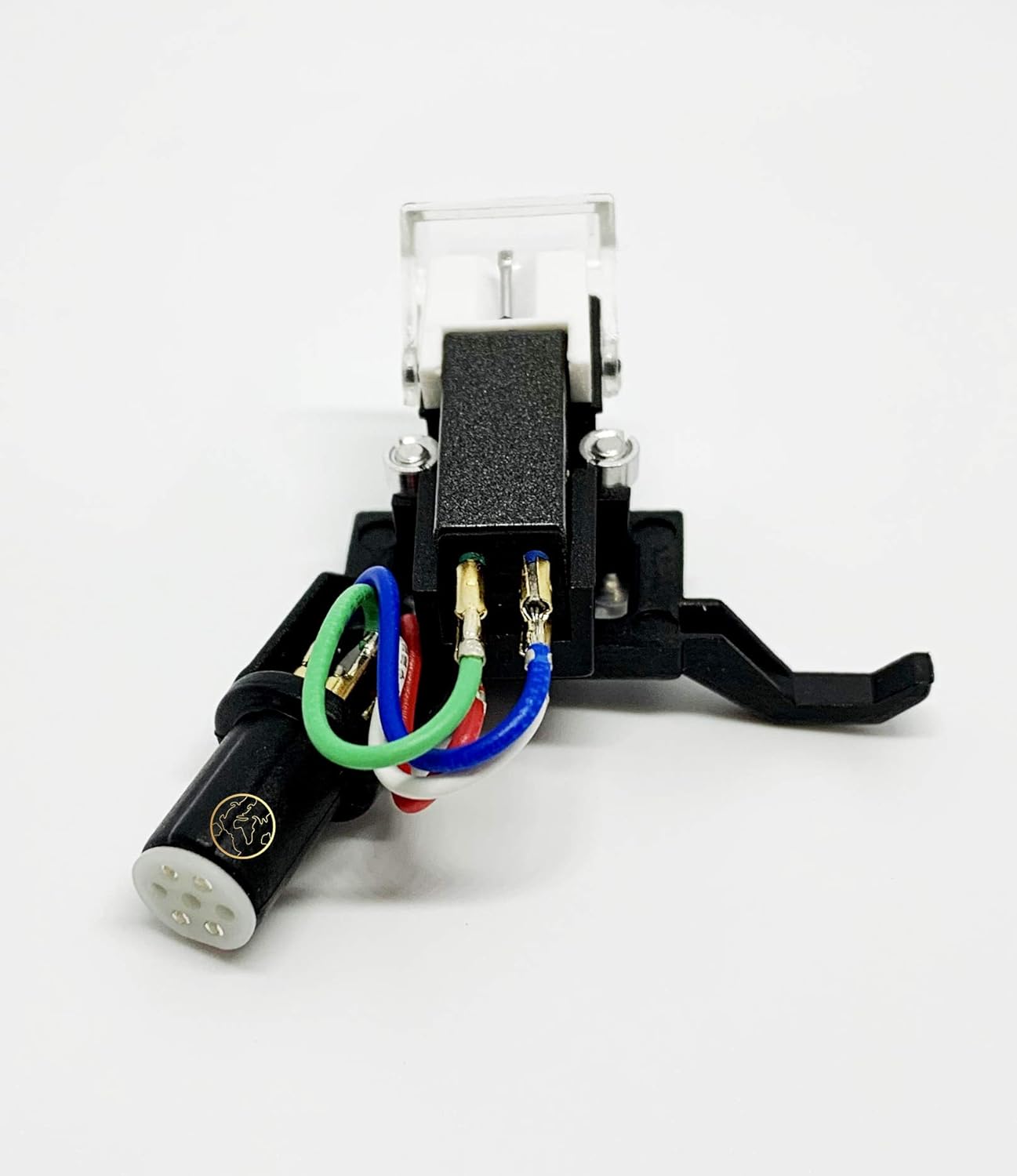
איור 2: צד view of the MAG Headshell and Cartridge, showing the stylus assembly, the main cartridge body, and the securing screw mechanism for attachment to the tonearm.
מדריך וידאו להתקנה
Video 1: An official video demonstrating the features and installation process of the MAG Headshell for DENON Turntables. This video provides a visual guide to help with setup and understanding the product's key attributes.
6. תפעול
Once the MAG Headshell and Cartridge are correctly installed and the tonearm is balanced with the appropriate downforce and anti-skate settings, operate your turntable as usual. Refer to your turntable's specific instruction manual for general operation procedures.
- Ensure the stylus guard is removed before playing a record.
- Gently lower the tonearm onto the record using the cueing lever.
- Raise the tonearm using the cueing lever when the record finishes or when you wish to stop playback.
7. תחזוקה
Regular maintenance helps prolong the life of your cartridge and stylus, ensuring optimal sound quality.
- ניקוי עט סטיילוס: Use a soft stylus brush (sold separately) to gently brush the stylus tip from back to front. Never brush from side to side or front to back, as this can damage the stylus. Clean regularly to remove dust and debris.
- הגנה מפני אבק: Always use your turntable's dust cover when not in use to protect the cartridge and record from dust accumulation.
- טיפול עדין: Avoid dropping the tonearm or applying excessive force to the cartridge.
- אִחסוּן: If storing the turntable for an extended period, replace the stylus guard to protect the stylus.
8. פתרון תקלות
If you experience issues with your MAG Headshell and Cartridge, consider the following common troubleshooting steps:
- אין צליל או צליל חלש:
- Check all wire connections between the headshell and tonearm, and from the turntable to your amplifier/receiver. Ensure they are secure and correctly matched (color-coded).
- ודא כי שלך amplifier/receiver is set to the correct input (e.g., PHONO).
- צליל מעוות או דילוג:
- Re-check the tonearm's downforce setting. Ensure it is within the recommended 2.5-3.5 grams.
- Verify the anti-skate setting is correctly adjusted.
- Inspect the stylus for any visible damage or debris. Clean the stylus if necessary.
- Ensure the record is clean and free of dust or scratches.
- רעש זמזום:
- Ensure the turntable's ground wire is properly connected to your ampמקלט/מקלט.
- בדוק אם יש מכשירים אלקטרוניים קרובים שעלולים לגרום להפרעה.
If problems persist after following these steps, consult a qualified audio technician or contact the product seller for further assistance.
9. אחריות ותמיכה
For information regarding product warranty, returns, or technical support, please refer to the documentation provided at the time of purchase or contact your retailer. You may also visit the manufacturer's official webאתר לקבלת מידע התמיכה העדכני ביותר.