
1. הקדמה
Thank you for choosing the CREATE SILKAIR CONNECT 3-in-1 Mobile Air Conditioner. This versatile appliance is designed to provide cooling, dehumidification, and fan functions for your living space. With its Wi-Fi connectivity, you can conveniently control the unit via a mobile application. Please read this manual thoroughly before operation to ensure safe and efficient use.
דֶגֶם: 64274_145198
מותג: לִיצוֹר
2. מידע בטיחות
יש להקפיד תמיד על אמצעי זהירות בסיסיים בעת שימוש במכשירי חשמל כדי להפחית את הסיכון לשריפה, התחשמלות ופציעות.
- ודא שספק הכוח מתאים לנפחtage המצוין בתווית הדירוג.
- אין להפעיל את היחידה עם כבל או תקע פגומים.
- הרחק את היחידה ממקורות חום ואור שמש ישיר.
- אין לחסום את כניסות או יציאות האוויר.
- תמיד נתקו את המכשיר מהחשמל לפני ניקוי או תחזוקה.
- מכשיר זה משתמש בקירור R290. אין לנקב את מעגל הקירור.
- יש לפקח על ילדים ולוודא שהם לא משחקים עם המכשיר.
3. תכולת החבילה
Carefully unpack your air conditioner and check that all items are present and in good condition.
- CREATE SILKAIR CONNECT Mobile Air Conditioner Unit
- צינור פליטה
- Window Sealing Kit (Adjustable window slider, hose adapter)
- שְׁלַט רָחוֹק
- מדריך למשתמש

Figure 1: The CREATE SILKAIR CONNECT Mobile Air Conditioner unit shown alongside a smartphone displaying its control application interface.
4. המוצר נגמרview
4.1 לוח בקרה

Figure 2: Close-up of the top-mounted control panel, featuring an LED display and touch-sensitive buttons for various functions such as power, mode selection, fan speed, and timer.
4.2 רכיבים ומידות
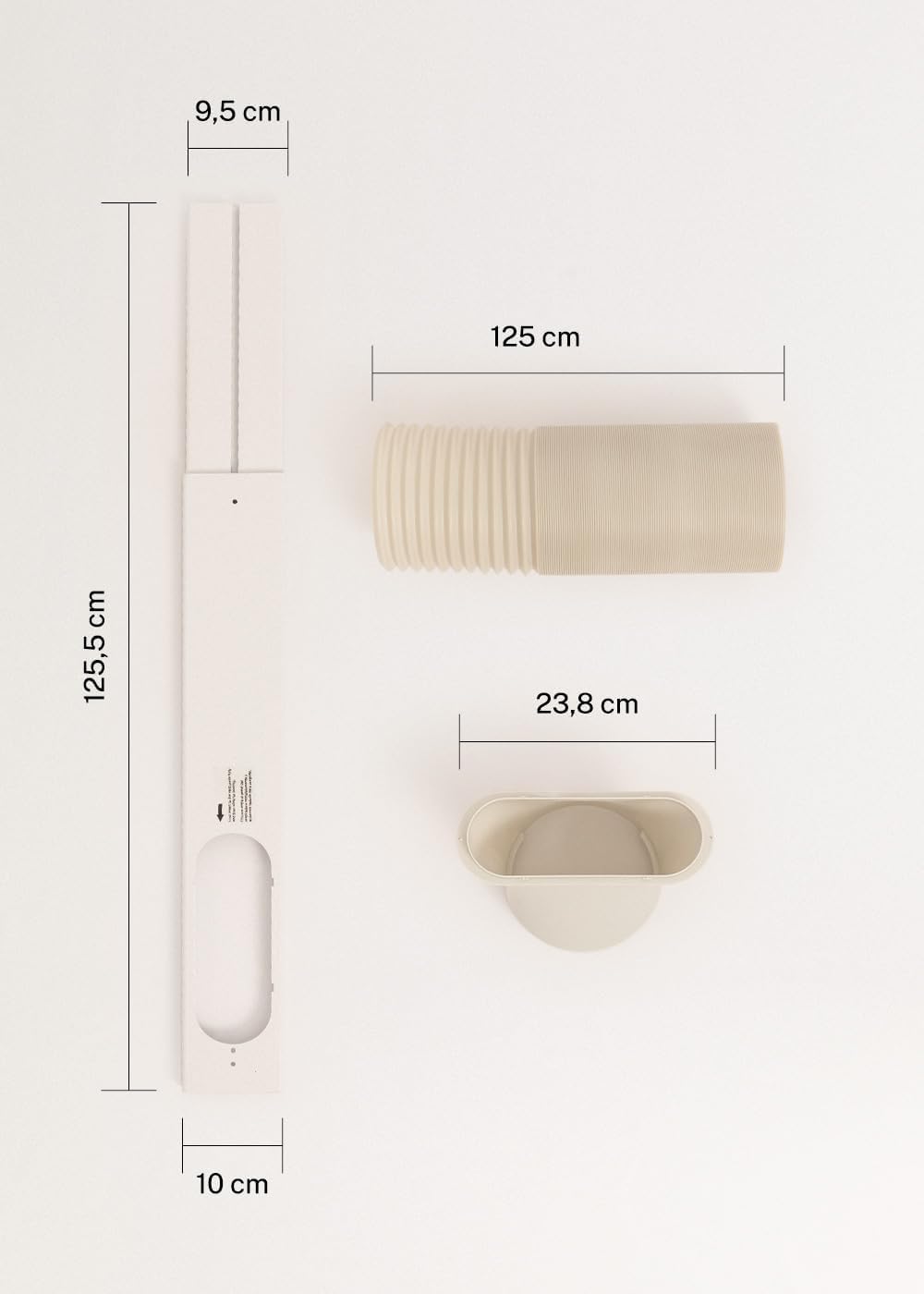
Figure 3: Detailed diagram illustrating the dimensions of the window sealing plate (125.5 cm length, 10 cm width, 9.5 cm adjustable width) and the exhaust hose (125 cm length) with its adapter (23.8 cm diameter).
5. התקנה והתקנה
Proper installation is crucial for the efficient operation of your mobile air conditioner.
5.1 מיקום היחידה
- הנח את היחידה על משטח יציב ויציב.
- ודאו שיש לפחות 30 ס"מ של רווח מסביב ליחידה כדי להבטיח זרימת אוויר תקינה.
- Position the unit near a window or opening for the exhaust hose.
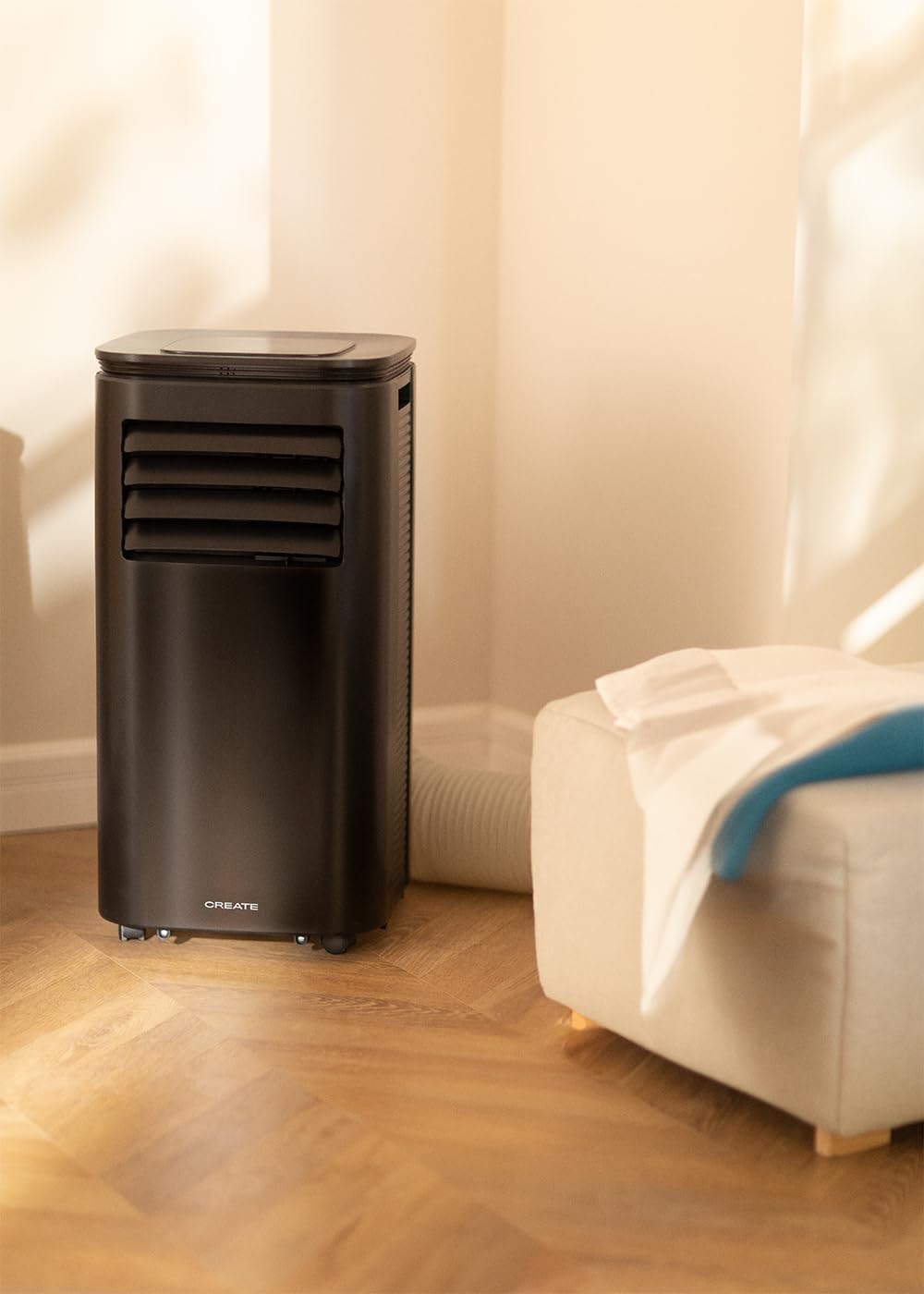
Figure 4: The air conditioner unit positioned in a room, demonstrating the typical setup with the exhaust hose directed towards a window for heat expulsion.
5.2 התקנת צינור הפליטה וערכת החלון
- חבר את מתאם הצינור לקצה אחד של צינור הפליטה.
- Connect the other end of the exhaust hose to the air outlet on the back of the unit.
- Install the adjustable window sealing kit in your window opening. Extend it to fit the window frame.
- Insert the hose adapter into the opening of the window sealing kit.

Figure 5: Illustrates the secure connection of the flexible exhaust hose to the designated port at the rear of the air conditioning unit.
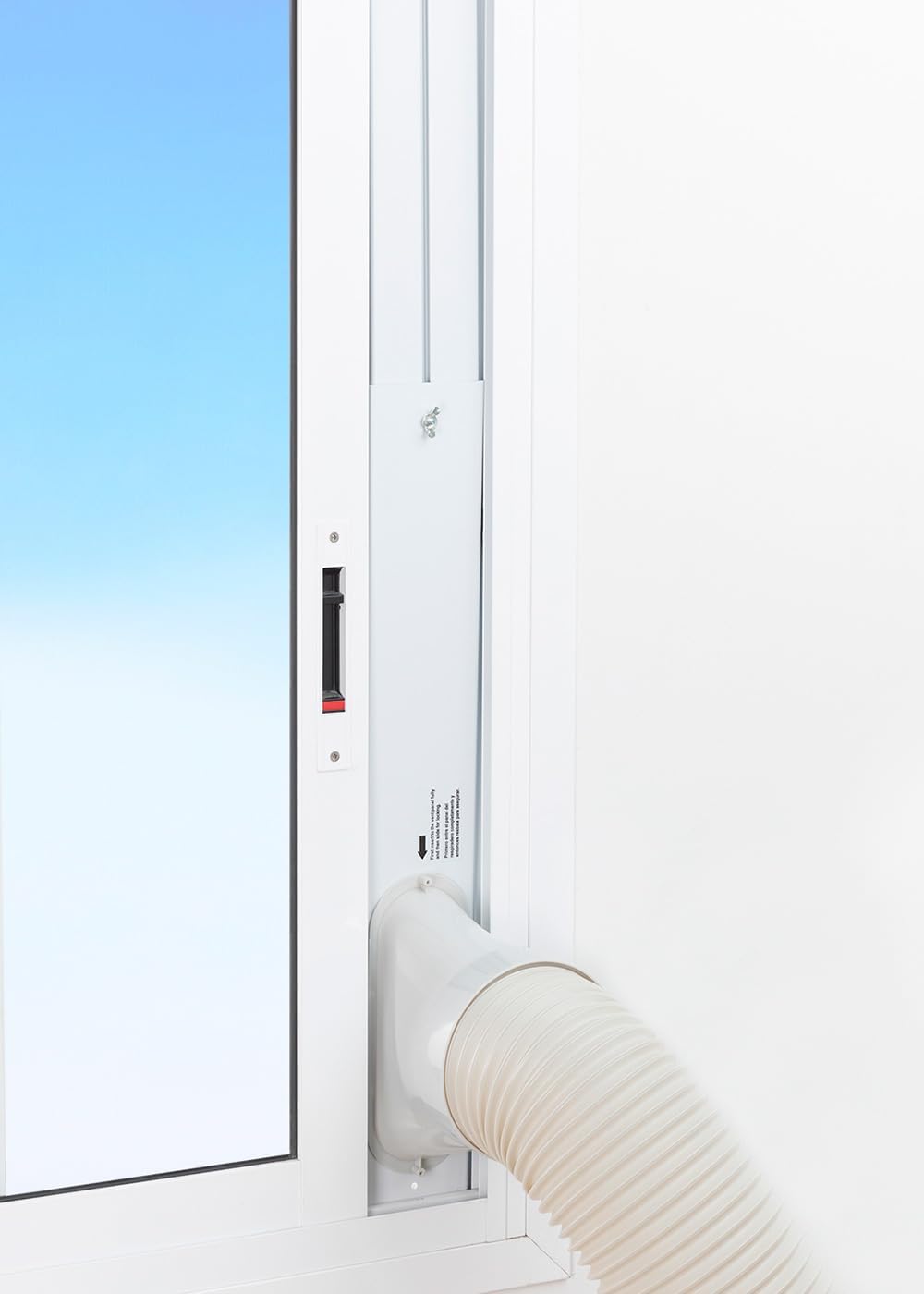
Figure 6: The window sealing kit is shown properly installed in a window frame, with the exhaust hose securely fitted into the kit's opening to vent hot air outside.
6. הוראות הפעלה
6.1 באמצעות לוח הבקרה
The control panel on top of the unit allows direct operation.
- לחצן הפעלה: לחץ כדי להפעיל או לכבות את היחידה.
- לחצן מצב: מעבר בין מצבי קירור, מאוורר ומסיר לחות.
- לחצן מהירות מאוורר: Adjust fan speed (Low, High).
- כפתורי טמפרטורה (+/-): Adjust desired temperature in Cooling mode.
- כפתור טיימר: Set the auto-on or auto-off timer (up to 24 hours).
- לחצן מצב שינה: מפעיל מצב פעולה שקט יותר לשימוש בלילה.
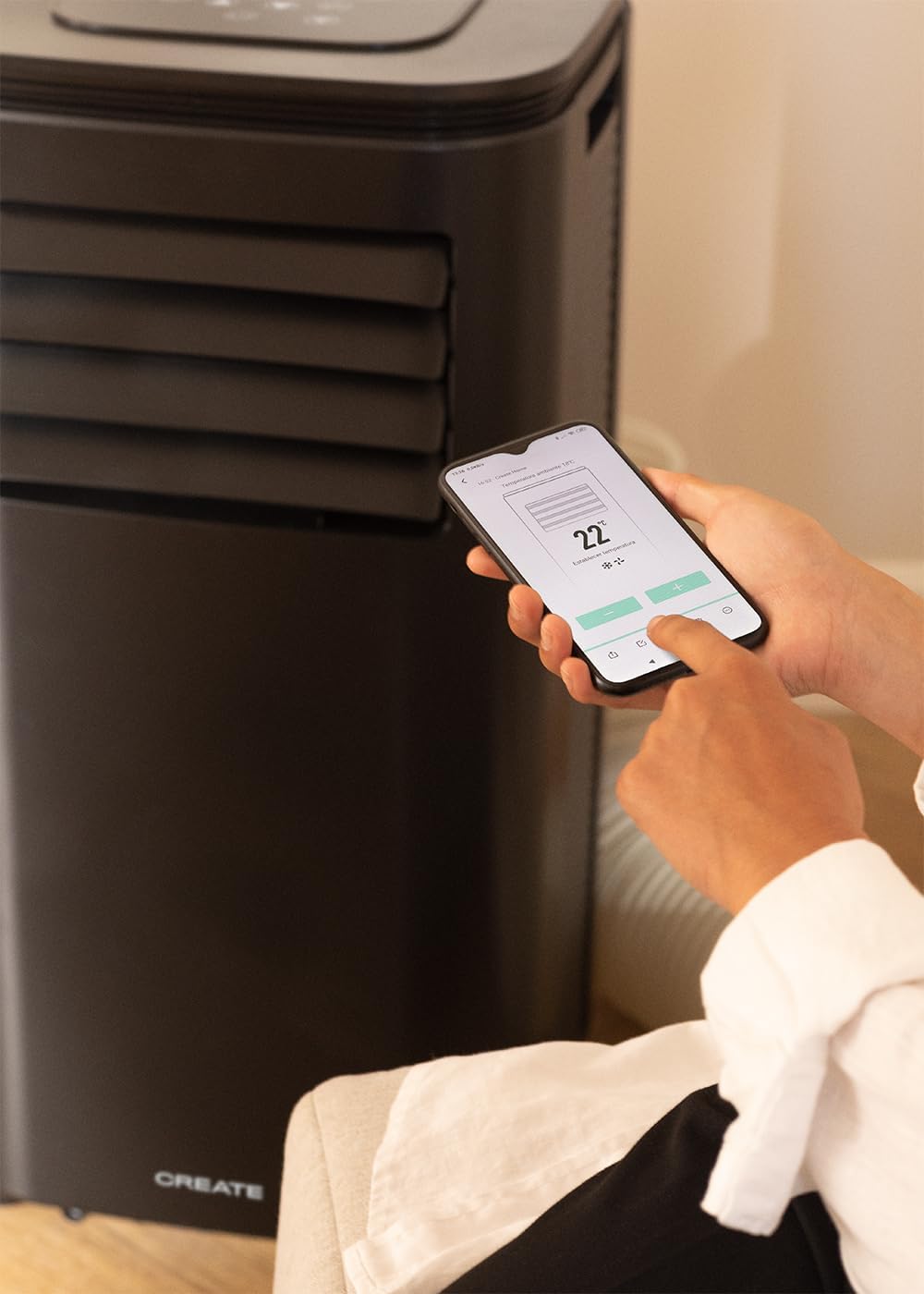
Figure 7: A user's hand interacting with the touch-sensitive control panel located on the top surface of the air conditioner, demonstrating direct manual operation.
6.2 שימוש בשלט רחוק
The remote control provides convenient operation from a distance.

Figure 8: A hand holding the dedicated remote control for the air conditioner, illustrating its use for convenient operation from a distance.
6.3 Wi-Fi ובקרת אפליקציות
Download the CREATE Home app from your smartphone's app store. Follow the in-app instructions to connect your air conditioner to your home Wi-Fi network. Once connected, you can control all functions of the unit from your smartphone, including mode selection, temperature adjustment, fan speed, and timer settings.
Figure 9: A user interacting with the mobile application on a smartphone to remotely control the air conditioner, showcasing the Wi-Fi connectivity feature.
7. תחזוקה
תחזוקה שוטפת מבטיחה ביצועים אופטימליים ומאריכה את תוחלת החיים של היחידה.
7.1 ניקוי מסנן האוויר
יש לנקות את מסנן האוויר כל שבועיים או בתדירות גבוהה יותר, בהתאם לשימוש ואיכות האוויר.
- כבו את היחידה ונתק אותה משקע החשמל.
- אתר את לוח מסנן האוויר בגב היחידה.
- הסר בעדינות את המסנן.
- Clean the filter with warm, soapy water or a vacuum cleaner. Rinse thoroughly and allow it to air dry completely before reinserting.

Figure 10: Demonstrates the process of removing the air filter from the rear of the air conditioner unit for cleaning or replacement.
7.2 ניקוז מים
In Dehumidifier mode or high humidity conditions, the internal water tank may fill up. The unit will stop operating when the tank is full. Drain the water from the drainage port at the bottom rear of the unit.
8. פתרון תקלות
| בְּעָיָה | סיבה אפשרית | פִּתָרוֹן |
|---|---|---|
| היחידה לא נדלקת | אין חשמל; כבל החשמל לא מחובר; מיכל המים מלא. | Check power outlet; Plug in power cord; Drain water tank. |
| היחידה לא מקררת בצורה יעילה | Air filter dirty; Exhaust hose not properly installed; Room too large; Doors/windows open. | Clean air filter; Ensure hose is sealed; Use in recommended room size (14-25 m²); Close doors/windows. |
| רעש חזק | היחידה אינה על משטח ישר; חסימה במאוורר. | Place on flat surface; Check for obstructions. |
| בעיות חיבור Wi-Fi | סיסמת Wi-Fi שגויה; הנתב רחוק מדי; בעיות באפליקציה. | Verify password; Move unit closer to router; Restart app/unit. |
9. מפרטים
| תכונה | מִפרָט |
|---|---|
| מספר דגם | 64274_145198 |
| קיבולת קירור | 9000 BTU / 2270 Watt |
| יכולת לחות | 24 ליטר/יום |
| זרימת אוויר | עד 350 מ"ק/שעה |
| גודל חדר מומלץ | 14-25 מ"ר |
| רמת רעש | 65 dB |
| חומר קירור | R290 (ECO-friendly) |
| כרך ידtage | 240 וולט |
| מהtage | 2600 וואט |
| מידות (L x W x H) | 35.5 x 36.5 x 71.3 ס"מ |
| חוֹמֶר | ABS |
| שיעור יעילות אנרגטית | A |

Figure 11: The energy efficiency label for the CREATE SILKAIR CONNECT, indicating an A-class energy rating, 2.6 kW cooling capacity, and a noise level of 65 dB. More details can be found at eprel.ec.europa.eu/qr/1580267.
10. אחריות ותמיכה
For warranty information and technical support, please refer to the warranty card included with your product or visit the official CREATE webאתר. שמור את קבלת הרכישה כהוכחת קנייה.
יַצרָן: לִיצוֹר
מַגָע: Refer to CREATE's official support channels.