
1. הקדמה
The MSD Digital 6AL Ignition Control Box is designed to provide superior ignition performance for 4, 6, or 8-cylinder engines. This unit delivers a powerful spark, ensuring optimal combustion and engine efficiency. Its digital design offers precise control and features like an adjustable rev limiter and an integrated LED for system diagnostics. The compact and robust construction, along with a sealed connector system, ensures reliable operation and a clean installation.

Figure 1.1: The MSD Digital 6AL Ignition Control Box, showcasinזה אדום גasing, silver fins, and prominent MSD logo. This unit is designed for enhanced engine performance.
2. מידע בטיחות
Always read and understand all instructions before installing or operating this product. Failure to do so may result in personal injury or damage to the product or vehicle.
- נתק סוללה: Always disconnect the vehicle's battery before performing any electrical work to prevent accidental short circuits or electrical shock.
- חיווט נכון: Ensure all wiring connections are secure and insulated to prevent shorts and ensure proper operation. Refer to the wiring diagram for correct connections.
- אוורור: Install the unit in a well-ventilated area, away from excessive heat or moisture.
- התקנה מקצועית: If you are unsure about any part of the installation process, seek assistance from a qualified automotive technician.
- אזהרה הצעה 65: מוצר זה עשוי להכיל כימיקלים הידועים למדינת קליפורניה כגורמים לסרטן ומומים מולדים או נזק רבייתי אחר.

איור 2.1: צד view of the MSD Digital 6AL Ignition Control Box, showing a warning label that advises against using the device with solid core spark plug wires.
3. תכולת החבילה
ודא שכל הרכיבים קיימים לפני תחילת ההתקנה:
- MSD Digital 6AL Ignition Control Box
- Main Wiring Harness with Sealed Connector
- Accessory Wiring Harness (for RPM input, etc.)
- Mounting Hardware (screws, rubber mounts)
- Various Electrical Connectors and Terminals
- קשרי מיקוד
- Diode (for specific wiring configurations)
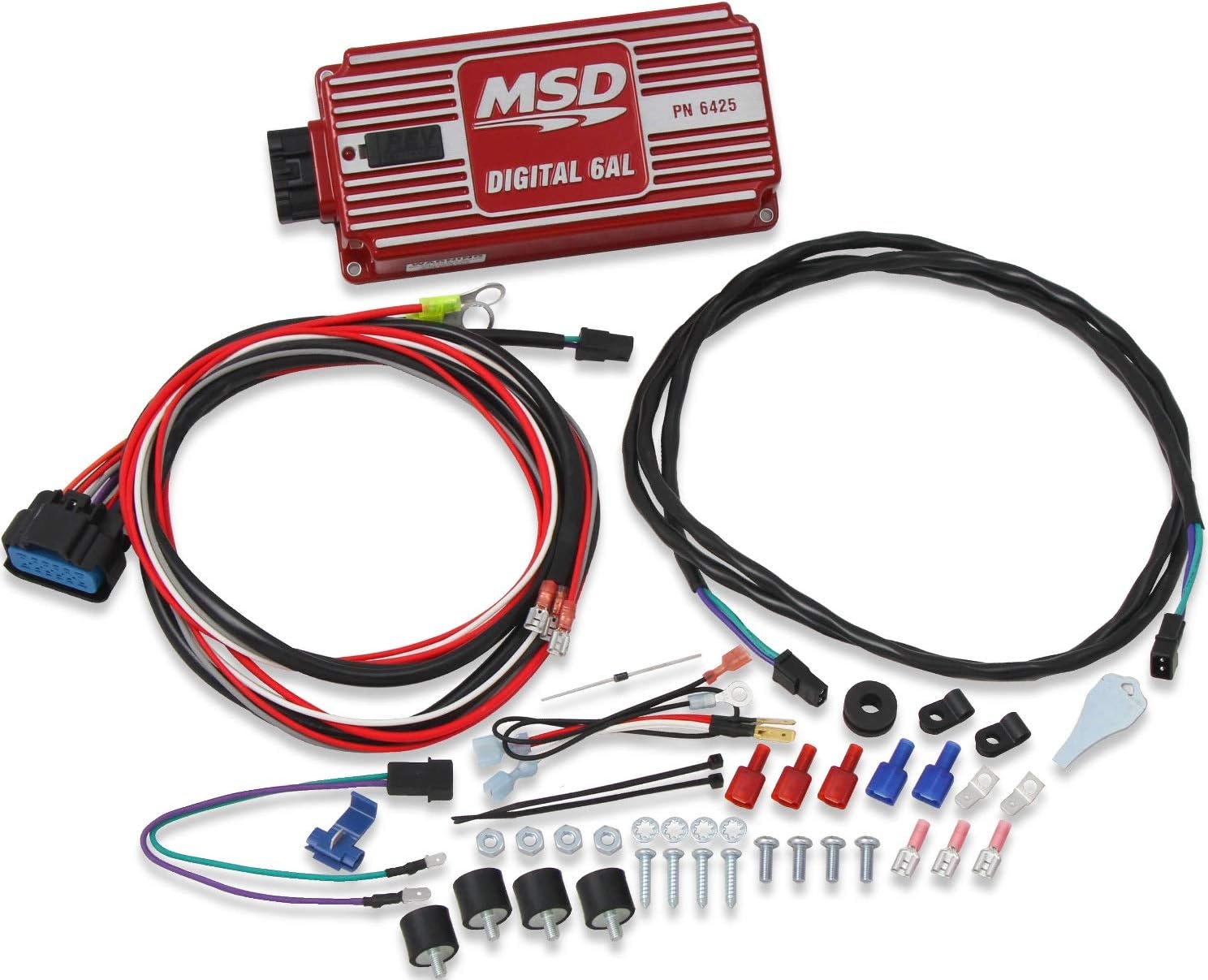
איור 3.1: מעלview of the MSD Digital 6AL Ignition Control Box along with its comprehensive set of wiring harnesses and various installation accessories, including connectors and mounting hardware.

איור 3.2: ניתוח מפורט view of the accessory kit, showing various electrical connectors, screws, rubber mounts, and zip ties provided for a complete installation.
4. התקנה והתקנה
Proper installation is critical for the performance and longevity of your Digital 6AL. Follow these steps carefully:
4.1 הרכבת היחידה
- Choose a location that is away from direct engine heat, exhaust manifolds, and excessive vibration. The unit should be mounted securely.
- Use the provided rubber mounts and screws to secure the Digital 6AL. The rubber mounts help absorb vibration.
4.2 חיבורי חיווט
The Digital 6AL features a sealed connector for all wiring, ensuring a clean and secure connection. Refer to the detailed wiring diagram in the full manual for specific vehicle applications.
- חוטי חשמל: Connect the heavy red wire to a constant 12-volt source (battery positive) and the heavy black wire to a good chassis ground.
- Ignition Switch Wire: Connect the thin red wire to a switched 12-volt source that is active when the ignition is ON and during cranking.
- Tachometer Output: The gray wire provides a 12-volt square wave signal for your tachometer.
- Magnetic Pickup/Crank Trigger: Connect the green and violet wires to your magnetic pickup or crank trigger sensor. Ensure correct polarity.
- Coil Connections: Connect the orange wire to the positive (+) terminal of the ignition coil and the black wire to the negative (-) terminal of the ignition coil.

איור 4.1: צד view of the MSD Digital 6AL Ignition Control Box, highlighting the multi-pin sealed connector where all wiring harnesses connect for a secure and organized installation.

איור 4.2: תקריב view of the sealed multi-pin connector, demonstrating its robust design for reliable electrical connections.

איור 4.3: מפורט view of various wire terminals and connectors, illustrating the quality and variety of components used for secure electrical connections.
5. הוראות הפעלה
The Digital 6AL is designed for straightforward operation once installed.
5.1 Adjustable Rev Limiter
The unit features two rotary dials for setting the RPM limit in 100 RPM increments. These dials are typically located on the side or top of the unit, accessible for adjustment.
- Locate the two rotary dials on the Digital 6AL unit.
- The left dial typically controls thousands of RPM (e.g., '5' for 5000 RPM).
- The right dial typically controls hundreds of RPM (e.g., '0' for 000, '5' for 500).
- Combine the settings to achieve your desired RPM limit. For example, setting the left dial to '6' and the right dial to '5' will set the limit to 6500 RPM.
5.2 מחוון LED
A built-in LED indicator provides system status. Consult the full manual for specific LED flash codes and their meanings, which can assist in diagnostics.
6. תחזוקה
The MSD Digital 6AL Ignition Control Box is designed for minimal maintenance. However, periodic checks can ensure optimal performance:
- בדיקת חיווט: Periodically inspect all wiring connections for signs of wear, fraying, or corrosion. Ensure all connections remain tight and secure.
- נִקָיוֹן: Keep the unit clean and free of dirt, dust, and moisture. Use a soft, dry cloth for cleaning. Do not use harsh chemicals or solvents.
- אבטחת הרכבה: Verify that the unit remains securely mounted and that the rubber isolators are in good condition.
7. פתרון תקלות
If you encounter issues with your Digital 6AL, refer to the following common problems and solutions:
| בְּעָיָה | סיבה אפשרית | פִּתָרוֹן |
|---|---|---|
| Engine Cranks but No Start |
|
|
| מנוע מתלקח או פועל בצורה לא יציבה |
|
|
| Unit Not Powering On (LED Off) |
|
|
For more detailed troubleshooting, refer to the complete MSD Digital 6AL instruction manual or contact MSD technical support.
8. מפרטים
| תכונה | פְּרָט |
|---|---|
| מותג | MSD |
| מספר דגם | MSD-6425 |
| כרך ידtagתאימות | 12 Volts (Negative Ground) |
| Spark Energy | 135mJ |
| פלט כרךtage | 530-540V |
| טווח סל"ד | עד 11,000 סל"ד |
| Cylinder Compatibility | 4, 6, or 8-Cylinder Engines |
| Rev Limiter Adjustment | Two rotary dials, 100 RPM increments |
| מידות (L x W x H) | אורך 8 אינץ', רוחב 4 אינץ', גובה 1.83 אינץ' |
| משקל פריט | 3.21 פאונד |
| חוֹמֶר | פּלָסטִי |
| צֶבַע | אָדוֹם |
| סוג תצוגה | LED |

Figure 8.1: Dimensional diagram of the MSD Digital 6AL Ignition Control Box, indicating its length (8 inches), width (4 inches), and height (1.82 inches).
9. אחריות ותמיכה
For warranty information, product registration, or technical assistance, please visit the official MSD webאתר או צרו קשר ישירות עם תמיכת הלקוחות שלהם. שמרו את קבלת הרכישה כהוכחת קנייה.
MSD Store: Visit the MSD Store on Amazon