
מָבוֹא
This manual provides comprehensive instructions for the ALLIMITY DR0337 replacement remote control. It is designed for use with various Sharp Aquos 3D TV models. Please read this manual carefully before using the remote control to ensure proper setup and operation.
1. התקנה
1.1 התקנת סוללה
השלט רחוק דורש שתי סוללות AAA (לא כלולות).
- אתר את מכסה תא הסוללות בגב השלט הרחוק.
- החלק את המכסה כלפי מטה כדי לפתוח.
- הכניסו שתי סוללות AAA, תוך הקפדה על הקוטביות הנכונה (+ ו-) כפי שמסומן בתוך התא.
- החלק את המכסה בחזרה למקומו עד שיינעל היטב.
פֶּתֶק: יש להחליף תמיד את שתי הסוללות בו זמנית. אין לערבב סוללות ישנות וחדשות או סוגים שונים של סוללות.
1.2 Initial Pairing (First-Time Installation)
If the remote control does not function with your TV during first-time installation, it may need to be paired.
- ודא שהטלוויזיה שלך דולקת.
- בשלט הרחוק, לחץ והחזק את צָהוֹב ו כְּחוֹל buttons simultaneously for a few seconds.
- The power light on the remote control will blink 5 times to confirm successful pairing.

Image: ALLIMITY DR0337 Remote Control showing the location of the YELLOW and BLUE buttons for pairing. The image also contains text instructions for pairing and troubleshooting.
2. הוראות הפעלה
This remote control provides full functionality for your Sharp Aquos 3D TV. Point the remote control directly at the TV's infrared sensor.
2.1 פונקציות כפתורים
- כפתור הפעלה (
 ): מפעיל או מכבה את הטלוויזיה.
 - לחצני מספרים (0-9): בחירת ערוצים ישירות.
- NETFLIXגישה ישירה לאפליקציית נטפליקס.
- YouTubeגישה ישירה לאפליקציית YouTube.
- NET+: Accesses additional network services.
- מדריך טלוויזיה: מציג את מדריך התוכניות האלקטרוני.
- TV: Switches to TV input.
- VOL +/-: Adjusts volume up or down.
- CH +/-: מעלה או מוריד ערוצים.
- FAV: גישה לערוצים מועדפים.
- מידע: מציג מידע על התוכנית הנוכחית.
- תַפרִיט: פותח את התפריט הראשי של הטלוויזיה.
- בְּחֲזָרָה: חזרה למסך או לתפריט הקודם.
- יְצִיאָה: יציאה מהתפריט או היישום הנוכחיים.
- OK / Navigation Buttons: Confirms selections and navigates through menus (Up, Down, Left, Right).
- בקרות השמעה (
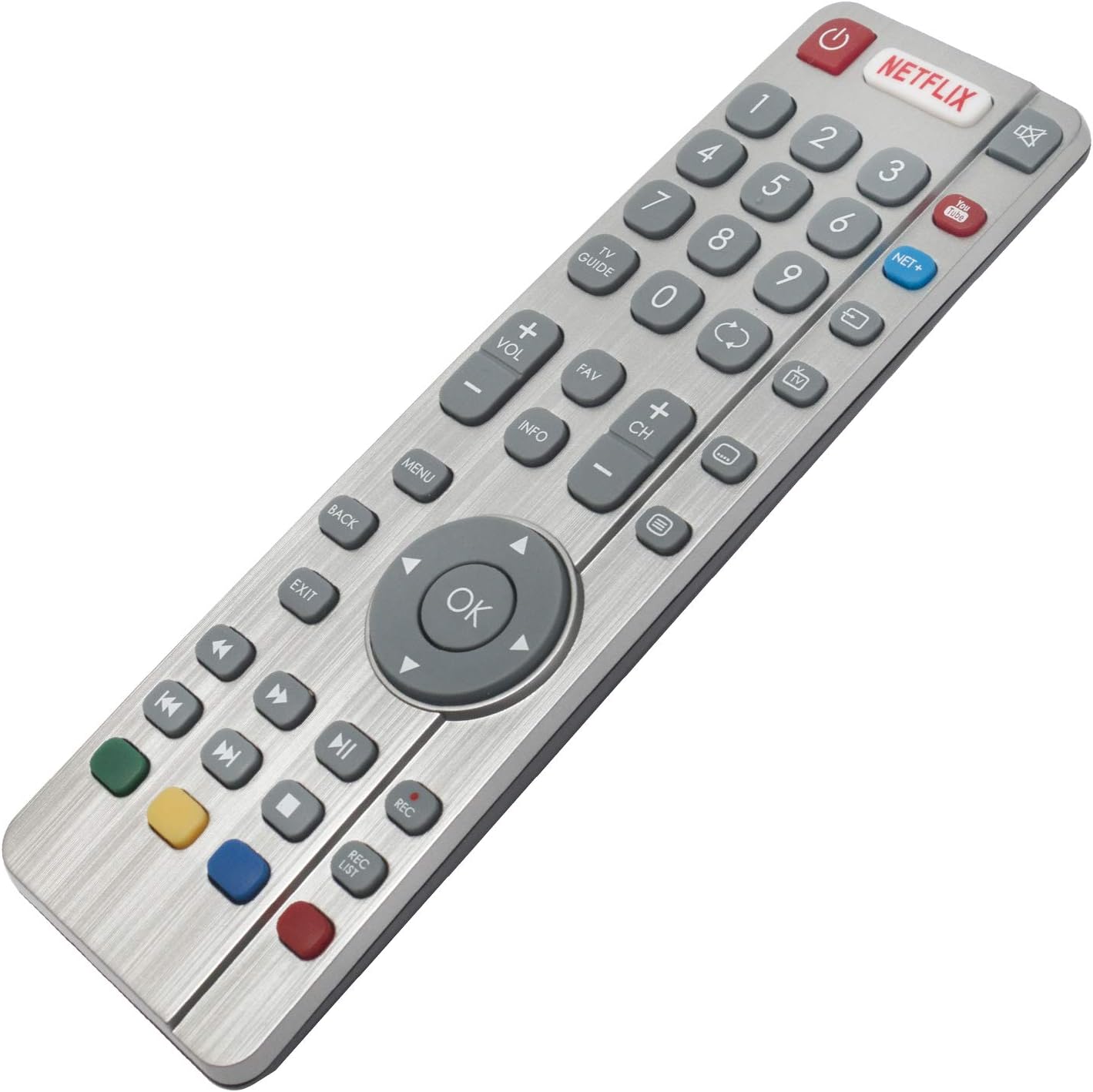 ): Rewind, Play/Pause, Fast Forward, Stop, Record (REC), Record List (REC LIST).
 - כפתורים צבעוניים (אדום, ירוק, צהוב, כחול): הפונקציונליות משתנה בהתאם לתפריט הטלוויזיה או ליישום.

תמונה: חזית view of the ALLIMITY DR0337 Remote Control, highlighting all buttons and their layout.
3. תחזוקה
3.1 ניקוי
To clean the remote control, gently wipe it with a soft, dry cloth. Do not use liquid cleaners, sprays, or abrasive materials, as these can damage the remote.
3.2 החלפת סוללה
אם טווח השלט רחוק פוחת או שהוא מאבד את התגובות, ייתכן שיהיה צורך להחליף את הסוללות. פעל לפי שלבי התקנת הסוללות בסעיף 1.1.
אַזהָרָה: יש להשליך סוללות משומשות בהתאם לתקנות המקומיות. אין לחשוף סוללות לחום מוגזם או לאש.
4. פתרון תקלות
4.1 Remote Control Not Working (First-Time Installation)
If the remote control does not function with the TV during initial setup, it may require pairing.
- ודא שהטלוויזיה דולקת.
- לחץ והחזק את צָהוֹב ו כְּחוֹל buttons on the remote control for a few seconds.
- The power light will blink 5 times, indicating successful pairing.
4.2 Remote Control Not Powering On the TV
If the remote control fails to turn on the TV:
- Switch the TV on manually using the standby button on the TV set itself (not the remote control).
- Once the TV is on, press the standby button on the TV set again. This action should prompt a 'pairing menu' to appear on the screen.
- Scroll through the menu and highlight 'Pair your remote' by pressing the CH+ or CH- TV button (this is for navigating the TV's menu, not the remote's).
- Confirm your selection by pressing the TV set's standby button (which acts as an OK function in the menu).
- With the remote control, press and hold the צָהוֹב ו כְּחוֹל כפתורים למשך מספר שניות.
- The power light on the remote control will blink 5 times to confirm that the TV and remote control are paired.
4.3 טיפים כלליים לפתרון בעיות
- בדוק סוללות: Ensure batteries are inserted correctly and are not depleted. Replace them if necessary.
- קו הראיה: ודא שאין מכשולים בין השלט רחוק לחיישן האינפרא אדום של הטלוויזיה.
- Remote Control Reset: הוציאו את הסוללות, לחצו על כל הכפתורים מספר פעמים כדי לפרוק שאריות חשמל, ולאחר מכן הכניסו מחדש את הסוללות.
5. מפרטים
| תכונה | פְּרָט |
|---|---|
| מספר דגם | DR0337 (QH-SHW-RMC-0116-O) |
| מותג | ALLIMITY |
| טכנולוגיית קישוריות | אינפרא אדום |
| מקור כוח | 2 x AAA Batteries (Alkaline recommended) |
| טווח מקסימלי | 10 מטר |
| תכונה מיוחדת | קַל מִשְׁקָל |
| דגמי טלוויזיה תואמים | LC-32CFG6022E, LC-32CFG6241K, LC-32CFG6451K, LC-32CHG6022K, LC-32CHG6451K, LC-40CFG6022E, LC-40CFG6352K, LC-43CFG6021K, LC-43CFG6352E, LC-43CUG8062K, LC-49CFG6021K, LC-49CFG6352E, LC-49CUG8062K, LC-55CFG6021E, LC-55CFG6351K, LC-32CFG6021E, LC-32CFG6352E, LC-32CHG6021K, LC-32CHG6352E, LC-40CFG6021E, LC-40CFG6351K, LC-40CUG8052K, LC-43CFG6242K, LC-43CFG6452K, LC-43CUG8462KS, LC-49CFG6242K, LC-49CFG6452K, LC-49CUG8462KS, LC-55CFG6241K, LC-55CFG6452E, LC-32CFG6032E, LC-32CFG6352K, LC-32CHG6022E, LC-32CHG6352K, LC-40CFG6021K, LC-40CFG6352E, LC-43CFG6021E, LC-43CFG6351K, LC-43CUG8052K, LC-49CFG6021E, LC-49CFG6351K, LC-49CUG8052K, LC-55CFG6022E, LC-55CFG6352K, LC-24DHG6131K, LC-32CFG6351K, LC-32CHG6021E, LC-32CHG6351K, LC-32DHG6021K, LC-40CFG6242K, LC-40CFG6452K, LC-43CFG6241K, LC-43CFG6452E, LC-43CUG8461KS, LC-49CFG6241K, LC-49CFG6452E, LC-49CUG8461KS, LC-55CFG6022K, LC-55CFG6451K, LC-32CFG6022K, LC-32CFG6452E, LC-32CHG6241K, LC-32CHG6452E, LC-40CFG6022K, LC-40CFG6451K, LC-43CFG6022E, LC-43CFG6352K, LC-43CUG8361KS, LC-49CFG6022E, LC-49CFG6352K, LC-49CUG8361KS, LC-55CFG6021K, LC-55CFG6352E, LC-32CFG6021K, LC-32CFG6242K, LC-32CFG6452K, LC-32CHG6242K, LC-32CHG6452K, LC-40CFG6241K, LC-40CFG6452E, LC-43CFG6022K, LC-43CFG6451K, LC-43CUG8362KS, LC-49CFG6022K, LC-49CFG6451K, LC-49CUG8362KS, LC-55CFG6242K |
6. מידע על אחריות
Specific warranty information for the ALLIMITY DR0337 remote control is not provided in the product details. Please refer to the seller's return policy or contact the seller directly for warranty details.
7. תמיכת לקוחות
For further assistance or inquiries regarding your ALLIMITY DR0337 remote control, please contact the seller directly through the platform where the purchase was made.
Seller: MAXCONTROL INC (ID: A1WPNK9E5ZIVMG)
For general product information, you may visit the ALLIMITY brand page.