
1. הקדמה
This manual provides detailed instructions for the assembly, operation, and maintenance of your MOUNTUP Universal TV Stand, Model MU0031. Please read this manual thoroughly before installation and use to ensure safe and correct operation. Keep this manual for future reference.
2. מידע בטיחות
WARNING: Failure to read and follow these instructions may result in serious personal injury, property damage, or voiding of warranty.
- Ensure the TV stand is placed on a stable, level surface capable of supporting the combined weight of the stand and your television.
- אין לחרוג מקיבולת המשקל המרבית של 88 ק"ג (40 ליברות).
- Verify your TV's VESA pattern is compatible (200x100 mm to 600x400 mm) before installation.
- Always use the provided safety wire to prevent TV tip-over accidents, especially in households with children or pets.
- Do not overtighten screws during assembly to avoid stripping threads or damaging components.
- הרחיקו את כל החלקים הקטנים וחומרי האריזה מהישג ידם של ילדים.
3. תכולת החבילה
Please check to ensure all parts are included and undamaged. If any parts are missing or defective, contact MOUNTUP customer support.
- TV Stand components (base, support pillar, TV bracket)
- Assembly hardware (screws, washers, spacers, nuts)
- חוט בטיחות
- מדריך הוראות
Note: Specific screw sizes and quantities are detailed in the assembly steps.
4. מפרטים
| תכונה | פְּרָט |
|---|---|
| מותג | הרכבה |
| מספר דגם | MU0031 |
| גדלי טלוויזיה תואמים | 37 עד 75 אינץ' |
| קיבולת משקל מקסימלית | 88 פאונד (40 ק"ג) |
| תאימות VESA | 200x100 מ"מ עד 600x400 מ"מ |
| סוג תנועה | סובב, הטיה |
| זווית מסתובבת | +/- 25 ° |
| זווית הטיה | Up to +8° |
| התאמת גובה | Multiple positions (up-and-down) |
| חומר בסיס | זכוכית מחוסמת |
| חומר מעמד | סגסוגת פלדה |
5. התקנה והתקנה
Follow these steps carefully for proper assembly. It is recommended to have a second person assist with mounting the TV.
5.1 Assemble the Base and Support Pillar
- הוצא את כל הרכיבים מהאריזה והנח אותם על משטח רך ונקי כדי למנוע שריטות.
- Attach the support pillar to the tempered glass base using the provided screws. Ensure the pillar is securely fastened.

Image: Main components of the MOUNTUP Universal TV Stand, including the base, support pillar, and TV bracket.

Image: Visual representation of Step 1, showing the assembly of the support pillar onto the base.
5.2 Mount the TV Bracket to Your Television
- Identify the VESA mounting holes on the back of your television.
- בחרו את הברגים, הדיסקיות והמרווחים המתאימים מערכת החומרה שמתאימים לתבנית VESA של הטלוויזיה שלכם.
- Attach the vertical TV bracket arms to the back of your television. Ensure they are level and securely tightened.

Image: The TV bracket arms are shown mounted to the rear of a flat-screen television, ready for attachment to the stand.
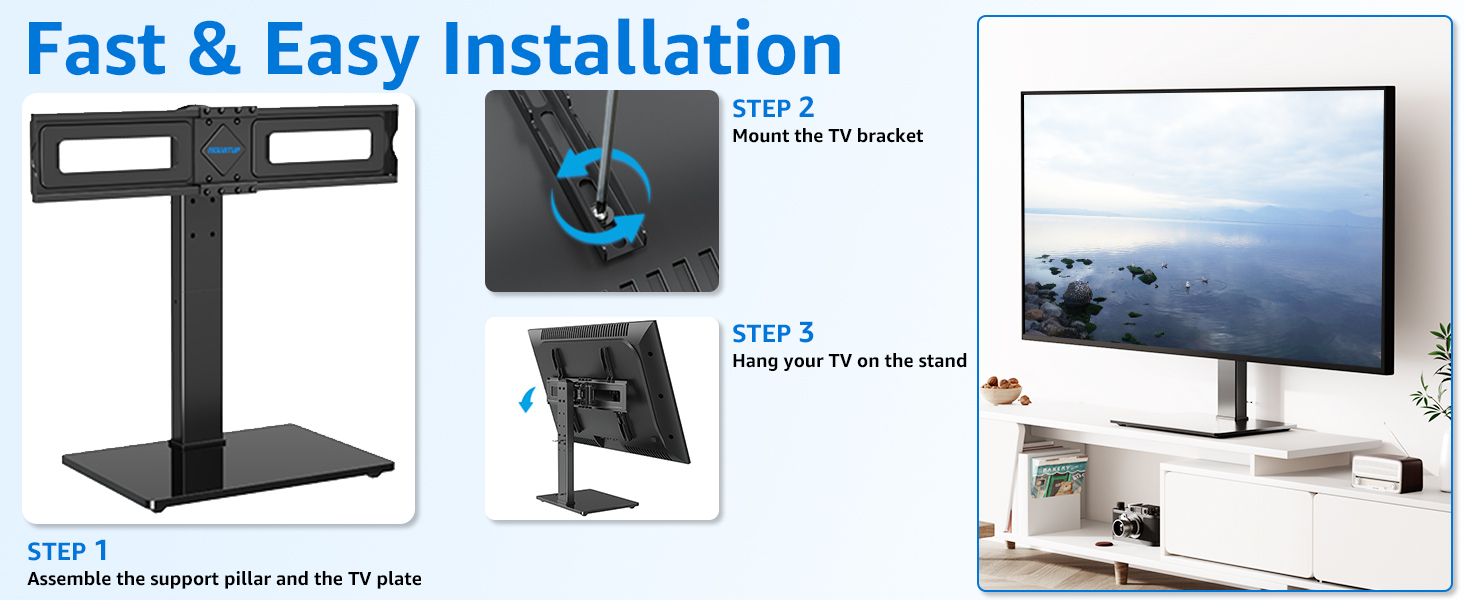
Image: Visual representation of Step 2, illustrating how to attach the TV bracket to the television's VESA holes.
5.3 Hang Your TV on the Stand
- Carefully lift the television with the attached bracket and hook it onto the support pillar's mounting plate.
- Ensure the TV is centered and level. Secure the TV to the stand using the safety locks on the TV mount stand.
- Connect the provided security wire from the TV bracket to a secure point on the stand or wall to prevent accidental tip-over.

Image: A television is shown securely mounted on the MOUNTUP TV stand, demonstrating the final assembly.
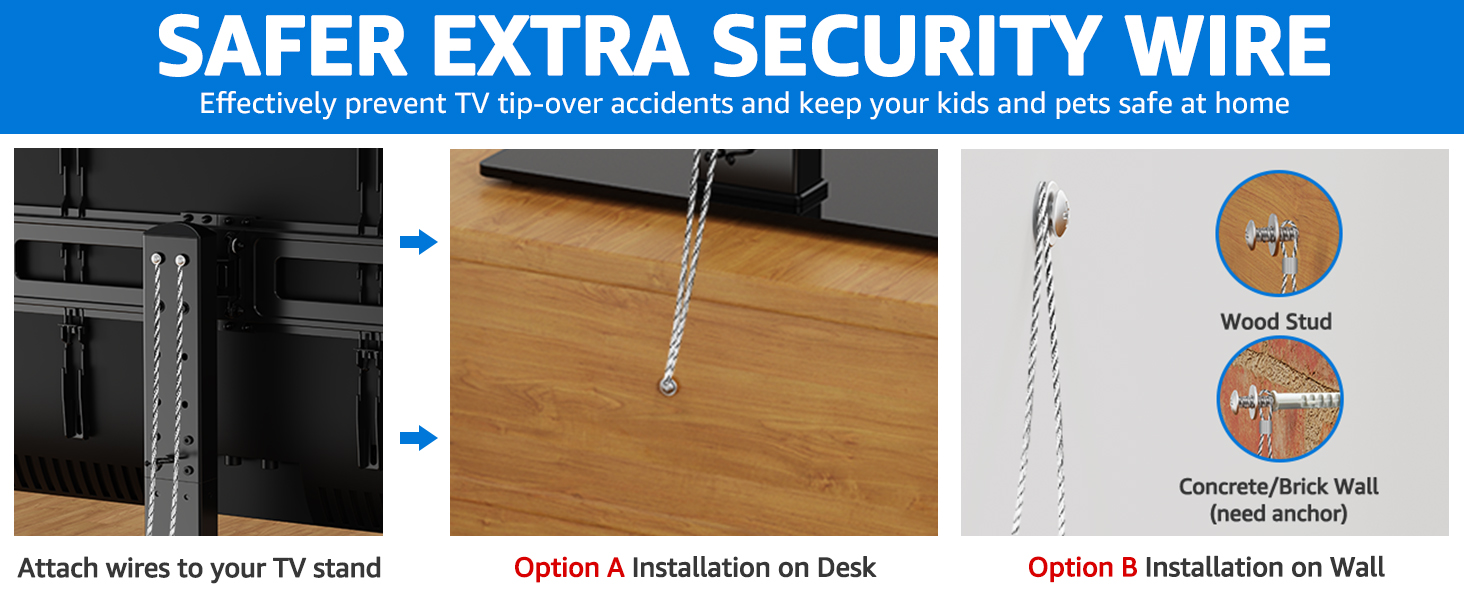
Image: Visual representation of Step 3, showing the process of hanging the TV onto the assembled stand.

Image: Diagram illustrating the installation of the safety wire to prevent TV tip-over, showing attachment to the stand and options for desk or wall.
6. הוראות הפעלה
6.1 התאמת גובה
The TV stand offers multiple height adjustment positions to optimize your viewing experience and allow space for soundbar placement.
- Before mounting the TV, you can adjust the height of the TV plate on the support pillar.
- The vertical hooks on the TV bracket also offer additional height adjustments.
- Choose the desired height by aligning the mounting holes on the TV bracket with the corresponding holes on the support pillar.

Image: Diagram showing the 9 different height adjustment options available for the TV stand, combining adjustments on the TV plate and the hooks.
6.2 פונקציית סיבוב
The stand allows for a swivel range of +/- 25° to provide optimal viewזוויות מבט מנקודות שונות בחדר.
- Gently grasp the sides of your television and rotate it to the desired left or right angle.
- The swivel mechanism is designed for smooth movement.

Image: Illustration demonstrating the TV stand's swivel capability, showing a television rotating +/- 25 degrees.
6.3 פונקציית הטיה
The TV stand supports an upward tilt of up to 8° to reduce glare and improve viewנוחות.
- Locate the tilt adjustment knobs or bolts on the TV bracket.
- Loosen the knobs/bolts slightly, adjust the TV to the desired tilt angle, and then re-tighten them securely to fix the position.

Image: Diagram illustrating the TV stand's tilt function, showing an upward tilt of up to 8 degrees with instructions to tighten or loosen for adjustment.
6.4 ניהול כבלים
Utilize the built-in back clip system to organize and conceal cables for a clean and tidy appearance.
- Gather all TV and accessory cables.
- Route them through the cable management clips located on the rear of the support pillar.

תמונה: תקריב view of the TV stand's features, including the cable management system, safety lock, tempered glass base, and non-slip feet.
7. תחזוקה
תחזוקה שוטפת תסייע להאריך את חייו ומראהו של מעמד הטלוויזיה שלכם.
- ניקוי: Use a soft, dry cloth to wipe down the stand. For the tempered glass base, a glass cleaner can be used. Avoid abrasive cleaners or solvents.
- בדיקות: בדקו מעת לעת את כל הברגים והחיבורים כדי לוודא שהם נשארים מהודקים ומאובטחים. הדקו מחדש במידת הצורך.
- הגבלת משקל: Do not place items exceeding the weight capacity on the stand or TV.
8. פתרון תקלות
| בְּעָיָה | סיבה אפשרית | פִּתָרוֹן |
|---|---|---|
| הטלוויזיה אינה מאוזן | Bracket not installed evenly; stand not on a level surface. | Adjust the TV bracket arms or reposition the stand on a level surface. |
| המעמד מרגיש מתנדנד | Screws are loose; stand overloaded. | Check and tighten all assembly screws. Ensure TV weight is within limits. |
| Difficulty swiveling/tilting | Mechanism too tight; obstruction. | For tilt, slightly loosen adjustment knobs/bolts. Check for any obstructions. |
| חלקים חסרים | שגיאת אריזה. | Contact MOUNTUP customer support immediately. |
9. אחריות ותמיכה
MOUNTUP is dedicated to quality and customer satisfaction. For any questions, concerns, or warranty claims, please contact MOUNTUP customer support.
You can find more information and contact details on the official MOUNTUP webבאתר או דרך פלטפורמת הרכישה שלך.
MOUNTUP provides friendly customer support.