
1. הקדמה
תודה על הרכישהasing the SOWO Q16 Bluetooth 5.0 Portable Speaker. This manual provides essential information for setting up, operating, and maintaining your device. Please read it thoroughly before use to ensure optimal performance and longevity of your speaker.
2. תכולת החבילה
ודא שכל הפריטים המפורטים להלן כלולים בחבילה שלך:
- SOWO Q16 Portable Bluetooth Speaker
- כבל טעינה מיקרו USB
- כבל שמע AUX
- מדריך למשתמש (מסמך זה)
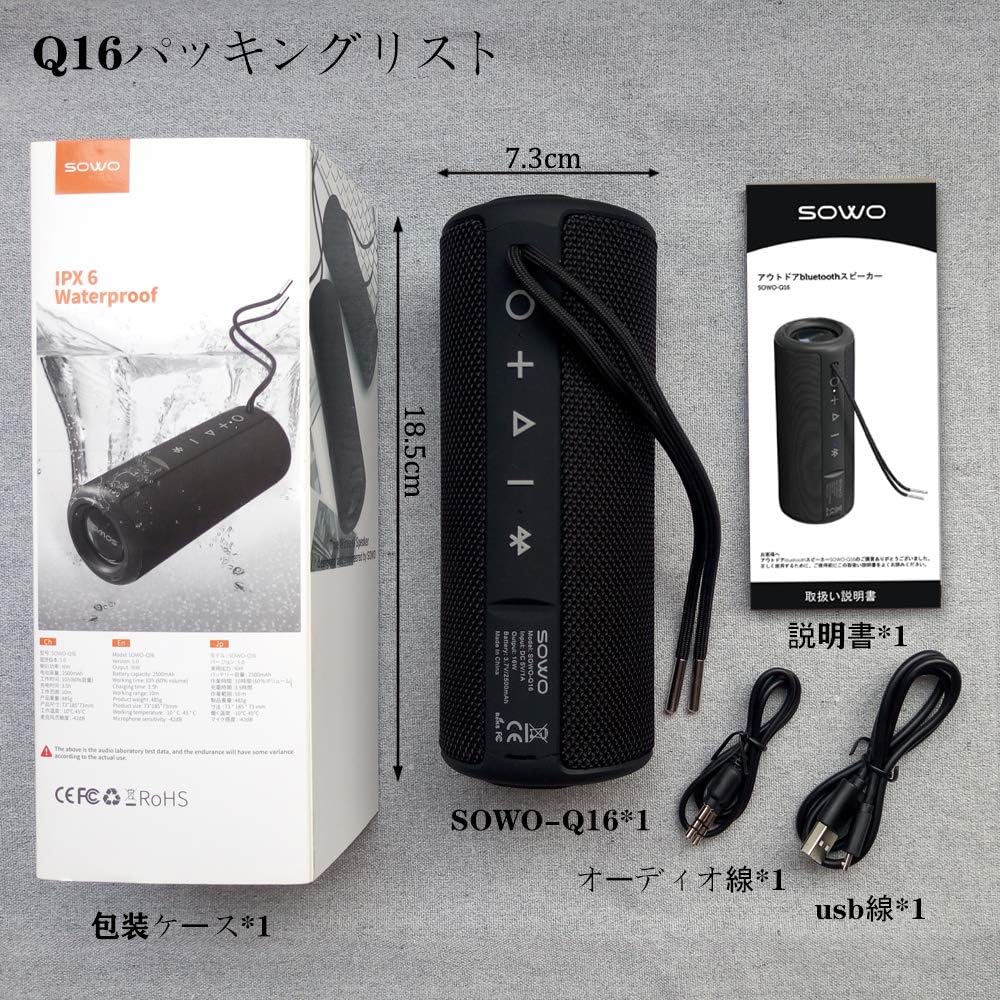
3. המוצר נגמרview
The SOWO Q16 is a versatile portable speaker designed for various audio needs. It features Bluetooth 5.0 connectivity, FM radio, MP3 playback via microSD card, and AUX input. The speaker is also IPX6 waterproof, making it suitable for outdoor use.
תכונות עיקריות:
- Bluetooth 5.0 for stable wireless connection
- Enhanced bass and clear sound output
- IPX6 Waterproof, dustproof, and shock-resistant design
- FM Radio (87.5MHz - 108MHz)
- MicroSD (TF Card) slot for MP3 playback
- AUX input for wired connections
- מיקרופון מובנה לשיחות דיבורית
- True Wireless Stereo (TWS) function for pairing two speakers
- עד 16 שעות של השמעה רציפה


4. התקנה
4.1 טעינת הרמקול
Before first use, fully charge the speaker. Connect the Micro USB charging cable to the speaker's charging port and the other end to a USB power adapter (not included) or a computer's USB port. The charging indicator light will illuminate during charging and turn off when fully charged.
4.2 הפעלה/כיבוי
- הפעלה: לחץ והחזק את לחצן ההפעלה למשך כ-3 שניות. תשמע הנחיה קולית.
- כיבוי: לחץ והחזק את לחצן ההפעלה למשך כ-3 שניות. תשמע הנחיה קולית.
4.3 זיווג בלוטות '
- ודא שהרמקול דולק ונמצא במצב צימוד Bluetooth (מסומן על ידי נורית LED מהבהבת).
- במכשיר שלך (סמארטפון, טאבלט, מחשב נייד), הפעל את Bluetooth וחפש מכשירים זמינים.
- Select "SOWO Q16" from the list of devices.
- לאחר הצימוד, הרמקול ישמיע צליל אישור, ונורית ה-LED תפסיק להבהב.
5. הוראות הפעלה
5.1 פונקציות כפתורים
The speaker features several control buttons. Refer to the product diagram for exact locations.
- לחצן הפעלה: Press and hold to power on/off. Short press to switch modes (Bluetooth, FM, MicroSD, AUX).
- לחצן הפעלה/השהה: Short press to play or pause music. In call mode, short press to answer/end a call. Press and hold to reject a call.
- הגברת עוצמת הקול (+): Short press to increase volume. Press and hold for next track (in music modes) or next station (in FM mode).
- להנמיך קול (-): Short press to decrease volume. Press and hold for previous track (in music modes) or previous station (in FM mode).
5.2 מצב Bluetooth
After successful pairing, your speaker will automatically connect to the last paired device when powered on. Play music from your connected device, and control playback using the speaker's buttons or your device.
מצב רדיו 5.3 FM
- Short press the Power button to switch to FM Radio mode.
- לחץ על כפתור ההפעלה/השהיה כדי לסרוק ולשמור תחנות FM זמינות באופן אוטומטי.
- השתמשו בלחצני הגברת עוצמת הקול (+) והנמכת עוצמת הקול (-) (לחיצה ארוכה) כדי לנווט בין תחנות שנשמרו.

5.4 MicroSD (TF Card) Mode
הכנס כרטיס MicroSD (TF) עם אודיו MP3 files into the designated slot. The speaker will automatically switch to MicroSD mode and begin playing music. Use the Play/Pause and Volume buttons to control playback.
5.5 מצב AUX
Connect one end of the AUX audio cable to the speaker's AUX input port and the other end to the audio output of your device (e.g., laptop, MP3 player). The speaker will automatically switch to AUX mode. Control playback from your connected device.
5.6 פונקציית שיחה
כאשר הוא מחובר באמצעות Bluetooth לטלפון חכם, ניתן להשתמש ברמקול לשיחות ללא ידיים:
- תשובה לשיחה: לחיצה קצרה על לחצן הפעל/השהה.
- סיום שיחה: לחיצה קצרה על לחצן הפעל/השהה.
- דחה שיחה: לחץ והחזק את לחצן הפעל/השהה.
5.7 צימוד סטריאו אלחוטי אמיתי (TWS)
To achieve a stereo sound experience, you can pair two SOWO Q16 speakers together:
- ודא ששני הרמקולים כבויים ואינם מחוברים למכשיר Bluetooth כלשהו.
- הפעילו את שני הרמקולים. הם ייכנסו למצב צימוד Bluetooth.
- On one of the speakers, double-press the Power button. The speakers will attempt to pair with each other.
- Once successfully paired, you will hear an audible confirmation. The LED indicator on one speaker will flash (master), and the other will be solid (slave).
- Now, connect your device to the master speaker via Bluetooth as described in section 4.3. Both speakers will play audio in stereo.


6. תחזוקה
- ניקוי: השתמשו במטלית רכה ויבשה לניקוי משטח הרמקול. אין להשתמש בחומרי ניקוי שוחקים או ממסים.
- חשיפה למים: While the speaker is IPX6 waterproof, avoid prolonged submersion. Ensure charging port covers are securely closed before exposing to water.
- אִחסוּן: יש לאחסן את הרמקול במקום קריר ויבש, הרחק מאור שמש ישיר וטמפרטורות קיצוניות.
- טיפול בסוללה: כדי להאריך את חיי הסוללה, טען את הרמקול באופן קבוע, גם אם אינו בשימוש תכוף. הימנע מפריקה מלאה של הסוללה למשך פרקי זמן ממושכים.
7. פתרון תקלות
| בְּעָיָה | סיבה אפשרית | פִּתָרוֹן |
|---|---|---|
| הרמקול לא נדלק. | סוללה חלשה. | טען את הרמקול באמצעות כבל ה-USB המצורף. |
| לא ניתן לבצע צימוד דרך בלוטות'. | הרמקול אינו במצב צימוד או שכבר מחובר למכשיר אחר. ה-Bluetooth של המכשיר כבוי. | Ensure speaker is in pairing mode. Disconnect from other devices. Enable Bluetooth on your device. |
| אין קול. | Volume too low. Incorrect mode selected. Device not playing audio. | Increase speaker and device volume. Ensure correct mode (Bluetooth, AUX, MicroSD) is selected. Check audio playback on your device. |
| קליטת רדיו FM גרועה. | אות חלש. | העבירו את הרמקול למיקום עם קליטת אות טובה יותר. |
| כרטיס MicroSD לא מזוהה. | Card inserted incorrectly. Unsupported file format. Corrupted card. | Reinsert the card. Ensure fileהקבצים הם בפורמט MP3. נסה כרטיס MicroSD אחר. |
8. מפרטים
| תכונה | פְּרָט |
|---|---|
| מותג | SOWO |
| מספר דגם | שאלה 16 |
| טכנולוגיית קישוריות | Bluetooth 5.0, AUX, MicroSD (TF Card), USB (for charging) |
| סוג הרכבה | מתקן לשולחן |
| חוֹמֶר | פּלָסטִי |
| סוג רמקול | חיצוני, נייד |
| שימושים מומלצים | Computer, TV, Mobile Devices |
| צֶבַע | שָׁחוֹר |
| דירוג עמיד למים | IPX6 |
| שיטת בקרה | כפתורים |
| קוטר הנהג | 40 מ"מ |
| חיי סוללה (ממוצע) | עד 16 שעות |
| מכשירים תואמים | iPhone, iPad, MP3 Players, Laptops, Android devices |
| מקור כוח | מופעל על ידי סוללה (טעינה באמצעות USB) |
| סוג סוללה | סוללת ליתיום-יון אחת (כלולה) |
| משקל המוצר | 540 גרם |
9. אחריות ותמיכה
SOWO products are designed and manufactured to the highest quality standards. For warranty information or technical support, please refer to the contact details provided with your purchase documentation or visit the official SOWO webאתר. אנא שמור את הוכחת הרכישה שלך לצורך תביעות אחריות.